Click Account, then Account settings. Under Reference managers, find Zotero and click Link to Zotero.
Zotero in the account settings
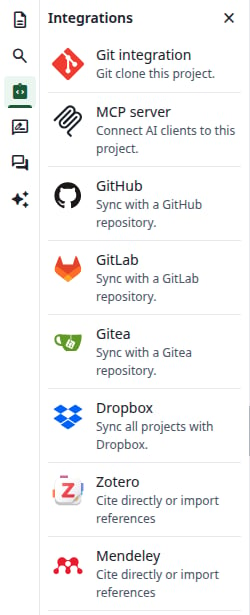
The Zotero card in the editor’s Integrations panel takes you to the same place, in the same tab.
The Integrations panel
2
Authorize on Zotero
Zotero opens. Sign in if you are asked to, then authorize the application. It only asks to read your library and your groups, so it cannot change anything in Zotero.
3
Check the link
You are back in the account settings. A green message says Reference manager linked, and the button now says Unlink.
Your Zotero account is linked
If you do not allow access on Zotero, the same section says Sorry, something went wrong. Click Link to Zotero to try again.
Open a project. In the file tree, click New file, then From Zotero. This entry is only there once your account is linked.
2
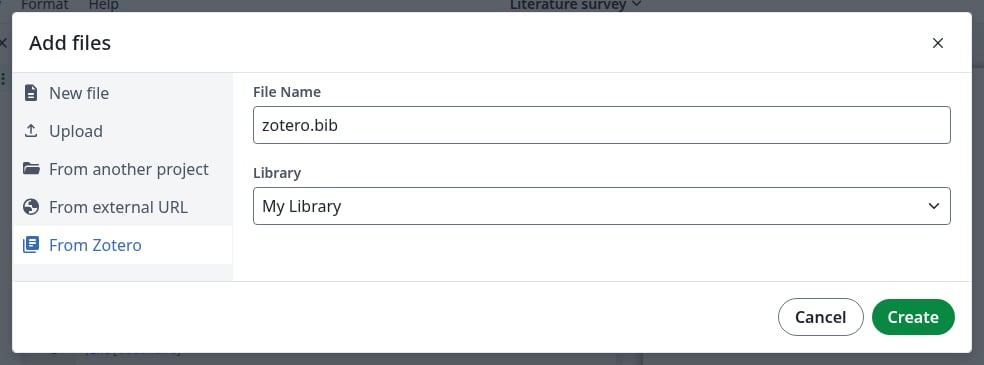
Choose the file name and the library
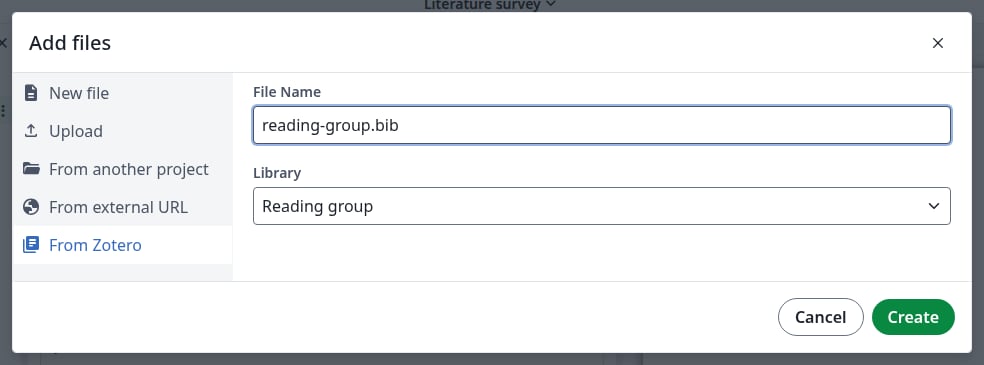
File Name starts as zotero.bib. Keep the .bib ending: without it you get no preview, and neither \cite nor \bibliography finds its entries.Library starts as My Library, and also lists your group libraries. One file holds one library.
A file from your personal library
3
Click Create
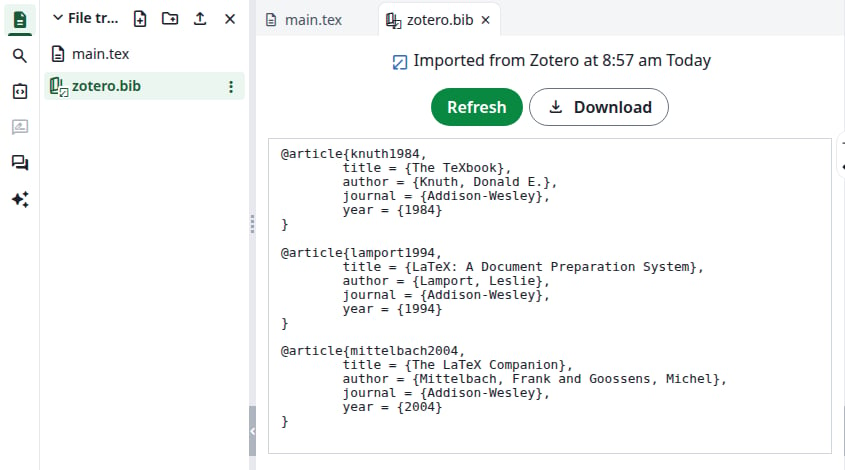
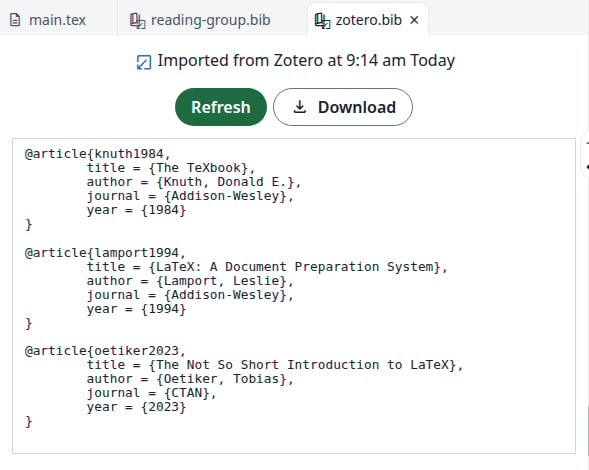
The dialog closes and the file is in the file tree. Click it: it shows when it was imported, and its entries. You cannot edit it in the editor.
The imported file
If Create seems to do nothing, a file with that name already exists. Choose another name.
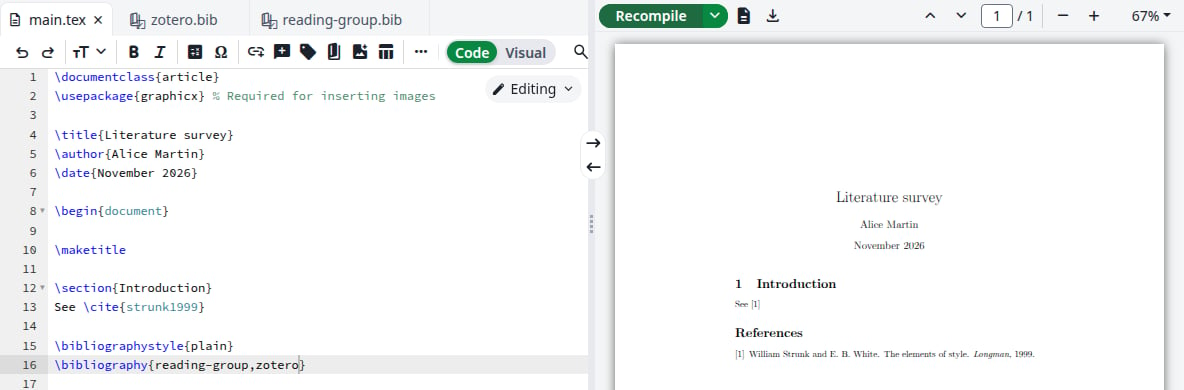
Click Recompile. The reference appears in the PDF.
The compiled reference
Imported files are not offered in Settings under References, Main bibliography file for this project, so the list stays empty if the project has no other .bib file. You can still cite from them.
Changes in your Zotero library do not reach the project on their own, and compiling does not fetch them.
1
Open the file
In the file tree, click the imported file.
2
Click Refresh
The whole file is imported again from the library you chose when you created it: new entries appear and removed ones disappear. The time at the top changes.
The refreshed file
3
Recompile
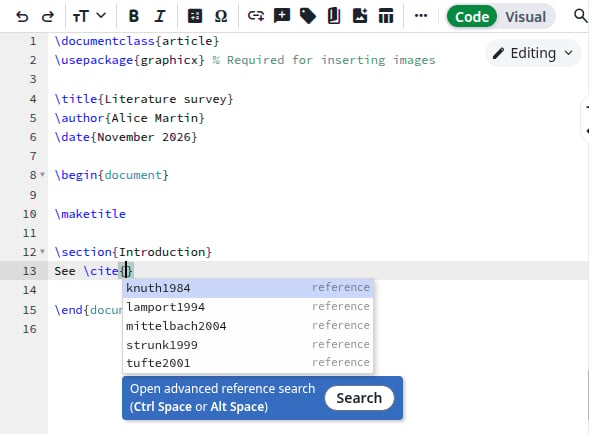
New entries are in the \cite{ list right away. Click Recompile to update the PDF.
Each file refreshes on its own: refresh your group’s file separately. For who can refresh a file in a shared project, see the notes for administrators.
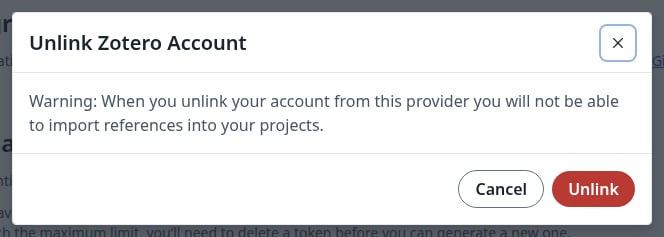
In Account settings, under Zotero, click Unlink, then Unlink again in the dialog. The button says Link to Zotero again.
Unlink your account
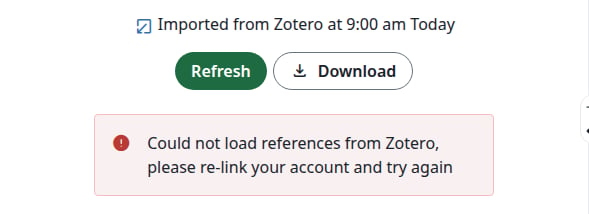
The files you imported stay in your projects and still compile. From Zotero is gone from the Add files dialog, and Refresh shows an error until you link your account again.
Refreshing without a linked account
After you link again, Refresh works on the same files.
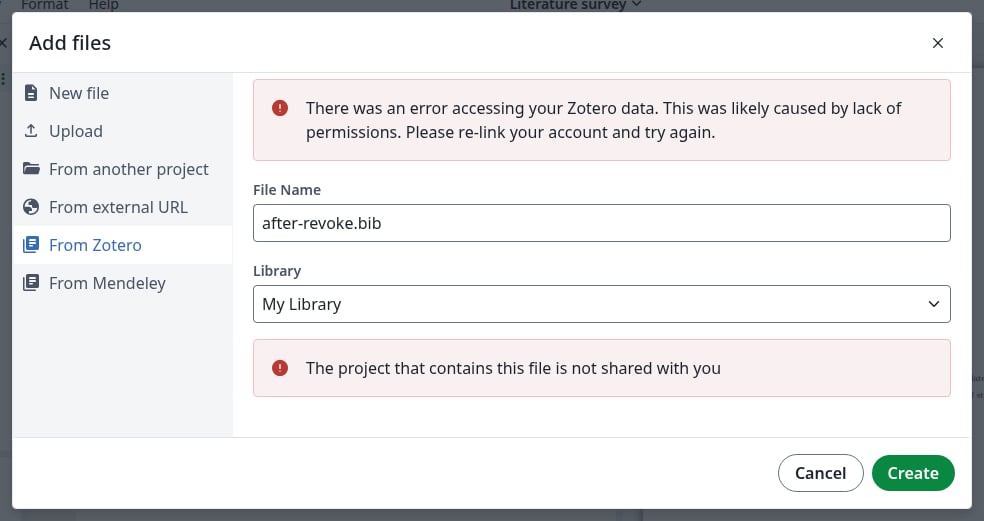
Could not load references from Zotero, please re-link your account and try again, or There was an error accessing your Zotero data in the Add files dialog: Overleaf can no longer read your library, for example because you removed its access on Zotero. In Account settings, click Unlink, then Link to Zotero. Create also fails until then, with the message The project that contains this file is not shared with you, even in your own project.
Overleaf can no longer read your library
The remote service produced an error when you click Refresh: the request to Zotero failed. The file keeps its content. Click Refresh again later.
Last modified on November 7, 2026
Was this page helpful?
{"docsConfig":{"theme":"mint","$schema":"https://mintlify.com/docs.json","name":"Ayakaleaf Pro","description":"Overleaf Community Edition enhanced with all Pro features: open source, free to use, self-hostable.","colors":{"primary":"#0E0E0E","light":"#D4A27F","dark":"#0E0E0E"},"logo":{"light":"https://mintcdn.com/ayakaleaf-pro/JetHeEeglWIIXNds/logo/light.png?fit=max\u0026auto=format\u0026n=JetHeEeglWIIXNds\u0026q=85\u0026s=7f1abd8dcc74dd3b7cdafac9e6e82092","dark":"https://mintcdn.com/ayakaleaf-pro/JetHeEeglWIIXNds/logo/dark.png?fit=max\u0026auto=format\u0026n=JetHeEeglWIIXNds\u0026q=85\u0026s=4e369d29a8c5a6cd8b4b7697ddb1f7e2","href":"/"},"favicon":"https://mintcdn.com/ayakaleaf-pro/x9kfDjtWlyyhG_mR/favicon.png?fit=max\u0026auto=format\u0026n=x9kfDjtWlyyhG_mR\u0026q=85\u0026s=832c6bfafce5eb69ebc83783083a4a85","background":{"color":{"light":"#FDFDF7","dark":"#09090B"}},"navbar":{"links":[{"href":"https://github.com/ayaka-notes/ayakaleaf-pro-playground","label":"Playground"},{"href":"https://github.com/orgs/ayaka-notes/packages/container/package/overleaf-pro","label":"Docker Image"},{"href":"https://github.com/ayaka-notes/texlive-full","label":"TeXLive Full"}],"primary":{"type":"button","label":"Open GitHub","href":"https://github.com/ayaka-notes/ayakaleaf-pro"}},"footer":{"socials":{"github":"https://github.com/ayaka-notes"}},"styling":{"latex":true},"contextual":{"options":["copy","view","chatgpt","claude","perplexity","mcp","cursor","vscode","assistant","download-pdf","download-spec"],"display":"header"},"metadata":{"timestamp":true},"navigation":{"languages":[{"language":"en","default":true,"href":""},{"language":"zh-CN","href":"zh-CN"},{"language":"zh-TW","href":"zh-TW"},{"language":"ja","href":"ja"},{"language":"de","href":"de"},{"language":"fr","href":"fr"},{"language":"es","href":"es"},{"language":"it","href":"it"},{"language":"ko","href":"ko"},{"language":"ru","href":"ru"},{"language":"nl","href":"nl"},{"language":"pt","href":"pt"},{"language":"tr","href":"tr"},{"language":"uk","href":"uk"},{"language":"pl","href":"pl"},{"language":"cs","href":"cs"},{"language":"sv","href":"sv"},{"language":"fi","href":"fi"},{"language":"ar","href":"ar"},{"language":"vi","href":"vi"},{"language":"no","href":"no"},{"language":"da","href":"da"},{"language":"id","href":"id"},{"language":"zh-Hans","href":"zh-Hans"},{"language":"zh-Hant","href":"zh-Hant"}]}},"deployment":{"deploymentMetadataValue":{"subdomain":"ayakaleaf-pro","hasAudioNarration":false,"actualSubdomain":"ayakaleaf-pro","customDomains":[],"gitSource":{"type":"github","owner":"ayaka-notes","repo":"docs","deployBranch":"main","contentDirectory":"","isPrivate":false,"mountPath":"","label":""},"feedback":{"thumbs":true},"entitlements":{"AI_CHAT":{"status":"ENABLED"},"WEB_MCP":{"status":"ENABLED"},"NARRATION":{"status":"ENABLED"}},"buildId":"6aee957818cb0ff786610e20","clientVersion":"0.0.4076","searchFilterCounts":[{"language":"en","tag":"On-Premises","count":138},{"language":"ar","tag":"الاستضافة المحلية","count":101},{"language":"cs","tag":"On-Premises","count":101},{"language":"da","tag":"On-premises","count":101},{"language":"de","tag":"On-Premises","count":101},{"language":"es","tag":"Local","count":101},{"language":"fi","tag":"Paikallinen asennus","count":101},{"language":"fr","tag":"Sur site","count":101},{"language":"id","tag":"On-Premises","count":101},{"language":"it","tag":"On-premise","count":101},{"language":"ja","tag":"オンプレミス","count":101},{"language":"ko","tag":"온프레미스","count":101},{"language":"nl","tag":"On-premises","count":101},{"language":"no","tag":"Lokal drift","count":101},{"language":"pl","tag":"On-Premises","count":101},{"language":"pt","tag":"On-Premises","count":101},{"language":"ru","tag":"Локальное развертывание","count":101},{"language":"sv","tag":"On-Premises","count":101},{"language":"tr","tag":"Şirket İçi Kurulum","count":101},{"language":"uk","tag":"Локальне розгортання","count":101},{"language":"vi","tag":"Tự triển khai (On-Premises)","count":101},{"language":"zh-CN","tag":"本地部署","count":101},{"language":"zh-Hans","tag":"本地部署","count":101},{"language":"zh-Hant","tag":"本地部署","count":101},{"language":"zh-TW","tag":"本地部署","count":101},{"language":"ar","tag":"الإعداد","count":60},{"language":"en","tag":"Configuration","count":60},{"language":"cs","tag":"Konfigurace","count":60},{"language":"da","tag":"Konfiguration","count":60},{"language":"de","tag":"Konfiguration","count":60},{"language":"es","tag":"Configuración","count":60},{"language":"fi","tag":"Määritys","count":60},{"language":"fr","tag":"Configuration","count":60},{"language":"id","tag":"Konfigurasi","count":60},{"language":"it","tag":"Configurazione","count":60},{"language":"ja","tag":"設定","count":60},{"language":"ko","tag":"구성","count":60},{"language":"nl","tag":"Configuratie","count":60},{"language":"no","tag":"Konfigurasjon","count":60},{"language":"pl","tag":"Konfiguracja","count":60},{"language":"pt","tag":"Configuração","count":60},{"language":"ru","tag":"Настройка","count":60},{"language":"sv","tag":"Konfiguration","count":60},{"language":"tr","tag":"Yapılandırma","count":60},{"language":"uk","tag":"Конфігурація","count":60},{"language":"vi","tag":"Cấu hình","count":60},{"language":"zh-CN","tag":"配置","count":60},{"language":"zh-Hans","tag":"配置","count":60},{"language":"zh-Hant","tag":"設定","count":60},{"language":"zh-TW","tag":"設定","count":60},{"language":"en","tag":"Installation","count":35},{"language":"ar","tag":"Ayakaleaf Toolkit","count":31},{"language":"en","tag":"Docker Compose","count":31},{"language":"cs","tag":"Ayakaleaf Toolkit","count":31},{"language":"da","tag":"Ayakaleaf Toolkit","count":31},{"language":"de","tag":"Ayakaleaf Toolkit","count":31},{"language":"es","tag":"Ayakaleaf Toolkit","count":31},{"language":"fi","tag":"Ayakaleaf Toolkit","count":31},{"language":"fr","tag":"Ayakaleaf Toolkit","count":31},{"language":"id","tag":"Ayakaleaf Toolkit","count":31},{"language":"it","tag":"Ayakaleaf Toolkit","count":31},{"language":"ja","tag":"Ayakaleaf Toolkit","count":31},{"language":"ko","tag":"Ayakaleaf Toolkit","count":31},{"language":"nl","tag":"Ayakaleaf Toolkit","count":31},{"language":"no","tag":"Ayakaleaf Toolkit","count":31},{"language":"pl","tag":"Ayakaleaf Toolkit","count":31},{"language":"pt","tag":"Ayakaleaf Toolkit","count":31},{"language":"ru","tag":"Ayakaleaf Toolkit","count":31},{"language":"sv","tag":"Ayakaleaf Toolkit","count":31},{"language":"tr","tag":"Ayakaleaf Toolkit","count":31},{"language":"uk","tag":"Ayakaleaf Toolkit","count":31},{"language":"vi","tag":"Ayakaleaf Toolkit","count":31},{"language":"zh-CN","tag":"Ayakaleaf Toolkit","count":31},{"language":"zh-Hans","tag":"Ayakaleaf Toolkit","count":31},{"language":"zh-Hant","tag":"Ayakaleaf Toolkit","count":31},{"language":"zh-TW","tag":"Ayakaleaf Toolkit","count":31},{"language":"ar","tag":"Kubernetes","count":29},{"language":"en","tag":"Kubernetes","count":29},{"language":"cs","tag":"Kubernetes","count":29},{"language":"da","tag":"Kubernetes","count":29},{"language":"de","tag":"Kubernetes","count":29},{"language":"es","tag":"Kubernetes","count":29},{"language":"fi","tag":"Kubernetes","count":29},{"language":"fr","tag":"Kubernetes","count":29},{"language":"id","tag":"Kubernetes","count":29},{"language":"it","tag":"Kubernetes","count":29},{"language":"ja","tag":"Kubernetes","count":29},{"language":"ko","tag":"Kubernetes","count":29},{"language":"nl","tag":"Kubernetes","count":29},{"language":"no","tag":"Kubernetes","count":29},{"language":"pl","tag":"Kubernetes","count":29},{"language":"pt","tag":"Kubernetes","count":29},{"language":"ru","tag":"Kubernetes","count":29},{"language":"sv","tag":"Kubernetes","count":29},{"language":"tr","tag":"Kubernetes","count":29},{"language":"uk","tag":"Kubernetes","count":29},{"language":"vi","tag":"Kubernetes","count":29},{"language":"zh-CN","tag":"Kubernetes","count":29},{"language":"zh-Hans","tag":"Kubernetes","count":29},{"language":"zh-Hant","tag":"Kubernetes","count":29},{"language":"zh-TW","tag":"Kubernetes","count":29},{"language":"en","tag":"Using Docker Compose","count":23},{"language":"en","tag":"User guide","count":21},{"language":"ar","tag":"التكاملات","count":20},{"language":"en","tag":"Integrations","count":20},{"language":"cs","tag":"Integrace","count":20},{"language":"da","tag":"Integrationer","count":20},{"language":"de","tag":"Integrationen","count":20},{"language":"es","tag":"Integraciones","count":20},{"language":"fi","tag":"Integraatiot","count":20},{"language":"fr","tag":"Intégrations","count":20},{"language":"id","tag":"Integrasi","count":20},{"language":"it","tag":"Integrazioni","count":20},{"language":"ja","tag":"連携","count":20},{"language":"ko","tag":"통합","count":20},{"language":"nl","tag":"Integraties","count":20},{"language":"no","tag":"Integrasjoner","count":20},{"language":"pl","tag":"Integracje","count":20},{"language":"pt","tag":"Integrações","count":20},{"language":"ru","tag":"Интеграции","count":20},{"language":"sv","tag":"Integrationer","count":20},{"language":"tr","tag":"Entegrasyonlar","count":20},{"language":"uk","tag":"Інтеграції","count":20},{"language":"vi","tag":"Tích hợp","count":20},{"language":"zh-CN","tag":"集成","count":20},{"language":"zh-Hans","tag":"集成","count":20},{"language":"zh-Hant","tag":"整合","count":20},{"language":"zh-TW","tag":"整合","count":20},{"language":"ar","tag":"التثبيت","count":19},{"language":"cs","tag":"Instalace","count":19},{"language":"da","tag":"Installation","count":19},{"language":"de","tag":"Installation","count":19},{"language":"es","tag":"Instalación","count":19},{"language":"fi","tag":"Asennus","count":19},{"language":"fr","tag":"Installation","count":19},{"language":"id","tag":"Instalasi","count":19},{"language":"it","tag":"Installazione","count":19},{"language":"ja","tag":"インストール","count":19},{"language":"ko","tag":"설치","count":19},{"language":"nl","tag":"Installatie","count":19},{"language":"no","tag":"Installasjon","count":19},{"language":"pl","tag":"Instalacja","count":19},{"language":"pt","tag":"Instalação","count":19},{"language":"ru","tag":"Установка","count":19},{"language":"sv","tag":"Installation","count":19},{"language":"tr","tag":"Kurulum","count":19},{"language":"uk","tag":"Встановлення","count":19},{"language":"vi","tag":"Cài đặt","count":19},{"language":"zh-CN","tag":"安装","count":19},{"language":"zh-Hans","tag":"安装","count":19},{"language":"zh-Hant","tag":"安裝","count":19},{"language":"zh-TW","tag":"安裝","count":19},{"language":"en","tag":"For users","count":16},{"language":"ar","tag":"المصادقة","count":12},{"language":"en","tag":"Authentication","count":12},{"language":"cs","tag":"Ověřování","count":12},{"language":"da","tag":"Godkendelse","count":12},{"language":"de","tag":"Authentifizierung","count":12},{"language":"es","tag":"Autenticación","count":12},{"language":"fi","tag":"Todennus","count":12},{"language":"fr","tag":"Authentification","count":12},{"language":"id","tag":"Autentikasi","count":12},{"language":"it","tag":"Autenticazione","count":12},{"language":"ja","tag":"認証","count":12},{"language":"ko","tag":"인증","count":12},{"language":"nl","tag":"Authenticatie","count":12},{"language":"no","tag":"Autentisering","count":12},{"language":"pl","tag":"Uwierzytelnianie","count":12},{"language":"pt","tag":"Autenticação","count":12},{"language":"ru","tag":"Аутентификация","count":12},{"language":"sv","tag":"Autentisering","count":12},{"language":"tr","tag":"Kimlik Doğrulama","count":12},{"language":"uk","tag":"Автентифікація","count":12},{"language":"vi","tag":"Xác thực","count":12},{"language":"zh-CN","tag":"身份验证","count":12},{"language":"zh-Hans","tag":"身份验证","count":12},{"language":"zh-Hant","tag":"身分驗證","count":12},{"language":"zh-TW","tag":"身分驗證","count":12},{"language":"ar","tag":"المطوّرون","count":11},{"language":"cs","tag":"Vývojáři","count":11},{"language":"da","tag":"Udvikler","count":11},{"language":"de","tag":"Entwickler","count":11},{"language":"es","tag":"Desarrollador","count":11},{"language":"fi","tag":"Kehittäjä","count":11},{"language":"fr","tag":"Développeur","count":11},{"language":"id","tag":"Pengembang","count":11},{"language":"it","tag":"Sviluppatore","count":11},{"language":"ja","tag":"開発者","count":11},{"language":"ko","tag":"개발자","count":11},{"language":"nl","tag":"Ontwikkelaar","count":11},{"language":"no","tag":"Utvikler","count":11},{"language":"pl","tag":"Dla deweloperów","count":11},{"language":"pt","tag":"Desenvolvedor","count":11},{"language":"ru","tag":"Разработчикам","count":11},{"language":"sv","tag":"Utvecklare","count":11},{"language":"tr","tag":"Geliştirici","count":11},{"language":"uk","tag":"Розробникам","count":11},{"language":"vi","tag":"Nhà phát triển","count":11},{"language":"zh-CN","tag":"开发者","count":11},{"language":"zh-Hans","tag":"开发者","count":11},{"language":"zh-Hant","tag":"開發者","count":11},{"language":"zh-TW","tag":"開發者","count":11},{"language":"ar","tag":"نظرة عامة","count":9},{"language":"ar","tag":"الصيانة","count":9},{"language":"cs","tag":"Přehled","count":9},{"language":"cs","tag":"Údržba","count":9},{"language":"da","tag":"Oversigt","count":9},{"language":"da","tag":"Vedligeholdelse","count":9},{"language":"de","tag":"Überblick","count":9},{"language":"de","tag":"Wartung","count":9},{"language":"es","tag":"Descripción general","count":9},{"language":"es","tag":"Mantenimiento","count":9},{"language":"fi","tag":"Yleiskatsaus","count":9},{"language":"fi","tag":"Ylläpito","count":9},{"language":"fr","tag":"Aperçu","count":9},{"language":"fr","tag":"Maintenance","count":9},{"language":"id","tag":"Ikhtisar","count":9},{"language":"id","tag":"Pemeliharaan","count":9},{"language":"it","tag":"Panoramica","count":9},{"language":"it","tag":"Manutenzione","count":9},{"language":"ja","tag":"概要","count":9},{"language":"ja","tag":"メンテナンス","count":9},{"language":"ko","tag":"개요","count":9},{"language":"ko","tag":"유지 관리","count":9},{"language":"nl","tag":"Overzicht","count":9},{"language":"nl","tag":"Onderhoud","count":9},{"language":"no","tag":"Oversikt","count":9},{"language":"no","tag":"Vedlikehold","count":9},{"language":"pl","tag":"Przegląd","count":9},{"language":"pl","tag":"Utrzymanie","count":9},{"language":"pt","tag":"Visão geral","count":9},{"language":"pt","tag":"Manutenção","count":9},{"language":"ru","tag":"Обзор","count":9},{"language":"ru","tag":"Обслуживание","count":9},{"language":"sv","tag":"Översikt","count":9},{"language":"sv","tag":"Underhåll","count":9},{"language":"tr","tag":"Genel Bakış","count":9},{"language":"tr","tag":"Bakım","count":9},{"language":"uk","tag":"Огляд","count":9},{"language":"uk","tag":"Обслуговування","count":9},{"language":"vi","tag":"Tổng quan","count":9},{"language":"vi","tag":"Bảo trì","count":9},{"language":"zh-CN","tag":"概览","count":9},{"language":"zh-CN","tag":"维护","count":9},{"language":"zh-Hans","tag":"概览","count":9},{"language":"zh-Hans","tag":"维护","count":9},{"language":"zh-Hant","tag":"概覽","count":9},{"language":"zh-Hant","tag":"維護","count":9},{"language":"zh-TW","tag":"概覽","count":9},{"language":"zh-TW","tag":"維護","count":9}],"searchSettings":{"maxResults":6}},"assistantConfig":{"enableAskAiButton":false,"enableStarterQuestions":false,"enableContextualStarterQuestions":false,"enableAskAiSearchBar":true},"basePath":"","hasChatPermissions":true,"hasWebMcpPermissions":true,"toggles":[{"name":"kill-isr","enabled":true,"variant":{"name":"disabled","enabled":false,"feature_enabled":true},"impressionData":false},{"name":"agent-mintlify-slack","enabled":true,"variant":{"name":"disabled","enabled":false,"feature_enabled":true},"impressionData":false},{"name":"agent-integrations-settings","enabled":true,"variant":{"name":"disabled","enabled":false,"feature_enabled":true},"impressionData":false},{"name":"rbac-expansion","enabled":true,"variant":{"name":"disabled","enabled":false,"feature_enabled":true},"impressionData":false},{"name":"automations-pr-grouping","enabled":true,"variant":{"name":"disabled","enabled":false,"feature_enabled":true},"impressionData":false},{"name":"custom-prefix","enabled":true,"variant":{"name":"disabled","enabled":false,"feature_enabled":true},"impressionData":false},{"name":"analytics-v7","enabled":true,"variant":{"name":"disabled","enabled":false,"feature_enabled":true},"impressionData":false},{"name":"user-flows-analytics","enabled":true,"variant":{"name":"disabled","enabled":false,"feature_enabled":true},"impressionData":false},{"name":"no-publish-flow","enabled":true,"variant":{"name":"disabled","enabled":false,"feature_enabled":true},"impressionData":false},{"name":"workos-onboarding","enabled":true,"variant":{"name":"disabled","enabled":false,"feature_enabled":true},"impressionData":false},{"name":"llms-txt-v2","enabled":true,"variant":{"name":"disabled","enabled":false,"feature_enabled":true},"impressionData":false},{"name":"snapshot-serving-live","enabled":true,"variant":{"name":"disabled","enabled":false,"feature_enabled":true},"impressionData":false},{"name":"stripTemperatureMiddleware","enabled":true,"variant":{"name":"disabled","enabled":false,"feature_enabled":true},"impressionData":false},{"name":"support-platform-pylon-zendesk","enabled":true,"variant":{"name":"disabled","enabled":false,"feature_enabled":true},"impressionData":false},{"name":"snapshot-serving","enabled":true,"variant":{"name":"disabled","enabled":false,"feature_enabled":true},"impressionData":false},{"name":"instant-rollback","enabled":true,"variant":{"name":"disabled","enabled":false,"feature_enabled":true},"impressionData":false},{"name":"granular-notifications-server","enabled":true,"variant":{"name":"disabled","enabled":false,"feature_enabled":true},"impressionData":false},{"name":"granular-notifications","enabled":true,"variant":{"name":"disabled","enabled":false,"feature_enabled":true},"impressionData":false},{"name":"automations-fable","enabled":true,"variant":{"name":"disabled","enabled":false,"feature_enabled":true},"impressionData":false},{"name":"fixed-ai-action-pricing","enabled":true,"variant":{"name":"disabled","enabled":false,"feature_enabled":true},"impressionData":false},{"name":"automation-resolve-merge-conflict","enabled":true,"variant":{"name":"disabled","enabled":false,"feature_enabled":true},"impressionData":false},{"name":"scoped-publishing","enabled":true,"variant":{"name":"disabled","enabled":false,"feature_enabled":true},"impressionData":false},{"name":"mintql","enabled":true,"variant":{"name":"disabled","enabled":false,"feature_enabled":true},"impressionData":false},{"name":"page-level-analytics","enabled":true,"variant":{"name":"disabled","enabled":false,"feature_enabled":true},"impressionData":false},{"name":"editor-version-history-v2","enabled":true,"variant":{"name":"disabled","enabled":false,"feature_enabled":true},"impressionData":false},{"name":"billing-page-v2","enabled":true,"variant":{"name":"disabled","enabled":false,"feature_enabled":true},"impressionData":false},{"name":"full-page-search","enabled":true,"variant":{"name":"disabled","enabled":false,"feature_enabled":true},"impressionData":false},{"name":"workspace-projects","enabled":true,"variant":{"name":"disabled","enabled":false,"feature_enabled":true},"impressionData":false},{"name":"assistant-v5","enabled":true,"variant":{"name":"disabled","enabled":false,"feature_enabled":true},"impressionData":false},{"name":"fork-pr-previews","enabled":true,"variant":{"name":"disabled","enabled":false,"feature_enabled":true},"impressionData":false},{"name":"revalidation-jwt","enabled":true,"variant":{"name":"disabled","enabled":false,"feature_enabled":true},"impressionData":false},{"name":"workos-sso-scim","enabled":true,"variant":{"name":"disabled","enabled":false,"feature_enabled":true},"impressionData":false},{"name":"hobby-abuse-scan","enabled":true,"variant":{"name":"disabled","enabled":false,"feature_enabled":true},"impressionData":false},{"name":"dashboard-inbox","enabled":true,"variant":{"name":"disabled","enabled":false,"feature_enabled":true},"impressionData":false},{"name":"workos-signup","enabled":true,"variant":{"name":"disabled","enabled":false,"feature_enabled":true},"impressionData":false},{"name":"turbopuffer-dual-write","enabled":true,"variant":{"name":"disabled","enabled":false,"feature_enabled":true},"impressionData":false},{"name":"workos-enabled","enabled":true,"variant":{"name":"disabled","enabled":false,"feature_enabled":true},"impressionData":false},{"name":"approve-review-flow","enabled":true,"variant":{"name":"disabled","enabled":false,"feature_enabled":true},"impressionData":false},{"name":"editor-metadata","enabled":true,"variant":{"name":"disabled","enabled":false,"feature_enabled":true},"impressionData":false},{"name":"sso-setup-deadline-banner","enabled":true,"variant":{"name":"disabled","enabled":false,"feature_enabled":true},"impressionData":false},{"name":"turbopuffer-serve","enabled":true,"variant":{"name":"disabled","enabled":false,"feature_enabled":true},"impressionData":false},{"name":"live-agents","enabled":true,"variant":{"name":"disabled","enabled":false,"feature_enabled":true},"impressionData":false},{"name":"comment-mode","enabled":true,"variant":{"name":"disabled","enabled":false,"feature_enabled":true},"impressionData":false}],"googleFontsInlined":false},"customCss":[{"filePath":"style.css","content":"@font-face{font-family:\"Site Sans\";src:url(\"/fonts/SiteSans-Text-Regular-Static.otf\") format(\"opentype\");font-weight:400;font-style:normal;font-display:swap}@font-face{font-family:\"Site Sans\";src:url(\"/fonts/SiteSans-Text-RegularItalic-Static.otf\") format(\"opentype\");font-weight:400;font-style:italic;font-display:swap}@font-face{font-family:\"Site Sans\";src:url(\"/fonts/SiteSans-Text-Medium-Static.otf\") format(\"opentype\");font-weight:500;font-style:normal;font-display:swap}@font-face{font-family:\"Site Sans\";src:url(\"/fonts/SiteSans-Text-MediumItalic-Static.otf\") format(\"opentype\");font-weight:500;font-style:italic;font-display:swap}@font-face{font-family:\"Site Sans\";src:url(\"/fonts/SiteSans-Text-Semibold-Static.otf\") format(\"opentype\");font-weight:600;font-style:normal;font-display:swap}@font-face{font-family:\"Site Sans\";src:url(\"/fonts/SiteSans-Text-SemiboldItalic-Static.otf\") format(\"opentype\");font-weight:600;font-style:italic;font-display:swap}@font-face{font-family:\"Site Sans\";src:url(\"/fonts/SiteSans-Text-Bold-Static.otf\") format(\"opentype\");font-weight:700;font-style:normal;font-display:swap}@font-face{font-family:\"Site Sans\";src:url(\"/fonts/SiteSans-Text-BoldItalic-Static.otf\") format(\"opentype\");font-weight:700;font-style:italic;font-display:swap}@font-face{font-family:\"Site Serif Display\";src:url(\"/fonts/SiteSerif-Display-Regular-Static.otf\") format(\"opentype\");font-weight:400;font-style:normal;font-display:swap}@font-face{font-family:\"Site Serif Display\";src:url(\"/fonts/SiteSerif-Display-RegularItalic-Static.otf\") format(\"opentype\");font-weight:400;font-style:italic;font-display:swap}@font-face{font-family:\"Site Serif Display\";src:url(\"/fonts/SiteSerif-Display-Medium-Static.otf\") format(\"opentype\");font-weight:500;font-style:normal;font-display:swap}@font-face{font-family:\"Site Serif Display\";src:url(\"/fonts/SiteSerif-Display-Semibold-Static.otf\") format(\"opentype\");font-weight:600;font-style:normal;font-display:swap}@font-face{font-family:\"Site Serif Display\";src:url(\"/fonts/SiteSerif-Display-Bold-Static.otf\") format(\"opentype\");font-weight:700;font-style:normal;font-display:swap}@font-face{font-family:\"Site Serif\";src:url(\"/fonts/SiteSerif-Text-Regular-Static.otf\") format(\"opentype\");font-weight:400;font-style:normal;font-display:swap}@font-face{font-family:\"Site Serif\";src:url(\"/fonts/SiteSerif-Text-RegularItalic-Static.otf\") format(\"opentype\");font-weight:400;font-style:italic;font-display:swap}@font-face{font-family:\"Site Serif\";src:url(\"/fonts/SiteSerif-Text-Medium-Static.otf\") format(\"opentype\");font-weight:500;font-style:normal;font-display:swap}@font-face{font-family:\"Site Serif\";src:url(\"/fonts/SiteSerif-Text-MediumItalic-Static.otf\") format(\"opentype\");font-weight:500;font-style:italic;font-display:swap}@font-face{font-family:\"Site Serif\";src:url(\"/fonts/SiteSerif-Text-Semibold-Static.otf\") format(\"opentype\");font-weight:600;font-style:normal;font-display:swap}@font-face{font-family:\"Site Serif\";src:url(\"/fonts/SiteSerif-Text-SemiboldItalic-Static.otf\") format(\"opentype\");font-weight:600;font-style:italic;font-display:swap}@font-face{font-family:\"Site Serif\";src:url(\"/fonts/SiteSerif-Text-Bold-Static.otf\") format(\"opentype\");font-weight:700;font-style:normal;font-display:swap}@font-face{font-family:\"Site Serif\";src:url(\"/fonts/SiteSerif-Text-BoldItalic-Static.otf\") format(\"opentype\");font-weight:700;font-style:italic;font-display:swap}:root{--always-white: 0 0% 100%;--always-black: 0 0% 0%;--constant-book-cloth: 15 55% 80%;--constant-clay: 15 60% 85%;--constant-kraft: 25 40% 83%;--constant-manilla: 40 20% 92%;--constant-slate-000: 0 0% 100%;--constant-slate-050: 48 33.3% 97.1%;--constant-slate-100: 53 28.6% 94.5%;--constant-slate-150: 48 25% 92.2%;--constant-slate-200: 50 20.7% 88.6%;--constant-slate-250: 51 16.5% 84.5%;--constant-slate-300: 50 11.5% 79.6%;--constant-slate-350: 50 9% 73.7%;--constant-slate-400: 49 6.5% 66.9%;--constant-slate-450: 48 4.8% 59.2%;--constant-slate-500: 53 3.2% 51.4%;--constant-slate-550: 51 3.1% 43.7%;--constant-slate-600: 48 2.7% 35.9%;--constant-slate-650: 48 3.4% 29.2%;--constant-slate-700: 60 2.5% 23.3%;--constant-slate-750: 60 2.1% 18.4%;--constant-slate-800: 60 2.7% 14.5%;--constant-slate-850: 30 3.3% 11.8%;--constant-slate-900: 30 4% 9.8%;--constant-slate-950: 60 2.6% 7.6%;--constant-slate-1000: 60 3.4% 5.7%}:root:not(.dark){--accent-brand: 15 63.1% 59.6%;--accent-main-000: 15 55.6% 52.4%;--accent-main-100: 15 55.6% 52.4%;--accent-main-200: 15 63.1% 59.6%;--accent-main-900: 0 0% 0%;--accent-pro-000: 251 34.2% 33.3%;--accent-pro-100: 251 40% 45.1%;--accent-pro-200: 251 61% 72.2%;--accent-pro-900: 253 33.3% 91.8%;--accent-secondary-000: 210 73.7% 40.2%;--accent-secondary-100: 210 70.9% 51.6%;--accent-secondary-200: 210 70.9% 51.6%;--accent-secondary-900: 211 72% 90%;--bg-000: 0 0% 100%;--bg-100: 48 33.3% 97.1%;--bg-200: 53 28.6% 94.5%;--bg-300: 48 25% 92.2%;--bg-400: 50 20.7% 88.6%;--bg-500: 50 20.7% 88.6%;--border-100: 30 3.3% 11.8%;--border-200: 30 3.3% 11.8%;--border-300: 30 3.3% 11.8%;--border-400: 30 3.3% 11.8%;--danger-000: 0 61.4% 22.4%;--danger-100: 0 58.6% 34.1%;--danger-200: 0 58.6% 34.1%;--danger-900: 0 50% 95%;--oncolor-100: 0 0% 100%;--oncolor-200: 60 6.7% 97.1%;--oncolor-300: 60 6.7% 97.1%;--text-000: 60 2.6% 7.6%;--text-100: 60 2.6% 7.6%;--text-200: 60 2.5% 23.3%;--text-300: 60 2.5% 23.3%;--text-400: 51 3.1% 43.7%;--text-500: 51 3.1% 43.7%}:root.dark{--accent-brand: 15 63.1% 59.6%;--accent-main-000: 15 55.6% 52.4%;--accent-main-100: 15 63.1% 59.6%;--accent-main-200: 15 63.1% 59.6%;--accent-main-900: 0 0% 0%;--accent-pro-000: 251 84.6% 74.5%;--accent-pro-100: 251 40.2% 54.1%;--accent-pro-200: 251 40% 45.1%;--accent-pro-900: 250 25.3% 19.4%;--accent-secondary-000: 210 71.1% 62%;--accent-secondary-100: 210 70.9% 51.6%;--accent-secondary-200: 210 70.9% 51.6%;--accent-secondary-900: 210 55.9% 24.6%;--bg-000: 60 2.1% 18.4%;--bg-100: 60 2.7% 14.5%;--bg-200: 30 3.3% 11.8%;--bg-300: 60 2.6% 7.6%;--bg-400: 60 3.4% 5.7%;--bg-500: 60 3.4% 5.7%;--border-100: 51 16.5% 84.5%;--border-200: 51 16.5% 84.5%;--border-300: 51 16.5% 84.5%;--border-400: 51 16.5% 84.5%;--danger-000: 0 73.1% 66.5%;--danger-100: 0 58.6% 34.1%;--danger-200: 0 58.6% 34.1%;--danger-900: 0 23% 15.6%;--oncolor-100: 0 0% 100%;--oncolor-200: 60 6.7% 97.1%;--oncolor-300: 60 6.7% 97.1%;--text-000: 48 33.3% 97.1%;--text-100: 48 33.3% 97.1%;--text-200: 50 9% 73.7%;--text-300: 50 9% 73.7%;--text-400: 48 4.8% 59.2%;--text-500: 48 4.8% 59.2%}#home-header{font-family:\"Site Sans\", system-ui, \"Segoe UI\", Roboto, Helvetica, Arial, sans-serif;font-weight:400!important;font-size:50px;line-height:1.2;margin-bottom:1rem;color:--text-000;display:flex;align-items:baseline;justify-content:center;flex-wrap:nowrap}#localization-select-trigger>:has(img[src*=\"flags\"]){display:none}div[id^=\"localization-select-item\"]>:has(img[src*=\"flags\"]){display:none}@media (min-width: 768px){#home-header{justify-content:center}}.build-with{font-family:\"Site Sans\", system-ui, \"Segoe UI\", Roboto, Helvetica, Arial, sans-serif;letter-spacing:-0.02em}.claude-wordmark-wrapper{display:inline-flex;align-items:baseline;margin-left:10px}.claude-wordmark{height:40px;width:auto;position:relative}.dark #home-header{color:white}.description-text{color:black}.dark .description-text{color:white}.dark .claude-wordmark{filter:invert(1)}:root{--bg-color: #f0efea}.dark{--bg-color: #2b2b2b}body,input,#category-select,.dropdown-item,#table-of-contents{font-family:\"Site Sans\", system-ui, \"Segoe UI\", Roboto, Helvetica, Arial, sans-serif}.eyebrow{font-family:\"Site Sans\", system-ui, \"Segoe UI\", Roboto, Helvetica, Arial, sans-serif;text-transform:uppercase;letter-spacing:0.02rem}#content-container{font-family:\"Site Sans\", system-ui, \"Segoe UI\", Roboto, Helvetica, Arial, sans-serif}#content-container h1,#content-container h2,#content-container h3,#content-container h4,#content-container h5,#content-container h6{font-family:\"Site Serif Display\", Georgia, \"Times New Roman\", Times, serif;font-weight:400;letter-spacing:0;word-spacing:0.1em}#content-container p{font-size:1rem;line-height:1.65rem}.font-extrabold{font-weight:600!important}.wide-table{width:100%;overflow-x:auto}.wide-table table{width:175%;margin-bottom:0}#prompt-library-container{margin:4rem auto;max-width:48rem;padding-left:1.25rem;padding-right:1.25rem}.prompt-library-title{font-size:24px;text-align:center;font-weight:700;color:#1f2937}.dark .prompt-library-title{color:#e5e7eb}.prompt-library-description{margin-top:1rem;text-align:center}.main-content{margin-bottom:10rem;max-width:64rem;margin-left:auto;margin-right:auto;padding-left:1.25rem;padding-right:1.25rem}.prompt-controllers{display:flex;gap:0.5rem}.prompt-search-container{position:relative;flex:1 1 0%}.prompt-search-icon-container{display:flex;position:absolute;top:0;bottom:0;left:0;align-items:center;padding-left:0.75rem}.prompt-search-icon{margin-left:0.25rem;margin-right:0.75rem;flex:none;width:1rem;height:1rem;background-color:#6b7280;mask-image:url(https://mintlify.b-cdn.net/v6.5.1/solid/magnifying-glass.svg);mask-repeat:no-repeat;mask-position:center center}input.prompt-search-bar{display:block;height:2.5rem;padding-left:2.5rem;border-radius:0.75rem;border-width:1px;background-color:#ffffff;width:100%;color:#111827;box-shadow:0 1px 2px 0 rgba(0, 0, 0, 0.05)}.dark input.prompt-search-bar{color:#ffffff;background-color:rgb(var(--background-dark));border-color:#d1d5db1a}input.prompt-search-bar:focus{outline-color:rgb(var(--primary))}.dark input.prompt-search-bar:focus{outline-color:rgb(var(--primary-light))}.dark .prompt-search-icon{background-color:#ffffff80}#category-select{padding-left:1rem;padding-right:2.5rem;height:2.5rem;display:flex;align-items:center;border-radius:0.75rem;border-width:1px;color:#111827;background-color:#ffffff;cursor:pointer;box-shadow:0 1px 2px 0 rgba(0, 0, 0, 0.05);white-space:nowrap}.dark #category-select{background-color:rgb(var(--background-dark));border-color:#d1d5db1a;color:#ffffff}#category-select:hover{background-color:#f9fafb}.dark #category-select:hover{background-color:#ffffff0d}#category-select:focus{outline-color:rgb(var(--primary))}.dark #category-select:focus{outline-color:rgb(var(--primary-light))}#categories-dropdown{top:calc(100% + 4px);padding:0.5rem 0.5rem;display:none;position:absolute;z-index:10;border-radius:0.75rem;border-width:1px;width:100%;color:#111827;background-color:#ffffff;box-shadow:0 1px 2px 0 rgba(0, 0, 0, 0.05)}.dark #categories-dropdown{background-color:rgb(var(--background-dark));border-color:#d1d5db1a;color:#ffffff}#categories-dropdown-clickout{position:fixed;top:0;right:0;bottom:0;left:0;z-index:0}.dropdown-icon-container{display:flex;position:absolute;top:0;bottom:0;right:0;align-items:center;padding-right:0.25rem}.dropdown-icon{margin-left:0.25rem;margin-right:0.75rem;flex:none;width:0.75rem;height:0.75rem;background-color:#6b7280;mask-image:url(https://mintlify.b-cdn.net/v6.5.1/solid/caret-down.svg);mask-repeat:no-repeat;mask-position:center center}.dark .dropdown-icon{background-color:#ffffff80}#prompts-container{grid-template-columns:repeat(1, minmax(0, 1fr));gap:2rem}.dropdown-item{padding:0.25rem 0.5rem;border-radius:0.375rem;display:flex;align-items:center;cursor:pointer}.dropdown-item:hover{background-color:#f9fafb}.dark .dropdown-item:hover{background-color:#ffffff0d}.check-icon{mask-image:url(https://mintlify.b-cdn.net/v6.5.1/solid/check.svg);height:0.875rem;width:1rem;background-color:rgb(var(--primary-light));mask-repeat:no-repeat;mask-position:center center}.prompt-card{margin:-0.75rem;padding:0.75rem;display:flex;border-radius:1rem}.prompt-card:hover{background-color:#03071208}.dark .prompt-card:hover{background-color:#ffffff08}.prompt-icon-container{display:flex;flex:none;align-items:center;justify-content:center;margin-right:1.5rem;border-radius:0.75rem;height:4rem;width:4rem;background-color:#cb785c1a}.prompt-icon{height:1.5rem;width:1.5rem;background-color:rgb(var(--primary-light));mask-repeat:no-repeat;mask-position:center center}.prompt-title{color:rgb(31 41 55);font-weight:600}.dark .prompt-title{color:rgb(229 231 235)}.prompt-description{margin-top:0.25rem}#prompts-container{display:grid;margin-top:2.5rem}@media (min-width: 640px){#category-select{width:16rem}}@media (min-width: 1024px){#prompts-container{grid-template-columns:repeat(2, minmax(0, 1fr))}}.home-cards-custom{display:grid;grid-template-columns:repeat(3, 1fr);grid-template-rows:repeat(2, auto);gap:1.5rem}.home-cards-custom .card{background:transparent;border:0.5px solid hsl(var(--border-300));border-radius:12px;padding:0.25rem}@media (max-width: 1024px){.home-cards-custom{grid-template-columns:repeat(2, 1fr);grid-template-rows:repeat(3, auto)}}@media (max-width: 768px){.home-cards-custom{grid-template-columns:1fr;grid-template-rows:repeat(6, auto)}}.relative{position:relative}.flex-1{flex:1 1 0%}.mermaid{position:relative;background-color:#FDFDFB;background-image:linear-gradient(rgba(235, 219, 188, .25) 1px, transparent 1px), /* Secondary color #EBDBBC with low opacity */\n linear-gradient(90deg, rgba(235, 219, 188, .25) 1px, transparent 1px),\n linear-gradient(rgba(235, 219, 188, .1) 1px, transparent 1px),\n linear-gradient(90deg, rgba(235, 219, 188, .1) 1px, transparent 1px);background-size:20px 20px,\n 20px 20px,\n 4px 4px,\n 4px 4px;background-position:-1px -1px,\n -1px -1px,\n -1px -1px,\n -1px -1px;padding:20px;border-radius:8px;border:1px solid rgba(235, 219, 188, .4);box-shadow:0 2px 4px rgba(64, 64, 62, 0.08)}.dark .mermaid{background-color:#1a1918;background-image:linear-gradient(rgba(212, 162, 127, .15) 1px, transparent 1px), /* Tertiary color #D4A27F with low opacity */\n linear-gradient(90deg, rgba(212, 162, 127, .15) 1px, transparent 1px),\n linear-gradient(rgba(212, 162, 127, .08) 1px, transparent 1px),\n linear-gradient(90deg, rgba(212, 162, 127, .08) 1px, transparent 1px);border:1px solid rgba(102, 102, 99, .5);box-shadow:0 2px 4px rgba(0, 0, 0, 0.2)}.digest-meta{display:flex;align-items:center;justify-content:space-between;flex-wrap:wrap;gap:0.5rem 1rem;padding:0.75rem 1rem;margin:1.5rem 0 2.5rem;border:1px solid hsl(var(--border-300) / 0.15);background:hsl(var(--bg-200));font-variant-numeric:tabular-nums;font-size:0.875rem;color:hsl(var(--text-400))}#content-container .digest-meta a{color:hsl(var(--accent-main-100));font-weight:500;text-decoration:none;border-bottom:none}#content-container .digest-meta a:hover{text-decoration:underline}.digest-feature{position:relative;margin:2.5rem 0;padding:1.875rem 1.875rem 1.625rem;background:radial-gradient(circle, hsl(var(--text-000) / 0.025) 1px, transparent 1px) 0 0 / 18px 18px,\n linear-gradient(180deg, hsl(var(--constant-manilla) / 0.55), hsl(var(--constant-manilla) / 0.38));border:1px solid hsl(var(--border-300) / 0.12);box-shadow:inset 0 1px 0 hsl(var(--text-000) / 0.04),\n 0 1px 2px hsl(var(--always-black) / 0.04)}.digest-feature::before{content:\"\";position:absolute;inset:0 auto 0 0;width:4px;background:hsl(var(--accent-brand))}.dark .digest-feature{background:radial-gradient(circle, hsl(var(--text-000) / 0.02) 1px, transparent 1px) 0 0 / 18px 18px,\n linear-gradient(180deg, hsl(var(--bg-000) / 0.75), hsl(var(--bg-000) / 0.5));border-color:hsl(var(--border-300) / 0.1);box-shadow:inset 0 1px 0 hsl(var(--text-000) / 0.03),\n 0 1px 2px hsl(var(--always-black) / 0.25)}.digest-feature>:first-child{margin-top:0}.digest-feature>:last-child{margin-bottom:0}.digest-feature-header{display:flex;align-items:center;flex-wrap:wrap;gap:0.625rem;margin:0 0 0.75rem}#content-container .digest-feature-title{font-family:\"Site Serif Display\", Georgia, serif;font-size:1.75rem;line-height:1.15;font-weight:500;letter-spacing:-0.015em;color:hsl(var(--text-000));margin:0}#content-container .digest-feature-pill{font-family:ui-monospace, \"SF Mono\", Menlo, Consolas, monospace;font-size:0.75rem;line-height:1;letter-spacing:0.01em;padding:0.3rem 0.6rem;border-radius:999px;background:hsl(var(--accent-brand) / 0.12);color:hsl(var(--accent-main-000));border:1px solid hsl(var(--accent-brand) / 0.25);white-space:nowrap;transform:translateY(1px)}#content-container .digest-feature-lede{font-size:1.0625rem;line-height:1.65;color:hsl(var(--text-100));margin:0 0 1.25rem;max-width:none}#content-container .digest-feature-lede code{font-size:0.875em;padding:0.1em 0.35em}#content-container .digest-feature-try{font-size:0.875rem;color:hsl(var(--text-400));margin:1.25rem 0 0.5rem}#content-container .digest-feature .frame{margin:1rem 0;border-radius:0;padding:0}#content-container .digest-feature .frame>*{border-radius:0}#content-container .digest-feature pre,#content-container .digest-feature [class*=\"CodeBlock\"]{border-radius:0}#content-container .digest-feature-link{display:inline-flex;align-items:center;gap:0.35rem;font-size:0.875rem;font-weight:500;color:hsl(var(--accent-main-100));text-decoration:none;border-bottom:none;margin-top:0.75rem}#content-container .digest-feature-link::after{content:\"→\";transition:transform 120ms ease-out}#content-container .digest-feature-link:hover::after{transform:translateX(3px)}.digest-wins{margin:2.5rem 0;padding:1.5rem 1.75rem 1.25rem;background:hsl(var(--bg-200));border:1px solid hsl(var(--border-300) / 0.1)}.dark .digest-wins{background:hsl(var(--bg-200) / 0.6)}#content-container .digest-wins-title{font-family:\"Site Serif Display\", Georgia, serif;font-size:1.25rem;font-weight:500;color:hsl(var(--text-000));margin:0 0 0.75rem}.digest-wins-grid{display:grid;grid-template-columns:repeat(auto-fit, minmax(16rem, 1fr));column-gap:2rem}#content-container .digest-wins-grid>div{position:relative;font-size:0.875rem;line-height:1.5;color:hsl(var(--text-300));padding:0.5rem 0 0.5rem 1.125rem;border-top:1px solid hsl(var(--border-300) / 0.06);margin:0}#content-container .digest-wins-grid>div::before{content:\"+\";position:absolute;left:0;top:0.5rem;font-family:ui-monospace, \"SF Mono\", Menlo, Consolas, monospace;font-size:0.8125rem;font-weight:600;color:hsl(var(--accent-brand))}#content-container .digest-wins-grid>div:first-child,#content-container .digest-wins-grid>div:nth-child(2){border-top:none;padding-top:0}#content-container .digest-wins-grid>div:first-child::before,#content-container .digest-wins-grid>div:nth-child(2)::before{top:0}#content-container .digest-wins-grid code{font-size:0.8125rem;padding:0.1em 0.3em}:root{--toc-wrapper-max: 92rem;--toc-wrapper-pad: 2rem;--toc-col: 19rem;--toc-side: 28rem;--toc-btn-size: 1.75rem}#toc-collapse-toggle{display:none;align-items:center;justify-content:center;position:fixed;top:10rem;right:calc(\n max((100% - var(--toc-wrapper-max)) / 2, 0px) + var(--toc-wrapper-pad) +\n var(--toc-col) - var(--toc-btn-size) - 0.35rem\n );transition:right 200ms ease-out;z-index:30;width:var(--toc-btn-size);height:var(--toc-btn-size);border-radius:9999px;border:1px solid hsl(var(--border-300) / 0.15);background:hsl(var(--bg-100));color:hsl(var(--text-400));cursor:pointer}#toc-collapse-toggle:hover{background:hsl(var(--bg-300));color:hsl(var(--text-100))}#toc-collapse-toggle svg{width:14px;height:14px;fill:none;stroke:currentColor;stroke-width:2.5;stroke-linecap:round;stroke-linejoin:round}#toc-collapse-toggle .toc-glyph{display:none;stroke-width:2}@media print{#toc-collapse-toggle{display:none!important}}@media (prefers-reduced-motion: reduce){#toc-collapse-toggle{transition:none}}@media (min-width: 1280px){html:has(#table-of-contents-layout) #toc-collapse-toggle{display:flex}html.toc-collapsed #toc-collapse-toggle .toc-chevron{transform:rotate(180deg)}html.toc-collapsed #toc-collapse-toggle{right:0.5rem;width:auto;padding:0 0.5rem;gap:0.25rem}html.toc-collapsed #toc-collapse-toggle .toc-glyph{display:block}html.toc-collapsed #table-of-contents-layout{display:none!important}html.toc-collapsed #content-side-layout:has(#table-of-contents-layout){display:none!important}html.toc-collapsed #content-container:has(#table-of-contents-layout) #content-area{width:100%!important}html.toc-collapsed #content-container:has(#table-of-contents-layout) #content-area>*{max-width:calc(var(--toc-wrapper-max) - var(--toc-side))}}@media (max-width: 640px){.digest-feature{padding:1.25rem 1rem 1rem;margin:1.5rem 0}#content-container .digest-feature-title{font-size:1.375rem}.digest-wins{padding:1.25rem 1rem 1rem}.digest-wins-grid{grid-template-columns:1fr}#content-container .digest-wins-grid>div:nth-child(2){border-top:1px solid hsl(var(--border-300) / 0.06);padding-top:0.5rem}#content-container .digest-wins-grid>div:nth-child(2)::before{top:0.5rem}}img[data-component-part=\"card-image\"]{aspect-ratio:16 / 9;height:auto;object-fit:cover;object-position:top center}"},{"filePath":"button.css","content":".btn{position:relative;display:inline-flex;gap:0.5rem;align-items:center;justify-content:center;flex-shrink:0;min-width:5rem;height:2.25rem;padding:0.5rem 1rem;white-space:nowrap;font-family:Styrene;font-weight:600;border-radius:0.5rem;\u0026:active{transform:scale(0.985)}\u0026.size-xs{height:1.75rem;min-width:3.5rem;padding:0 0.5rem;border-radius:0.25rem;font-size:0.75rem;gap:0.25rem}\u0026.size-sm{height:2rem;min-width:4rem;padding:0 0.75rem;border-radius:0.375rem;font-size:0.75rem}\u0026.size-lg{height:2.75rem;min-width:6rem;padding:0 1.25rem;border-radius:0.6rem}\u0026:disabled{pointer-events:none;opacity:0.5;box-shadow:none}\u0026:focus-visible{outline:none;--tw-ring-offset-shadow: var(--tw-ring-inset) 0 0 0 var(--tw-ring-offset-width) var(--tw-ring-offset-color);--tw-ring-shadow: var(--tw-ring-inset) 0 0 0 calc(1px + var(--tw-ring-offset-width)) var(--tw-ring-color);box-shadow:var(--tw-ring-offset-shadow), var(--tw-ring-shadow)}\u0026.primary{font-weight:600;color:hsl(var(--oncolor-100));background-color:hsl(var(--accent-main-100));background-image:linear-gradient(\n to right,\n hsl(var(--accent-main-100)) 0%,\n hsl(var(--accent-main-200) / 0.5) 50%,\n hsl(var(--accent-main-200)) 100%\n );background-size:200% 100%;background-position:0% 0%;border:0.5px solid hsl(var(--border-300) / 0.25);box-shadow:inset 0 0.5px 0px rgba(255, 255, 0, 0.15),\n 0 1px 1px rgba(0, 0, 0, 0.05);text-shadow:0 1px 2px rgb(0 0 0 / 10%);transition:all 150ms cubic-bezier(0.4, 0, 0.2, 1);\u0026:hover{background-position:100% 0%;background-image:linear-gradient(\n to right,\n hsl(var(--accent-main-200)) 0%,\n hsl(var(--accent-main-200)) 100%\n )}\u0026:active{background-color:hsl(var(--accent-main-000));box-shadow:inset 0 1px 6px rgba(0, 0, 0, 0.2);transform:scale(0.985)}}\u0026.flat{font-weight:500;color:hsl(var(--oncolor-100));background-color:hsl(var(--accent-main-100));transition:background-color 150ms;\u0026:hover{background-color:hsl(var(--accent-main-200))}}\u0026.secondary{font-weight:600;color:hsl(var(--text-100) / 0.9);background-image:radial-gradient(\n ellipse at center,\n hsl(var(--bg-500) / 0.1) 50%,\n hsl(var(--bg-500) / 0.3) 100%\n );border:0.5px solid hsl(var(--border-400));transition:color 150ms, background-color 150ms;\u0026:hover{color:hsl(var(--text-000));background-color:hsl(var(--bg-500) / 0.6)}\u0026:active{background-color:hsl(var(--bg-500) / 0.5)}}\u0026.outline{font-weight:600;color:hsl(var(--text-200));background-color:transparent;border:1.5px solid currentColor;transition:color 150ms, background-color 150ms;\u0026:hover{color:hsl(var(--text-100));background-color:hsl(var(--bg-400));border-color:hsl(var(--bg-400))}}\u0026.ghost{color:hsl(var(--text-200));border-color:transparent;transition:color 150ms, background-color 150ms;\u0026:hover{color:hsl(var(--text-100));background-color:hsl(var(--bg-500) / 0.4)}\u0026:active{background-color:hsl(var(--bg-400))}}\u0026.underline{opacity:0.8;text-decoration-line:none;text-underline-offset:3px;transition:all 150ms;\u0026:hover{opacity:1;text-decoration-line:underline}\u0026:active{transform:scale(0.985)}}\u0026.danger{font-weight:600;color:hsl(var(--oncolor-100));background-color:hsl(var(--danger-100));transition:background-color 150ms;\u0026:hover{background-color:hsl(var(--danger-200))}}}"}],"page":{"pagePath":"on-premises/user-guide/users/zotero-integration","slug":"/on-premises/user-guide/users/zotero-integration","pageMetadata":{"title":"Zotero Integration","description":"Link your Zotero account, import a library into a .bib file, cite from it, refresh it and unlink.","icon":"z","href":"/on-premises/user-guide/users/zotero-integration"},"description":{"compiledSource":"\"use strict\";\nconst {jsx: _jsx} = arguments[0];\nconst {useMDXComponents: _provideComponents} = arguments[0];\nfunction _createMdxContent(props) {\n const _components = {\n p: \"p\",\n ..._provideComponents(),\n ...props.components\n };\n return _jsx(_components.p, {\n children: \"Link your Zotero account, import a library into a .bib file, cite from it, refresh it and unlink.\"\n });\n}\nfunction MDXContent(props = {}) {\n const {wrapper: MDXLayout} = {\n ..._provideComponents(),\n ...props.components\n };\n return MDXLayout ? _jsx(MDXLayout, {\n ...props,\n children: _jsx(_createMdxContent, {\n ...props\n })\n }) : _createMdxContent(props);\n}\nreturn {\n default: MDXContent\n};\n","frontmatter":{},"scope":{}},"pageType":"default","mdx":{"mdxSource":{"compiledSource":"\"use strict\";const{Fragment:_Fragment,jsx:_jsx,jsxs:_jsxs}=arguments[0];const{useMDXComponents:_provideComponents}=arguments[0];function _createMdxContent(props){const _components={a:`a`,code:`code`,p:`p`,pre:`pre`,span:`span`,strong:`strong`,..._provideComponents(),...props.components},{CodeBlock,Frame,Heading,Info,OptimizedImage,Step,Steps}=_components;if(!CodeBlock)_missingMdxReference(`CodeBlock`,true);if(!Frame)_missingMdxReference(`Frame`,true);if(!Heading)_missingMdxReference(`Heading`,true);if(!Info)_missingMdxReference(`Info`,true);if(!OptimizedImage)_missingMdxReference(`OptimizedImage`,true);if(!Step)_missingMdxReference(`Step`,true);if(!Steps)_missingMdxReference(`Steps`,true);return _jsxs(_Fragment,{children:[_jsxs(_components.p,{children:[`Import a Zotero library into a project as a `,_jsx(_components.code,{children:`.bib`}),` file, then cite from it as usual. The file is a copy: it changes only when you click `,_jsx(_components.strong,{children:`Refresh`}),`.`]}),`\n`,_jsx(Info,{children:_jsxs(_components.p,{children:[`If you see no Zotero option in `,_jsx(_components.strong,{children:`Account settings`}),`, ask your administrator to turn on `,_jsx(_components.a,{href:`/on-premises/configuration/overleaf-toolkit/integrations/zotero-integration`,children:`Zotero Integration`}),`.`]})}),`\n`,_jsx(Heading,{level:`2`,id:`link-your-zotero-account`,children:`Link your Zotero account`}),`\n`,_jsx(_components.p,{children:`You do this once.`}),`\n`,_jsxs(Steps,{children:[_jsxs(Step,{title:`Open your account settings`,children:[_jsxs(_components.p,{children:[`Click `,_jsx(_components.strong,{children:`Account`}),`, then `,_jsx(_components.strong,{children:`Account settings`}),`. Under `,_jsx(_components.strong,{children:`Reference managers`}),`, find `,_jsx(_components.strong,{children:`Zotero`}),` and click `,_jsx(_components.strong,{children:`Link to Zotero`}),`.`]}),_jsx(Frame,{caption:`Zotero in the account settings`,children:_jsx(OptimizedImage,{src:`https://mintcdn.com/ayakaleaf-pro/Obqf0nQWnHIHMjO7/images/on-premises/zotero-link.png?fit=max\u0026auto=format\u0026n=Obqf0nQWnHIHMjO7\u0026q=85\u0026s=bd8103eadfb8c79e5d2f58a83a5ac33e`,alt:`The Zotero section of the account settings with a Link to Zotero button`,\"data-og-width\":`1042`,width:`1042`,\"data-og-height\":`104`,height:`104`,\"data-path\":`images/on-premises/zotero-link.png`,\"data-optimize\":`true`,\"data-opv\":`3`,srcset:`https://mintcdn.com/ayakaleaf-pro/Obqf0nQWnHIHMjO7/images/on-premises/zotero-link.png?w=280\u0026fit=max\u0026auto=format\u0026n=Obqf0nQWnHIHMjO7\u0026q=85\u0026s=a9abb8218386f3e6a87299c0be743eff 280w, https://mintcdn.com/ayakaleaf-pro/Obqf0nQWnHIHMjO7/images/on-premises/zotero-link.png?w=560\u0026fit=max\u0026auto=format\u0026n=Obqf0nQWnHIHMjO7\u0026q=85\u0026s=c4e01faca63878cd3bedff45559b196c 560w, https://mintcdn.com/ayakaleaf-pro/Obqf0nQWnHIHMjO7/images/on-premises/zotero-link.png?w=840\u0026fit=max\u0026auto=format\u0026n=Obqf0nQWnHIHMjO7\u0026q=85\u0026s=6c505fe630e3269911e94b51361ee9ee 840w, https://mintcdn.com/ayakaleaf-pro/Obqf0nQWnHIHMjO7/images/on-premises/zotero-link.png?w=1100\u0026fit=max\u0026auto=format\u0026n=Obqf0nQWnHIHMjO7\u0026q=85\u0026s=896618d63a4ba1220793e31f10aa3e8f 1100w, https://mintcdn.com/ayakaleaf-pro/Obqf0nQWnHIHMjO7/images/on-premises/zotero-link.png?w=1650\u0026fit=max\u0026auto=format\u0026n=Obqf0nQWnHIHMjO7\u0026q=85\u0026s=ee68b7c05c933e69b4c3cf589a45864b 1650w, https://mintcdn.com/ayakaleaf-pro/Obqf0nQWnHIHMjO7/images/on-premises/zotero-link.png?w=2500\u0026fit=max\u0026auto=format\u0026n=Obqf0nQWnHIHMjO7\u0026q=85\u0026s=fb1b3b9e16495161dbcd6b049d59d134 2500w`})}),_jsxs(_components.p,{children:[`The `,_jsx(_components.strong,{children:`Zotero`}),` card in the editor’s `,_jsx(_components.strong,{children:`Integrations`}),` panel takes you to the same place, in the same tab.`]}),_jsx(Frame,{caption:`The Integrations panel`,children:_jsx(OptimizedImage,{src:`https://mintcdn.com/ayakaleaf-pro/Obqf0nQWnHIHMjO7/images/on-premises/zotero-integrations.png?fit=max\u0026auto=format\u0026n=Obqf0nQWnHIHMjO7\u0026q=85\u0026s=ee6c0da4ffd26db23956a92eebf60765`,alt:`The Integrations panel with the Zotero card`,\"data-og-width\":`250`,width:`250`,\"data-og-height\":`615`,height:`615`,\"data-path\":`images/on-premises/zotero-integrations.png`,\"data-optimize\":`true`,\"data-opv\":`3`,srcset:`https://mintcdn.com/ayakaleaf-pro/Obqf0nQWnHIHMjO7/images/on-premises/zotero-integrations.png?w=280\u0026fit=max\u0026auto=format\u0026n=Obqf0nQWnHIHMjO7\u0026q=85\u0026s=8ec6c719f283790535b323309e0c86e6 280w, https://mintcdn.com/ayakaleaf-pro/Obqf0nQWnHIHMjO7/images/on-premises/zotero-integrations.png?w=560\u0026fit=max\u0026auto=format\u0026n=Obqf0nQWnHIHMjO7\u0026q=85\u0026s=8103bc7acc3a597d9bce96d9632262d9 560w, https://mintcdn.com/ayakaleaf-pro/Obqf0nQWnHIHMjO7/images/on-premises/zotero-integrations.png?w=840\u0026fit=max\u0026auto=format\u0026n=Obqf0nQWnHIHMjO7\u0026q=85\u0026s=dd21a53557b32b886f53b23e4026d935 840w, https://mintcdn.com/ayakaleaf-pro/Obqf0nQWnHIHMjO7/images/on-premises/zotero-integrations.png?w=1100\u0026fit=max\u0026auto=format\u0026n=Obqf0nQWnHIHMjO7\u0026q=85\u0026s=04521fd24d76b885d056b0f9fdf7396b 1100w, https://mintcdn.com/ayakaleaf-pro/Obqf0nQWnHIHMjO7/images/on-premises/zotero-integrations.png?w=1650\u0026fit=max\u0026auto=format\u0026n=Obqf0nQWnHIHMjO7\u0026q=85\u0026s=b47ab3c6e561dfa2bcb0417625d4be31 1650w, https://mintcdn.com/ayakaleaf-pro/Obqf0nQWnHIHMjO7/images/on-premises/zotero-integrations.png?w=2500\u0026fit=max\u0026auto=format\u0026n=Obqf0nQWnHIHMjO7\u0026q=85\u0026s=7f98201c45b502b1de308ec3fbb93af3 2500w`})})]}),_jsx(Step,{title:`Authorize on Zotero`,children:_jsx(_components.p,{children:`Zotero opens. Sign in if you are asked to, then authorize the application. It only asks to read your library and your groups, so it cannot change anything in Zotero.`})}),_jsxs(Step,{title:`Check the link`,children:[_jsxs(_components.p,{children:[`You are back in the account settings. A green message says `,_jsx(_components.strong,{children:`Reference manager linked`}),`, and the button now says `,_jsx(_components.strong,{children:`Unlink`}),`.`]}),_jsx(Frame,{caption:`Your Zotero account is linked`,children:_jsx(OptimizedImage,{src:`https://mintcdn.com/ayakaleaf-pro/Obqf0nQWnHIHMjO7/images/on-premises/zotero-linked.png?fit=max\u0026auto=format\u0026n=Obqf0nQWnHIHMjO7\u0026q=85\u0026s=185a0e5c172d3a5f6a9e50a325f32cf3`,alt:`The Zotero section of the account settings with a green message and an Unlink button`,\"data-og-width\":`1042`,width:`1042`,\"data-og-height\":`194`,height:`194`,\"data-path\":`images/on-premises/zotero-linked.png`,\"data-optimize\":`true`,\"data-opv\":`3`,srcset:`https://mintcdn.com/ayakaleaf-pro/Obqf0nQWnHIHMjO7/images/on-premises/zotero-linked.png?w=280\u0026fit=max\u0026auto=format\u0026n=Obqf0nQWnHIHMjO7\u0026q=85\u0026s=2854e6ef081717a538194155ced14592 280w, https://mintcdn.com/ayakaleaf-pro/Obqf0nQWnHIHMjO7/images/on-premises/zotero-linked.png?w=560\u0026fit=max\u0026auto=format\u0026n=Obqf0nQWnHIHMjO7\u0026q=85\u0026s=e965ca9b0fcc7cd72f4fec0cb96a254c 560w, https://mintcdn.com/ayakaleaf-pro/Obqf0nQWnHIHMjO7/images/on-premises/zotero-linked.png?w=840\u0026fit=max\u0026auto=format\u0026n=Obqf0nQWnHIHMjO7\u0026q=85\u0026s=4d3c0329cbf137682abb5c73c3eb3ea3 840w, https://mintcdn.com/ayakaleaf-pro/Obqf0nQWnHIHMjO7/images/on-premises/zotero-linked.png?w=1100\u0026fit=max\u0026auto=format\u0026n=Obqf0nQWnHIHMjO7\u0026q=85\u0026s=7501397b4657cb1f711931f89b454de4 1100w, https://mintcdn.com/ayakaleaf-pro/Obqf0nQWnHIHMjO7/images/on-premises/zotero-linked.png?w=1650\u0026fit=max\u0026auto=format\u0026n=Obqf0nQWnHIHMjO7\u0026q=85\u0026s=a29b0054c54e92cc2e83e78eae8ee4c2 1650w, https://mintcdn.com/ayakaleaf-pro/Obqf0nQWnHIHMjO7/images/on-premises/zotero-linked.png?w=2500\u0026fit=max\u0026auto=format\u0026n=Obqf0nQWnHIHMjO7\u0026q=85\u0026s=bde42a5eccd7db8834ae72b8c2d34d60 2500w`})})]})]}),`\n`,_jsxs(_components.p,{children:[`If you do not allow access on Zotero, the same section says `,_jsx(_components.strong,{children:`Sorry, something went wrong`}),`. Click `,_jsx(_components.strong,{children:`Link to Zotero`}),` to try again.`]}),`\n`,_jsx(Heading,{level:`2`,id:`create-a-file-from-your-library`,children:`Create a file from your library`}),`\n`,_jsxs(Steps,{children:[_jsx(Step,{title:`Open the Add files dialog`,children:_jsxs(_components.p,{children:[`Open a project. In the file tree, click `,_jsx(_components.strong,{children:`New file`}),`, then `,_jsx(_components.strong,{children:`From Zotero`}),`. This entry is only there once your account is linked.`]})}),_jsxs(Step,{title:`Choose the file name and the library`,children:[_jsxs(_components.p,{children:[_jsx(_components.strong,{children:`File Name`}),` starts as `,_jsx(_components.code,{children:`zotero.bib`}),`. Keep the `,_jsx(_components.code,{children:`.bib`}),` ending: without it you get no preview, and neither `,_jsx(_components.code,{children:`\\\\cite`}),` nor `,_jsx(_components.code,{children:`\\\\bibliography`}),` finds its entries.`]}),_jsxs(_components.p,{children:[_jsx(_components.strong,{children:`Library`}),` starts as `,_jsx(_components.strong,{children:`My Library`}),`, and also lists your group libraries. One file holds one library.`]}),_jsx(Frame,{caption:`A file from your personal library`,children:_jsx(OptimizedImage,{src:`https://mintcdn.com/ayakaleaf-pro/Obqf0nQWnHIHMjO7/images/on-premises/zotero-new-file.png?fit=max\u0026auto=format\u0026n=Obqf0nQWnHIHMjO7\u0026q=85\u0026s=707728eb955b49101ab3977d1b19baa6`,alt:`The From Zotero tab of the Add files dialog with zotero.bib and My Library`,\"data-og-width\":`984`,width:`984`,\"data-og-height\":`365`,height:`365`,\"data-path\":`images/on-premises/zotero-new-file.png`,\"data-optimize\":`true`,\"data-opv\":`3`,srcset:`https://mintcdn.com/ayakaleaf-pro/Obqf0nQWnHIHMjO7/images/on-premises/zotero-new-file.png?w=280\u0026fit=max\u0026auto=format\u0026n=Obqf0nQWnHIHMjO7\u0026q=85\u0026s=b0656c8e6f507fc7ee36fa832c353295 280w, https://mintcdn.com/ayakaleaf-pro/Obqf0nQWnHIHMjO7/images/on-premises/zotero-new-file.png?w=560\u0026fit=max\u0026auto=format\u0026n=Obqf0nQWnHIHMjO7\u0026q=85\u0026s=2f0b701bf08f185df13f1a3bb96d8b5e 560w, https://mintcdn.com/ayakaleaf-pro/Obqf0nQWnHIHMjO7/images/on-premises/zotero-new-file.png?w=840\u0026fit=max\u0026auto=format\u0026n=Obqf0nQWnHIHMjO7\u0026q=85\u0026s=e0dfc63bf949e408ef8d8ca96b5bd7ce 840w, https://mintcdn.com/ayakaleaf-pro/Obqf0nQWnHIHMjO7/images/on-premises/zotero-new-file.png?w=1100\u0026fit=max\u0026auto=format\u0026n=Obqf0nQWnHIHMjO7\u0026q=85\u0026s=fb1c26a81f41220aa5f3f65a5ab51b17 1100w, https://mintcdn.com/ayakaleaf-pro/Obqf0nQWnHIHMjO7/images/on-premises/zotero-new-file.png?w=1650\u0026fit=max\u0026auto=format\u0026n=Obqf0nQWnHIHMjO7\u0026q=85\u0026s=10749fa1c47bfb229a84646e85d76ee4 1650w, https://mintcdn.com/ayakaleaf-pro/Obqf0nQWnHIHMjO7/images/on-premises/zotero-new-file.png?w=2500\u0026fit=max\u0026auto=format\u0026n=Obqf0nQWnHIHMjO7\u0026q=85\u0026s=e80de8523c38dc89ba849bbb3b1f79af 2500w`})})]}),_jsxs(Step,{title:`Click Create`,children:[_jsx(_components.p,{children:`The dialog closes and the file is in the file tree. Click it: it shows when it was imported, and its entries. You cannot edit it in the editor.`}),_jsx(Frame,{caption:`The imported file`,children:_jsx(OptimizedImage,{src:`https://mintcdn.com/ayakaleaf-pro/Obqf0nQWnHIHMjO7/images/on-premises/zotero-file.png?fit=max\u0026auto=format\u0026n=Obqf0nQWnHIHMjO7\u0026q=85\u0026s=b2d3560f942619fcc479ea875e7f7957`,alt:`The imported zotero.bib open in the editor with a Refresh button`,\"data-og-width\":`845`,width:`845`,\"data-og-height\":`470`,height:`470`,\"data-path\":`images/on-premises/zotero-file.png`,\"data-optimize\":`true`,\"data-opv\":`3`,srcset:`https://mintcdn.com/ayakaleaf-pro/Obqf0nQWnHIHMjO7/images/on-premises/zotero-file.png?w=280\u0026fit=max\u0026auto=format\u0026n=Obqf0nQWnHIHMjO7\u0026q=85\u0026s=aa552986407daff057a7c303ba2723d8 280w, https://mintcdn.com/ayakaleaf-pro/Obqf0nQWnHIHMjO7/images/on-premises/zotero-file.png?w=560\u0026fit=max\u0026auto=format\u0026n=Obqf0nQWnHIHMjO7\u0026q=85\u0026s=682b4c49508376e3a3460d1e9d460873 560w, https://mintcdn.com/ayakaleaf-pro/Obqf0nQWnHIHMjO7/images/on-premises/zotero-file.png?w=840\u0026fit=max\u0026auto=format\u0026n=Obqf0nQWnHIHMjO7\u0026q=85\u0026s=a43957cdcfbab9eb6847228ddc0b85b5 840w, https://mintcdn.com/ayakaleaf-pro/Obqf0nQWnHIHMjO7/images/on-premises/zotero-file.png?w=1100\u0026fit=max\u0026auto=format\u0026n=Obqf0nQWnHIHMjO7\u0026q=85\u0026s=2116ad7d406fe40571e053a7e1aeea90 1100w, https://mintcdn.com/ayakaleaf-pro/Obqf0nQWnHIHMjO7/images/on-premises/zotero-file.png?w=1650\u0026fit=max\u0026auto=format\u0026n=Obqf0nQWnHIHMjO7\u0026q=85\u0026s=5d94cc3900ac9c5c65ff446cd8fe4783 1650w, https://mintcdn.com/ayakaleaf-pro/Obqf0nQWnHIHMjO7/images/on-premises/zotero-file.png?w=2500\u0026fit=max\u0026auto=format\u0026n=Obqf0nQWnHIHMjO7\u0026q=85\u0026s=d7a161b5b6458d5e9702ce8765304fa1 2500w`})}),_jsxs(_components.p,{children:[`If `,_jsx(_components.strong,{children:`Create`}),` seems to do nothing, a file with that name already exists. Choose another name.`]})]})]}),`\n`,_jsx(Heading,{level:`3`,id:`import-a-group-library`,children:`Import a group library`}),`\n`,_jsxs(_components.p,{children:[`Do the same again, with a file name of its own, and choose the group under `,_jsx(_components.strong,{children:`Library`}),`. A project can have several of these files.`]}),`\n`,_jsx(Frame,{caption:`A file from a group library`,children:_jsx(OptimizedImage,{src:`https://mintcdn.com/ayakaleaf-pro/Obqf0nQWnHIHMjO7/images/on-premises/zotero-group.png?fit=max\u0026auto=format\u0026n=Obqf0nQWnHIHMjO7\u0026q=85\u0026s=a5cb43fdf5d97546eb1609160147aeee`,alt:`The From Zotero tab with the file name reading-group.bib and the library Reading group`,\"data-og-width\":`984`,width:`984`,\"data-og-height\":`365`,height:`365`,\"data-path\":`images/on-premises/zotero-group.png`,\"data-optimize\":`true`,\"data-opv\":`3`,srcset:`https://mintcdn.com/ayakaleaf-pro/Obqf0nQWnHIHMjO7/images/on-premises/zotero-group.png?w=280\u0026fit=max\u0026auto=format\u0026n=Obqf0nQWnHIHMjO7\u0026q=85\u0026s=e6a7ef7a2a4f9ae8d4b6855a8197a8c9 280w, https://mintcdn.com/ayakaleaf-pro/Obqf0nQWnHIHMjO7/images/on-premises/zotero-group.png?w=560\u0026fit=max\u0026auto=format\u0026n=Obqf0nQWnHIHMjO7\u0026q=85\u0026s=76bc7c4d96fed00fcef35f51c971a93f 560w, https://mintcdn.com/ayakaleaf-pro/Obqf0nQWnHIHMjO7/images/on-premises/zotero-group.png?w=840\u0026fit=max\u0026auto=format\u0026n=Obqf0nQWnHIHMjO7\u0026q=85\u0026s=153cadeadac18d419fde9fef47d515ca 840w, https://mintcdn.com/ayakaleaf-pro/Obqf0nQWnHIHMjO7/images/on-premises/zotero-group.png?w=1100\u0026fit=max\u0026auto=format\u0026n=Obqf0nQWnHIHMjO7\u0026q=85\u0026s=b7eebd16820b36ea151cfcadc70f1962 1100w, https://mintcdn.com/ayakaleaf-pro/Obqf0nQWnHIHMjO7/images/on-premises/zotero-group.png?w=1650\u0026fit=max\u0026auto=format\u0026n=Obqf0nQWnHIHMjO7\u0026q=85\u0026s=cccbc054ac8a2f41e3dad2a2561370f9 1650w, https://mintcdn.com/ayakaleaf-pro/Obqf0nQWnHIHMjO7/images/on-premises/zotero-group.png?w=2500\u0026fit=max\u0026auto=format\u0026n=Obqf0nQWnHIHMjO7\u0026q=85\u0026s=695c63f74e9075c546209bdfd62f3d70 2500w`})}),`\n`,_jsx(Heading,{level:`2`,id:`cite-from-the-file`,children:`Cite from the file`}),`\n`,_jsxs(Steps,{children:[_jsxs(Step,{title:`Start a citation`,children:[_jsxs(_components.p,{children:[`In a `,_jsx(_components.code,{children:`.tex`}),` file, type `,_jsx(_components.code,{children:`\\\\cite{`}),`. The list shows the entries of all the `,_jsx(_components.code,{children:`.bib`}),` files in the project. Click one to insert it.`]}),_jsx(Frame,{caption:`The entries of the imported files`,children:_jsx(OptimizedImage,{src:`https://mintcdn.com/ayakaleaf-pro/Obqf0nQWnHIHMjO7/images/on-premises/zotero-cite.png?fit=max\u0026auto=format\u0026n=Obqf0nQWnHIHMjO7\u0026q=85\u0026s=394bda9a2a326e5d878fc16932ec0322`,alt:`The editor listing citation keys under a citation`,\"data-og-width\":`589`,width:`589`,\"data-og-height\":`434`,height:`434`,\"data-path\":`images/on-premises/zotero-cite.png`,\"data-optimize\":`true`,\"data-opv\":`3`,srcset:`https://mintcdn.com/ayakaleaf-pro/Obqf0nQWnHIHMjO7/images/on-premises/zotero-cite.png?w=280\u0026fit=max\u0026auto=format\u0026n=Obqf0nQWnHIHMjO7\u0026q=85\u0026s=88b61318478cda7c918e50dd83da8f42 280w, https://mintcdn.com/ayakaleaf-pro/Obqf0nQWnHIHMjO7/images/on-premises/zotero-cite.png?w=560\u0026fit=max\u0026auto=format\u0026n=Obqf0nQWnHIHMjO7\u0026q=85\u0026s=1ab4c0ba0dd6147f7add34e5eddecae0 560w, https://mintcdn.com/ayakaleaf-pro/Obqf0nQWnHIHMjO7/images/on-premises/zotero-cite.png?w=840\u0026fit=max\u0026auto=format\u0026n=Obqf0nQWnHIHMjO7\u0026q=85\u0026s=a5f987d8d74bfe11ba7f1e40ae2bfa83 840w, https://mintcdn.com/ayakaleaf-pro/Obqf0nQWnHIHMjO7/images/on-premises/zotero-cite.png?w=1100\u0026fit=max\u0026auto=format\u0026n=Obqf0nQWnHIHMjO7\u0026q=85\u0026s=516634fe128fa7b5efed4a6238b2336c 1100w, https://mintcdn.com/ayakaleaf-pro/Obqf0nQWnHIHMjO7/images/on-premises/zotero-cite.png?w=1650\u0026fit=max\u0026auto=format\u0026n=Obqf0nQWnHIHMjO7\u0026q=85\u0026s=c5203893fac3f52c5c58978ee886a518 1650w, https://mintcdn.com/ayakaleaf-pro/Obqf0nQWnHIHMjO7/images/on-premises/zotero-cite.png?w=2500\u0026fit=max\u0026auto=format\u0026n=Obqf0nQWnHIHMjO7\u0026q=85\u0026s=dc65968e2ffe17beba81aae870633d6c 2500w`})})]}),_jsxs(Step,{title:`Or search by title or author`,children:[_jsxs(_components.p,{children:[`Click `,_jsx(_components.strong,{children:`Search`}),` under the list, or press Ctrl+Space inside the braces. Type to filter, click one or more entries, then click `,_jsx(_components.strong,{children:`Insert`}),`.`]}),_jsx(Frame,{caption:`The reference search`,children:_jsx(OptimizedImage,{src:`https://mintcdn.com/ayakaleaf-pro/Obqf0nQWnHIHMjO7/images/on-premises/zotero-search.png?fit=max\u0026auto=format\u0026n=Obqf0nQWnHIHMjO7\u0026q=85\u0026s=027a2212a2b3cb83b7017014fe40ce22`,alt:`The Search the .bib files in this project dialog with one entry selected`,\"data-og-width\":`984`,width:`984`,\"data-og-height\":`346`,height:`346`,\"data-path\":`images/on-premises/zotero-search.png`,\"data-optimize\":`true`,\"data-opv\":`3`,srcset:`https://mintcdn.com/ayakaleaf-pro/Obqf0nQWnHIHMjO7/images/on-premises/zotero-search.png?w=280\u0026fit=max\u0026auto=format\u0026n=Obqf0nQWnHIHMjO7\u0026q=85\u0026s=1df4236ade3698e9f5ee43a42e910df6 280w, https://mintcdn.com/ayakaleaf-pro/Obqf0nQWnHIHMjO7/images/on-premises/zotero-search.png?w=560\u0026fit=max\u0026auto=format\u0026n=Obqf0nQWnHIHMjO7\u0026q=85\u0026s=ef342445fc90f0006f386233f3d4869f 560w, https://mintcdn.com/ayakaleaf-pro/Obqf0nQWnHIHMjO7/images/on-premises/zotero-search.png?w=840\u0026fit=max\u0026auto=format\u0026n=Obqf0nQWnHIHMjO7\u0026q=85\u0026s=9a54e7344b327655bc67fd6e17bbcde9 840w, https://mintcdn.com/ayakaleaf-pro/Obqf0nQWnHIHMjO7/images/on-premises/zotero-search.png?w=1100\u0026fit=max\u0026auto=format\u0026n=Obqf0nQWnHIHMjO7\u0026q=85\u0026s=238ad064a745a9b24f47479ede6bf98e 1100w, https://mintcdn.com/ayakaleaf-pro/Obqf0nQWnHIHMjO7/images/on-premises/zotero-search.png?w=1650\u0026fit=max\u0026auto=format\u0026n=Obqf0nQWnHIHMjO7\u0026q=85\u0026s=c8ee7a8acc0d87d556fcfc39ead0cbba 1650w, https://mintcdn.com/ayakaleaf-pro/Obqf0nQWnHIHMjO7/images/on-premises/zotero-search.png?w=2500\u0026fit=max\u0026auto=format\u0026n=Obqf0nQWnHIHMjO7\u0026q=85\u0026s=c8f2cd619cefd0c9ed018906e5d4bdac 2500w`})})]}),_jsxs(Step,{title:`Add the bibliography`,children:[_jsxs(_components.p,{children:[`Add these lines before `,_jsx(_components.code,{children:`\\\\end{document}`}),`, using the names of your files without `,_jsx(_components.code,{children:`.bib`}),`, separated by commas:`]}),_jsx(CodeBlock,{filename:``,numberOfLines:`2`,language:`latex`,children:_jsx(_components.pre,{className:`shiki shiki-themes github-light-default dark-plus`,style:{backgroundColor:`#ffffff`,\"--shiki-dark-bg\":`#0B0C0E`,color:`#1f2328`,\"--shiki-dark\":`#D4D4D4`},language:`latex`,children:_jsxs(_components.code,{language:`latex`,numberOfLines:`2`,children:[_jsxs(_components.span,{className:`line`,children:[_jsx(_components.span,{style:{color:`#0550AE`,\"--shiki-dark\":`#DCDCAA`},children:`\\\\bibliographystyle`}),_jsx(_components.span,{style:{color:`#1F2328`,\"--shiki-dark\":`#D4D4D4`},children:`{plain}`})]}),`\n`,_jsxs(_components.span,{className:`line`,children:[_jsx(_components.span,{style:{color:`#0550AE`,\"--shiki-dark\":`#DCDCAA`},children:`\\\\bibliography`}),_jsx(_components.span,{style:{color:`#1F2328`,\"--shiki-dark\":`#D4D4D4`},children:`{reading-group,zotero}`})]}),`\n`]})})}),_jsxs(_components.p,{children:[`Click `,_jsx(_components.strong,{children:`Recompile`}),`. The reference appears in the PDF.`]}),_jsx(Frame,{caption:`The compiled reference`,children:_jsx(OptimizedImage,{src:`https://mintcdn.com/ayakaleaf-pro/Obqf0nQWnHIHMjO7/images/on-premises/zotero-compiled.png?fit=max\u0026auto=format\u0026n=Obqf0nQWnHIHMjO7\u0026q=85\u0026s=9c593d72f5d12495dc4ec2863dd0546d`,alt:`The editor with the citation and bibliography, and the compiled PDF with a reference`,\"data-og-width\":`1184`,width:`1184`,\"data-og-height\":`390`,height:`390`,\"data-path\":`images/on-premises/zotero-compiled.png`,\"data-optimize\":`true`,\"data-opv\":`3`,srcset:`https://mintcdn.com/ayakaleaf-pro/Obqf0nQWnHIHMjO7/images/on-premises/zotero-compiled.png?w=280\u0026fit=max\u0026auto=format\u0026n=Obqf0nQWnHIHMjO7\u0026q=85\u0026s=4a7b85d2316b17b1f053c22e84142ad5 280w, https://mintcdn.com/ayakaleaf-pro/Obqf0nQWnHIHMjO7/images/on-premises/zotero-compiled.png?w=560\u0026fit=max\u0026auto=format\u0026n=Obqf0nQWnHIHMjO7\u0026q=85\u0026s=453c83322a5fa90a33e9f448b48d6307 560w, https://mintcdn.com/ayakaleaf-pro/Obqf0nQWnHIHMjO7/images/on-premises/zotero-compiled.png?w=840\u0026fit=max\u0026auto=format\u0026n=Obqf0nQWnHIHMjO7\u0026q=85\u0026s=1814dbdef68f13c4b6ac7e3d7deac821 840w, https://mintcdn.com/ayakaleaf-pro/Obqf0nQWnHIHMjO7/images/on-premises/zotero-compiled.png?w=1100\u0026fit=max\u0026auto=format\u0026n=Obqf0nQWnHIHMjO7\u0026q=85\u0026s=3488848438c72141ecd10a54d4966f99 1100w, https://mintcdn.com/ayakaleaf-pro/Obqf0nQWnHIHMjO7/images/on-premises/zotero-compiled.png?w=1650\u0026fit=max\u0026auto=format\u0026n=Obqf0nQWnHIHMjO7\u0026q=85\u0026s=81dbe998523ea8ee07d0a29047355356 1650w, https://mintcdn.com/ayakaleaf-pro/Obqf0nQWnHIHMjO7/images/on-premises/zotero-compiled.png?w=2500\u0026fit=max\u0026auto=format\u0026n=Obqf0nQWnHIHMjO7\u0026q=85\u0026s=b118c360dcdd7829fa9bd9d41c1c9b1c 2500w`})})]})]}),`\n`,_jsxs(_components.p,{children:[`Imported files are not offered in `,_jsx(_components.strong,{children:`Settings`}),` under `,_jsx(_components.strong,{children:`References`}),`, `,_jsx(_components.strong,{children:`Main bibliography file for this project`}),`, so the list stays empty if the project has no other `,_jsx(_components.code,{children:`.bib`}),` file. You can still cite from them.`]}),`\n`,_jsx(Frame,{caption:`The empty list is expected`,children:_jsx(OptimizedImage,{src:`https://mintcdn.com/ayakaleaf-pro/Obqf0nQWnHIHMjO7/images/on-premises/zotero-settings-references.png?fit=max\u0026auto=format\u0026n=Obqf0nQWnHIHMjO7\u0026q=85\u0026s=48dad4818c2dac63afc46decea21790f`,alt:`The References tab of the project settings with an empty, disabled list`,\"data-og-width\":`960`,width:`960`,\"data-og-height\":`190`,height:`190`,\"data-path\":`images/on-premises/zotero-settings-references.png`,\"data-optimize\":`true`,\"data-opv\":`3`,srcset:`https://mintcdn.com/ayakaleaf-pro/Obqf0nQWnHIHMjO7/images/on-premises/zotero-settings-references.png?w=280\u0026fit=max\u0026auto=format\u0026n=Obqf0nQWnHIHMjO7\u0026q=85\u0026s=abfbb1e8c3fcd423688f46ab601bca3d 280w, https://mintcdn.com/ayakaleaf-pro/Obqf0nQWnHIHMjO7/images/on-premises/zotero-settings-references.png?w=560\u0026fit=max\u0026auto=format\u0026n=Obqf0nQWnHIHMjO7\u0026q=85\u0026s=b169d65daa2774b9db208ac1b6060ac5 560w, https://mintcdn.com/ayakaleaf-pro/Obqf0nQWnHIHMjO7/images/on-premises/zotero-settings-references.png?w=840\u0026fit=max\u0026auto=format\u0026n=Obqf0nQWnHIHMjO7\u0026q=85\u0026s=f1d3f3744e8f1a33ca910e992a43a63e 840w, https://mintcdn.com/ayakaleaf-pro/Obqf0nQWnHIHMjO7/images/on-premises/zotero-settings-references.png?w=1100\u0026fit=max\u0026auto=format\u0026n=Obqf0nQWnHIHMjO7\u0026q=85\u0026s=72817bc653eb3e4f234ff2c3b5dae4e4 1100w, https://mintcdn.com/ayakaleaf-pro/Obqf0nQWnHIHMjO7/images/on-premises/zotero-settings-references.png?w=1650\u0026fit=max\u0026auto=format\u0026n=Obqf0nQWnHIHMjO7\u0026q=85\u0026s=e524509e1758cba04e856ddc1b2507b7 1650w, https://mintcdn.com/ayakaleaf-pro/Obqf0nQWnHIHMjO7/images/on-premises/zotero-settings-references.png?w=2500\u0026fit=max\u0026auto=format\u0026n=Obqf0nQWnHIHMjO7\u0026q=85\u0026s=b5ecf5a7577ef0b4925e29be5758c0ae 2500w`})}),`\n`,_jsx(Heading,{level:`2`,id:`refresh-the-file`,children:`Refresh the file`}),`\n`,_jsx(_components.p,{children:`Changes in your Zotero library do not reach the project on their own, and compiling does not fetch them.`}),`\n`,_jsxs(Steps,{children:[_jsx(Step,{title:`Open the file`,children:_jsx(_components.p,{children:`In the file tree, click the imported file.`})}),_jsxs(Step,{title:`Click Refresh`,children:[_jsx(_components.p,{children:`The whole file is imported again from the library you chose when you created it: new entries appear and removed ones disappear. The time at the top changes.`}),_jsx(Frame,{caption:`The refreshed file`,children:_jsx(OptimizedImage,{src:`https://mintcdn.com/ayakaleaf-pro/Obqf0nQWnHIHMjO7/images/on-premises/zotero-refresh.png?fit=max\u0026auto=format\u0026n=Obqf0nQWnHIHMjO7\u0026q=85\u0026s=aa095ac91264ef0e4517a860fb94b5c9`,alt:`The refreshed zotero.bib with a new entry and a new import time`,\"data-og-width\":`589`,width:`589`,\"data-og-height\":`470`,height:`470`,\"data-path\":`images/on-premises/zotero-refresh.png`,\"data-optimize\":`true`,\"data-opv\":`3`,srcset:`https://mintcdn.com/ayakaleaf-pro/Obqf0nQWnHIHMjO7/images/on-premises/zotero-refresh.png?w=280\u0026fit=max\u0026auto=format\u0026n=Obqf0nQWnHIHMjO7\u0026q=85\u0026s=e44730ff2e1b6e0b5797ab97053831e4 280w, https://mintcdn.com/ayakaleaf-pro/Obqf0nQWnHIHMjO7/images/on-premises/zotero-refresh.png?w=560\u0026fit=max\u0026auto=format\u0026n=Obqf0nQWnHIHMjO7\u0026q=85\u0026s=c3440dc6db0f499e3d7be4f301b71a70 560w, https://mintcdn.com/ayakaleaf-pro/Obqf0nQWnHIHMjO7/images/on-premises/zotero-refresh.png?w=840\u0026fit=max\u0026auto=format\u0026n=Obqf0nQWnHIHMjO7\u0026q=85\u0026s=a0662ccec154a433f52a7e801fe204ac 840w, https://mintcdn.com/ayakaleaf-pro/Obqf0nQWnHIHMjO7/images/on-premises/zotero-refresh.png?w=1100\u0026fit=max\u0026auto=format\u0026n=Obqf0nQWnHIHMjO7\u0026q=85\u0026s=5295bae52f4065b6c308b71a55393232 1100w, https://mintcdn.com/ayakaleaf-pro/Obqf0nQWnHIHMjO7/images/on-premises/zotero-refresh.png?w=1650\u0026fit=max\u0026auto=format\u0026n=Obqf0nQWnHIHMjO7\u0026q=85\u0026s=0b8e239bb1ef944cb3345ef38e506846 1650w, https://mintcdn.com/ayakaleaf-pro/Obqf0nQWnHIHMjO7/images/on-premises/zotero-refresh.png?w=2500\u0026fit=max\u0026auto=format\u0026n=Obqf0nQWnHIHMjO7\u0026q=85\u0026s=abf59672982110e2b9ae70db77946d5b 2500w`})})]}),_jsx(Step,{title:`Recompile`,children:_jsxs(_components.p,{children:[`New entries are in the `,_jsx(_components.code,{children:`\\\\cite{`}),` list right away. Click `,_jsx(_components.strong,{children:`Recompile`}),` to update the PDF.`]})})]}),`\n`,_jsxs(_components.p,{children:[`Each file refreshes on its own: refresh your group’s file separately. For who can refresh a file in a shared project, see the `,_jsx(_components.a,{href:`/on-premises/configuration/overleaf-toolkit/integrations/zotero-integration#notes`,children:`notes for administrators`}),`.`]}),`\n`,_jsx(Heading,{level:`2`,id:`unlink-your-zotero-account`,children:`Unlink your Zotero account`}),`\n`,_jsxs(_components.p,{children:[`In `,_jsx(_components.strong,{children:`Account settings`}),`, under `,_jsx(_components.strong,{children:`Zotero`}),`, click `,_jsx(_components.strong,{children:`Unlink`}),`, then `,_jsx(_components.strong,{children:`Unlink`}),` again in the dialog. The button says `,_jsx(_components.strong,{children:`Link to Zotero`}),` again.`]}),`\n`,_jsx(Frame,{caption:`Unlink your account`,children:_jsx(OptimizedImage,{src:`https://mintcdn.com/ayakaleaf-pro/Obqf0nQWnHIHMjO7/images/on-premises/zotero-unlink.png?fit=max\u0026auto=format\u0026n=Obqf0nQWnHIHMjO7\u0026q=85\u0026s=3783d8622dee66277c2420154294220e`,alt:`The Unlink Zotero Account dialog`,\"data-og-width\":`664`,width:`664`,\"data-og-height\":`237`,height:`237`,\"data-path\":`images/on-premises/zotero-unlink.png`,\"data-optimize\":`true`,\"data-opv\":`3`,srcset:`https://mintcdn.com/ayakaleaf-pro/Obqf0nQWnHIHMjO7/images/on-premises/zotero-unlink.png?w=280\u0026fit=max\u0026auto=format\u0026n=Obqf0nQWnHIHMjO7\u0026q=85\u0026s=adb3a149b1419886b50765d0888c97e9 280w, https://mintcdn.com/ayakaleaf-pro/Obqf0nQWnHIHMjO7/images/on-premises/zotero-unlink.png?w=560\u0026fit=max\u0026auto=format\u0026n=Obqf0nQWnHIHMjO7\u0026q=85\u0026s=89797dcc2d58f195fe121b99215a4ad7 560w, https://mintcdn.com/ayakaleaf-pro/Obqf0nQWnHIHMjO7/images/on-premises/zotero-unlink.png?w=840\u0026fit=max\u0026auto=format\u0026n=Obqf0nQWnHIHMjO7\u0026q=85\u0026s=e567ddd144f6de7f2e869de642e67260 840w, https://mintcdn.com/ayakaleaf-pro/Obqf0nQWnHIHMjO7/images/on-premises/zotero-unlink.png?w=1100\u0026fit=max\u0026auto=format\u0026n=Obqf0nQWnHIHMjO7\u0026q=85\u0026s=16293d698cb3ca56caedba37f4b3d29e 1100w, https://mintcdn.com/ayakaleaf-pro/Obqf0nQWnHIHMjO7/images/on-premises/zotero-unlink.png?w=1650\u0026fit=max\u0026auto=format\u0026n=Obqf0nQWnHIHMjO7\u0026q=85\u0026s=40abaa914c2ccf5285340f4e82c68f2c 1650w, https://mintcdn.com/ayakaleaf-pro/Obqf0nQWnHIHMjO7/images/on-premises/zotero-unlink.png?w=2500\u0026fit=max\u0026auto=format\u0026n=Obqf0nQWnHIHMjO7\u0026q=85\u0026s=228c6156509467288264b590e0019f24 2500w`})}),`\n`,_jsxs(_components.p,{children:[`The files you imported stay in your projects and still compile. `,_jsx(_components.strong,{children:`From Zotero`}),` is gone from the `,_jsx(_components.strong,{children:`Add files`}),` dialog, and `,_jsx(_components.strong,{children:`Refresh`}),` shows an error until you link your account again.`]}),`\n`,_jsx(Frame,{caption:`Refreshing without a linked account`,children:_jsx(OptimizedImage,{src:`https://mintcdn.com/ayakaleaf-pro/Obqf0nQWnHIHMjO7/images/on-premises/zotero-relink-error.png?fit=max\u0026auto=format\u0026n=Obqf0nQWnHIHMjO7\u0026q=85\u0026s=d0c678b299fa6604d857398aad9bca18`,alt:`An imported file with the error Could not load references from Zotero, please re-link your account and try again`,\"data-og-width\":`589`,width:`589`,\"data-og-height\":`214`,height:`214`,\"data-path\":`images/on-premises/zotero-relink-error.png`,\"data-optimize\":`true`,\"data-opv\":`3`,srcset:`https://mintcdn.com/ayakaleaf-pro/Obqf0nQWnHIHMjO7/images/on-premises/zotero-relink-error.png?w=280\u0026fit=max\u0026auto=format\u0026n=Obqf0nQWnHIHMjO7\u0026q=85\u0026s=bf8bd050d4db466eb2bacbebb5f4ebc0 280w, https://mintcdn.com/ayakaleaf-pro/Obqf0nQWnHIHMjO7/images/on-premises/zotero-relink-error.png?w=560\u0026fit=max\u0026auto=format\u0026n=Obqf0nQWnHIHMjO7\u0026q=85\u0026s=16e099a889f336a14d8ccb19319997f0 560w, https://mintcdn.com/ayakaleaf-pro/Obqf0nQWnHIHMjO7/images/on-premises/zotero-relink-error.png?w=840\u0026fit=max\u0026auto=format\u0026n=Obqf0nQWnHIHMjO7\u0026q=85\u0026s=277b746f5b3b8524576b9fbd4dca5f62 840w, https://mintcdn.com/ayakaleaf-pro/Obqf0nQWnHIHMjO7/images/on-premises/zotero-relink-error.png?w=1100\u0026fit=max\u0026auto=format\u0026n=Obqf0nQWnHIHMjO7\u0026q=85\u0026s=b2cce7dc4748c5f227061c58eafdb2ba 1100w, https://mintcdn.com/ayakaleaf-pro/Obqf0nQWnHIHMjO7/images/on-premises/zotero-relink-error.png?w=1650\u0026fit=max\u0026auto=format\u0026n=Obqf0nQWnHIHMjO7\u0026q=85\u0026s=dee06405fcd090ef8e325909af936e06 1650w, https://mintcdn.com/ayakaleaf-pro/Obqf0nQWnHIHMjO7/images/on-premises/zotero-relink-error.png?w=2500\u0026fit=max\u0026auto=format\u0026n=Obqf0nQWnHIHMjO7\u0026q=85\u0026s=f057d5291de127d5325e6d04555c9cbd 2500w`})}),`\n`,_jsxs(_components.p,{children:[`After you link again, `,_jsx(_components.strong,{children:`Refresh`}),` works on the same files.`]}),`\n`,_jsx(Heading,{level:`2`,id:`if-something-goes-wrong`,children:`If something goes wrong`}),`\n`,_jsxs(_components.p,{children:[_jsx(_components.strong,{children:`Could not load references from Zotero, please re-link your account and try again`}),`, or `,_jsx(_components.strong,{children:`There was an error accessing your Zotero data`}),` in the `,_jsx(_components.strong,{children:`Add files`}),` dialog: Overleaf can no longer read your library, for example because you removed its access on Zotero. In `,_jsx(_components.strong,{children:`Account settings`}),`, click `,_jsx(_components.strong,{children:`Unlink`}),`, then `,_jsx(_components.strong,{children:`Link to Zotero`}),`. `,_jsx(_components.strong,{children:`Create`}),` also fails until then, with the message `,_jsx(_components.strong,{children:`The project that contains this file is not shared with you`}),`, even in your own project.`]}),`\n`,_jsx(Frame,{caption:`Overleaf can no longer read your library`,children:_jsx(OptimizedImage,{src:`https://mintcdn.com/ayakaleaf-pro/Obqf0nQWnHIHMjO7/images/on-premises/zotero-access-error.png?fit=max\u0026auto=format\u0026n=Obqf0nQWnHIHMjO7\u0026q=85\u0026s=65bee2963ce16aec585fb55945e6554d`,alt:`The From Zotero tab with both error messages`,\"data-og-width\":`984`,width:`984`,\"data-og-height\":`521`,height:`521`,\"data-path\":`images/on-premises/zotero-access-error.png`,\"data-optimize\":`true`,\"data-opv\":`3`,srcset:`https://mintcdn.com/ayakaleaf-pro/Obqf0nQWnHIHMjO7/images/on-premises/zotero-access-error.png?w=280\u0026fit=max\u0026auto=format\u0026n=Obqf0nQWnHIHMjO7\u0026q=85\u0026s=ad94004761372925c571fe5756fe5f16 280w, https://mintcdn.com/ayakaleaf-pro/Obqf0nQWnHIHMjO7/images/on-premises/zotero-access-error.png?w=560\u0026fit=max\u0026auto=format\u0026n=Obqf0nQWnHIHMjO7\u0026q=85\u0026s=ba92b0046f846fc8989b46cef81980d6 560w, https://mintcdn.com/ayakaleaf-pro/Obqf0nQWnHIHMjO7/images/on-premises/zotero-access-error.png?w=840\u0026fit=max\u0026auto=format\u0026n=Obqf0nQWnHIHMjO7\u0026q=85\u0026s=39386413eda46730b81d180602d1f0b3 840w, https://mintcdn.com/ayakaleaf-pro/Obqf0nQWnHIHMjO7/images/on-premises/zotero-access-error.png?w=1100\u0026fit=max\u0026auto=format\u0026n=Obqf0nQWnHIHMjO7\u0026q=85\u0026s=8a8a11dcac8c0781d3043cb95e1d4e3a 1100w, https://mintcdn.com/ayakaleaf-pro/Obqf0nQWnHIHMjO7/images/on-premises/zotero-access-error.png?w=1650\u0026fit=max\u0026auto=format\u0026n=Obqf0nQWnHIHMjO7\u0026q=85\u0026s=9d9594ee36b167e9f9a5dc01f094cf7e 1650w, https://mintcdn.com/ayakaleaf-pro/Obqf0nQWnHIHMjO7/images/on-premises/zotero-access-error.png?w=2500\u0026fit=max\u0026auto=format\u0026n=Obqf0nQWnHIHMjO7\u0026q=85\u0026s=ea66329fbfb59366022e20b8fa856632 2500w`})}),`\n`,_jsxs(_components.p,{children:[_jsx(_components.strong,{children:`The remote service produced an error`}),` when you click `,_jsx(_components.strong,{children:`Refresh`}),`: the request to Zotero failed. The file keeps its content. Click `,_jsx(_components.strong,{children:`Refresh`}),` again later.`]})]})}function MDXContent(props={}){const{wrapper:MDXLayout}={..._provideComponents(),...props.components};return MDXLayout?_jsx(MDXLayout,{...props,children:_jsx(_createMdxContent,{...props})}):_createMdxContent(props)}return{default:MDXContent};function _missingMdxReference(id,component){throw new Error(`Expected `+(component?`component`:`object`)+\" `\"+id+\"` to be defined: you likely forgot to import, pass, or provide it.\")}","frontmatter":{},"scope":{"config":{},"pageMetadata":{"title":"Zotero Integration","description":"Link your Zotero account, import a library into a .bib file, cite from it, refresh it and unlink.","icon":"z","href":"/on-premises/user-guide/users/zotero-integration"}}},"mdxSourceWithNoJs":null},"mdxExtracts":{"tableOfContents":[{"title":"Link your Zotero account","slug":"link-your-zotero-account","depth":2,"children":[]},{"title":"Create a file from your library","slug":"create-a-file-from-your-library","depth":2,"children":[{"title":"Import a group library","slug":"import-a-group-library","depth":3,"children":[]}]},{"title":"Cite from the file","slug":"cite-from-the-file","depth":2,"children":[]},{"title":"Refresh the file","slug":"refresh-the-file","depth":2,"children":[]},{"title":"Unlink your Zotero account","slug":"unlink-your-zotero-account","depth":2,"children":[]},{"title":"If something goes wrong","slug":"if-something-goes-wrong","depth":2,"children":[]}],"codeExamples":{}},"jsLinks":[],"subdomain":"ayakaleaf-pro","siteName":"Ayakaleaf Pro","title":"Zotero Integration - Ayakaleaf Pro","navMaps":{"firstHrefInVersion":{},"firstHrefInLanguage":{"en":{"href":"/on-premises/user-guide/users/zotero-integration","matchLevel":0},"zh-CN":{"href":"/zh-CN","matchLevel":4},"zh-TW":{"href":"/zh-TW","matchLevel":4},"ja":{"href":"/ja","matchLevel":4},"de":{"href":"/de","matchLevel":4},"fr":{"href":"/fr","matchLevel":4},"es":{"href":"/es","matchLevel":4},"it":{"href":"/it","matchLevel":4},"ko":{"href":"/ko","matchLevel":4},"ru":{"href":"/ru","matchLevel":4},"nl":{"href":"/nl","matchLevel":4},"pt":{"href":"/pt","matchLevel":4},"tr":{"href":"/tr","matchLevel":4},"uk":{"href":"/uk","matchLevel":4},"pl":{"href":"/pl","matchLevel":4},"cs":{"href":"/cs","matchLevel":4},"sv":{"href":"/sv","matchLevel":4},"fi":{"href":"/fi","matchLevel":4},"ar":{"href":"/ar","matchLevel":4},"vi":{"href":"/vi","matchLevel":4},"no":{"href":"/no","matchLevel":4},"da":{"href":"/da","matchLevel":4},"id":{"href":"/id","matchLevel":4},"zh-Hans":{"href":"/zh-Hans","matchLevel":4},"zh-Hant":{"href":"/zh-Hant","matchLevel":4}}},"lastModified":"2026-11-07T03:05:41.662Z","gitLastModified":"2026-11-07T03:05:24.000Z","originalFileLocation":"on-premises/user-guide/users/zotero-integration.mdx","locale":"en"},"headHtml":"\u003cscript data-mint-head>(function(){var d=document.documentElement,p=null;if(!p){try{p=localStorage.getItem(\"isDarkMode\")}catch(e){}if(p==='true')p='dark';else if(p==='false')p='light';if(p!=='light'\u0026\u0026p!=='dark'\u0026\u0026p!=='system')p=\"system\"}var r=p==='system'?(matchMedia(\"(prefers-color-scheme: dark)\").matches?'dark':'light'):p;d.classList.remove(r==='dark'?'light':'dark');d.classList.add(r);d.setAttribute(\"data-theme-preference\",p)})();\u003c/script>\u003cmeta data-mint-head name=\"description\" content=\"Link your Zotero account, import a library into a .bib file, cite from it, refresh it and unlink.\">\u003cmeta data-mint-head name=\"application-name\" content=\"Ayakaleaf Pro\">\u003cmeta data-mint-head name=\"generator\" content=\"Mintlify\">\u003clink data-mint-head rel=\"icon\" type=\"image/png\" sizes=\"192x192\" href=\"/mintlify-assets/_mintlify/favicons/ayakaleaf-pro/o_LAbiVNKQm96Y75/_generated/favicon/android-chrome-192x192.png\" media=\"(prefers-color-scheme: light)\">\u003clink data-mint-head rel=\"apple-touch-icon\" type=\"image/png\" sizes=\"180x180\" href=\"/mintlify-assets/_mintlify/favicons/ayakaleaf-pro/o_LAbiVNKQm96Y75/_generated/favicon/apple-touch-icon.png\">\u003clink data-mint-head rel=\"icon\" type=\"image/png\" sizes=\"16x16\" href=\"/mintlify-assets/_mintlify/favicons/ayakaleaf-pro/o_LAbiVNKQm96Y75/_generated/favicon/favicon-16x16.png\" media=\"(prefers-color-scheme: light)\">\u003clink data-mint-head rel=\"icon\" type=\"image/png\" sizes=\"32x32\" href=\"/mintlify-assets/_mintlify/favicons/ayakaleaf-pro/o_LAbiVNKQm96Y75/_generated/favicon/favicon-32x32.png\" media=\"(prefers-color-scheme: light)\">\u003clink data-mint-head rel=\"shortcut icon\" type=\"image/x-icon\" href=\"/mintlify-assets/_mintlify/favicons/ayakaleaf-pro/o_LAbiVNKQm96Y75/_generated/favicon/favicon.ico\" media=\"(prefers-color-scheme: light)\">\u003clink data-mint-head rel=\"icon\" type=\"image/png\" sizes=\"192x192\" href=\"/mintlify-assets/_mintlify/favicons/ayakaleaf-pro/o_LAbiVNKQm96Y75/_generated/favicon-dark/android-chrome-192x192.png\" media=\"(prefers-color-scheme: dark)\">\u003clink data-mint-head rel=\"icon\" type=\"image/png\" sizes=\"16x16\" href=\"/mintlify-assets/_mintlify/favicons/ayakaleaf-pro/o_LAbiVNKQm96Y75/_generated/favicon-dark/favicon-16x16.png\" media=\"(prefers-color-scheme: dark)\">\u003clink data-mint-head rel=\"icon\" type=\"image/png\" sizes=\"32x32\" href=\"/mintlify-assets/_mintlify/favicons/ayakaleaf-pro/o_LAbiVNKQm96Y75/_generated/favicon-dark/favicon-32x32.png\" media=\"(prefers-color-scheme: dark)\">\u003clink data-mint-head rel=\"shortcut icon\" type=\"image/x-icon\" href=\"/mintlify-assets/_mintlify/favicons/ayakaleaf-pro/o_LAbiVNKQm96Y75/_generated/favicon-dark/favicon.ico\" media=\"(prefers-color-scheme: dark)\">\u003cmeta data-mint-head property=\"og:title\" content=\"Zotero Integration - Ayakaleaf Pro\">\u003cmeta data-mint-head property=\"og:description\" content=\"Link your Zotero account, import a library into a .bib file, cite from it, refresh it and unlink.\">\u003cmeta data-mint-head property=\"og:site_name\" content=\"Ayakaleaf Pro\">\u003cmeta data-mint-head property=\"og:url\" content=\"https://ayakaleaf-pro.mintlify.app/on-premises/user-guide/users/zotero-integration\">\u003cmeta data-mint-head property=\"og:type\" content=\"website\">\u003cmeta data-mint-head property=\"og:image\" content=\"https://ayakaleaf-pro.mintlify.site/_mintlify/api/og/v2?division=For+users\u0026amp;title=Zotero+Integration\u0026amp;description=Link+your+Zotero+account%2C+import+a+library+into+a+.bib+file%2C+cite+from+it%2C+refresh+it+and+unlink.\u0026amp;theme=a852d976fde0e13c2ab73efd\u0026amp;signature=d91ca1f6fea7208b632dc795c6cacabe5dc6353c1fb8c8e4413006e1c67f8901\">\u003cmeta data-mint-head property=\"og:image:width\" content=\"1200\">\u003cmeta data-mint-head property=\"og:image:height\" content=\"630\">\u003cmeta data-mint-head name=\"twitter:card\" content=\"summary_large_image\">\u003cmeta data-mint-head name=\"twitter:title\" content=\"Zotero Integration - Ayakaleaf Pro\">\u003cmeta data-mint-head name=\"twitter:description\" content=\"Link your Zotero account, import a library into a .bib file, cite from it, refresh it and unlink.\">\u003cmeta data-mint-head name=\"twitter:image\" content=\"https://ayakaleaf-pro.mintlify.site/_mintlify/api/og/v2?division=For+users\u0026amp;title=Zotero+Integration\u0026amp;description=Link+your+Zotero+account%2C+import+a+library+into+a+.bib+file%2C+cite+from+it%2C+refresh+it+and+unlink.\u0026amp;theme=a852d976fde0e13c2ab73efd\u0026amp;signature=d91ca1f6fea7208b632dc795c6cacabe5dc6353c1fb8c8e4413006e1c67f8901\">\u003cmeta data-mint-head name=\"twitter:image:width\" content=\"1200\">\u003cmeta data-mint-head name=\"twitter:image:height\" content=\"630\">\u003cmeta data-mint-head name=\"msapplication-config\" content=\"/mintlify-assets/_mintlify/favicons/ayakaleaf-pro/o_LAbiVNKQm96Y75/_generated/favicon/browserconfig.xml\">\u003cmeta data-mint-head name=\"apple-mobile-web-app-title\" content=\"Ayakaleaf Pro\">\u003cmeta data-mint-head name=\"msapplication-TileColor\" content=\"#0E0E0E\">\u003clink data-mint-head rel=\"canonical\" href=\"https://ayakaleaf-pro.mintlify.app/on-premises/user-guide/users/zotero-integration\">\u003clink data-mint-head rel=\"alternate\" type=\"application/xml\" href=\"/sitemap.xml\">\u003clink data-mint-head rel=\"alternate\" type=\"text/markdown\" href=\"/on-premises/user-guide/users/zotero-integration.md\">\u003cscript data-mint-head type=\"application/ld+json\">{\"@context\":\"https://schema.org\",\"@graph\":[{\"@type\":\"Organization\",\"@id\":\"https://ayakaleaf-pro.mintlify.app/#organization\",\"name\":\"Ayakaleaf Pro\",\"url\":\"https://ayakaleaf-pro.mintlify.app\",\"logo\":{\"@type\":\"ImageObject\",\"url\":\"https://mintcdn.com/ayakaleaf-pro/JetHeEeglWIIXNds/logo/light.png?fit=max\u0026auto=format\u0026n=JetHeEeglWIIXNds\u0026q=85\u0026s=7f1abd8dcc74dd3b7cdafac9e6e82092\"}},{\"@type\":\"WebSite\",\"@id\":\"https://ayakaleaf-pro.mintlify.app#website\",\"name\":\"Ayakaleaf Pro\",\"url\":\"https://ayakaleaf-pro.mintlify.app\",\"publisher\":{\"@id\":\"https://ayakaleaf-pro.mintlify.app/#organization\"}},{\"@type\":\"WebPage\",\"@id\":\"https://ayakaleaf-pro.mintlify.app/on-premises/user-guide/users/zotero-integration#webpage\",\"url\":\"https://ayakaleaf-pro.mintlify.app/on-premises/user-guide/users/zotero-integration\",\"name\":\"Zotero Integration\",\"description\":\"Link your Zotero account, import a library into a .bib file, cite from it, refresh it and unlink.\",\"dateModified\":\"2026-11-07T03:05:24.000Z\",\"isPartOf\":{\"@id\":\"https://ayakaleaf-pro.mintlify.app#website\"},\"breadcrumb\":{\"@id\":\"https://ayakaleaf-pro.mintlify.app/on-premises/user-guide/users/zotero-integration#breadcrumb\"}},{\"@type\":\"BreadcrumbList\",\"@id\":\"https://ayakaleaf-pro.mintlify.app/on-premises/user-guide/users/zotero-integration#breadcrumb\",\"itemListElement\":[{\"@type\":\"ListItem\",\"position\":1,\"name\":\"User guide\",\"item\":\"https://ayakaleaf-pro.mintlify.app/on-premises/user-guide/administrators/onboarding\"},{\"@type\":\"ListItem\",\"position\":2,\"name\":\"For users\",\"item\":\"https://ayakaleaf-pro.mintlify.app/on-premises/user-guide/users/index\"},{\"@type\":\"ListItem\",\"position\":3,\"name\":\"Zotero Integration\",\"item\":\"https://ayakaleaf-pro.mintlify.app/on-premises/user-guide/users/zotero-integration\"}]},{\"@type\":[\"Article\",\"TechArticle\"],\"@id\":\"https://ayakaleaf-pro.mintlify.app/on-premises/user-guide/users/zotero-integration#article\",\"headline\":\"Zotero Integration\",\"name\":\"Zotero Integration\",\"description\":\"Link your Zotero account, import a library into a .bib file, cite from it, refresh it and unlink.\",\"url\":\"https://ayakaleaf-pro.mintlify.app/on-premises/user-guide/users/zotero-integration\",\"mainEntityOfPage\":{\"@id\":\"https://ayakaleaf-pro.mintlify.app/on-premises/user-guide/users/zotero-integration#webpage\"},\"dateModified\":\"2026-11-07T03:05:24.000Z\",\"publisher\":{\"@id\":\"https://ayakaleaf-pro.mintlify.app/#organization\"},\"isPartOf\":{\"@id\":\"https://ayakaleaf-pro.mintlify.app#website\"}}]}\u003c/script>\u003cscript data-mint-head type=\"application/ld+json\">{\"@context\":\"https://schema.org\",\"@type\":\"WebSite\",\"name\":\"Ayakaleaf Pro\",\"creator\":{\"@type\":\"Organization\",\"name\":\"Mintlify\",\"url\":\"https://mintlify.com\"}}\u003c/script>","siteName":"Ayakaleaf Pro","nav":{"global":null,"languages":[{"language":"en","default":true,"tabs":[{"tab":"Home","icon":"house-chimney","pages":[{"title":"Home","href":""}]},{"tab":"On-Premises","icon":"server","groups":[{"group":"Overview","pages":[{"group":"Welcome","icon":"hand-wave","root":{"title":"Welcome","icon":"hand-wave","href":"/on-premises"},"pages":[{"title":"Features and Copyright","icon":"layer-plus","href":"/on-premises/readme/features-and-copyright"},{"title":"Trust and Security","icon":"https://d3gk2c5xim1je2.cloudfront.net/fontawesome/v7.2.0/brands/expeditedssl.svg","href":"/on-premises/readme/trust-and-security"},{"title":"Overleaf Server Pro vs. Ayakaleaf Pro","icon":"scale-balanced","href":"/on-premises/readme/ayakaleaf-pro-vs-server-pro"},{"title":"Question and Answer","icon":"comment-question","href":"/on-premises/readme/question-and-answer"}]},{"group":"Release notes","icon":"code-branch","root":{"title":"Release notes","icon":"code-branch","href":"/on-premises/release-notes/index"},"pages":[{"title":"Release notes 6.x.x","href":"/on-premises/release-notes/release-notes-6.x.x"}]}]},{"group":"Installation","pages":[{"title":"Introduction","icon":"map-location","href":"/on-premises/installation/introduction"},{"group":"Using Docker Compose","icon":"https://d3gk2c5xim1je2.cloudfront.net/fontawesome/v7.2.0/brands/docker.svg","root":{"title":"Using Docker Compose","icon":"https://d3gk2c5xim1je2.cloudfront.net/fontawesome/v7.2.0/brands/docker.svg","href":"/on-premises/installation/using-docker-compose/index"},"pages":[{"group":"Linux","icon":"https://d3gk2c5xim1je2.cloudfront.net/fontawesome/v7.2.0/brands/linux.svg","root":{"title":"Linux","icon":"https://d3gk2c5xim1je2.cloudfront.net/fontawesome/v7.2.0/brands/linux.svg","href":"/on-premises/installation/using-docker-compose/linux/index"},"pages":[{"title":"0. Setup Docker","icon":"https://d3gk2c5xim1je2.cloudfront.net/fontawesome/v7.2.0/brands/docker.svg","href":"/on-premises/installation/using-docker-compose/linux/0.-setup-docker"},{"title":"1. Download the Toolkit","icon":"arrow-down-to-bracket","href":"/on-premises/installation/using-docker-compose/linux/1.-download-the-toolkit"},{"title":"2. Familiarize yourself with the Toolkit","icon":"magnifying-glass","href":"/on-premises/installation/using-docker-compose/linux/2.-familiarize-yourself-with-the-toolkit"},{"title":"3. Initialize the configuration","icon":"circle-play","href":"/on-premises/installation/using-docker-compose/linux/3.-initialize-the-configuration"},{"title":"4. Get Ayakaleaf Pro Images","icon":"split","href":"/on-premises/installation/using-docker-compose/linux/4.-get-overleaf-pro-images"},{"title":"5. Personalizing your instance","icon":"square-sliders","href":"/on-premises/installation/using-docker-compose/linux/5.-personalizing-your-instance"},{"title":"6. Post-installation tasks","icon":"ballot-check","href":"/on-premises/installation/using-docker-compose/linux/6.-post-installation-tasks"}]},{"group":"macOS","icon":"https://d3gk2c5xim1je2.cloudfront.net/fontawesome/v7.2.0/brands/apple.svg","root":{"title":"macOS","icon":"https://d3gk2c5xim1je2.cloudfront.net/fontawesome/v7.2.0/brands/apple.svg","href":"/on-premises/installation/using-docker-compose/macos/index"},"pages":[{"title":"0. Setup Docker Desktop","icon":"https://d3gk2c5xim1je2.cloudfront.net/fontawesome/v7.2.0/brands/docker.svg","href":"/on-premises/installation/using-docker-compose/macos/0.-setup-docker-desktop"},{"title":"1. Download the Toolkit","icon":"arrow-down-to-bracket","href":"/on-premises/installation/using-docker-compose/macos/1.-download-the-toolkit"},{"title":"2. Familiarize yourself with the Toolkit","icon":"magnifying-glass","href":"/on-premises/installation/using-docker-compose/macos/2.-familiarize-yourself-with-the-toolkit"},{"title":"3. Initialize the configuration","icon":"circle-play","href":"/on-premises/installation/using-docker-compose/macos/3.-initialize-the-configuration"},{"title":"4. Get Ayakaleaf Pro Images","icon":"split","href":"/on-premises/installation/using-docker-compose/macos/4.-get-ayakaleaf-pro-images"},{"title":"5. Personalizing your instance","icon":"square-sliders","href":"/on-premises/installation/using-docker-compose/macos/5.-personalizing-your-instance"},{"title":"6. Post-installation tasks","icon":"ballot-check","href":"/on-premises/installation/using-docker-compose/macos/6.-post-installation-tasks"},{"title":"Troubleshooting","icon":"screwdriver-wrench","href":"/on-premises/installation/using-docker-compose/macos/troubleshooting"}]},{"group":"Windows","icon":"https://d3gk2c5xim1je2.cloudfront.net/fontawesome/v7.2.0/brands/windows.svg","root":{"title":"Windows","icon":"https://d3gk2c5xim1je2.cloudfront.net/fontawesome/v7.2.0/brands/windows.svg","href":"/on-premises/installation/using-docker-compose/windows/index"},"pages":[{"title":"0. Setup WSL 2 and Docker Desktop","icon":"https://d3gk2c5xim1je2.cloudfront.net/fontawesome/v7.2.0/brands/docker.svg","href":"/on-premises/installation/using-docker-compose/windows/0.-setup-wsl-and-docker-desktop"},{"title":"1. Download the Toolkit","icon":"arrow-down-to-bracket","href":"/on-premises/installation/using-docker-compose/windows/1.-download-the-toolkit"},{"title":"2. Familiarize yourself with the Toolkit","icon":"magnifying-glass","href":"/on-premises/installation/using-docker-compose/windows/2.-familiarize-yourself-with-the-toolkit"},{"title":"3. Initialize the configuration","icon":"circle-play","href":"/on-premises/installation/using-docker-compose/windows/3.-initialize-the-configuration"},{"title":"4. Get Ayakaleaf Pro Images","icon":"split","href":"/on-premises/installation/using-docker-compose/windows/4.-get-ayakaleaf-pro-images"},{"title":"5. Personalizing your instance","icon":"square-sliders","href":"/on-premises/installation/using-docker-compose/windows/5.-personalizing-your-instance"},{"title":"6. Post-installation tasks","icon":"ballot-check","href":"/on-premises/installation/using-docker-compose/windows/6.-post-installation-tasks"},{"title":"Troubleshooting","icon":"wrench","href":"/on-premises/installation/using-docker-compose/windows/troubleshooting"}]}]},{"group":"Using Kubernetes","icon":"dharmachakra","root":{"title":"Using Kubernetes","icon":"dharmachakra","href":"/on-premises/installation/using-kubernetes/index"},"pages":[{"title":"0. Prepare the nodes","icon":"server","href":"/on-premises/installation/using-kubernetes/0.-prepare-the-nodes"},{"title":"1. Get Ayakaleaf Pro Images","icon":"split","href":"/on-premises/installation/using-kubernetes/1.-get-ayakaleaf-pro-images"},{"title":"2. Create the namespace and secrets","icon":"key","href":"/on-premises/installation/using-kubernetes/2.-create-the-namespace-and-secrets"},{"title":"3. Deploy MongoDB and Redis","icon":"database","href":"/on-premises/installation/using-kubernetes/3.-deploy-mongodb-and-redis"},{"title":"4. Personalizing your instance","icon":"square-sliders","href":"/on-premises/installation/using-kubernetes/4.-personalizing-your-instance"},{"title":"5. Deploy Ayakaleaf Pro","icon":"rocket-launch","href":"/on-premises/installation/using-kubernetes/5.-deploy-ayakaleaf-pro"},{"title":"6. Post-installation tasks","icon":"ballot-check","href":"/on-premises/installation/using-kubernetes/6.-post-installation-tasks"}]},{"title":"Using Claude or Codex","icon":"https://d3gk2c5xim1je2.cloudfront.net/fontawesome/v7.2.0/brands/claude.svg","href":"/on-premises/installation/using-claude-or-codex"},{"title":"Using GitHub Codespace","icon":"https://d3gk2c5xim1je2.cloudfront.net/fontawesome/v7.2.0/brands/github.svg","href":"/on-premises/installation/using-the-github-codespace"},{"title":"Air-gapped/offline deployments","icon":"block-brick","href":"/on-premises/installation/air-gapped-offline-deployments"},{"title":"Migrate from Existing","icon":"u-turn-up-right","href":"/on-premises/installation/migrate-from-existing"}]},{"group":"Configuration","pages":[{"group":"Docker Compose","icon":"https://d3gk2c5xim1je2.cloudfront.net/fontawesome/v7.2.0/brands/docker.svg","root":{"title":"Docker Compose","icon":"https://d3gk2c5xim1je2.cloudfront.net/fontawesome/v7.2.0/brands/docker.svg","href":"/on-premises/configuration/overleaf-toolkit/index"},"pages":[{"title":"Files and locations","icon":"folder-open","href":"/on-premises/configuration/overleaf-toolkit/files-and-locations"},{"title":"Toolkit settings","icon":"gear-complex","href":"/on-premises/configuration/overleaf-toolkit/toolkit-settings"},{"title":"Environment variables","icon":"seedling","href":"/on-premises/configuration/overleaf-toolkit/environment-variables"},{"group":"Authentication","icon":"address-card","root":{"title":"Authentication","icon":"address-card","href":"/on-premises/configuration/overleaf-toolkit/authentication/index"},"pages":[{"title":"OIDC Authentication","icon":"id-card-clip","href":"/on-premises/configuration/overleaf-toolkit/authentication/oidc-authentication"},{"title":"SAML Authentication","icon":"key","href":"/on-premises/configuration/overleaf-toolkit/authentication/saml-authentication"},{"title":"LDAP Authentication","icon":"lock","href":"/on-premises/configuration/overleaf-toolkit/authentication/ldap-authentication"},{"title":"Public Access","icon":"lock-open","href":"/on-premises/configuration/overleaf-toolkit/authentication/public-access"},{"title":"reCAPTCHA","icon":"robot","href":"/on-premises/configuration/overleaf-toolkit/authentication/recaptcha"},{"title":"Password restrictions","icon":"key","href":"/on-premises/configuration/overleaf-toolkit/authentication/password-restrictions"}]},{"title":"Sandboxed Compiles","icon":"gear-code","href":"/on-premises/configuration/overleaf-toolkit/sandboxed-compiles"},{"title":"Pandoc Import and Export","icon":"file-lines","href":"/on-premises/configuration/overleaf-toolkit/pandoc-import-and-export"},{"group":"Integrations","icon":"puzzle-piece","root":{"title":"Integrations","icon":"puzzle-piece","href":"/on-premises/configuration/overleaf-toolkit/integrations/index"},"pages":[{"title":"Git integration","icon":"https://d3gk2c5xim1je2.cloudfront.net/fontawesome/v7.2.0/brands/git-alt.svg","href":"/on-premises/configuration/overleaf-toolkit/integrations/git-integration"},{"title":"GitHub Synchronisation","icon":"https://d3gk2c5xim1je2.cloudfront.net/fontawesome/v7.2.0/brands/github.svg","href":"/on-premises/configuration/overleaf-toolkit/integrations/github-synchronisation"},{"title":"GitLab Synchronisation","icon":"https://d3gk2c5xim1je2.cloudfront.net/fontawesome/v7.2.0/brands/gitlab.svg","href":"/on-premises/configuration/overleaf-toolkit/integrations/gitlab-synchronisation"},{"title":"Gitea Synchronisation","icon":"mug-hot","href":"/on-premises/configuration/overleaf-toolkit/integrations/gitea-synchronisation"},{"title":"Dropbox Synchronisation","icon":"https://d3gk2c5xim1je2.cloudfront.net/fontawesome/v7.2.0/brands/dropbox.svg","href":"/on-premises/configuration/overleaf-toolkit/integrations/dropbox-synchronisation"},{"title":"Zotero Integration","icon":"z","href":"/on-premises/configuration/overleaf-toolkit/integrations/zotero-integration"},{"title":"Mendeley Integration","icon":"https://d3gk2c5xim1je2.cloudfront.net/fontawesome/v7.2.0/brands/mendeley.svg","href":"/on-premises/configuration/overleaf-toolkit/integrations/mendeley-integration"},{"title":"MCP Server","icon":"plug","href":"/on-premises/configuration/overleaf-toolkit/integrations/mcp-server"},{"title":"AI Integration","icon":"https://d3gk2c5xim1je2.cloudfront.net/fontawesome/v7.2.0/brands/openai.svg","href":"/on-premises/configuration/overleaf-toolkit/integrations/ai-integration"},{"title":"Overleaf Import API","icon":"rectangle-api","href":"/on-premises/configuration/overleaf-toolkit/integrations/overleaf-import-api"}]},{"title":"Templates","icon":"paste","href":"/on-premises/configuration/overleaf-toolkit/templates"},{"title":"External URL","icon":"link","href":"/on-premises/configuration/overleaf-toolkit/external-url"},{"title":"Logging","icon":"memo-circle-info","href":"/on-premises/configuration/overleaf-toolkit/logging"},{"title":"TLS proxy","icon":"lock","href":"/on-premises/configuration/overleaf-toolkit/tls-proxy"},{"title":"Branding","icon":"copyright","href":"/on-premises/configuration/overleaf-toolkit/branding"},{"title":"Localization","icon":"globe-pointer","href":"/on-premises/configuration/overleaf-toolkit/localization"},{"title":"Email delivery","icon":"paper-plane-top","href":"/on-premises/configuration/overleaf-toolkit/email-delivery"},{"title":"Redis","icon":"memory","href":"/on-premises/configuration/overleaf-toolkit/redis"},{"title":"S3","icon":"https://d3gk2c5xim1je2.cloudfront.net/fontawesome/v7.2.0/brands/aws.svg","href":"/on-premises/configuration/overleaf-toolkit/s3"},{"title":"Adding LaTeX user help","icon":"graduation-cap","href":"/on-premises/configuration/overleaf-toolkit/adding-latex-user-help"}]},{"group":"Kubernetes","icon":"dharmachakra","root":{"title":"Kubernetes","icon":"dharmachakra","href":"/on-premises/configuration/kubernetes/index"},"pages":[{"group":"Authentication","icon":"address-card","root":{"title":"Authentication","icon":"address-card","href":"/on-premises/configuration/kubernetes/authentication/index"},"pages":[{"title":"OIDC Authentication","icon":"id-card-clip","href":"/on-premises/configuration/kubernetes/authentication/oidc-authentication"},{"title":"SAML Authentication","icon":"building-columns","href":"/on-premises/configuration/kubernetes/authentication/saml-authentication"},{"title":"LDAP Authentication","icon":"address-book","href":"/on-premises/configuration/kubernetes/authentication/ldap-authentication"},{"title":"Public Access","icon":"lock-open","href":"/on-premises/configuration/kubernetes/authentication/public-access"},{"title":"reCAPTCHA","icon":"robot","href":"/on-premises/configuration/kubernetes/authentication/recaptcha"},{"title":"Password restrictions","icon":"key","href":"/on-premises/configuration/kubernetes/authentication/password-restrictions"}]},{"title":"Sandboxed Compiles","icon":"gear-code","href":"/on-premises/configuration/kubernetes/sandboxed-compiles"},{"title":"Pandoc Import and Export","icon":"file-lines","href":"/on-premises/configuration/kubernetes/pandoc-import-and-export"},{"group":"Integrations","icon":"puzzle-piece","root":{"title":"Integrations","icon":"puzzle-piece","href":"/on-premises/configuration/kubernetes/integrations/index"},"pages":[{"title":"Git integration","icon":"code-branch","href":"/on-premises/configuration/kubernetes/integrations/git-integration"},{"title":"GitHub Synchronisation","icon":"https://d3gk2c5xim1je2.cloudfront.net/fontawesome/v7.2.0/brands/github.svg","href":"/on-premises/configuration/kubernetes/integrations/github-synchronisation"},{"title":"GitLab Synchronisation","icon":"https://d3gk2c5xim1je2.cloudfront.net/fontawesome/v7.2.0/brands/gitlab.svg","href":"/on-premises/configuration/kubernetes/integrations/gitlab-synchronisation"},{"title":"Gitea Synchronisation","icon":"mug-hot","href":"/on-premises/configuration/kubernetes/integrations/gitea-synchronisation"},{"title":"Dropbox Synchronisation","icon":"https://d3gk2c5xim1je2.cloudfront.net/fontawesome/v7.2.0/brands/dropbox.svg","href":"/on-premises/configuration/kubernetes/integrations/dropbox-synchronisation"},{"title":"Zotero Integration","icon":"z","href":"/on-premises/configuration/kubernetes/integrations/zotero-integration"},{"title":"Mendeley Integration","icon":"https://d3gk2c5xim1je2.cloudfront.net/fontawesome/v7.2.0/brands/mendeley.svg","href":"/on-premises/configuration/kubernetes/integrations/mendeley-integration"},{"title":"MCP Server","icon":"plug","href":"/on-premises/configuration/kubernetes/integrations/mcp-server"},{"title":"AI Integration","icon":"https://d3gk2c5xim1je2.cloudfront.net/fontawesome/v7.2.0/brands/openai.svg","href":"/on-premises/configuration/kubernetes/integrations/ai-integration"},{"title":"Overleaf Import API","icon":"rectangle-api","href":"/on-premises/configuration/kubernetes/integrations/overleaf-import-api"}]},{"title":"Templates","icon":"paste","href":"/on-premises/configuration/kubernetes/templates"},{"title":"External URL","icon":"link","href":"/on-premises/configuration/kubernetes/external-url"},{"title":"Logging","icon":"memo-circle-info","href":"/on-premises/configuration/kubernetes/logging"},{"title":"TLS proxy","icon":"lock","href":"/on-premises/configuration/kubernetes/tls-proxy"},{"title":"Branding","icon":"copyright","href":"/on-premises/configuration/kubernetes/branding"},{"title":"Localization","icon":"globe-pointer","href":"/on-premises/configuration/kubernetes/localization"},{"title":"Email delivery","icon":"paper-plane-top","href":"/on-premises/configuration/kubernetes/email-delivery"},{"title":"Redis","icon":"memory","href":"/on-premises/configuration/kubernetes/redis"},{"title":"S3","icon":"https://d3gk2c5xim1je2.cloudfront.net/fontawesome/v7.2.0/brands/aws.svg","href":"/on-premises/configuration/kubernetes/s3"},{"title":"Adding LaTeX user help","icon":"graduation-cap","href":"/on-premises/configuration/kubernetes/adding-latex-user-help"},{"title":"Horizontal scaling","icon":"layer-group","href":"/on-premises/configuration/kubernetes/horizontal-scaling"}]}]},{"group":"User guide","pages":[{"group":"For administrators","icon":"user-gear","root":{"title":"For administrators","icon":"user-gear","href":"/on-premises/user-guide/administrators/index"},"pages":[{"title":"Onboarding","icon":"user-plus","href":"/on-premises/user-guide/administrators/onboarding"},{"title":"Basic management","icon":"sliders","href":"/on-premises/user-guide/administrators/basic-management"},{"title":"User management","icon":"users-gear","href":"/on-premises/user-guide/administrators/user-management"},{"title":"Project management","icon":"folder-gear","href":"/on-premises/user-guide/administrators/project-management"},{"title":"Template management","icon":"paste","href":"/on-premises/user-guide/administrators/template-management"}]},{"group":"For users","icon":"users","root":{"title":"For users","icon":"users","href":"/on-premises/user-guide/users/index"},"pages":[{"title":"Git integration","icon":"https://d3gk2c5xim1je2.cloudfront.net/fontawesome/v7.2.0/brands/git-alt.svg","href":"/on-premises/user-guide/users/git-integration"},{"title":"GitHub Synchronisation","icon":"https://d3gk2c5xim1je2.cloudfront.net/fontawesome/v7.2.0/brands/github.svg","href":"/on-premises/user-guide/users/github-synchronisation"},{"title":"GitLab Synchronisation","icon":"https://d3gk2c5xim1je2.cloudfront.net/fontawesome/v7.2.0/brands/gitlab.svg","href":"/on-premises/user-guide/users/gitlab-synchronisation"},{"title":"Gitea Synchronisation","icon":"mug-hot","href":"/on-premises/user-guide/users/gitea-synchronisation"},{"title":"Dropbox Synchronisation","description":"Link your Dropbox account, find your projects in Dropbox, let changes sync both ways, force a sync and unlink.","icon":"https://d3gk2c5xim1je2.cloudfront.net/fontawesome/v7.2.0/brands/dropbox.svg","href":"/on-premises/user-guide/users/dropbox-synchronisation"},{"title":"Zotero Integration","icon":"z","href":"/on-premises/user-guide/users/zotero-integration"},{"title":"Mendeley Integration","description":"Link your Mendeley account, import a library into a .bib file, cite from it, refresh it and unlink.","icon":"https://d3gk2c5xim1je2.cloudfront.net/fontawesome/v7.2.0/brands/mendeley.svg","href":"/on-premises/user-guide/users/mendeley-integration"},{"title":"Templates","icon":"paste","href":"/on-premises/user-guide/users/templates"},{"title":"Symbol Palette","icon":"omega","href":"/on-premises/user-guide/users/symbol-palette"},{"title":"Advanced Reference Search","icon":"magnifying-glass","href":"/on-premises/user-guide/users/advanced-reference-search"},{"title":"AI Assistant","icon":"sparkles","href":"/on-premises/user-guide/users/ai-assistant"},{"title":"Error Assistant","icon":"wand-magic-sparkles","href":"/on-premises/user-guide/users/error-assistant"},{"title":"MCP Server","icon":"plug","href":"/on-premises/user-guide/users/mcp-server"},{"title":"Python Runner","icon":"https://d3gk2c5xim1je2.cloudfront.net/fontawesome/v7.2.0/brands/python.svg","href":"/on-premises/user-guide/users/python-runner"},{"title":"Word import and export","icon":"file-word","href":"/on-premises/user-guide/users/word-import-export"},{"title":"Open in Overleaf","icon":"arrow-up-right-from-square","href":"/on-premises/user-guide/users/open-in-overleaf"}]}]},{"group":"Maintenance","pages":[{"title":"docker-compose.yml to Toolkit migration","icon":"right-left","href":"/on-premises/maintenance/docker-compose.yml-to-toolkit-migration"},{"title":"Upgrading your deployment","icon":"arrow-up-from-square","href":"/on-premises/maintenance/upgrading-your-deployment"},{"title":"Upgrading on Kubernetes","icon":"arrow-up-from-square","href":"/on-premises/maintenance/upgrading-on-kubernetes"},{"group":"Data and backups","icon":"database","root":{"title":"Data and backups","icon":"database","href":"/on-premises/maintenance/data-and-backups/index"},"pages":[{"title":"Exporting projects","icon":"file-export","href":"/on-premises/maintenance/data-and-backups/exporting-projects"}]},{"title":"Extending TeX Live","icon":"rectangle-pro","href":"/on-premises/maintenance/extending-tex-live"},{"title":"Updating TeX Live Full Images Automatically","icon":"arrows-rotate","href":"/on-premises/maintenance/updating-tex-live-full-images-automatically"},{"title":"Horizontal scaling","icon":"distribute-spacing-horizontal","href":"/on-premises/maintenance/horizontal-scaling"},{"title":"S3 migration","icon":"https://d3gk2c5xim1je2.cloudfront.net/fontawesome/v7.2.0/brands/aws.svg","href":"/on-premises/maintenance/s3-migration"},{"title":"Updating MongoDB","icon":"database","href":"/on-premises/maintenance/updating-mongodb"}]},{"group":"User and project management","pages":[{"title":"Roles and permissions","icon":"list-check","href":"/on-premises/user-and-project-management/roles-and-permissions"},{"group":"User management","icon":"users-between-lines","root":{"title":"User management","icon":"users-between-lines","href":"/on-premises/user-and-project-management/user-management/index"},"pages":[{"title":"Username migration","icon":"lock","href":"/on-premises/user-and-project-management/user-management/username-migration"},{"title":"Migrating to LDAP or SAML","icon":"rectangle-pro","href":"/on-premises/user-and-project-management/user-management/migrating-to-ldap-or-saml"}]},{"group":"Project management","icon":"rectangle-history","root":{"title":"Project management","icon":"rectangle-history","href":"/on-premises/user-and-project-management/project-management/index"},"pages":[{"title":"Bulk transfer of project ownership","icon":"lock","href":"/on-premises/user-and-project-management/project-management/bulk-transfer-of-project-ownership"}]}]},{"group":"Support","pages":[{"title":"Project limits","icon":"list-check","href":"/on-premises/support/project-limits"},{"title":"Troubleshooting","icon":"comments-question-check","href":"/on-premises/support/troubleshooting"},{"title":"Getting help","icon":"truck-medical","href":"/on-premises/support/getting-help"},{"group":"Support guides","icon":"message-question","root":{"title":"Support guides","icon":"message-question","href":"/on-premises/support/support-guides/index"},"pages":[{"title":"Using templates as an individual","icon":"rectangle-vertical-history","href":"/on-premises/support/support-guides/using-templates-as-an-individual"}]}]}]},{"tab":"Blog","icon":"rss","pages":[{"title":"Blog","href":"/blog"}]},{"tab":"TeXLive","icon":"compact-disc","pages":[{"title":"TeXLive","href":"/texlive"}]},{"tab":"Developer","icon":"rectangle-terminal","pages":[{"title":"Developer","href":"/dev"}]}]},{"language":"zh-CN","pages":[{"title":"zh-CN","href":"/zh-CN"}]},{"language":"zh-TW","pages":[{"title":"zh-TW","href":"/zh-TW"}]},{"language":"ja","pages":[{"title":"ja","href":"/ja"}]},{"language":"de","pages":[{"title":"de","href":"/de"}]},{"language":"fr","pages":[{"title":"fr","href":"/fr"}]},{"language":"es","pages":[{"title":"es","href":"/es"}]},{"language":"it","pages":[{"title":"it","href":"/it"}]},{"language":"ko","pages":[{"title":"ko","href":"/ko"}]},{"language":"ru","pages":[{"title":"ru","href":"/ru"}]},{"language":"nl","pages":[{"title":"nl","href":"/nl"}]},{"language":"pt","pages":[{"title":"pt","href":"/pt"}]},{"language":"tr","pages":[{"title":"tr","href":"/tr"}]},{"language":"uk","pages":[{"title":"uk","href":"/uk"}]},{"language":"pl","pages":[{"title":"pl","href":"/pl"}]},{"language":"cs","pages":[{"title":"cs","href":"/cs"}]},{"language":"sv","pages":[{"title":"sv","href":"/sv"}]},{"language":"fi","pages":[{"title":"fi","href":"/fi"}]},{"language":"ar","pages":[{"title":"ar","href":"/ar"}]},{"language":"vi","pages":[{"title":"vi","href":"/vi"}]},{"language":"no","pages":[{"title":"no","href":"/no"}]},{"language":"da","pages":[{"title":"da","href":"/da"}]},{"language":"id","pages":[{"title":"id","href":"/id"}]},{"language":"zh-Hans","pages":[{"title":"zh-Hans","href":"/zh-Hans"}]},{"language":"zh-Hant","pages":[{"title":"zh-Hant","href":"/zh-Hant"}]}]},"basePath":"","title":"Zotero Integration - Ayakaleaf Pro","buildId":"dpl_8LJbrAiZvr1K98WQNZXCyY5AvT34","deploymentId":"dpl_8LJbrAiZvr1K98WQNZXCyY5AvT34","dynamics":["07c022d89b","a74be98ba7"],"chunks":["Frame-NdetNziF.js","DynamicMarkdown-CD8713Yy.js","zoom-image-lightbox-DMoL6lHz.js","lightbox-handle-r17bVUz3.js"]}