

Ayakaleaf Pro supports horizontal scaling. We have tested and verified that it runs correctly with multiple replicas.
Starting with Server CE/Server Pro
5.0.3 environment variables have been rebranded from SHARELATEX_* to OVERLEAF_*.If you’re using a 4.x version (or earlier) please make sure the variables are prefix accordingly (e.g. SHARELATEX_SITE_URL instead of OVERLEAF_SITE_URL)Requirements
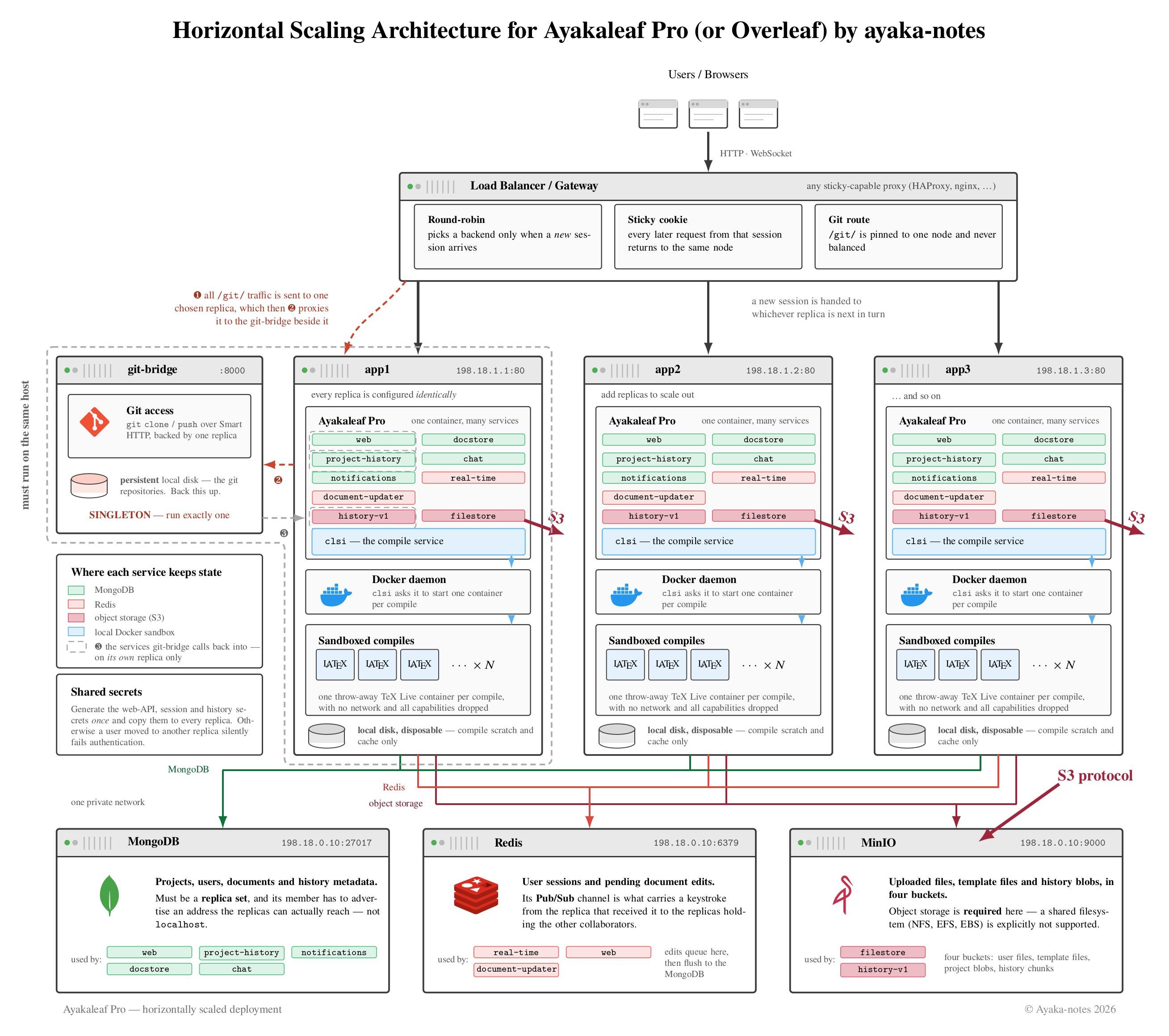
External, central data storage
The data storage in Server Pro can be split into four data stores:-
MongoDB
- Most of the data is persisted into MongoDB.
- We support either a local instance or an external instance, such as MongoDB Atlas (a fully managed MongoDB service that runs within the AWS infrastructure).
-
Redis
- Redis stores temporary data, such as pending document updates before they are flushed to MongoDB.
- Redis is used for communicating document updates between different services and notifying the editor about state changes in a given project.
- Redis is used for storing the user sessions.
- We support either a local instance or an external instance.
-
Project files and History files
- Non-editable project files are stored outside of MongoDB. The new project history system (Server Pro 3.5 onwards) stores the history outside MongoDB as well.
- For small single instances we support either a local file system (which could be backed by a local SSD, NFS or EBS) or a S3 compatible data storage system.
-
For horizontal scaling, we only support S3 compatible data storage systems.
-
Ephemeral files
- LaTeX compiles need to run on fast, local disks for optimal performance. The output of the compilation does not need to persisted or backed up.
- Buffering of new file uploads and the creation of project zip files also benefits from using a local disk.
We strongly advise on using a local disk. Using any kind of networked disk (such as NFS or EBS) can result in unexpected compile errors and other performance issues.
Git-bridge
Git-bridge is available in Server Pro starting with version 4.0.1.
- a central MongoDB instance that is accessible from all Server Pro instances
- a central Redis instance that is accessible from all Server Pro instances
- a central S3 compatible storage backend for project and history files
- a local disk on each instance for ephemeral files
- a local disk on the instance that hosts the git-bridge container for git-bridge data
Load balancer requirements
-
Persistent routing, e.g. using a cookie
This requirement stems from these components:
- The real-time editing capability in Server Pro uses WebSockets with a fallback to XHR polling. Each editing session has local state on the server side and the requests of a given editing session always need to be routed to the same Server Pro instance. The collaboration feature uses Redis Pub/Sub for sharing updates between multiple Server Pro instances.
- The LaTeX compilation keeps the output and compile cache locally for optional performance. Upon issuing a compile request to one Server Pro instance, the following PDF/log download requests need to be routed to the same Server Pro instance.
- Long request timeouts to support the compilation of large LaTeX documents
- WebSocket support for optimal performance
- POST payload size of 50MB
-
Keep-alive timeout must be lower than the Server Pro keep-alive timeout
The keep-alive timeout inServer Pro can be configured using the environment variable
NGINX_KEEPALIVE_TIMEOUT. The default value is 65s. With the default, a keep-alive timeout of 60s in the load balancer works. WithNGINX_KEEPALIVE_TIMEOUT=120, the load balancer could pick 115s. -
Client IPs
Set the request header
X-Forwarded-Forto the client IP. -
When terminating SSL
The load balancer needs to add the request header
X-Forwarded-Proto: https.
Sample HAProxy configuration
Sample HAProxy configuration
Server Pro configuration
Secrets The Server Pro instances need to agree on shared secrets:WEB_API_PASSWORD(web api auth)STAGING_PASSWORDandV1_HISTORY_PASSWORDsame value (history auth)CRYPTO_RANDOM(for session cookie)OT_JWT_AUTH_KEY(history auth)
/dev/urandom (256 random bits).
OVERLEAF_MONGO_URL (SHARELATEX_MONGO_URL for versions 4.x and earlier) at the central MongoDB instance.
Redis
Point OVERLEAF_REDIS_HOST (SHARELATEX_REDIS_HOST for versions 4.x and earlier) and REDIS_HOST at the central Redis instance.
S3 compatible storage for project and history files
Please see the documentation on S3 compatible storage for details.
Ephemeral files
The default bind-mount of a local SSD to /var/lib/overleaf (/var/lib/sharelatex for versions 4.x and earlier) will be sufficient. Be sure to point SANDBOXED_COMPILES_HOST_DIR at the mount point on the host.
We strongly advise using a local disk. Using any kind of networked disk (such as NFS or EBS) can result in unexpected compile errors and other performance issues.
- Set
OVERLEAF_BEHIND_PROXY=true(SHARELATEX_BEHIND_PROXYfor versions4.xand earlier) for accurate client IPs. - Set
TRUSTED_PROXY_IPSto the IP of the load balancer (Multiple CIDRs can be specified, separated with a comma).
Git-bridge is available in Server Pro starting with version 4.0.1.
-
Set
GIT_BRIDGE_ENABLEDto'true' -
Set
GIT_BRIDGE_HOSTto<git-bridge container name>e.g.git-bridge -
Set
GIT_BRIDGE_PORTto8000 -
Set
V1_HISTORY_URLtohttp://<server-pro sibling container name>:3100/api. Note: This is only necessary on the sibling container for the git-bridge container. The other instances can use a localhost URL, which is the default.
- Set
GIT_BRIDGE_API_BASE_URLtohttp://<server-pro sibling container name>/api/v0, e.g.http://server-pro-ha-1/api/v0 - Set
GIT_BRIDGE_OAUTH2_SERVERtohttp://<server-pro sibling container name>, e.g.http://server-pro-ha-1 - Set
GIT_BRIDGE_POSTBACK_BASE_URLtohttp://<git-bridge container name>:8000, e.g.http://git-bridge:8000 - Set
GIT_BRIDGE_ROOT_DIRto the bind-mounted git-bridge data disk, e.g./data/git-bridge
Sample docker-compose.yml configuration
Sample docker-compose.yml configuration
The following configuration is showing a self-contained setup. For the demo to work, you need to provide a valid SSL key/certificate and adjust the
OVERLEAF_SITE_URL (SHARELATEX_SITE_URL for versions 4.x and earlier). For an actual setup, you must replace the dummy secrets with actual secrets as noted inline. For an actual setup, you need to move the individual containers onto dedicates nodes and adjust the IP addresses to your local network setup.Hardware
We recommend using the same hardware specifications for all the Server Pro instances that are taking part in horizontal scaling. The general recommendations on hardware specifications for Server Pro instances apply.Upgrading Server Pro
As part of the upgrade process, Server Pro automatically runs database migrations. These migrations are not designed to be run from multiple instances in parallel. The migrations need to finish before the actual web application is started. You can either check the logs for an entry ofFinished migrations or wait until the application accepts traffic.
The upgrade procedure looks like this:
- Schedule a maintenance window
- Stop all the instances of Server Pro
- Take a consistent backup as described in the documentation
- Start a single instance of Server Pro with the new version
- Validate that the new instance is working as expected
- Bring up the other instances with the new version