If you’re using the Toolkit, enable the git-bridge by setting the following in your config/overleaf.rc:
config/overleaf.rc
GIT_BRIDGE_ENABLED=true
The Toolkit ignores it unless SERVER_PRO=true is also set. Nothing else is needed: the Toolkit sets GIT_BRIDGE_HOST, GIT_BRIDGE_PORT and V1_HISTORY_URL for the sharelatex container itself, so skip the two Docker Compose steps below. Run bin/up to recreate the containers.
2
Add the git-bridge container (For Docker-compose user Only)
For users running a custom docker-compose.yml, add the following container configuration to your compose file:
docker-compose.yml (git-bridge service)
git-bridge:
    restart: always
    image: ghcr.io/ayaka-notes/overleaf-pro/git-bridge:6.3.2 # tag should match the `sharelatex` container tag
    volumes:
        - ~/git_bridge_data:/data/git-bridge
    container_name: git-bridge
    expose:
        - "8000"
    environment:
        GIT_BRIDGE_API_BASE_URL: "http://sharelatex:3000/api/v0/"
        GIT_BRIDGE_OAUTH2_SERVER: "http://sharelatex"
        GIT_BRIDGE_POSTBACK_BASE_URL: "http://git-bridge:8000"
        GIT_BRIDGE_ROOT_DIR: "/data/git-bridge"
    user: root
    command: ["/server-pro-start.sh"]
Use the same tag as the sharelatex image. The MCP Server (v6.3.1 and later) is part of the sharelatex image and is enabled together with Git integration, so it needs no extra container.
3
Update the sharelatex container configuration
You’ll also need to link the git-bridge container in the sharelatex container and define the following environment variables, please pay attention to V1_HISTORY_URL:
docker-compose.yml (sharelatex service)
sharelatex:
    links:
        - git-bridge
    environment:
         GIT_BRIDGE_ENABLED: true
         GIT_BRIDGE_HOST: "git-bridge"
         GIT_BRIDGE_PORT: "8000"
         # We use v1 now, if you used to set V1_HISTORY_URL, please update now
         V1_HISTORY_URL: "http://sharelatex:3100/api"
4
Authentication
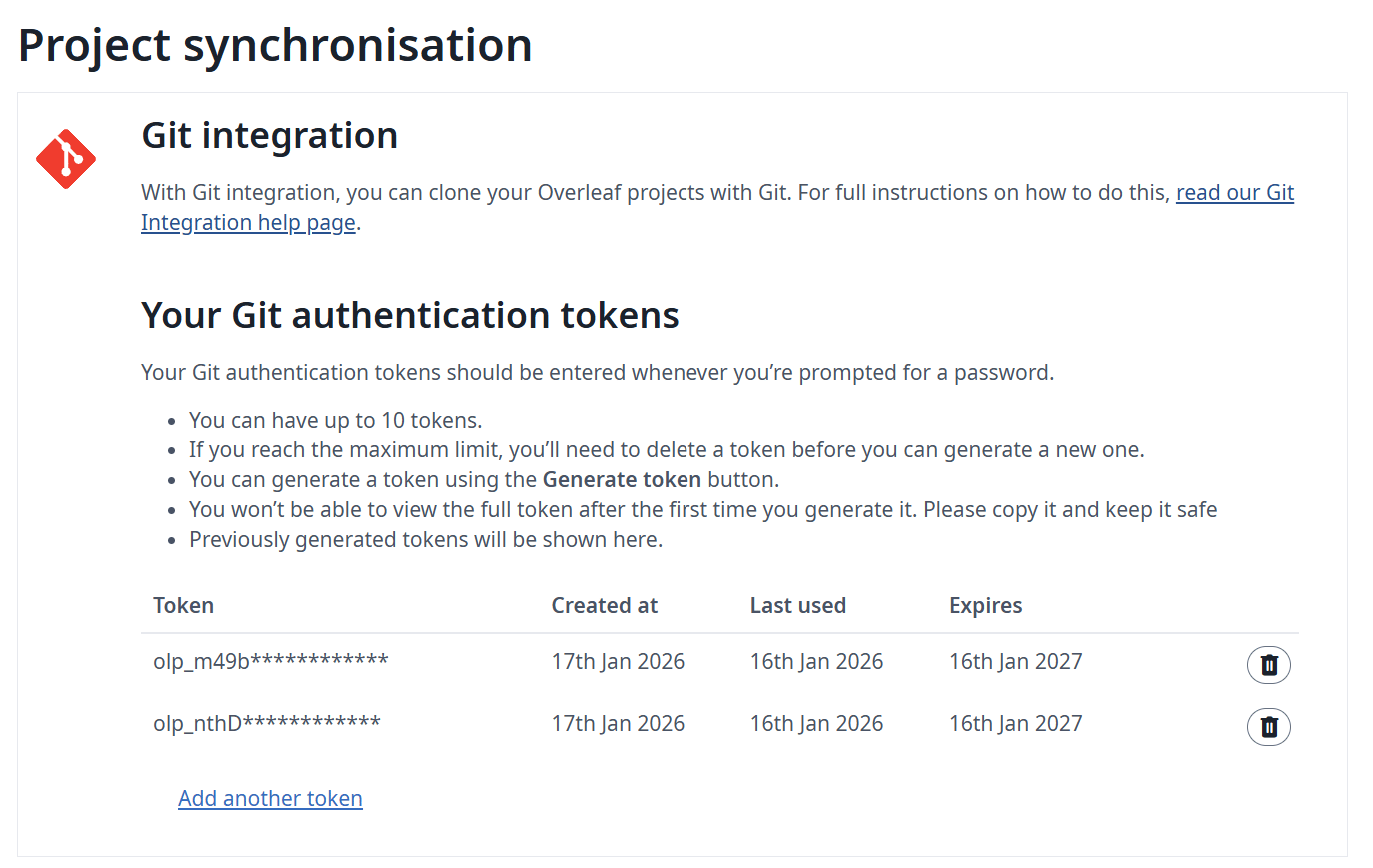
When authenticating a git client, users need a Personal Access Token. Users can manage Personal Access Tokens through the application UI (see the documentation):
Git Intergration Personal Access Token
5
Monitoring and resource considerations
We recommend you monitor your host resources after enabling the git-bridge. The load increase will depend on:
the number of users accessing the feature
the types of projects hosted in your instance (larger projects are generally more resource intensive)
The Git integration stores a complete git repository on disk for each project that gets cloned by a user. If you have limited disk space, you can activate a swap job that will move repositories that are less used to AWS S3. If a swapped repository is needed again, it gets moved back to the disk. The following environment variables control the swap job:
Name
Description
GIT_BRIDGE_SWAPSTORE_TYPE
Set this to “s3” to activate the swap job.
GIT_BRIDGE_SWAPSTORE_AWS_ACCESS_KEY
Your AWS access key
GIT_BRIDGE_SWAPSTORE_AWS_SECRET
Your AWS secret
GIT_BRIDGE_SWAPSTORE_S3_BUCKET_NAME
This bucket will contain the zipped git repositories
GIT_BRIDGE_SWAPSTORE_AWS_REGION
The bucket’s region
GIT_BRIDGE_SWAPJOB_MIN_PROJECTS
How many projects to keep on disk, at a minimum.
- Default: 50
GIT_BRIDGE_SWAPJOB_LOW_GIB
Low watermark for swapping. The swap job will move projects until disk usage is below this value.
- Default: 128 GB
GIT_BRIDGE_SWAPJOB_HIGH_GIB
High watermark for swapping. The swap job will start swapping when disk usage reaches this value.
- Default: 256 GB
GIT_BRIDGE_SWAPJOB_INTERVAL_MILLIS
The amount of time between checking disk usage and running the swap job.
If I share my project with someone else, how does the Git Bridge permission model work?
Users with read-only access can only clone this project; users with read-write access can clone and push projects. Note: Users need to be logged in to join this project.
How do I clone a project, and which username and password do I use?
In the editor, open Integrations in the left rail and click Git integration. It shows the clone command, in the form:
When Git asks for credentials, enter git as the username and a Personal Access Token as the password. Generate the token in Account Settings; it is valid for one year. Your account password does not work.Changes are not synced automatically: use git pull to get the changes made in the editor and git push to send yours. The /git path is served by the sharelatex container, so a reverse proxy in front of it needs no extra rule.
git push fails with HTTP 413 or curl 55 Broken pipe
The push is larger than the upload size limit, which is set by MAX_UPLOAD_SIZE (in megabytes, 50 by default) and also applies to pushes. Raise it in config/variables.env, for example MAX_UPLOAD_SIZE=200, then run bin/up -d. If you use the TLS proxy or your own reverse proxy, also raise its client_max_body_size (50M in the Toolkit’s config/nginx/nginx.conf).The git-bridge also refuses files larger than 50 MB and projects with more than 2,000 files. These limits are set by GIT_BRIDGE_REPOSTORE_MAX_FILE_SIZE (in bytes) and GIT_BRIDGE_REPOSTORE_MAX_FILE_NUM in config/variables.env.
The git-bridge log shows Failed to fetch log level
The warning is harmless, and clone, pull and push keep working. In 6.2.x, git-bridge asks the Google Cloud metadata server (metadata.google.internal) for a log level once a minute, which only works on Google Cloud. Elsewhere the request fails, git-bridge logs the error (such as null or an HTTP status) and keeps the level from GIT_BRIDGE_LOG_LEVEL. From 6.3.0 the check is off, and upgrading also updates the git-bridge image, whose version follows the main image.
Do I need the track-changes service or OVERLEAF_IS_SERVER_PRO=true for Git and full project history?
Answer: No. Ayakaleaf Pro has no track-changes service. Project history is kept by the project-history and history-v1 services, which always run inside the sharelatex container. The git-bridge reads history from history-v1 at V1_HISTORY_URL (http://sharelatex:3100/api), which the Toolkit sets. Do not set OVERLEAF_IS_SERVER_PRO: no feature depends on it, it only switches the database migrations run at startup to the Server Pro set.
Last modified on November 2, 2026
Was this page helpful?
Assistant
Responses are generated using AI and may contain mistakes.