

This feature is developed by ayaka-notes/ayakaleaf-pro. It is introduced in v6.3.1 as an early preview and will be officially released in v6.4.0, so its configuration and behavior may still change. We need your feedback if you have any problem.
Apps/<your Dropbox app>/, changes in Overleaf are sent to Dropbox, and changes made in Dropbox come back to Overleaf.
Setup Dropbox Synchronisation
Create an app in the Dropbox App Console, signed in with the Dropbox account that will own the app:- Click Create app, then fill in the page:
- 1. Choose an API: select Scoped access.
- 2. Choose the type of access you need: select App folder, not Full Dropbox. Overleaf only syncs inside the folder of the app.
- 3. Name your app: enter a name, e.g.
Overleaf. It must be unique on Dropbox. Each user’s projects appear inApps/<name of your app>/in their Dropbox, and this name isDROPBOX_APP_NAMEbelow. - Click Create app. The app opens on its Settings tab.
- On the Permissions tab, under Files and folders, check
files.metadata.write,files.content.writeandfiles.content.read.account_info.readandfiles.metadata.readare checked with them and cannot be unchecked. Do not check other permissions. - Click Submit in the bar at the bottom of the Permissions tab. Without Submit the permissions are not saved, and Dropbox refuses to sync files for the users who link their account.
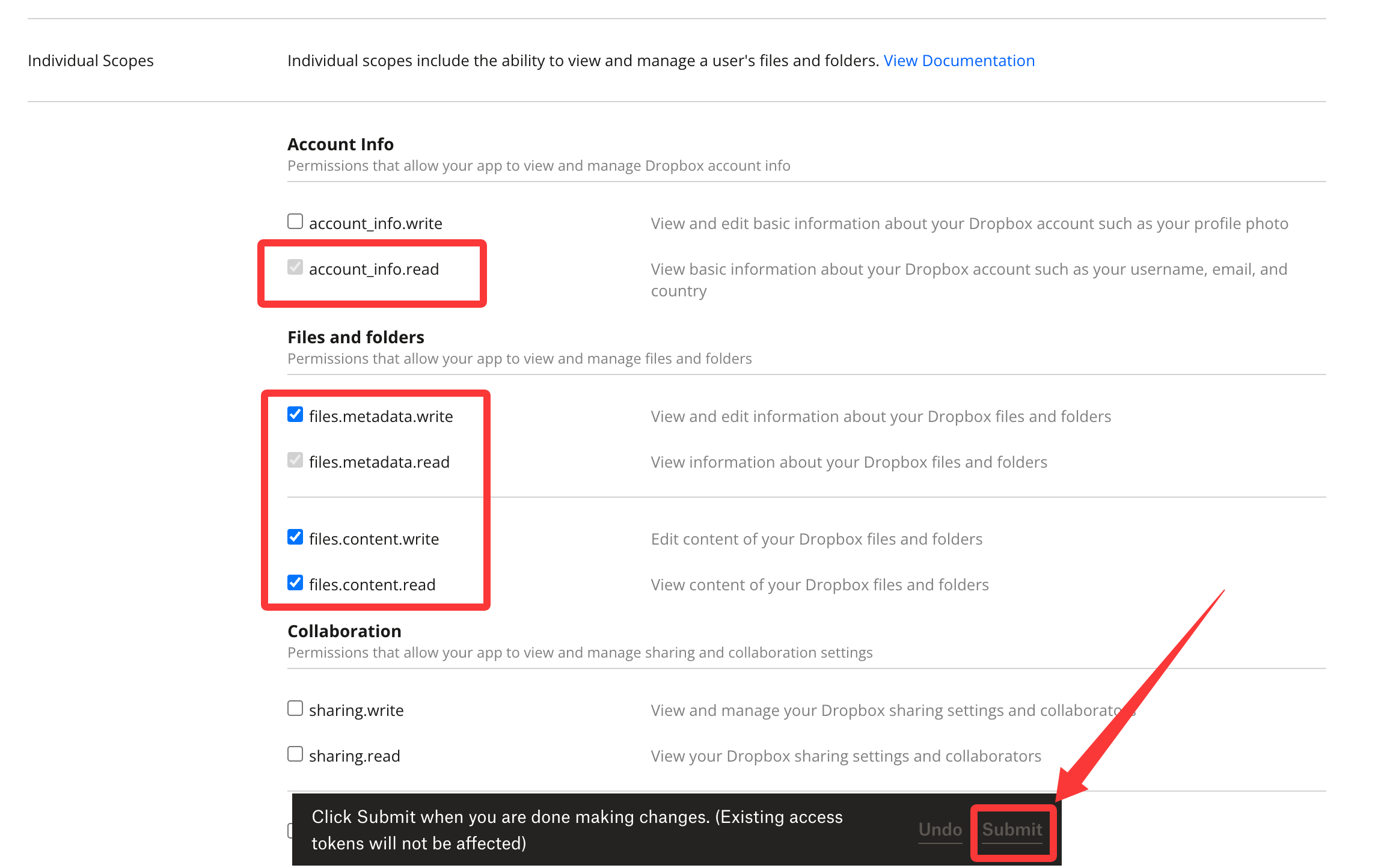
Dropbox App Console: the permissions to check, saved with Submit
- On the Settings tab, under OAuth 2, enter
${OVERLEAF_SITE_URL}/user/dropbox/oauth/callbackin Redirect URIs, then click Add. Typing the URI is not enough: it is only saved once it shows in the list above the field.
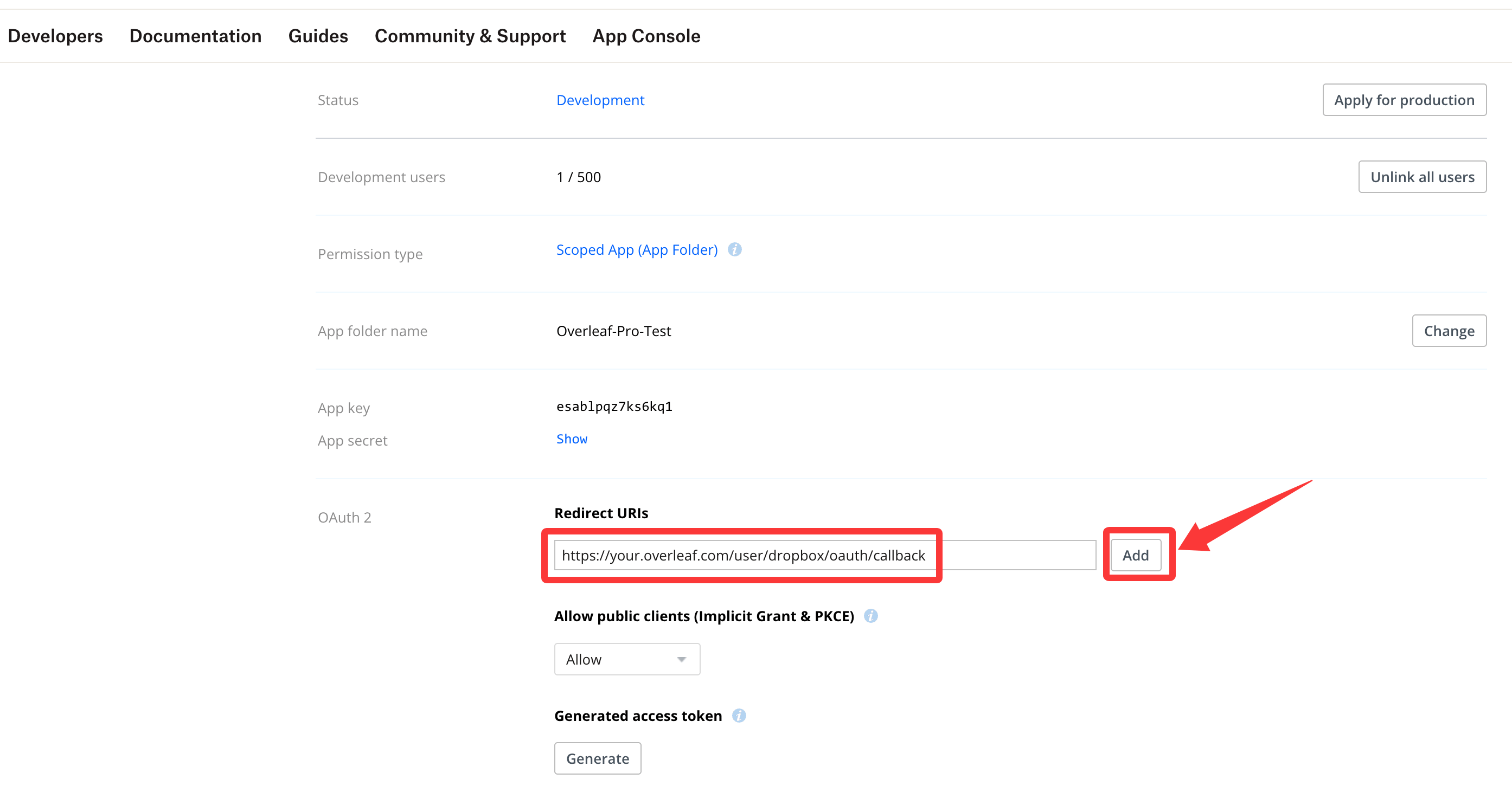
Dropbox App Console: enter the redirect URI, then click Add
- On the Settings tab, under Webhooks, enter
${OVERLEAF_SITE_URL}/dropbox/webhookin Webhook URIs, then click Add as well. Dropbox calls it right away to check it, so Overleaf must already be running with the settings below and be reachable from the internet (see Webhook). Its status shows Enabled once the check passes.
config/variables.env
DROPBOX_SYNC_PROXY_URL=http://10.0.0.1:10808. It must be a standard HTTP/HTTPS forward proxy, and must not use 127.0.0.1.
Create the database indexes
Run this once, before users link their Dropbox accounts. The indexes that Dropbox sync uses are not created automatically, so without them every sync lookup scans the collection. Toolkit users: runbin/mongo. Docker Compose users: run docker compose exec mongo mongosh sharelatex. Then paste:
Do not run the
dropboxEntities migrations of tools/migrations instead: 20220825160708_recreate_dropboxEntities drops the collection, which deletes the sync state of every user.Webhook
Dropbox tells Overleaf about changes in Dropbox with a webhook, so they show up in Overleaf within seconds. The webhook goes to your site’s address,${OVERLEAF_SITE_URL}/dropbox/webhook, no extra port is needed, but Dropbox must be able to reach it from the internet. When you add it in the App Console, Dropbox checks it right away.
Without a webhook, for example on a server that Dropbox cannot reach, changes in Overleaf are still sent to Dropbox, but changes in Dropbox only come back when a user clicks sync this project now in the Dropbox dialog of the editor.
How syncing works
- Linking: when a user links their Dropbox account, the projects they own are sent to Dropbox. Projects shared with them appear in Dropbox with their next change.
- Overleaf to Dropbox: new files, renames, moves, deletions and project renames are sent right away. Edits in the editor are sent once Overleaf saves them to its storage, a few minutes after everyone has left the project. To send them earlier, click sync this project now in the Dropbox dialog of the editor (once per minute).
- Dropbox to Overleaf: new and changed files, new folders and deletions in a project folder are applied to the project. A new folder at the top of the app folder becomes a new project. Deleting a project folder in Dropbox marks the project as deleted in Overleaf.
- Conflicts: when a file changes in both places at the same time, the last change wins. Dropbox may keep the other version as a conflicted copy.
- Collaborators: collaborators who link their Dropbox get the projects shared with them. Read-only viewers and reviewers get the project, but their changes in Dropbox do not sync back to Overleaf.
- Ignored files: files Overleaf does not sync, like build output (
.aux,.log, …),.DS_Storeor Python virtual environments, stay in Dropbox only.
Q&A
Why can a user not link their Dropbox account?
Why can a user not link their Dropbox account?
- A Dropbox folder that Overleaf does not know yet is matched to a project by its name, so a user whose projects share a name is asked to rename them first. Names are compared without case, and archived and trashed projects count too.
- A Dropbox account can only be linked to one Overleaf account.
Why was a Dropbox account unlinked?
Why was a Dropbox account unlinked?
Answer: Overleaf unlinks a Dropbox account when Dropbox refuses its token (for example after the user removed the app in Dropbox), when the Dropbox is full, or when Dropbox suspended the account. A notification in the project list tells the user which of these happened, until they link the account again. The user can link it again once the problem is solved.
Can I rename a project folder in Dropbox?
Can I rename a project folder in Dropbox?
Answer: Please rename the project in Overleaf instead: its folder in Dropbox is renamed too. For Overleaf, renaming the folder in Dropbox deletes the project folder and creates a new one, so the old project is marked as deleted and a new project is created from the files.
Why are some project folders numbered, like "Thesis (1)"?
Why are some project folders numbered, like "Thesis (1)"?
Answer: Every project has a folder of its own, also when two projects have the same name. Dropbox cannot hold two folders with the same name, so it adds a number to the folder made later. The number depends on which names were free in Dropbox at that moment, not on which project is older. Overleaf knows the folder of each project, so changes never go to the folder of another project with the same name.An uploaded project whose name is already taken is named with a number in Overleaf as well, for example “Thesis (1)”.
What happens when I delete a project folder in Dropbox?
What happens when I delete a project folder in Dropbox?
- If no other project has the name of the folder, the project is marked as deleted in Overleaf. Its files and history are kept.
- If several projects have that name, Overleaf cannot tell which one the folder belonged to. It unlinks the Dropbox account and shows a notification asking to rename the projects. Give projects distinct names before deleting their folders in Dropbox.
- A numbered folder, like “Thesis (1)”, matches no project name, so deleting it does not change the project in Overleaf. Click sync this project now in the Dropbox dialog of the editor to send the project to Dropbox again.
What happens in Dropbox when I delete a project in Overleaf?
What happens in Dropbox when I delete a project in Overleaf?
Answer: Nothing, its folder stays in Dropbox. Delete the folder in Dropbox if you no longer need it.
What happens to changes in Dropbox while a project is archived or trashed?
What happens to changes in Dropbox while a project is archived or trashed?
Answer: They are not applied to the project, and restoring the project does not bring them in either. After restoring, Overleaf stops sending its changes of the files that were changed in Dropbox meanwhile, so the two sides differ.To bring such a file back in sync, save it once more in Dropbox. Overleaf then takes the Dropbox version: changes made to the file in Overleaf since restoring are replaced, and stay in the project history. Restore a project before you change it in Dropbox.
Why does the Dropbox link of the editor open the Dropbox home page?
Why does the Dropbox link of the editor open the Dropbox home page?
Answer: The link goes to
Apps/<app folder>/<project> on dropbox.com, as on Overleaf Cloud. When Dropbox shows its Apps folder under a translated name, for example 应用 in Chinese, the link does not find the folder and Dropbox opens its home page instead. Open the project folder from the translated Apps folder in Dropbox.Why are some files of a project missing in Dropbox?
Why are some files of a project missing in Dropbox?
Answer: Changes made while the sync service was not running, for example while it restarted, are not sent to Dropbox later. Click sync this project now in the Dropbox dialog of the editor: it sends the whole project again.