

Changes
- New admin panel (early preview): user, project and template pages, audit logs and per-user feature switches.
- Multiple emails per account (early preview).
- MCP Server: history, tracked changes, comments, chat and file moves.
- AI assistant: the OpenAI Responses API, and PDF attachments, reading web pages and long chats (early preview).
- Sign up and login: reCAPTCHA v2 and email domain lists for public registration (early preview).
- Node.js 24.22.3 and package updates: the security update in upstream Overleaf 6.3.3.
- Bug fixes found by our E2E testing system and Internal Horizon Issue Investigation.
The new admin panel, multiple emails, the AI assistant attachments and the new sign up options ship in 6.3.3 as an early preview for gray testing, and will be officially released in v6.4.0. Their behavior may still change before then. Please report any issues on GitHub.
Feature 01: New Admin Panel (Preview)
Running an instance for a lab or a department brings the same questions every week: why can’t this student log in, who gave that account admin rights, where did last year’s thesis go. The new admin panel has one list for every user and one for every project, a page for each of them, template management and audit logs. Admins act on many users at once, copy activation and password links when no email goes out, and turn big features such as Dropbox, Git, the AI assistant, track changes and the symbol palette on or off for a single user.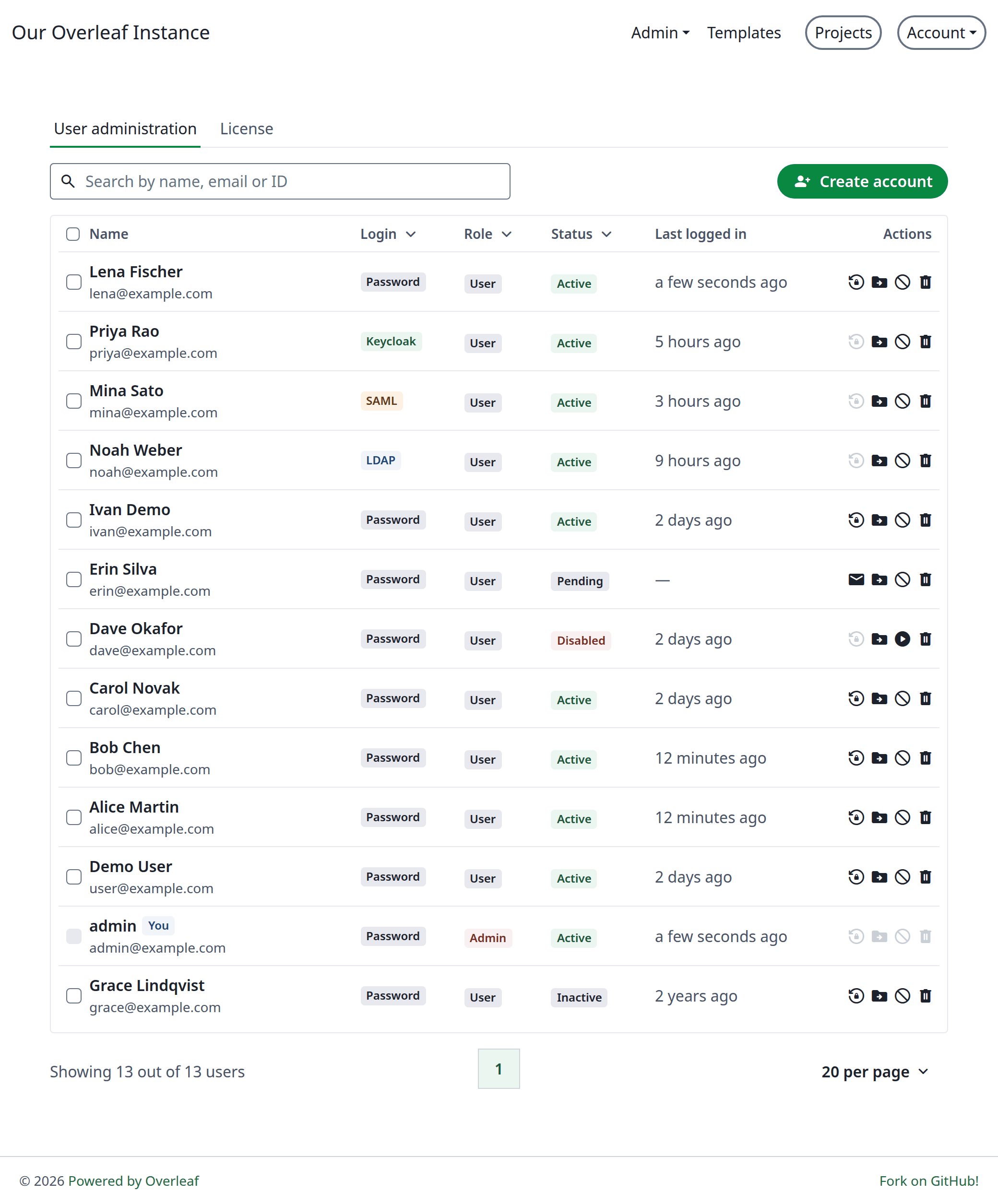
The user list
Feature 02: Multiple Emails per Account (Preview)
Users add more emails to their account with a code sent to each one, and can make another one primary, for example before a university address is taken away. Only the primary email logs in and gets password resets. It is on when the instance can send email. See Multiple emails.Feature 03: MCP Server
AI clients such as Claude Code, Codex or Cursor can now look through the project history and restore versions, review tracked changes, make their own edits tracked changes, comment on text, read and send chat messages, and move or rename files. The MCP Server now has 33 tools, up from 17. See MCP Server.Feature 04: OpenAI Responses API
OpenAI’s newer reasoning models, such as gpt-6.x, refuse function tools on Chat Completions, so the AI assistant and the error assistant could not use them. SetAI_API_MODE=responses to call the OpenAI Responses API instead. Attachments and the token quota work as before.
See AI Integration.
Feature 05: AI Assistant Improvements (Preview)
Attach PDF files of up to 2 MB next to images, with an optionalAI_PDF_MODEL for a model that reads them. The assistant reads web pages through the linked URL proxy and knows today’s date when it searches the web. Long chats are summarized and old tool output is condensed, so a chat keeps going without filling the model’s context.
See AI Assistant.
Feature 06: Sign Up and Login (Preview)
SetRECAPTCHA_SITE_KEY and RECAPTCHA_SECRET_KEY to protect login, LDAP login, register and password reset with reCAPTCHA v2. OVERLEAF_ALLOW_PUBLIC_REGISTRATION now takes a list of email domains, such as @example.edu,@*.example.org, or @* for any domain. The login and register pages show their forms in a card.
See reCAPTCHA and Public Access.
Bug fixes
- Admin panel: an admin who was deleted is still named by email in the audit logs and as “Deleted by”, and shows as “Deleted user” once purged. Direct requests to disable, delete or demote one’s own account are refused.
- AI assistant: without
AI_PDF_MODEL, a chat with a PDF file and images goes toAI_MODEL, not to an image model that may not read PDF files. - Template gallery: an edit takes only the fields of the form, and a field that is not text answers 400 instead of a 500.
- Git bridge: the clone command breaks at the edge of its copy block, not at its punctuation.
Upgrade
- From 6.3.2, 6.3.1 or 6.3.0: no migration is needed. Pull the new image and restart.
- From 6.2.x or earlier with Zotero or Mendeley in use: run the Zotero / Mendeley migration from 6.3.0 first.
- The new admin panel replaces the old one. Multiple emails need email delivery; reCAPTCHA, the domain list and
AI_API_MODEonly need new environment variables.
Docker Image
You can find docker image here: https://github.com/ayaka-notes/ayakaleaf-pro/pkgs/container/overleaf-proOfficial Release Notes
Official Release Notes
Release date: 2026-11-13This is a security release containing updates to the installed packages.Source: https://docs.overleaf.com/on-premises/release-notes/release-notes-6.x.x