> ## Documentation Index
> Fetch the complete documentation index at: https://ayakaleaf-pro.mintlify.site/llms.txt
> Use this file to discover all available pages before exploring further.
# TLS 代理
一個使用 NGINX、用於終止 HTTPS 連線的選用 TLS 代理。
執行 `bin/init --tls` 以使用 NGINX 代理設定初始化本機設定,或將 NGINX 代理設定新增至現有的本機設定中。系統會在 `config/nginx/certs/overleaf_key.pem` 建立一個**範例**私密金鑰,並在 `config/nginx/certs/overleaf_certificate.pem` 建立一個**虛擬**憑證。您可以將它們替換為實際的私密金鑰與憑證,或將 `TLS_PRIVATE_KEY_PATH` 與 `TLS_CERTIFICATE_PATH` 變數的值分別設為實際私密金鑰與憑證的路徑。
`config/nginx/nginx.conf` 中提供了 NGINX 的預設設定,您可以依需求自訂。設定檔的路徑可透過 `NGINX_CONFIG_PATH` 變數變更。
如果您使用的是以 **docker-compose.yml** 為基礎的部署,或自行管理 NGINX 反向代理,可以在[這裡](https://github.com/overleaf/toolkit/blob/master/lib/config-seed/nginx.conf)查看 **nginx.conf** 範例檔案。
如果您的 `config/overleaf.rc` 檔案中還沒有以下區段,請將其加入:
```text theme={null}
# TLS proxy configuration (optional)
NGINX_ENABLED=false
NGINX_CONFIG_PATH=config/nginx/nginx.conf
NGINX_HTTP_PORT=80
# Replace these IP addresses with the external IP address of your host
NGINX_HTTP_LISTEN_IP=127.0.1.1
NGINX_TLS_LISTEN_IP=127.0.1.1
TLS_PRIVATE_KEY_PATH=config/nginx/certs/overleaf_key.pem
TLS_CERTIFICATE_PATH=config/nginx/certs/overleaf_certificate.pem
TLS_PORT=443
```
如果您使用外部 TLS 代理(即不由 Overleaf Toolkit 管理),請確保在 `config/variables.env` 中設定 `OVERLEAF_TRUSTED_PROXY_IPS=loopback,`,例如 `OVERLEAF_TRUSTED_PROXY_IPS=loopback,192.168.13.37`。
如果您的本機網路使用 `172.16.0.0/12`(Docker 網路的預設子網路)中的子網路,您需要在 `config/variables.env` 中設定 `OVERLEAF_TRUSTED_PROXY_IPS=loopback,`。其中 `` 是 `docker inspect overleaf_default` 中 `IPAM -> Config -> Subnet` 的值,例如 `OVERLEAF_TRUSTED_PROXY_IPS=loopback,172.19.0.0/16`。這是為了防止 `X-Forwarded` 標頭遭到偽造。
如果未手動設定 `OVERLEAF_TRUSTED_PROXY_IPS`,其預設值為 `loopback`。若要手動設定,您必須確保包含 `loopback`(或 `127.0.0.1`),以信任在 **sharelatex** 容器內執行的 **nginx** 執行個體。只接受 IP 位址與 CIDR 範圍:請勿加入 `localhost` 之類的主機名稱,否則 Overleaf 將無法啟動並回傳 `502 Bad Gateway`。
如果您已正確設定受信任的代理 IP,應該會在 `/user/sessions` 頁面上看到您的公用 IP 位址,如下所示:
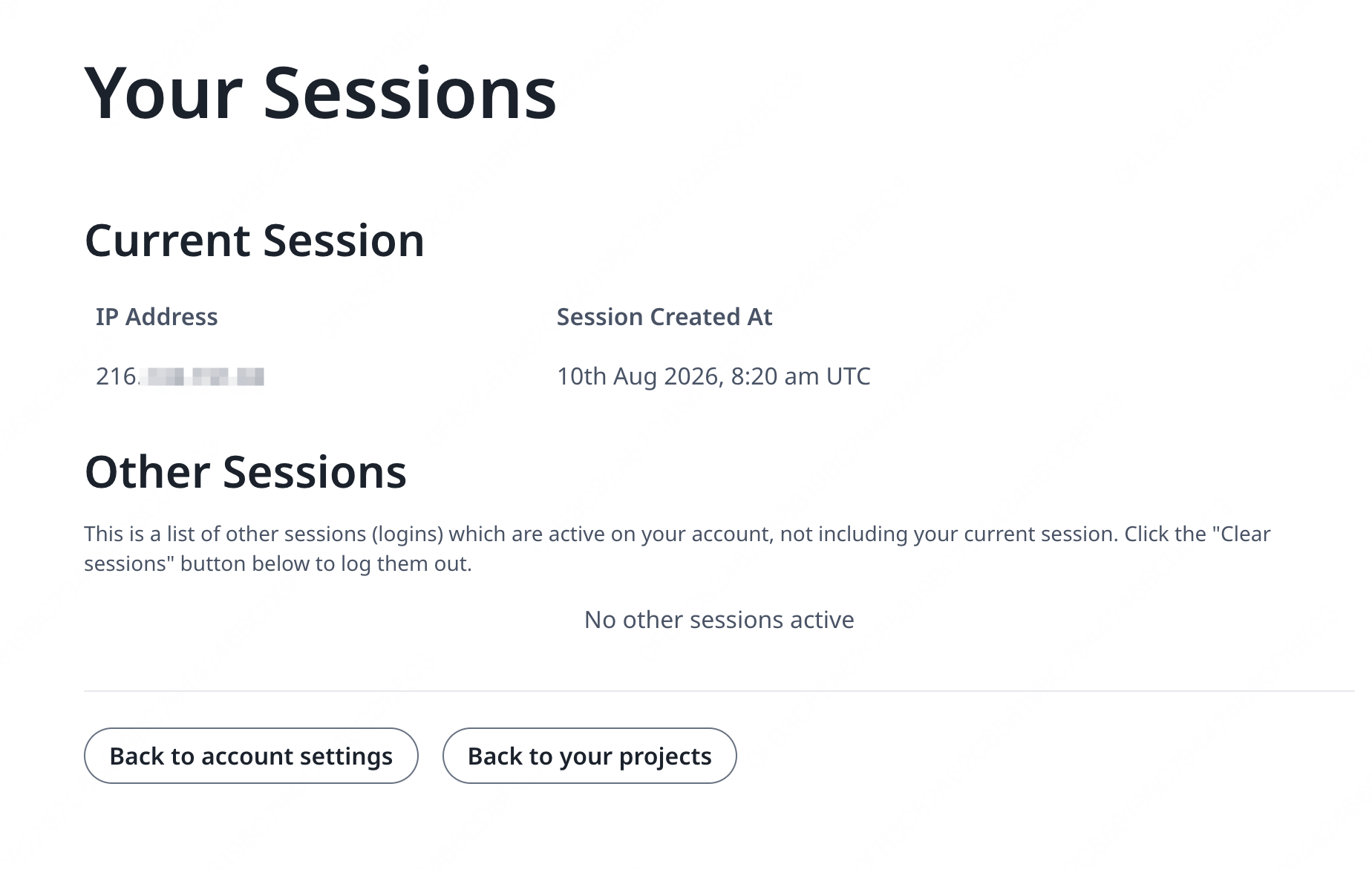 如果上方顯示的 IP 位址仍是 `127.0.0.1` 之類的位址或私有/本機網路 IP 位址,請檢查您的受信任代理設定,特別是 `OVERLEAF_TRUSTED_PROXY_IPS` 的值。
若要執行代理,請將 `config/overleaf.rc` 中 `NGINX_ENABLED` 變數的值從 `false` 改為 `true`,然後重新執行 `bin/up`。
預設情況下,HTTPS 網頁介面可透過 `https://127.0.1.1:443` 存取。對 `http://127.0.1.1:80` 的連線會被重新導向至 `https://127.0.1.1:443`。若要變更 NGINX 監聽的 IP 位址,請設定 `NGINX_HTTP_LISTEN_IP` 與 `NGINX_TLS_LISTEN_IP` 變數。連接埠可透過 `NGINX_HTTP_PORT` 與 `TLS_PORT` 變數變更。
如果 NGINX 無法啟動並出現錯誤訊息 `Error starting userland proxy: listen tcp4 ... bind: address already in use`,請確保 `OVERLEAF_LISTEN_IP:OVERLEAF_PORT` 與 `NGINX_HTTP_LISTEN_IP:NGINX_HTTP_PORT` 沒有重疊。
```mermaid theme={null}
sequenceDiagram
participant user as 使用者
participant external as 主機外部
participant internal as 主機內部
participant nginx as nginx
participant sharelatex as sharelatex
participant git-bridge as git-bridge
%% User connects to external host HTTP
user->>+ external: HTTP
note over external: NGINX_HTTP_LISTEN_IP:NGINX_HTTP_PORT
external->>+ nginx: HTTP
note over nginx: nginx:80
nginx-->>-external: 301
%% User connects to external host HTTPS
user->>+ external: HTTPS
note over external: NGINX_TLS_LISTEN_IP:TLS_PORT
external->>+ nginx: HTTPS
note over nginx: nginx:443
nginx->>+ sharelatex: HTTP
note over sharelatex: sharlatex:80
%% User connects to localhost HTTP
user->>+ internal: HTTP
note over internal: OVERLEAF_LISTEN_IP:OVERLEAF_PORT
internal->>+sharelatex: HTTP
note over sharelatex: sharlatex:80
%% sharelatex connects to git-bridge
sharelatex->>+git-bridge: HTTP /git/
note over git-bridge: git-bridge:8000
note over sharelatex: GIT_BRIDGE_HOST:GIT_BRIDGE_PORT
git-bridge->>+sharelatex: WEB/WEB-API:3000
git-bridge->>+sharelatex: HISTORY-V1:3100
```
This documentation is built and hosted on [Mintlify](https://mintlify.com), a developer documentation platform.
如果上方顯示的 IP 位址仍是 `127.0.0.1` 之類的位址或私有/本機網路 IP 位址,請檢查您的受信任代理設定,特別是 `OVERLEAF_TRUSTED_PROXY_IPS` 的值。
若要執行代理,請將 `config/overleaf.rc` 中 `NGINX_ENABLED` 變數的值從 `false` 改為 `true`,然後重新執行 `bin/up`。
預設情況下,HTTPS 網頁介面可透過 `https://127.0.1.1:443` 存取。對 `http://127.0.1.1:80` 的連線會被重新導向至 `https://127.0.1.1:443`。若要變更 NGINX 監聽的 IP 位址,請設定 `NGINX_HTTP_LISTEN_IP` 與 `NGINX_TLS_LISTEN_IP` 變數。連接埠可透過 `NGINX_HTTP_PORT` 與 `TLS_PORT` 變數變更。
如果 NGINX 無法啟動並出現錯誤訊息 `Error starting userland proxy: listen tcp4 ... bind: address already in use`,請確保 `OVERLEAF_LISTEN_IP:OVERLEAF_PORT` 與 `NGINX_HTTP_LISTEN_IP:NGINX_HTTP_PORT` 沒有重疊。
```mermaid theme={null}
sequenceDiagram
participant user as 使用者
participant external as 主機外部
participant internal as 主機內部
participant nginx as nginx
participant sharelatex as sharelatex
participant git-bridge as git-bridge
%% User connects to external host HTTP
user->>+ external: HTTP
note over external: NGINX_HTTP_LISTEN_IP:NGINX_HTTP_PORT
external->>+ nginx: HTTP
note over nginx: nginx:80
nginx-->>-external: 301
%% User connects to external host HTTPS
user->>+ external: HTTPS
note over external: NGINX_TLS_LISTEN_IP:TLS_PORT
external->>+ nginx: HTTPS
note over nginx: nginx:443
nginx->>+ sharelatex: HTTP
note over sharelatex: sharlatex:80
%% User connects to localhost HTTP
user->>+ internal: HTTP
note over internal: OVERLEAF_LISTEN_IP:OVERLEAF_PORT
internal->>+sharelatex: HTTP
note over sharelatex: sharlatex:80
%% sharelatex connects to git-bridge
sharelatex->>+git-bridge: HTTP /git/
note over git-bridge: git-bridge:8000
note over sharelatex: GIT_BRIDGE_HOST:GIT_BRIDGE_PORT
git-bridge->>+sharelatex: WEB/WEB-API:3000
git-bridge->>+sharelatex: HISTORY-V1:3100
```
This documentation is built and hosted on [Mintlify](https://mintlify.com), a developer documentation platform.