> ## Documentation Index
> Fetch the complete documentation index at: https://ayakaleaf-pro.mintlify.site/llms.txt
> Use this file to discover all available pages before exploring further.
# Mendeley 整合
此功能由 [ayaka-notes/ayakaleaf-pro](https://github.com/ayaka-notes/overleaf-pro) 提供,支援 OAuth 2.0,自 v6.3.0 起可用。如果您遇到任何問題,歡迎提供意見回饋。
#### 設定 Mendeley 整合
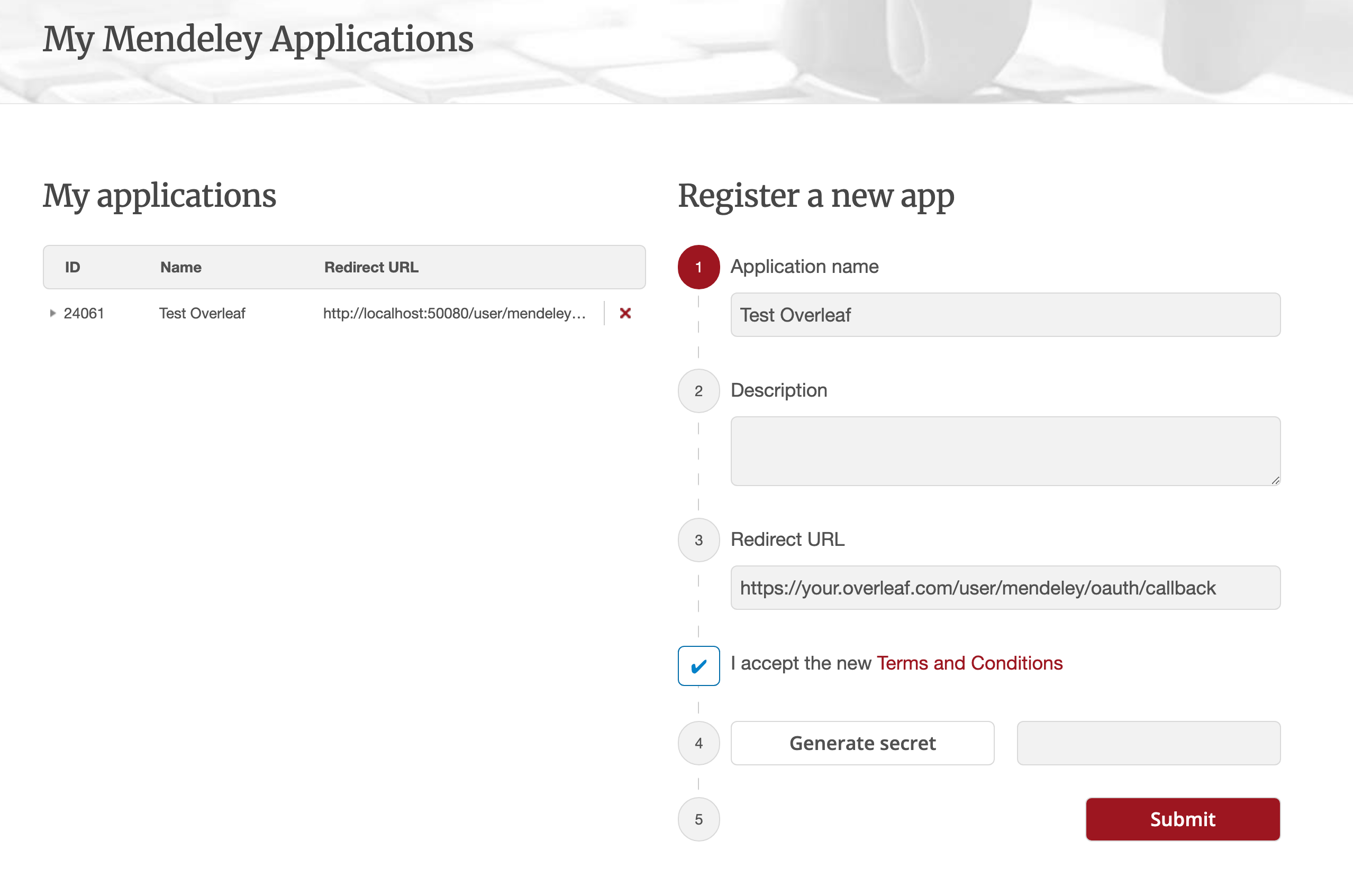
1. 前往[此連結](https://dev.mendeley.com/myapps.html)註冊 Mendeley OAuth 應用程式
2. 將 **Redirect URL** 設定為:`${OVERLEAF_SITE_URL}/user/mendeley/oauth/callback`
3. 記下應用程式產生的 **ID**(通常是數字,如下圖中的 `24061`)與 **Secret**
4. 修改您的 `config/variables.env`
5. 保留授權流程為 Elsevier 即可(建議設定)
 ```dotenv title="config/variables.env" theme={null}
#################
# Mendeley #
#################
# 'mendeley' must be in ENABLED_LINKED_FILE_TYPES (keep 'zotero' too if you use both)
ENABLED_LINKED_FILE_TYPES=project_file,project_output_file,url,mendeley
# From a Mendeley OAuth application (register at https://dev.mendeley.com/myapps.html)
# Redirect URL -> ${OVERLEAF_SITE_URL}/user/mendeley/oauth/callback
MENDELEY_CLIENT_ID=
MENDELEY_CLIENT_SECRET=
# Encrypts the Mendeley OAuth tokens in mongo; if unset, a key file is generated
# in /var/lib/overleaf/data on first use
# How to generate: `openssl rand -hex 32`
MENDELEY_CIPHER_PASSWORD=
# Optional: route the module's server-side Mendeley requests (OAuth + API) through
# an HTTP proxy (must be reachable from the web container; same as github-sync)
# http://10.0.0.1:10808
# (Optional) MENDELEY_PROXY_URL=
```
`mendeley` 必須包含在 `ENABLED_LINKED_FILE_TYPES` 中(如果您同時使用 `zotero`,也請將它保留在清單中)。`MENDELEY_CLIENT_ID` 與 `MENDELEY_CLIENT_SECRET` 來自您註冊的 OAuth 應用程式。加密密碼用於加密 MongoDB 中的 Mendeley OAuth 權杖(可透過 `openssl rand -hex 32` 產生);若未設定,首次使用時會在資料磁碟區中產生一個金鑰檔。您也可以選擇設定 `MENDELEY_PROXY_URL`,讓伺服器端的 Mendeley 請求(OAuth + API)透過可從 web 容器存取的 HTTP 代理傳送。
### 注意事項
將已有 Mendeley 連結書目檔案的現有安裝升級至重新發布的 6.3.0 時,請依照 [Zotero / Mendeley 遷移說明](/zh-TW/on-premises/release-notes/release-notes-6.x.x#ayakaleaf-pro-6.3.0 "mention")進行操作。全新安裝則不需要此遷移。
由於 Ayakaleaf 是一個協作平台,為了提升安全性,自 6.3.0 版起,只有參考文獻 `bib` 檔案的原始建立者才能更新所匯入的檔案。
舉例來說,假設專案擁有者使用者 A 啟用了連結分享,並在專案中建立 `test.bib` 檔案,將其連結到自己的 Zotero 帳號。如果另一位使用者 B 透過分享連結存取該專案,使用者 B 仍然可以讀取與下載 `test.bib`,但無法從 Zotero 更新或重新匯入該檔案。只有身為參考文獻檔案原始建立者的使用者 A 才能執行更新。換言之,只有 `.bib` 檔案的原始建立者擁有更新它的權限。
This documentation is built and hosted on [Mintlify](https://mintlify.com), a developer documentation platform.
```dotenv title="config/variables.env" theme={null}
#################
# Mendeley #
#################
# 'mendeley' must be in ENABLED_LINKED_FILE_TYPES (keep 'zotero' too if you use both)
ENABLED_LINKED_FILE_TYPES=project_file,project_output_file,url,mendeley
# From a Mendeley OAuth application (register at https://dev.mendeley.com/myapps.html)
# Redirect URL -> ${OVERLEAF_SITE_URL}/user/mendeley/oauth/callback
MENDELEY_CLIENT_ID=
MENDELEY_CLIENT_SECRET=
# Encrypts the Mendeley OAuth tokens in mongo; if unset, a key file is generated
# in /var/lib/overleaf/data on first use
# How to generate: `openssl rand -hex 32`
MENDELEY_CIPHER_PASSWORD=
# Optional: route the module's server-side Mendeley requests (OAuth + API) through
# an HTTP proxy (must be reachable from the web container; same as github-sync)
# http://10.0.0.1:10808
# (Optional) MENDELEY_PROXY_URL=
```
`mendeley` 必須包含在 `ENABLED_LINKED_FILE_TYPES` 中(如果您同時使用 `zotero`,也請將它保留在清單中)。`MENDELEY_CLIENT_ID` 與 `MENDELEY_CLIENT_SECRET` 來自您註冊的 OAuth 應用程式。加密密碼用於加密 MongoDB 中的 Mendeley OAuth 權杖(可透過 `openssl rand -hex 32` 產生);若未設定,首次使用時會在資料磁碟區中產生一個金鑰檔。您也可以選擇設定 `MENDELEY_PROXY_URL`,讓伺服器端的 Mendeley 請求(OAuth + API)透過可從 web 容器存取的 HTTP 代理傳送。
### 注意事項
將已有 Mendeley 連結書目檔案的現有安裝升級至重新發布的 6.3.0 時,請依照 [Zotero / Mendeley 遷移說明](/zh-TW/on-premises/release-notes/release-notes-6.x.x#ayakaleaf-pro-6.3.0 "mention")進行操作。全新安裝則不需要此遷移。
由於 Ayakaleaf 是一個協作平台,為了提升安全性,自 6.3.0 版起,只有參考文獻 `bib` 檔案的原始建立者才能更新所匯入的檔案。
舉例來說,假設專案擁有者使用者 A 啟用了連結分享,並在專案中建立 `test.bib` 檔案,將其連結到自己的 Zotero 帳號。如果另一位使用者 B 透過分享連結存取該專案,使用者 B 仍然可以讀取與下載 `test.bib`,但無法從 Zotero 更新或重新匯入該檔案。只有身為參考文獻檔案原始建立者的使用者 A 才能執行更新。換言之,只有 `.bib` 檔案的原始建立者擁有更新它的權限。
This documentation is built and hosted on [Mintlify](https://mintlify.com), a developer documentation platform.