> ## Documentation Index
> Fetch the complete documentation index at: https://ayakaleaf-pro.mintlify.site/llms.txt
> Use this file to discover all available pages before exploring further.
# 身分驗證
此功能由 [yu-i-i/overleaf-cep](https://github.com/yu-i-i/overleaf-cep) 開發。
目前支援 3 種身分驗證方式。設定完成後,您可以使用以下選項登入,如下圖所示。
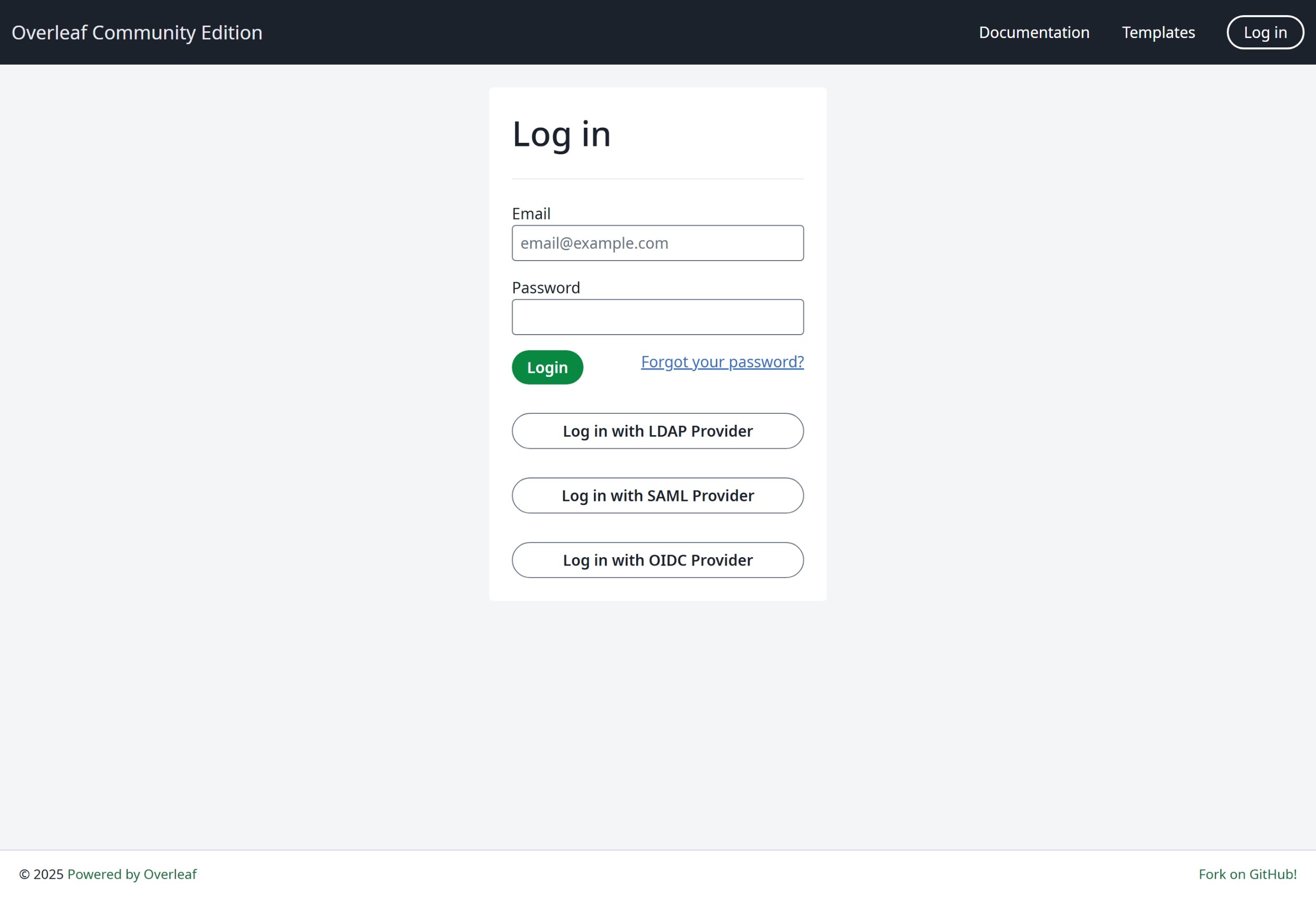 我們強烈建議您使用 OIDC,因為這是最通用的方式。
### 全域設定
必須設定環境變數 `EXTERNAL_AUTH` 才能啟用特定的身分驗證模組。此環境變數指定要啟用哪些外部身分驗證方式。可用選項如下(小寫):
* saml
* ldap
* oidc
若要讓使用者只能透過這些方式登入,請設定 `OVERLEAF_DISABLE_LOCAL_LOGIN=true`。這會隱藏電子郵件與密碼登入。除非 `EXTERNAL_AUTH` 至少啟用了一種方式,否則此設定不會生效(於 6.4.0 新增)。
### SSO 建議
我測試過 Overleaf 的 saml、ldap 與 oauth。saml 與 oauth 在 Overleaf 中都運作良好,但 ldap 則視情況而定。它在 [https://docs.goauthentik.io/](https://docs.goauthentik.io/) 上無法正常運作,但在 openLDAP([https://github.com/rroemhild/docker-test-openldap](https://github.com/rroemhild/docker-test-openldap))上則運作良好。
我們需要更新 passport-ldapauth。最近我嘗試用 [https://goauthentik.io/](https://goauthentik.io/) 測試 Overleaf 的 LDAP,結果失敗了。將 "passport-ldapauth" 更新到 3.0.0 之後,一切都運作正常。
```text theme={null}
"passport-ldapauth": "^3.0.0",
```
原本的版本是 2.x.x,那已經是 6 年前的版本了。
我不確定原因為何,因為我們都依賴外部套件來進行 LDAP(以及 saml、oauth)身分驗證。如果無法運作,Overleaf Server Pro 的情況可能也相同,因為我們只是將所有環境變數傳遞給內部套件,如果其中有錯誤,目前我們也無從得知。
**因此我強烈建議使用者建立開發環境,搭配完整原始碼來測試 SSO**,相關說明請參閱[設定開發環境(本機)](/zh-TW/dev/environment/setup-develop-environment-local "mention")。在開發環境中,您可以在終端機中看到所有日誌,方便進行除錯。
\\
我們強烈建議您使用 OIDC,因為這是最通用的方式。
### 全域設定
必須設定環境變數 `EXTERNAL_AUTH` 才能啟用特定的身分驗證模組。此環境變數指定要啟用哪些外部身分驗證方式。可用選項如下(小寫):
* saml
* ldap
* oidc
若要讓使用者只能透過這些方式登入,請設定 `OVERLEAF_DISABLE_LOCAL_LOGIN=true`。這會隱藏電子郵件與密碼登入。除非 `EXTERNAL_AUTH` 至少啟用了一種方式,否則此設定不會生效(於 6.4.0 新增)。
### SSO 建議
我測試過 Overleaf 的 saml、ldap 與 oauth。saml 與 oauth 在 Overleaf 中都運作良好,但 ldap 則視情況而定。它在 [https://docs.goauthentik.io/](https://docs.goauthentik.io/) 上無法正常運作,但在 openLDAP([https://github.com/rroemhild/docker-test-openldap](https://github.com/rroemhild/docker-test-openldap))上則運作良好。
我們需要更新 passport-ldapauth。最近我嘗試用 [https://goauthentik.io/](https://goauthentik.io/) 測試 Overleaf 的 LDAP,結果失敗了。將 "passport-ldapauth" 更新到 3.0.0 之後,一切都運作正常。
```text theme={null}
"passport-ldapauth": "^3.0.0",
```
原本的版本是 2.x.x,那已經是 6 年前的版本了。
我不確定原因為何,因為我們都依賴外部套件來進行 LDAP(以及 saml、oauth)身分驗證。如果無法運作,Overleaf Server Pro 的情況可能也相同,因為我們只是將所有環境變數傳遞給內部套件,如果其中有錯誤,目前我們也無從得知。
**因此我強烈建議使用者建立開發環境,搭配完整原始碼來測試 SSO**,相關說明請參閱[設定開發環境(本機)](/zh-TW/dev/environment/setup-develop-environment-local "mention")。在開發環境中,您可以在終端機中看到所有日誌,方便進行除錯。
\\
This documentation is built and hosted on [Mintlify](https://mintlify.com), a developer documentation platform.