> ## Documentation Index
> Fetch the complete documentation index at: https://ayakaleaf-pro.mintlify.site/llms.txt
> Use this file to discover all available pages before exploring further.
# 設定開發工具
## 推薦的開發工具
這些選用服務並非執行 Overleaf 所必需,但在本機開發時,強烈建議用於開發、除錯與檢視。
* **Hoppscotch** 是一款輕量的 API 測試工具,類似 Postman,但以瀏覽器為基礎,在開發時非常方便。
* 前端:[http://localhost:3000](http://localhost:3000/)
* Proxy(用於繞過 CORS):[http://localhost:9159](http://localhost:9159/)
* **RedisInsight** 提供檢視 Redis 資料的視覺化介面。UI 位於:[http://localhost:5540](http://localhost:5540/)
* **Mongo Express** 是 MongoDB 的網頁版 UI。您可以造訪 [http://localhost:8081](http://localhost:8081/),**帳密**為:`admin:pass`
請將以下內容加入您的 `docker-compose.yml`:
```yml title="develop/docker-compose.yml" theme={null}
# services:
# Overleaf Dev Containers
# ...
# Add those for your development
# API debug
hoppscotch-frontend:
image: hoppscotch/hoppscotch-frontend:latest
ports:
- "3000:3000"
hoppscotch-proxy:
image: hoppscotch/proxyscotch:latest
environment:
- PORT=9159
ports:
- "9159:9159"
# Redis-insight
redis-insight:
image: redislabs/redisinsight:latest
ports:
- "5540:5540"
depends_on:
- redis
volumes:
- ./data/redis-insight:/data
# mongo-express
# basicAuth credentials are "admin:pass"
mongo-express:
image: mongo-express
ports:
- "8081:8081"
environment:
ME_CONFIG_MONGODB_SERVER: mongo
```
### 設定 Hoppscotch
#### 透過 Proxy 傳送 API 請求
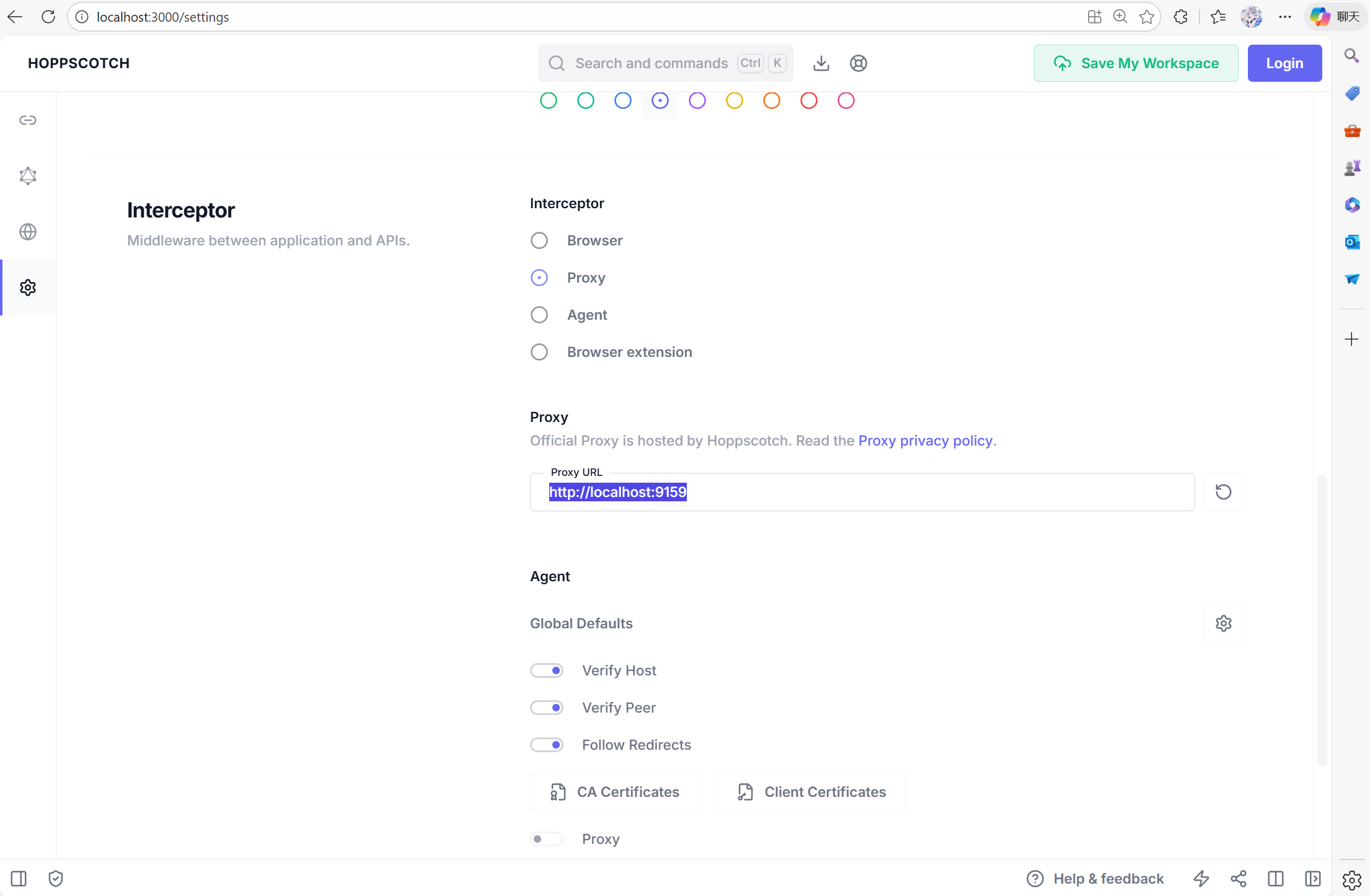
要設定 Hoppscotch,您可以造訪 [http://localhost:3000](http://localhost:3000/),然後前往設定分頁。您需要將 `Proxy` 設為 [http://localhost:9159](http://localhost:9159/),讓您的除錯工具能與容器內部網路互動。
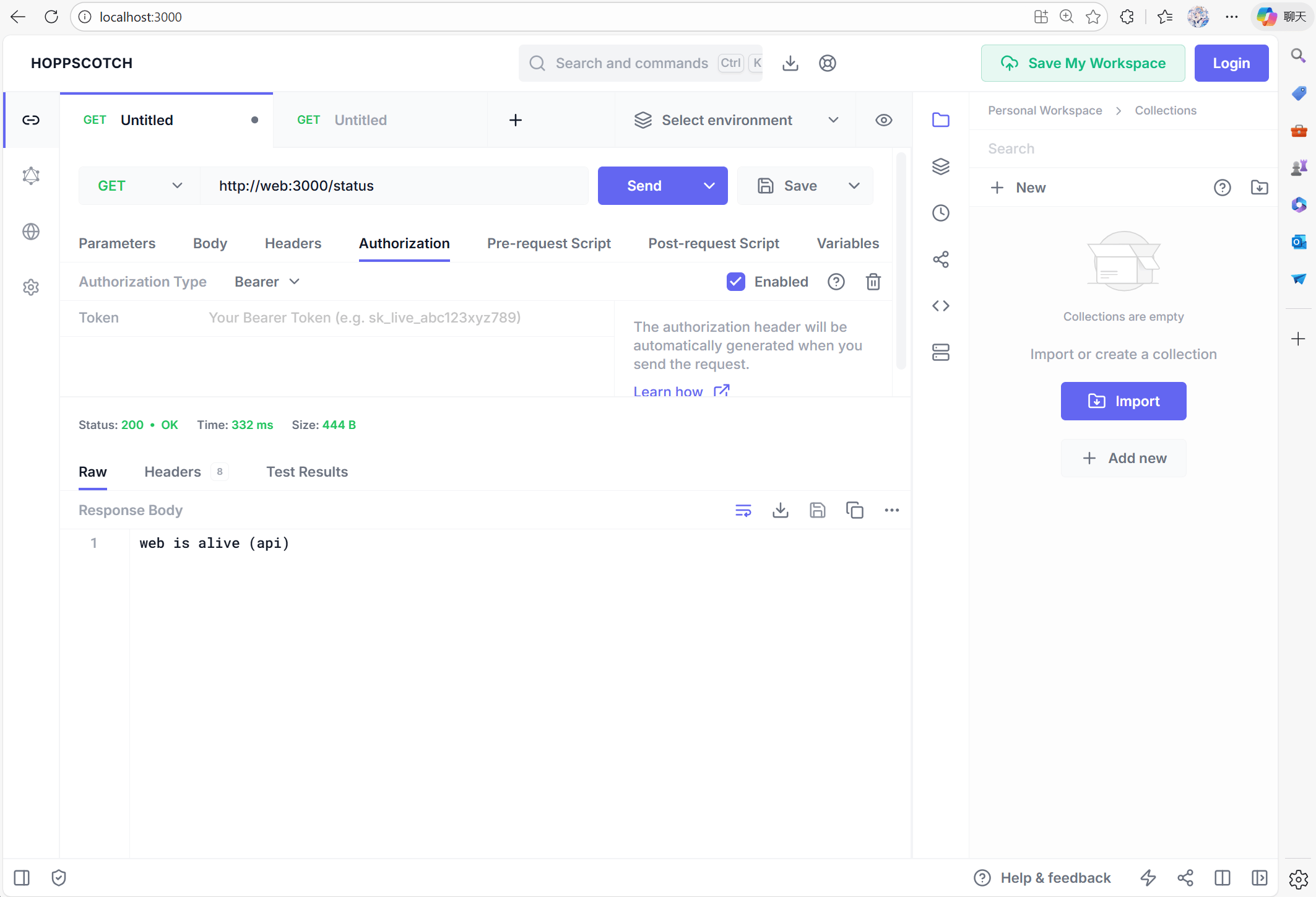
 現在您可以用 [http://web:3000/status](http://web:3000/status) 測試 web 服務是否正常運作:
 #### CSRF 問題
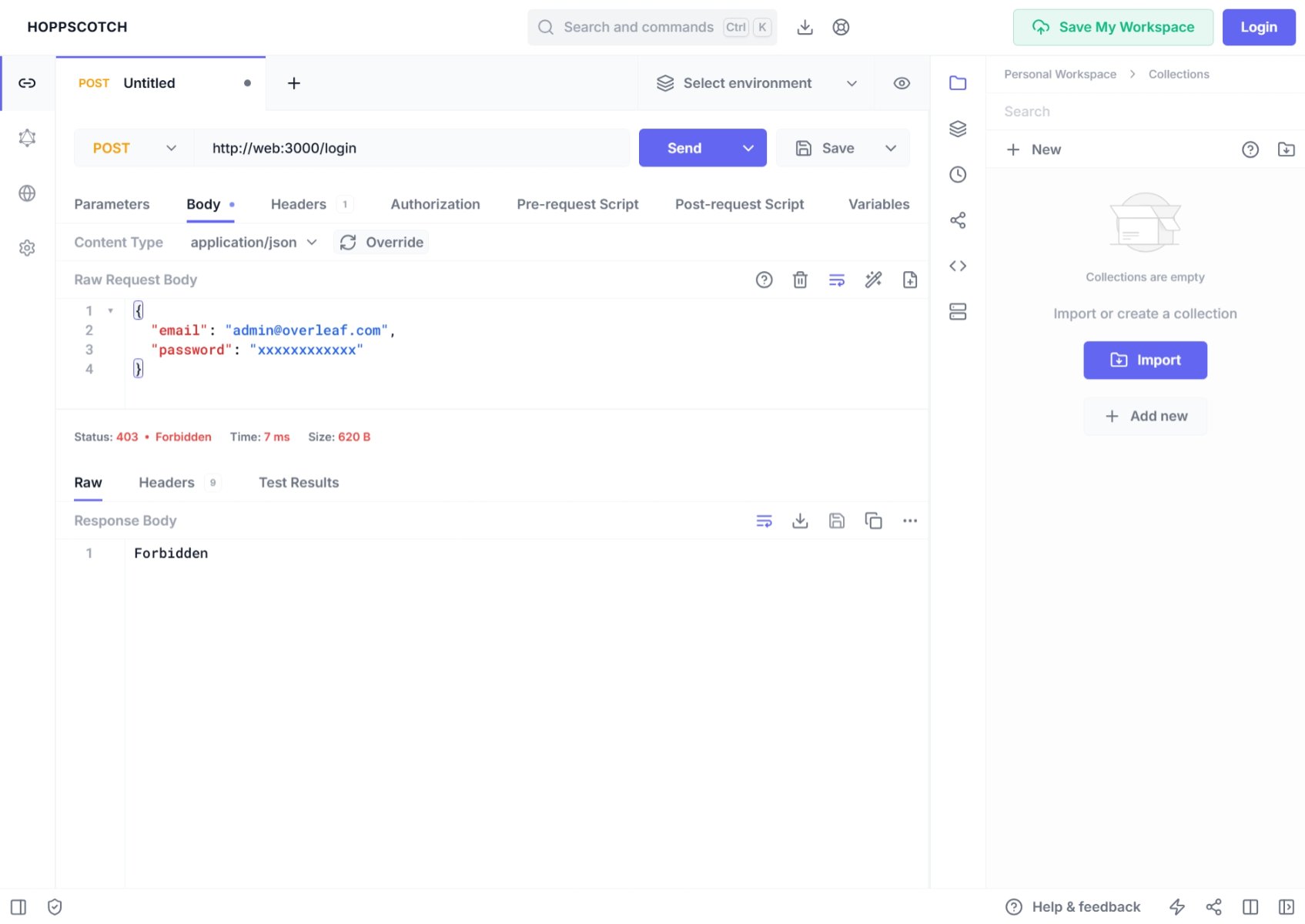
如果您使用 Postman 或其他除錯工具產生 **POST** 請求,可能會發現登入被**禁止**,原因是 401 錯誤。這是因為 Overleaf 受到 **CSRF** 驗證保護。
#### CSRF 問題
如果您使用 Postman 或其他除錯工具產生 **POST** 請求,可能會發現登入被**禁止**,原因是 401 錯誤。這是因為 Overleaf 受到 **CSRF** 驗證保護。
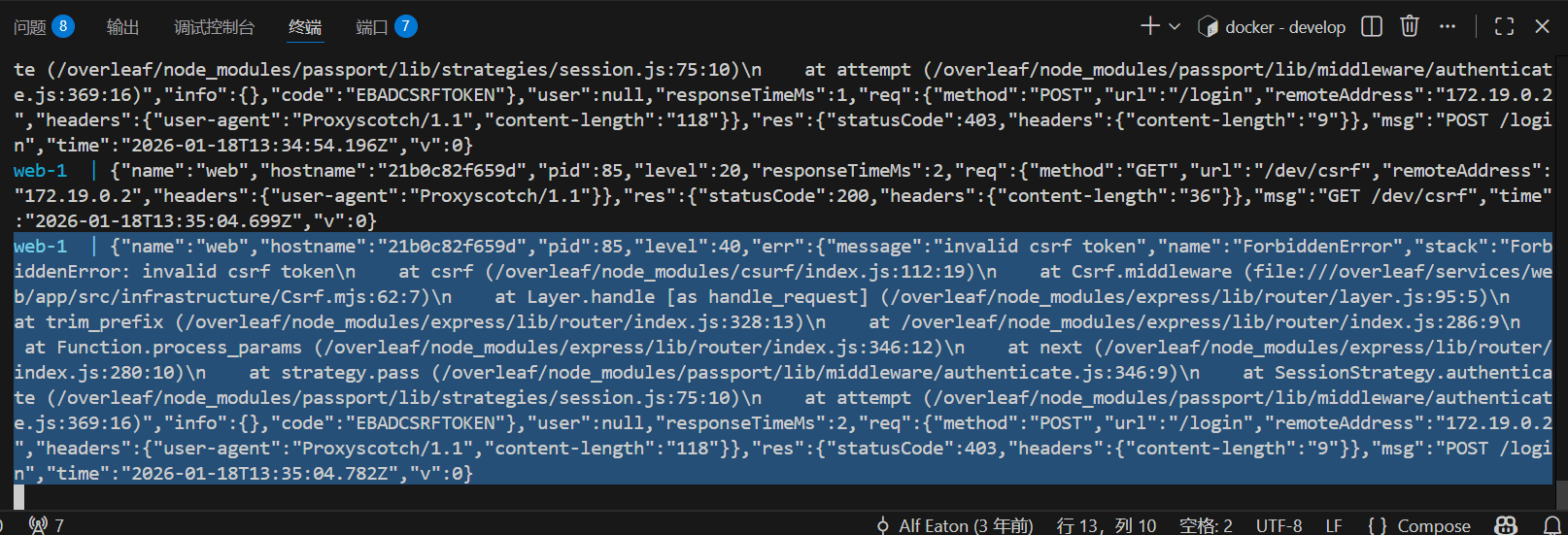
 在主控台中,您可能會看到:
 要在 Overleaf 開發中處理這個問題,您需要設定 CSRF token。以下是詳細教學。
將以下程式碼加入 Pre-Request
要在 Overleaf 開發中處理這個問題,您需要設定 CSRF token。以下是詳細教學。
將以下程式碼加入 Pre-Request
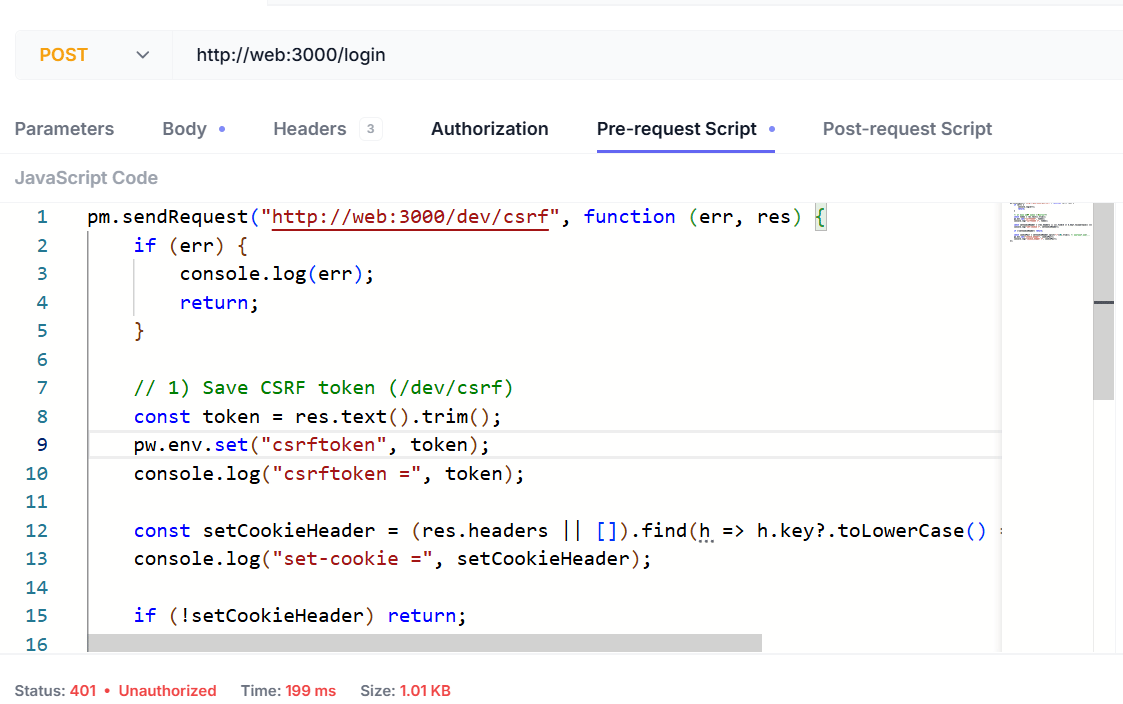 腳本如下:
```js wrap theme={null}
pm.sendRequest("http://web:3000/dev/csrf", function (err, res) {
if (err) {
console.log(err);
return;
}
// 1) Save CSRF token (/dev/csrf)
const token = res.text().trim();
pw.env.set("csrftoken", token);
console.log("csrftoken =", token);
const setCookieHeader = (res.headers || []).find(h => h.key?.toLowerCase() === "set-cookie")?.value;
console.log("set-cookie =", setCookieHeader);
if (!setCookieHeader) return;
const cookiePair = setCookieHeader.split(";")[0].trim(); // overleaf.sid=...
pw.env.set("cookie_header", cookiePair);
console.log("cookie_header =", cookiePair);
});
```
您需要新增以下標頭:
| 標頭名稱 | 標頭值 |
| - | - |
| Content-Type | `application/json` |
| X-Csrf-Token | `<>` |
| Cookie | `<>` |
腳本如下:
```js wrap theme={null}
pm.sendRequest("http://web:3000/dev/csrf", function (err, res) {
if (err) {
console.log(err);
return;
}
// 1) Save CSRF token (/dev/csrf)
const token = res.text().trim();
pw.env.set("csrftoken", token);
console.log("csrftoken =", token);
const setCookieHeader = (res.headers || []).find(h => h.key?.toLowerCase() === "set-cookie")?.value;
console.log("set-cookie =", setCookieHeader);
if (!setCookieHeader) return;
const cookiePair = setCookieHeader.split(";")[0].trim(); // overleaf.sid=...
pw.env.set("cookie_header", cookiePair);
console.log("cookie_header =", cookiePair);
});
```
您需要新增以下標頭:
| 標頭名稱 | 標頭值 |
| - | - |
| Content-Type | `application/json` |
| X-Csrf-Token | `<>` |
| Cookie | `<>` |
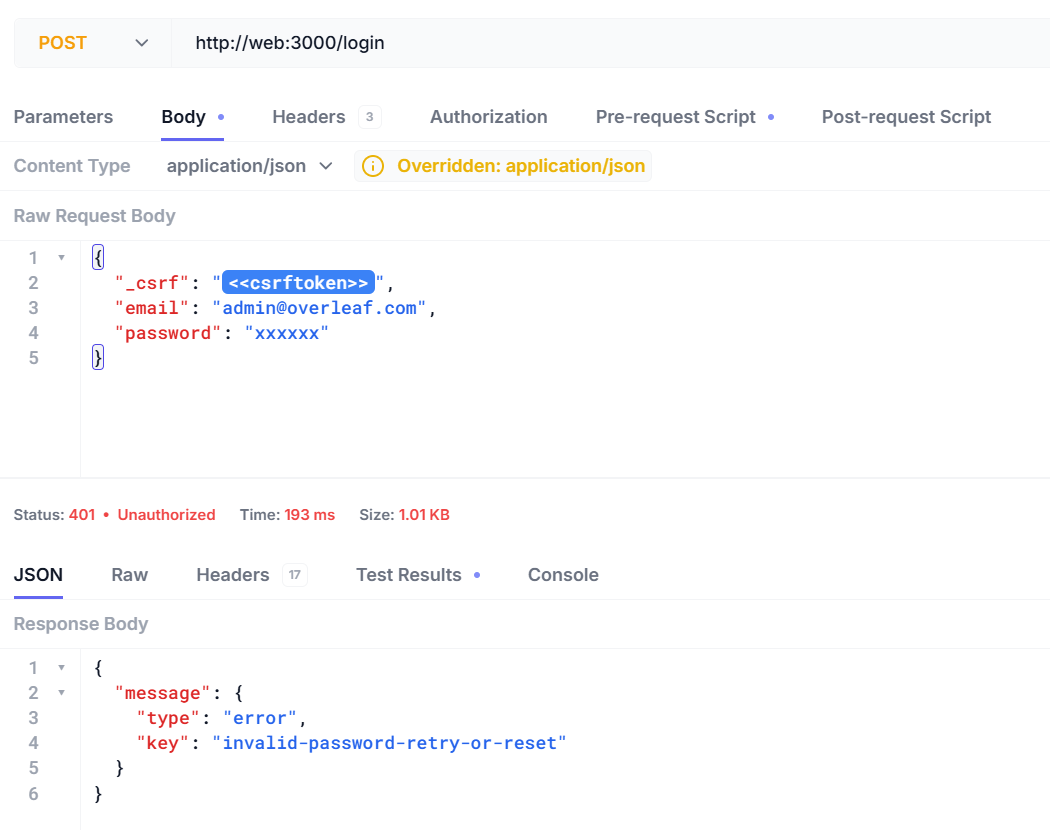
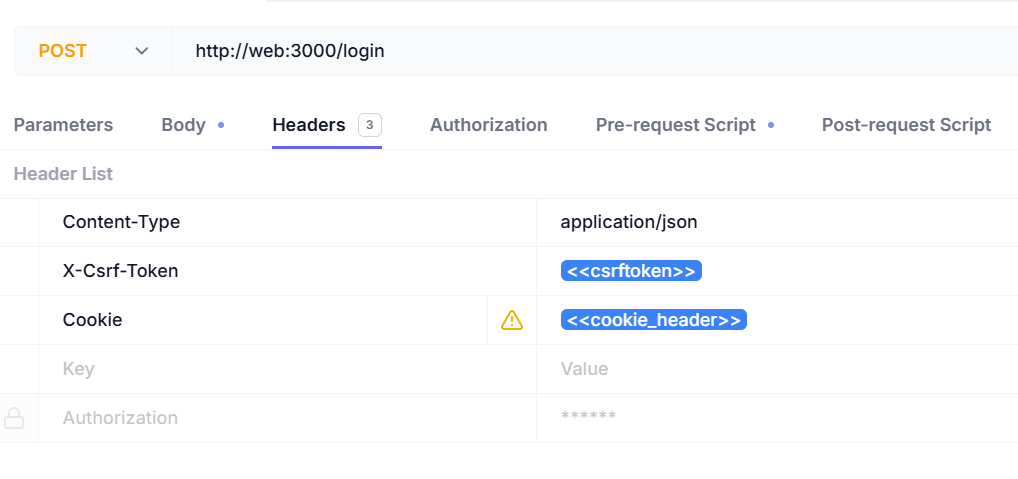 現在您可以使用您的使用者名稱與密碼登入。
```json5 theme={null}
{
"_csrf": "<>",
"email": "admin@overleaf.com",
"password": "xxxxxx"
}
```
以下是輸入錯誤的使用者名稱或密碼時的回應。
現在您可以使用您的使用者名稱與密碼登入。
```json5 theme={null}
{
"_csrf": "<>",
"email": "admin@overleaf.com",
"password": "xxxxxx"
}
```
以下是輸入錯誤的使用者名稱或密碼時的回應。
 This documentation is built and hosted on [Mintlify](https://mintlify.com), a developer documentation platform.