> ## Documentation Index
> Fetch the complete documentation index at: https://ayakaleaf-pro.mintlify.site/llms.txt
> Use this file to discover all available pages before exploring further.
# R 代码(knitr)
Overleaf 提供了与 **knitr** 的集成,允许你在 LaTeX 文档中添加 R 代码以生成动态输出。
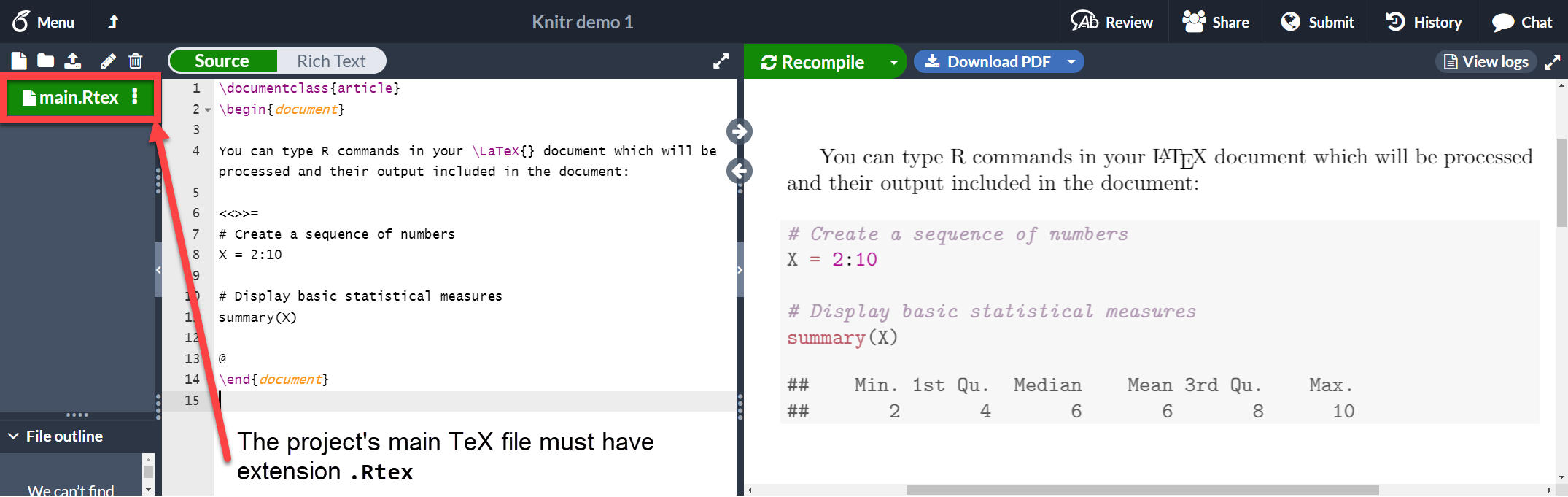
包含 R 代码的文档必须以 `.Rtex` 或 `.Rnw` 为扩展名保存,否则代码将无法运行。我们来看一个示例:
```latex wrap theme={null}
\documentclass{article}
\begin{document}
You can type R commands in your \LaTeX{} document which will be processed and their output included in the document:
<<>>=
# Create a sequence of numbers
X = 2:10
# Display basic statistical measures
summary(X)
@
\end{document}
```
 [在 Overleaf 上打开此 `knitr` 示例](https://www.overleaf.com/project/new/template/20421?id=69881107\&templateName=Knitr+demo+1\&latexEngine=pdflatex\&texImage=texlive-full%3A2020.1\&mainFile=)
如你所见,字符 `<<>>=` 和 `@` 之间的文本就是 R 代码。这段代码及其输出会以类似代码清单的格式打印出来。这段代码块还可以接受一些额外参数来自定义动态输出,详见下一节。
### 代码块
上一节中展示的这种代码块通常称为 *chunk*。你可以在 knitr 代码块中设置一些额外选项。请看下面的示例:
```latex wrap theme={null}
\documentclass{article}
\begin{document}
You can type R commands in your \LaTeX{} document which will be processed and their output included in the document:
<>=
# Create a sequence of numbers
X = 2:10
# Display basic statistical measures
summary(X)
@
\end{document}
```
[在 Overleaf 上打开此 `knitr` 示例](https://www.overleaf.com/project/new/template/20421?id=69881107\&templateName=Knitr+demo+1\&latexEngine=pdflatex\&texImage=texlive-full%3A2020.1\&mainFile=)
如你所见,字符 `<<>>=` 和 `@` 之间的文本就是 R 代码。这段代码及其输出会以类似代码清单的格式打印出来。这段代码块还可以接受一些额外参数来自定义动态输出,详见下一节。
### 代码块
上一节中展示的这种代码块通常称为 *chunk*。你可以在 knitr 代码块中设置一些额外选项。请看下面的示例:
```latex wrap theme={null}
\documentclass{article}
\begin{document}
You can type R commands in your \LaTeX{} document which will be processed and their output included in the document:
<>=
# Create a sequence of numbers
X = 2:10
# Display basic statistical measures
summary(X)
@
\end{document}
```
 [在 Overleaf 上打开此 `knitr` 示例](https://www.overleaf.com/project/new/template/20423?id=69885763\&templateName=Knitr+demo+2\&latexEngine=pdflatex\&texImage=texlive-full%3A2020.1\&mainFile=)
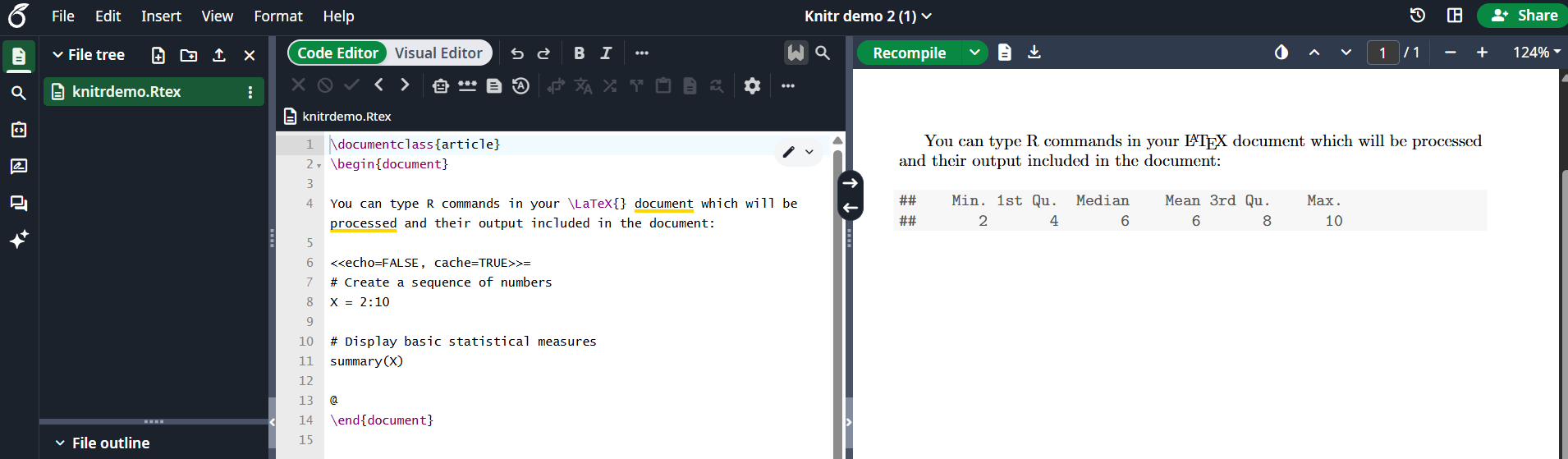
在 `<<` 和 `>>` 之间传入了两个额外选项。
* `echo=FALSE`:隐藏代码,只打印 R 生成的输出。
* `cache=TRUE`:如果将 cache 设置为 true,则不会运行该代码块,只使用其生成的对象。如果该代码块中的数据没有变化,这可以节省时间。
注意,Overleaf 目前不支持 cache=TRUE 选项,但它在本地应该可以正常工作。
更多选项请参阅[参考指南](https://learn.overleaf.com/learn/Knitr#Reference_guide)。
### 行内命令
可以访问代码块中生成的对象,并将其以行内方式打印出来。
```latex wrap theme={null}
\documentclass{article}
\begin{document}
You can type R commands in your \LaTeX{} document which will be processed and their output included in the document:
<>=
# Create a sequence of numbers
X = 2:10
# Display basic statistical measures
summary(X)
@
So, the mean of the data is $\Sexpr{mean(X)}$
\end{document}
```
[在 Overleaf 上打开此 `knitr` 示例](https://www.overleaf.com/project/new/template/20423?id=69885763\&templateName=Knitr+demo+2\&latexEngine=pdflatex\&texImage=texlive-full%3A2020.1\&mainFile=)
在 `<<` 和 `>>` 之间传入了两个额外选项。
* `echo=FALSE`:隐藏代码,只打印 R 生成的输出。
* `cache=TRUE`:如果将 cache 设置为 true,则不会运行该代码块,只使用其生成的对象。如果该代码块中的数据没有变化,这可以节省时间。
注意,Overleaf 目前不支持 cache=TRUE 选项,但它在本地应该可以正常工作。
更多选项请参阅[参考指南](https://learn.overleaf.com/learn/Knitr#Reference_guide)。
### 行内命令
可以访问代码块中生成的对象,并将其以行内方式打印出来。
```latex wrap theme={null}
\documentclass{article}
\begin{document}
You can type R commands in your \LaTeX{} document which will be processed and their output included in the document:
<>=
# Create a sequence of numbers
X = 2:10
# Display basic statistical measures
summary(X)
@
So, the mean of the data is $\Sexpr{mean(X)}$
\end{document}
```
 [在 Overleaf 上打开此 `knitr` 示例](https://www.overleaf.com/project/new/template/20425?id=69886866\&templateName=Knitr+demo+3\&latexEngine=pdflatex\&texImage=texlive-full%3A2020.1\&mainFile=)
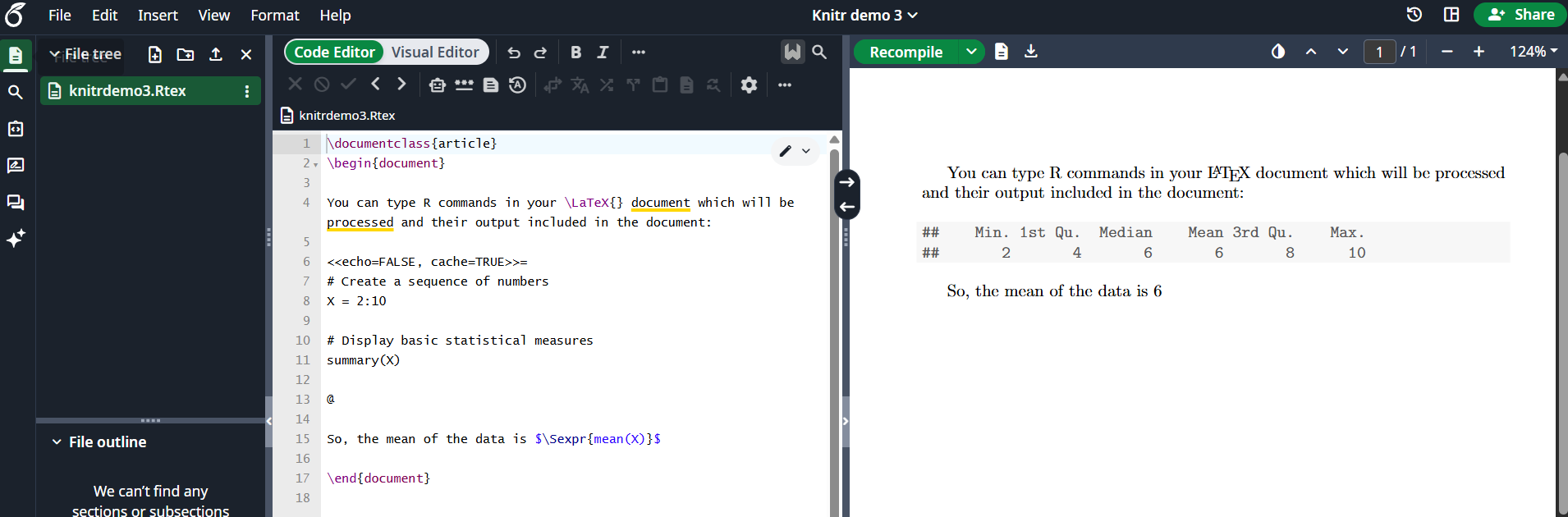
命令 `\Sexpr{mean(X)}` 会打印 R 代码 `mean(X)` 返回的输出。花括号内可以传入任意 R 命令。
### 图表
也可以在 knitr 文档中添加图表,如下例所示:
```latex wrap theme={null}
\documentclass{article}
\begin{document}
<>=
xdata = read.csv(file="data.txt", head=TRUE,sep=" ")
hist(xdata$data, main="Overleaf histogram", xlab="Data")
@
The figure \ref{fig:plot1} is simple histogram.
\end{document}
```
[在 Overleaf 上打开此 `knitr` 示例](https://www.overleaf.com/project/new/template/20425?id=69886866\&templateName=Knitr+demo+3\&latexEngine=pdflatex\&texImage=texlive-full%3A2020.1\&mainFile=)
命令 `\Sexpr{mean(X)}` 会打印 R 代码 `mean(X)` 返回的输出。花括号内可以传入任意 R 命令。
### 图表
也可以在 knitr 文档中添加图表,如下例所示:
```latex wrap theme={null}
\documentclass{article}
\begin{document}
<>=
xdata = read.csv(file="data.txt", head=TRUE,sep=" ")
hist(xdata$data, main="Overleaf histogram", xlab="Data")
@
The figure \ref{fig:plot1} is simple histogram.
\end{document}
```
 [在 Overleaf 上打开此 `knitr` 示例](https://www.overleaf.com/project/new/template/20427?id=69890965\&templateName=Knitr+demo+3\&latexEngine=pdflatex\&texImage=texlive-full%3A2020.1\&mainFile=)
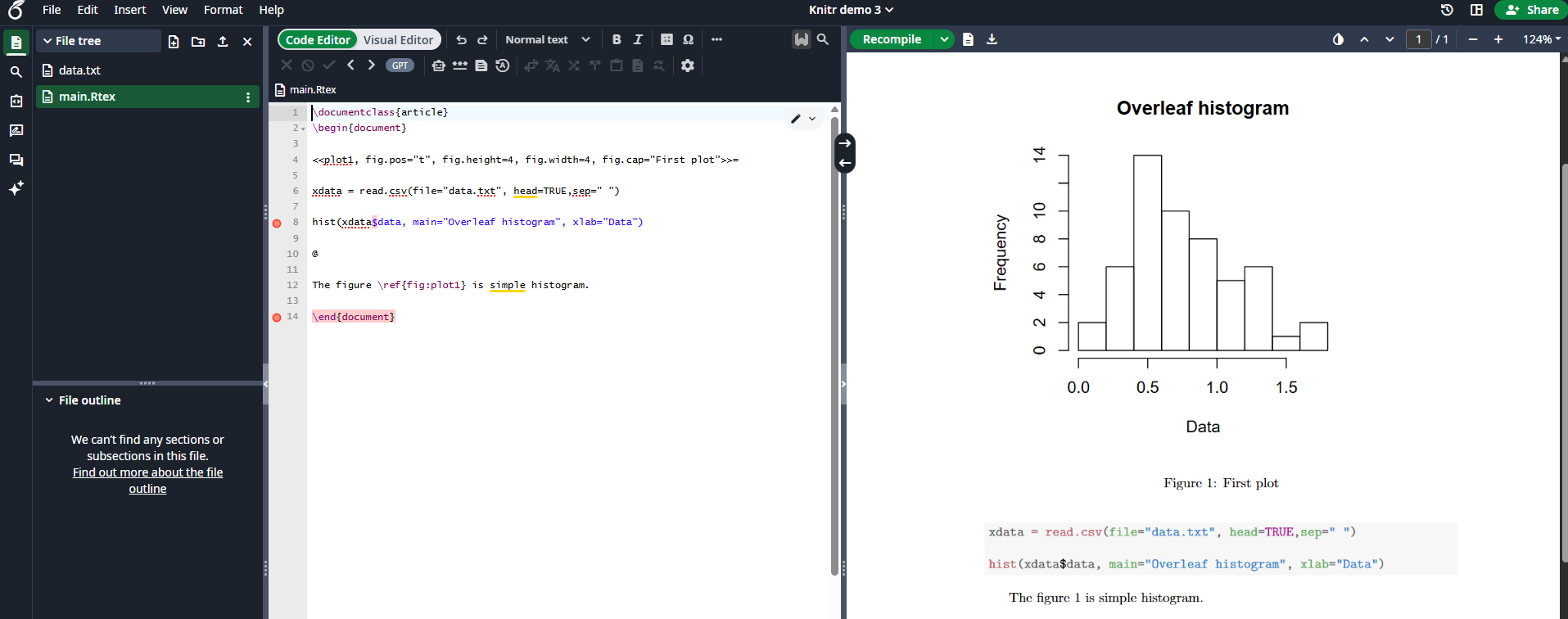
这个直方图使用存储在当前工作目录下 "data.txt" 中的数据。代码块中传入了几个与图形相关的选项。
`plot1`:用于引用该图的标签。前缀 "fig:" 是必需的。在示例中可以看到,该图通过 `\ref{fig:plot1}` 进行引用。`fig.pos="t"`:定位参数,与 [figure 环境](https://learn.overleaf.com/learn/Positioning_images_and_tables#The_figure_environment)中使用的相同。`fig.height=4, fig.width=4`:图形的宽度和高度。`fig.cap="First plot"`:图形的标题。
### 外部 R 脚本
你可以将外部 R 脚本的部分内容导入到 knitr 文档中。这非常有用,因为通常会先在外部程序中编写和调试脚本,然后再将其包含到文档中。
假设我们在名为 `mycode.R` 的文件中有以下 R 代码,并将其包含到 LaTeX 文档中:
```r theme={null}
## ---- myrcode1
# Create a sequence of numbers
X = 2:10
## ---- myrcode2
# Display basic statistical measures
summary(X)
```
注意以下几行:
```r theme={null}
## ---- myrcode1
```
和
```r theme={null}
## ---- myrcode2
```
它们标记了代码块的开始。如果你想在文档中使用此脚本,这些标记是必需的,如以下代码片段所示:
```r theme={null}
The chunk below will not be printed
<>=
read_chunk("mycode.R")
@
The code must show up here
<>=
@
```
[在 Overleaf 上打开此 `knitr` 示例](https://www.overleaf.com/project/new/template/20427?id=69890965\&templateName=Knitr+demo+3\&latexEngine=pdflatex\&texImage=texlive-full%3A2020.1\&mainFile=)
这个直方图使用存储在当前工作目录下 "data.txt" 中的数据。代码块中传入了几个与图形相关的选项。
`plot1`:用于引用该图的标签。前缀 "fig:" 是必需的。在示例中可以看到,该图通过 `\ref{fig:plot1}` 进行引用。`fig.pos="t"`:定位参数,与 [figure 环境](https://learn.overleaf.com/learn/Positioning_images_and_tables#The_figure_environment)中使用的相同。`fig.height=4, fig.width=4`:图形的宽度和高度。`fig.cap="First plot"`:图形的标题。
### 外部 R 脚本
你可以将外部 R 脚本的部分内容导入到 knitr 文档中。这非常有用,因为通常会先在外部程序中编写和调试脚本,然后再将其包含到文档中。
假设我们在名为 `mycode.R` 的文件中有以下 R 代码,并将其包含到 LaTeX 文档中:
```r theme={null}
## ---- myrcode1
# Create a sequence of numbers
X = 2:10
## ---- myrcode2
# Display basic statistical measures
summary(X)
```
注意以下几行:
```r theme={null}
## ---- myrcode1
```
和
```r theme={null}
## ---- myrcode2
```
它们标记了代码块的开始。如果你想在文档中使用此脚本,这些标记是必需的,如以下代码片段所示:
```r theme={null}
The chunk below will not be printed
<>=
read_chunk("mycode.R")
@
The code must show up here
<>=
@
```
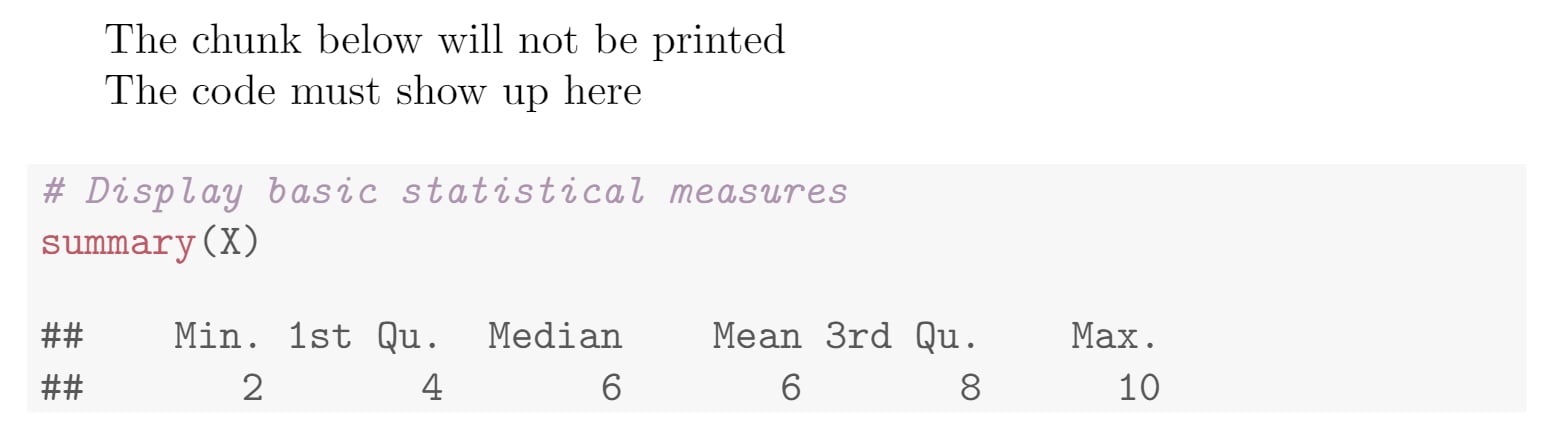 第一个代码块不会被打印,仅用于通过命令 `read_chunk("mycode.R")` 导入脚本。这就是设置 `echo=FALSE` 选项的原因。此外,脚本不能被缓存。导入脚本后,你可以使用在 `## ----` 之后设置的标签来打印某个代码块。在本例中为 `myrcode2`。
我们已将本文中的所有代码片段放入一个项目中,[你可以在 Overleaf 上打开它](https://www.overleaf.com/project/new/template/20429?id=69894649\&templateName=Knitr+full+demo\&latexEngine=pdflatex\&texImage=texlive-full%3A2020.1\&mainFile=)。
### 参考指南
一些代码块选项:
* `results`:更改 R 代码所生成结果的行为。可能的取值有:
* `markup`:使用 LaTeX 格式化输出。
* `asis`:打印 R 的原始结果。
* `hold`:暂存输出结果,并将其推到代码块末尾。
* `hide`:隐藏结果。
* `echo`:是否包含 R 源代码。其他参数包括:
* `echo=2:3` 只打印第二行和第三行;
* `echo=-2:-3` 仅排除第二行和第三行。
* `cache`:是否缓存代码块。可能的取值为:`TRUE` 和 `FALSE`
* `highlight`:是否高亮源代码。可能的取值为:`TRUE` 和 `FALSE`
* `background`:代码块的背景颜色。可以使用 rgb 和 HTML 格式。默认值为 *"#F7F7F7"*。
This documentation is built and hosted on [Mintlify](https://mintlify.com), a developer documentation platform.
第一个代码块不会被打印,仅用于通过命令 `read_chunk("mycode.R")` 导入脚本。这就是设置 `echo=FALSE` 选项的原因。此外,脚本不能被缓存。导入脚本后,你可以使用在 `## ----` 之后设置的标签来打印某个代码块。在本例中为 `myrcode2`。
我们已将本文中的所有代码片段放入一个项目中,[你可以在 Overleaf 上打开它](https://www.overleaf.com/project/new/template/20429?id=69894649\&templateName=Knitr+full+demo\&latexEngine=pdflatex\&texImage=texlive-full%3A2020.1\&mainFile=)。
### 参考指南
一些代码块选项:
* `results`:更改 R 代码所生成结果的行为。可能的取值有:
* `markup`:使用 LaTeX 格式化输出。
* `asis`:打印 R 的原始结果。
* `hold`:暂存输出结果,并将其推到代码块末尾。
* `hide`:隐藏结果。
* `echo`:是否包含 R 源代码。其他参数包括:
* `echo=2:3` 只打印第二行和第三行;
* `echo=-2:-3` 仅排除第二行和第三行。
* `cache`:是否缓存代码块。可能的取值为:`TRUE` 和 `FALSE`
* `highlight`:是否高亮源代码。可能的取值为:`TRUE` 和 `FALSE`
* `background`:代码块的背景颜色。可以使用 rgb 和 HTML 格式。默认值为 *"#F7F7F7"*。
This documentation is built and hosted on [Mintlify](https://mintlify.com), a developer documentation platform.