> ## Documentation Index
> Fetch the complete documentation index at: https://ayakaleaf-pro.mintlify.site/llms.txt
> Use this file to discover all available pages before exploring further.
# 模板
此功能最初由 [yu-i-i/overleaf-cep](https://github.com/yu-i-i/overleaf-cep) 开发,并由 [ayaka-notes/overleaf-pro](https://github.com/ayaka-notes/overleaf-pro) 修改和优化。
默认情况下,只有已登录的用户才能浏览模板库和打开模板链接。要与未登录的访问者共享模板,还需设置 `OVERLEAF_ALLOW_PUBLIC_ACCESS=true`,参见[页面访问](/zh-CN/on-premises/configuration/overleaf-toolkit/public-access#page-access "mention")。从模板创建项目始终需要登录。
 ### 配置
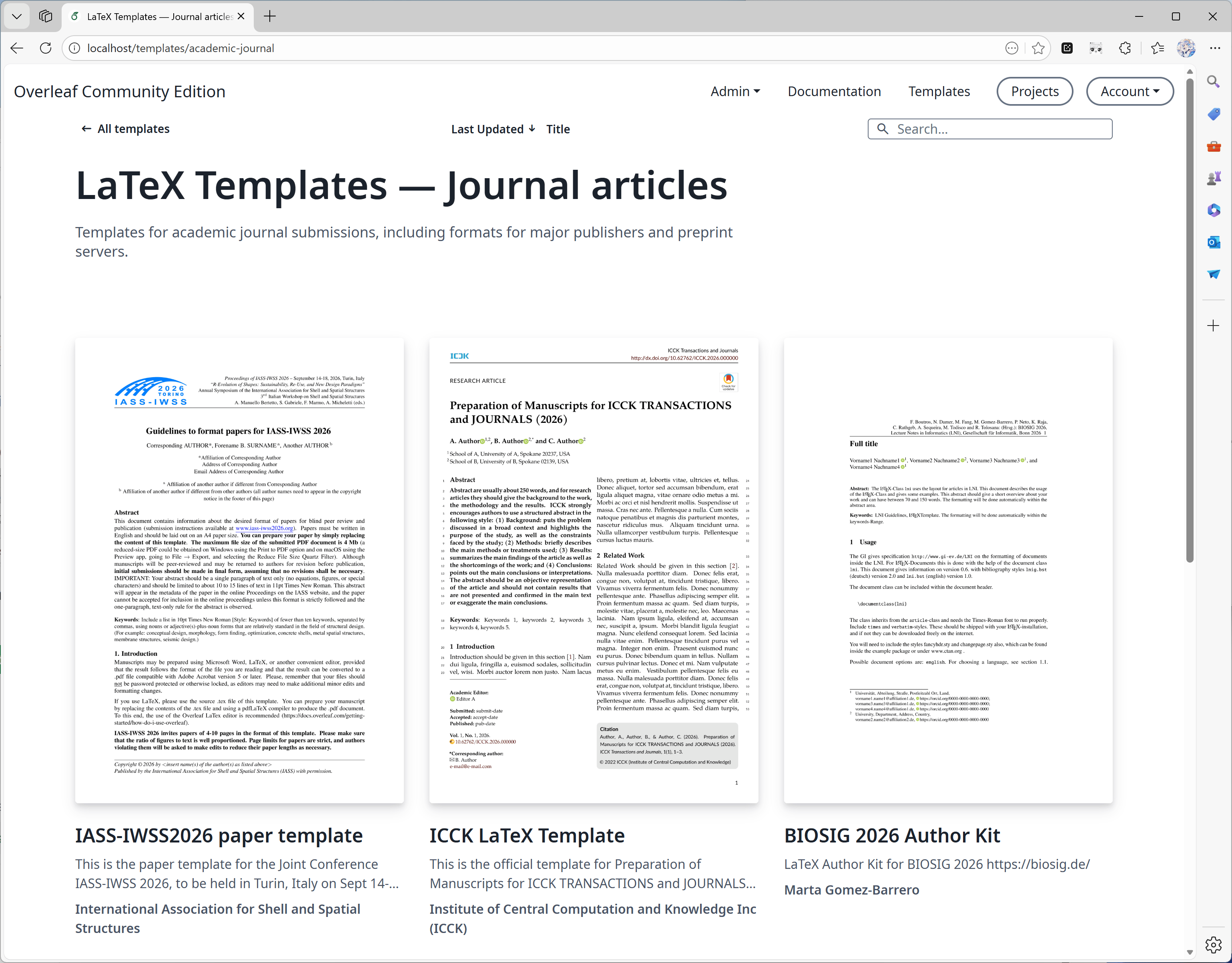
从 6.3.0 开始,模板库在服务器端执行分页、搜索和排序,无需进行迁移。对于大型模板库,请参阅发行说明中的[可选 MongoDB 索引](/zh-CN/on-premises/release-notes/release-notes-6.x.x#feature-04-template-pagination "mention")。
模板库功能通过以下环境变量进行控制:
* `OVERLEAF_TEMPLATE_GALLERY`:设置为 `true` 以启用模板库。
* `OVERLEAF_TEMPLATE_CATEGORIES`:可选,以空白字符分隔的零个或多个模板分类键列表。有效的键包括:
* *`academic-journal`*
* *`book`*
* *`presentation`*
* *`poster`*
* *`cv`*
* *`homework`*
* *`bibliography`*
* *`calendar`*
* *`formal-letter`*
* *`report`*
* *`thesis`*
* *`newsletter`*
特殊键 *`all`* 会被自动追加。该键代表包含所有模板的分类。
对于每个分类键,可以设置以下可选环境变量:
* `TEMPLATE__NAME`:模板分类的显示名称。
* `TEMPLATE__DESCRIPTION`:该分类的简短描述。
如果分类键中包含连字符(`-`),请在环境变量名中将其替换为下划线(`_`)。
* `ENABLE_CONVERSIONS`:必须设置为 `true`,才能为模板生成缩略图和预览。
### 发布权限
管理员可以发布模板。你也可以指定一个非管理员用户来管理本地模板库 `/templates` 中展示的精选模板。
为此,你需要在 `toolkit/config/variables.env` 中将环境变量 `OVERLEAF_TEMPLATES_USER_ID` 设置为负责实例内模板管理的用户的 `ID`,例如:
```dotenv theme={null}
OVERLEAF_TEMPLATES_USER_ID=56a8865231faeb5f07d69959
```
### 发布模板
对于每个要上传的模板:
1. 创建一个包含模板源代码的项目,并确保它能成功编译。
2. 在编辑器中,选择 **File** > **Manage Template**。
3. 在弹出的表单中填写模板详情:
* *Title*(标题)必须唯一。
* *Description*(描述)字段支持 Markdown 格式。
* *Author*(作者)字段支持 Markdown 格式的链接。
提交后,可以在模板库页面编辑模板详情或删除模板。管理员和模板用户(`OVERLEAF_TEMPLATES_USER_ID`)可以管理任何模板。
以下是一个示例:
```dotenv wrap expandable theme={null}
#################
# TEMPLATES #
#################
ENABLE_CONVERSIONS=true
OVERLEAF_TEMPLATE_GALLERY=true
OVERLEAF_TEMPLATE_CATEGORIES=academic-journal book presentation poster cv homework bibliography calendar formal-letter report thesis newsletter
TEMPLATE_ACADEMIC_JOURNAL_NAME=Journal articles
TEMPLATE_ACADEMIC_JOURNAL_DESCRIPTION=Templates for academic journal submissions, including formats for major publishers and preprint servers.
TEMPLATE_BIBLIOGRAPHY_NAME=Bibliographies
TEMPLATE_BIBLIOGRAPHY_DESCRIPTION=Styles for creating and managing bibliographies with BibTeX or BibLaTeX. Suitable for use in academic papers, theses, and reports.
TEMPLATE_BOOK_NAME=Books
TEMPLATE_BOOK_DESCRIPTION=Templates for writing books or long-form documents, including chapter structuring, front matter, and indexing.
TEMPLATE_CALENDAR_NAME=Calendars
TEMPLATE_CALENDAR_DESCRIPTION=Templates to create yearly, monthly, or weekly calendars. Useful for personal planners or event scheduling.
TEMPLATE_CV_NAME=CVs and résumés
TEMPLATE_CV_DESCRIPTION=Templates for CVs and résumés with various formats for academic, industry, and creative positions.
TEMPLATE_FORMAL_LETTER_NAME=Formal letters
TEMPLATE_FORMAL_LETTER_DESCRIPTION=Templates for professional letters, such as cover letters, recommendation letters, and official correspondence.
TEMPLATE_HOMEWORK_NAME=Assignments
TEMPLATE_HOMEWORK_DESCRIPTION=Templates for homework, coursework, and problem sets. Designed to be clean and well-structured for students and educators.
TEMPLATE_NEWSLETTER_NAME=Newsletters
TEMPLATE_NEWSLETTER_DESCRIPTION=Templates for creating newsletters with formats for academic, corporate, or community communications.
TEMPLATE_POSTER_NAME=Posters
TEMPLATE_POSTER_DESCRIPTION=Templates for scientific and academic posters, typically used in conferences and research presentations.
TEMPLATE_PRESENTATION_NAME=Presentations
TEMPLATE_PRESENTATION_DESCRIPTION=Templates for Beamer and other presentation formats, tailored for academic talks and lectures.
TEMPLATE_REPORT_NAME=Reports
TEMPLATE_REPORT_DESCRIPTION=Templates for technical, lab, or project reports. Includes sections for figures, tables, and references.
TEMPLATE_THESIS_NAME=Theses
TEMPLATE_THESIS_DESCRIPTION=Templates for writing theses and dissertations, following institutional formatting and citation guidelines.
TEMPLATE_ALL_NAME=All templates
TEMPLATE_ALL_DESCRIPTION=Browse a collection of all available LaTeX templates, categorized by document type, style, and purpose.
```
### 从 overleaf.com 迁移模板
由于 Overleaf Pro 的架构设计为可离线运行,因此没有自动化的方式将 [overleaf.com](https://www.overleaf.com/) 模板库中的模板集成到你的本地部署中,不过可以逐个模板手动完成这一操作。
默认情况下,Overleaf Pro 配置为使用 basic scheme 版本的 TeXLive 进行编译。这个基础版本较为轻量,仅包含非常有限的 LaTeX 宏包子集,因此当用户尝试在本地部署实例上使用来自 [overleaf.com](https://www.overleaf.com/) 的模板时,很可能会遇到缺少宏包的错误。
遗憾的是,虽然没有自动安装缺失宏包的方式,但 Server Pro 中有一项可配置的设置,能够让用户以更安全的方式编译项目并使用更多宏包。该功能称为[沙盒编译](https://docs.overleaf.com/on-premises/configuration/overleaf-toolkit/server-pro-only-configuration/sandboxed-compiles)(也称为 Sibling Containers)。
为确保下载的模板与你的本地 Server Pro 实例兼容,我们强烈建议启用[沙盒编译](https://docs.overleaf.com/on-premises/configuration/overleaf-toolkit/server-pro-only-configuration/sandboxed-compiles),因为该功能会为用户提供与 [overleaf.com](https://www.overleaf.com/) 相同的 TeX Live 环境。这些镜像包含最常用的宏包和字体,并且已针对我们的模板库模板进行过测试。
关于配置用户可在项目中选择的 TeX Live 版本,以及为新项目设置默认 TeX Live 镜像版本的更多信息,请参阅文档中的[更改 TeX Live 镜像](https://docs.overleaf.com/on-premises/configuration/overleaf-toolkit/server-pro-only-configuration/sandboxed-compiles#changing-the-tex-live-image)一节。
1. 前往 [overleaf.com](https://www.overleaf.com/) 上的[模板库](https://www.overleaf.com/latex/templates),找到所需模板,例如 [IEEE Photonics Journal Paper Template - Example Submission](https://www.overleaf.com/latex/examples/ieee-photonics-journal-paper-template-example-submission/bsfjjfkdsjds)
2. 点击 **Open as Template** 按钮
3. 点击项目菜单并选择 **Download Source**
4. 接着,登录本地部署的 Server Pro 账户
5. 在项目面板中点击 **New Project** 按钮并选择 **Upload Project**
6. 点击 **Select a .zip file** 按钮并选择下载的模板 zip 文件
之后,用户即可在自己的账户中使用这个新上传的模板;或者,作为模板用户,你可以将其发布供其他用户使用。
### 常见问题
回答:可以,但我们不建议这样做。发布模板时,我们会为项目创建快照,并在发布时将项目保存为 zip 文件。这样即使你删除了模板对应的项目,模板也不会受到影响。
不过,我们还会记录与该模板关联的 ProjectID,以便你将来更新模板。
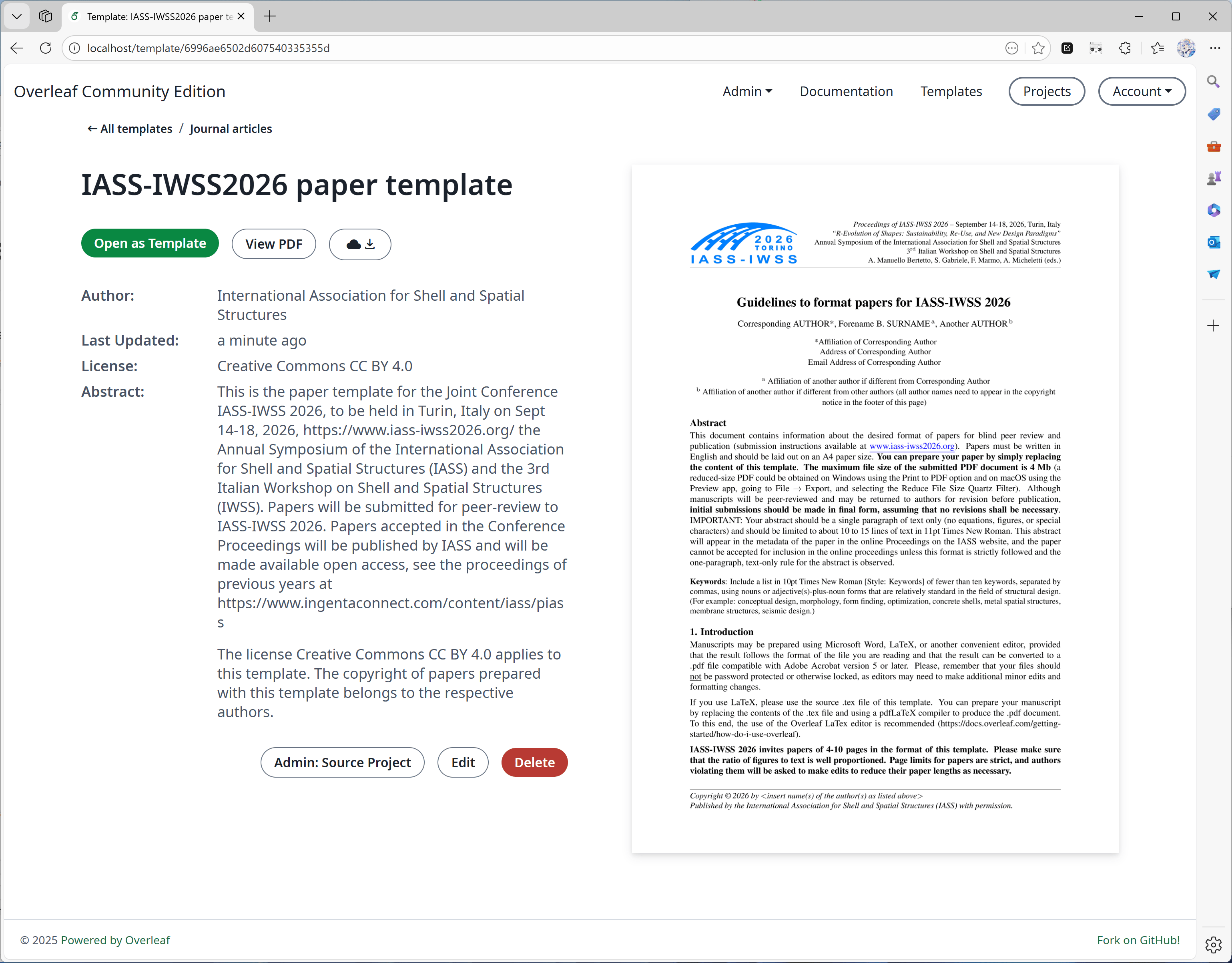
如果你删除了对应的项目,将不会在模板详情页上看到"Admin: Source Project"按钮(见下图)。
### 配置
从 6.3.0 开始,模板库在服务器端执行分页、搜索和排序,无需进行迁移。对于大型模板库,请参阅发行说明中的[可选 MongoDB 索引](/zh-CN/on-premises/release-notes/release-notes-6.x.x#feature-04-template-pagination "mention")。
模板库功能通过以下环境变量进行控制:
* `OVERLEAF_TEMPLATE_GALLERY`:设置为 `true` 以启用模板库。
* `OVERLEAF_TEMPLATE_CATEGORIES`:可选,以空白字符分隔的零个或多个模板分类键列表。有效的键包括:
* *`academic-journal`*
* *`book`*
* *`presentation`*
* *`poster`*
* *`cv`*
* *`homework`*
* *`bibliography`*
* *`calendar`*
* *`formal-letter`*
* *`report`*
* *`thesis`*
* *`newsletter`*
特殊键 *`all`* 会被自动追加。该键代表包含所有模板的分类。
对于每个分类键,可以设置以下可选环境变量:
* `TEMPLATE__NAME`:模板分类的显示名称。
* `TEMPLATE__DESCRIPTION`:该分类的简短描述。
如果分类键中包含连字符(`-`),请在环境变量名中将其替换为下划线(`_`)。
* `ENABLE_CONVERSIONS`:必须设置为 `true`,才能为模板生成缩略图和预览。
### 发布权限
管理员可以发布模板。你也可以指定一个非管理员用户来管理本地模板库 `/templates` 中展示的精选模板。
为此,你需要在 `toolkit/config/variables.env` 中将环境变量 `OVERLEAF_TEMPLATES_USER_ID` 设置为负责实例内模板管理的用户的 `ID`,例如:
```dotenv theme={null}
OVERLEAF_TEMPLATES_USER_ID=56a8865231faeb5f07d69959
```
### 发布模板
对于每个要上传的模板:
1. 创建一个包含模板源代码的项目,并确保它能成功编译。
2. 在编辑器中,选择 **File** > **Manage Template**。
3. 在弹出的表单中填写模板详情:
* *Title*(标题)必须唯一。
* *Description*(描述)字段支持 Markdown 格式。
* *Author*(作者)字段支持 Markdown 格式的链接。
提交后,可以在模板库页面编辑模板详情或删除模板。管理员和模板用户(`OVERLEAF_TEMPLATES_USER_ID`)可以管理任何模板。
以下是一个示例:
```dotenv wrap expandable theme={null}
#################
# TEMPLATES #
#################
ENABLE_CONVERSIONS=true
OVERLEAF_TEMPLATE_GALLERY=true
OVERLEAF_TEMPLATE_CATEGORIES=academic-journal book presentation poster cv homework bibliography calendar formal-letter report thesis newsletter
TEMPLATE_ACADEMIC_JOURNAL_NAME=Journal articles
TEMPLATE_ACADEMIC_JOURNAL_DESCRIPTION=Templates for academic journal submissions, including formats for major publishers and preprint servers.
TEMPLATE_BIBLIOGRAPHY_NAME=Bibliographies
TEMPLATE_BIBLIOGRAPHY_DESCRIPTION=Styles for creating and managing bibliographies with BibTeX or BibLaTeX. Suitable for use in academic papers, theses, and reports.
TEMPLATE_BOOK_NAME=Books
TEMPLATE_BOOK_DESCRIPTION=Templates for writing books or long-form documents, including chapter structuring, front matter, and indexing.
TEMPLATE_CALENDAR_NAME=Calendars
TEMPLATE_CALENDAR_DESCRIPTION=Templates to create yearly, monthly, or weekly calendars. Useful for personal planners or event scheduling.
TEMPLATE_CV_NAME=CVs and résumés
TEMPLATE_CV_DESCRIPTION=Templates for CVs and résumés with various formats for academic, industry, and creative positions.
TEMPLATE_FORMAL_LETTER_NAME=Formal letters
TEMPLATE_FORMAL_LETTER_DESCRIPTION=Templates for professional letters, such as cover letters, recommendation letters, and official correspondence.
TEMPLATE_HOMEWORK_NAME=Assignments
TEMPLATE_HOMEWORK_DESCRIPTION=Templates for homework, coursework, and problem sets. Designed to be clean and well-structured for students and educators.
TEMPLATE_NEWSLETTER_NAME=Newsletters
TEMPLATE_NEWSLETTER_DESCRIPTION=Templates for creating newsletters with formats for academic, corporate, or community communications.
TEMPLATE_POSTER_NAME=Posters
TEMPLATE_POSTER_DESCRIPTION=Templates for scientific and academic posters, typically used in conferences and research presentations.
TEMPLATE_PRESENTATION_NAME=Presentations
TEMPLATE_PRESENTATION_DESCRIPTION=Templates for Beamer and other presentation formats, tailored for academic talks and lectures.
TEMPLATE_REPORT_NAME=Reports
TEMPLATE_REPORT_DESCRIPTION=Templates for technical, lab, or project reports. Includes sections for figures, tables, and references.
TEMPLATE_THESIS_NAME=Theses
TEMPLATE_THESIS_DESCRIPTION=Templates for writing theses and dissertations, following institutional formatting and citation guidelines.
TEMPLATE_ALL_NAME=All templates
TEMPLATE_ALL_DESCRIPTION=Browse a collection of all available LaTeX templates, categorized by document type, style, and purpose.
```
### 从 overleaf.com 迁移模板
由于 Overleaf Pro 的架构设计为可离线运行,因此没有自动化的方式将 [overleaf.com](https://www.overleaf.com/) 模板库中的模板集成到你的本地部署中,不过可以逐个模板手动完成这一操作。
默认情况下,Overleaf Pro 配置为使用 basic scheme 版本的 TeXLive 进行编译。这个基础版本较为轻量,仅包含非常有限的 LaTeX 宏包子集,因此当用户尝试在本地部署实例上使用来自 [overleaf.com](https://www.overleaf.com/) 的模板时,很可能会遇到缺少宏包的错误。
遗憾的是,虽然没有自动安装缺失宏包的方式,但 Server Pro 中有一项可配置的设置,能够让用户以更安全的方式编译项目并使用更多宏包。该功能称为[沙盒编译](https://docs.overleaf.com/on-premises/configuration/overleaf-toolkit/server-pro-only-configuration/sandboxed-compiles)(也称为 Sibling Containers)。
为确保下载的模板与你的本地 Server Pro 实例兼容,我们强烈建议启用[沙盒编译](https://docs.overleaf.com/on-premises/configuration/overleaf-toolkit/server-pro-only-configuration/sandboxed-compiles),因为该功能会为用户提供与 [overleaf.com](https://www.overleaf.com/) 相同的 TeX Live 环境。这些镜像包含最常用的宏包和字体,并且已针对我们的模板库模板进行过测试。
关于配置用户可在项目中选择的 TeX Live 版本,以及为新项目设置默认 TeX Live 镜像版本的更多信息,请参阅文档中的[更改 TeX Live 镜像](https://docs.overleaf.com/on-premises/configuration/overleaf-toolkit/server-pro-only-configuration/sandboxed-compiles#changing-the-tex-live-image)一节。
1. 前往 [overleaf.com](https://www.overleaf.com/) 上的[模板库](https://www.overleaf.com/latex/templates),找到所需模板,例如 [IEEE Photonics Journal Paper Template - Example Submission](https://www.overleaf.com/latex/examples/ieee-photonics-journal-paper-template-example-submission/bsfjjfkdsjds)
2. 点击 **Open as Template** 按钮
3. 点击项目菜单并选择 **Download Source**
4. 接着,登录本地部署的 Server Pro 账户
5. 在项目面板中点击 **New Project** 按钮并选择 **Upload Project**
6. 点击 **Select a .zip file** 按钮并选择下载的模板 zip 文件
之后,用户即可在自己的账户中使用这个新上传的模板;或者,作为模板用户,你可以将其发布供其他用户使用。
### 常见问题
回答:可以,但我们不建议这样做。发布模板时,我们会为项目创建快照,并在发布时将项目保存为 zip 文件。这样即使你删除了模板对应的项目,模板也不会受到影响。
不过,我们还会记录与该模板关联的 ProjectID,以便你将来更新模板。
如果你删除了对应的项目,将不会在模板详情页上看到"Admin: Source Project"按钮(见下图)。
 回答:发布模板时,我们会将项目保存为 zip 和 pdf 文件,这通常很快。但我们还需要为 PDF 生成缩略图,以便在模板详情中显示。
缩略图生成时间通常取决于 PDF 第一页的内容。为了在显示质量和转换时间之间取得平衡,我们选择了一个适中的宽度。
但是,如果 PDF 第一页包含大量文字,转换缩略图可能需要 40 秒甚至更长时间,请耐心等待。以下是一个大型海报的示例,它需要更长的时间。
回答:发布模板时,我们会将项目保存为 zip 和 pdf 文件,这通常很快。但我们还需要为 PDF 生成缩略图,以便在模板详情中显示。
缩略图生成时间通常取决于 PDF 第一页的内容。为了在显示质量和转换时间之间取得平衡,我们选择了一个适中的宽度。
但是,如果 PDF 第一页包含大量文字,转换缩略图可能需要 40 秒甚至更长时间,请耐心等待。以下是一个大型海报的示例,它需要更长的时间。
 This documentation is built and hosted on [Mintlify](https://mintlify.com), a developer documentation platform.