> ## Documentation Index
> Fetch the complete documentation index at: https://ayakaleaf-pro.mintlify.site/llms.txt
> Use this file to discover all available pages before exploring further.
# MCP 服务器
每个项目都有一个 MCP 服务器,因此 Claude Code、Codex、Cursor、VS Code 或 Gemini CLI 等 AI 客户端可以处理该项目:读取和编辑其文件、编译项目、读取 LaTeX 日志、下载 PDF 以及回复评论。
此功能由 [ayaka-notes/ayakaleaf-pro](https://github.com/ayaka-notes/ayakaleaf-pro) 开发。它自 v6.4.0 起引入。
 ### 设置
MCP 服务器随 Git 集成一起提供:启用 [git-bridge](/zh-CN/on-premises/configuration/overleaf-toolkit/git-integration) 后,MCP 服务器也随之可用。无需其他配置。
### 连接 AI 客户端
1. 在 **Account Settings** 中生成一个 Git 身份验证令牌。MCP 服务器和 Git 使用同一个令牌。
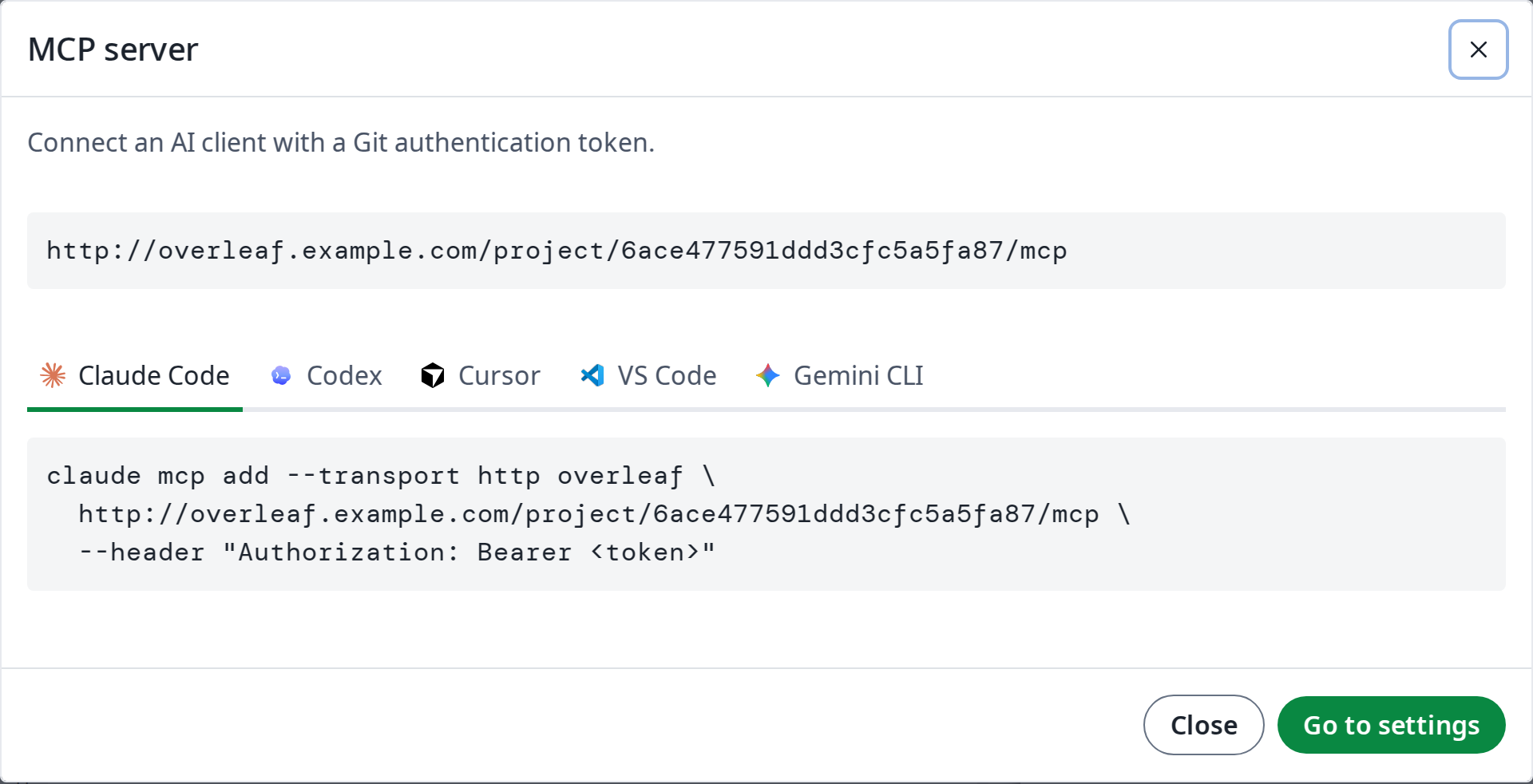
2. 在编辑器中打开 **Integrations**,然后点击 **MCP server**。它会显示项目 MCP 服务器的地址 `https:///project//mcp`,以及如何将其添加到各个 AI 客户端:复制命令,并将 `` 替换为你的令牌。
### 使用
连接完成后,用自然语言向 AI 客户端提出请求即可。例如:
| 你的请求 | AI 客户端使用的工具 |
| - | - |
| *修正引言中的拼写错误。* | `read_file`、`edit_file`:编辑会实时显示在编辑器中 |
| *编译项目并修复 LaTeX 错误。* | `compile`、`get_compile_log`、`edit_file` |
| *回复未解决的评论,然后将其标记为已解决。* | `list_comments`、`reply_to_comment`、`resolve_comment` |
| *切换到 XeLaTeX 并下载 PDF。* | `update_settings`、`compile`、`get_output_file_link` |
### 工具
| 分组 | 工具 |
| - | - |
| 项目 | `get_clone_info`、`get_settings`、`update_settings`、`list_versions` |
| 文件 | `list_files`、`read_file`、`edit_file`、`write_file`、`delete_file` |
| 编译 | `compile`、`get_compile_log`、`get_output_file_link`、`word_count` |
| 评论 | `list_comments`、`reply_to_comment`、`resolve_comment`、`reopen_comment` |
通过 `edit_file` 和 `write_file` 所做的编辑会实时显示在编辑器中,并与协作者的编辑合并。对于一次处理大量文件、二进制文件或重命名操作,AI 客户端也可以使用 Git 克隆项目并推送。
### 权限
与 Git 一样,MCP 服务器遵循项目的共享设置:
* 所有可以查看项目的人都可以读取项目、编译项目并下载其输出。
* 只有所有者和编辑者可以更改其文件和设置。
* 审阅者还可以回复评论,并将自己发起的评论标记为已解决或重新打开。
* 通过链接加入的查看者无法看到评论,与在编辑器中一致。
This documentation is built and hosted on [Mintlify](https://mintlify.com), a developer documentation platform.
### 设置
MCP 服务器随 Git 集成一起提供:启用 [git-bridge](/zh-CN/on-premises/configuration/overleaf-toolkit/git-integration) 后,MCP 服务器也随之可用。无需其他配置。
### 连接 AI 客户端
1. 在 **Account Settings** 中生成一个 Git 身份验证令牌。MCP 服务器和 Git 使用同一个令牌。
2. 在编辑器中打开 **Integrations**,然后点击 **MCP server**。它会显示项目 MCP 服务器的地址 `https:///project//mcp`,以及如何将其添加到各个 AI 客户端:复制命令,并将 `` 替换为你的令牌。
### 使用
连接完成后,用自然语言向 AI 客户端提出请求即可。例如:
| 你的请求 | AI 客户端使用的工具 |
| - | - |
| *修正引言中的拼写错误。* | `read_file`、`edit_file`:编辑会实时显示在编辑器中 |
| *编译项目并修复 LaTeX 错误。* | `compile`、`get_compile_log`、`edit_file` |
| *回复未解决的评论,然后将其标记为已解决。* | `list_comments`、`reply_to_comment`、`resolve_comment` |
| *切换到 XeLaTeX 并下载 PDF。* | `update_settings`、`compile`、`get_output_file_link` |
### 工具
| 分组 | 工具 |
| - | - |
| 项目 | `get_clone_info`、`get_settings`、`update_settings`、`list_versions` |
| 文件 | `list_files`、`read_file`、`edit_file`、`write_file`、`delete_file` |
| 编译 | `compile`、`get_compile_log`、`get_output_file_link`、`word_count` |
| 评论 | `list_comments`、`reply_to_comment`、`resolve_comment`、`reopen_comment` |
通过 `edit_file` 和 `write_file` 所做的编辑会实时显示在编辑器中,并与协作者的编辑合并。对于一次处理大量文件、二进制文件或重命名操作,AI 客户端也可以使用 Git 克隆项目并推送。
### 权限
与 Git 一样,MCP 服务器遵循项目的共享设置:
* 所有可以查看项目的人都可以读取项目、编译项目并下载其输出。
* 只有所有者和编辑者可以更改其文件和设置。
* 审阅者还可以回复评论,并将自己发起的评论标记为已解决或重新打开。
* 通过链接加入的查看者无法看到评论,与在编辑器中一致。
This documentation is built and hosted on [Mintlify](https://mintlify.com), a developer documentation platform.