> ## Documentation Index
> Fetch the complete documentation index at: https://ayakaleaf-pro.mintlify.site/llms.txt
> Use this file to discover all available pages before exploring further.
# Mở rộng theo chiều ngang
Ayakaleaf Pro hỗ trợ mở rộng theo chiều ngang (horizontal scaling). Chúng tôi đã kiểm thử và xác nhận rằng nó chạy đúng với nhiều bản sao (replica).
Tài liệu này liệt kê các yêu cầu kỹ thuật và cung cấp hướng dẫn để chạy Ayakaleaf Pro trên nhiều hơn một node.
Bắt đầu từ Server CE/Server Pro `5.0.3`, các biến môi trường đã được đổi tên từ `SHARELATEX_*` thành `OVERLEAF_*`.
Nếu bạn đang dùng phiên bản `4.x` (hoặc cũ hơn), hãy đảm bảo các biến có tiền tố tương ứng (ví dụ: `SHARELATEX_SITE_URL` thay vì `OVERLEAF_SITE_URL`)
Việc thiết lập mở rộng theo chiều ngang đòi hỏi rất nhiều công sức. Chúng tôi khuyên bạn **chỉ** nên cân nhắc mở rộng theo chiều ngang khi đạt đến một quy mô nhất định. Ví dụ, một bản cài đặt Server Pro cho tổng cộng 1.000 người dùng đã được thiết lập thành công trên một máy chủ duy nhất được trang bị hai bộ xử lý 4 nhân và 32GB bộ nhớ hệ thống. Xem tài liệu [yêu cầu phần cứng](/vi/on-premises/getting-started/requirements/hardware-requirements) để biết các khuyến nghị.
Một bản triển khai Server Pro với mở rộng theo chiều ngang bao gồm một tập hợp các thành phần bên ngoài, chẳng hạn như Load Balancer và một hệ thống lưu trữ tương thích S3.
Chúng tôi có thể giúp khắc phục các lỗi trong container Server Pro có thể phát sinh do cấu hình sai và đưa ra lời khuyên chung dựa trên tài liệu này. Rất tiếc, chúng tôi không thể hỗ trợ cấu hình các ứng dụng/hệ thống của bên thứ ba.
Việc giải quyết các vấn đề kỹ thuật cụ thể liên quan đến phần cứng/phần mềm của bạn để cung cấp các thành phần bên ngoài không nằm trong phạm vi điều khoản hỗ trợ của chúng tôi.
### Yêu cầu
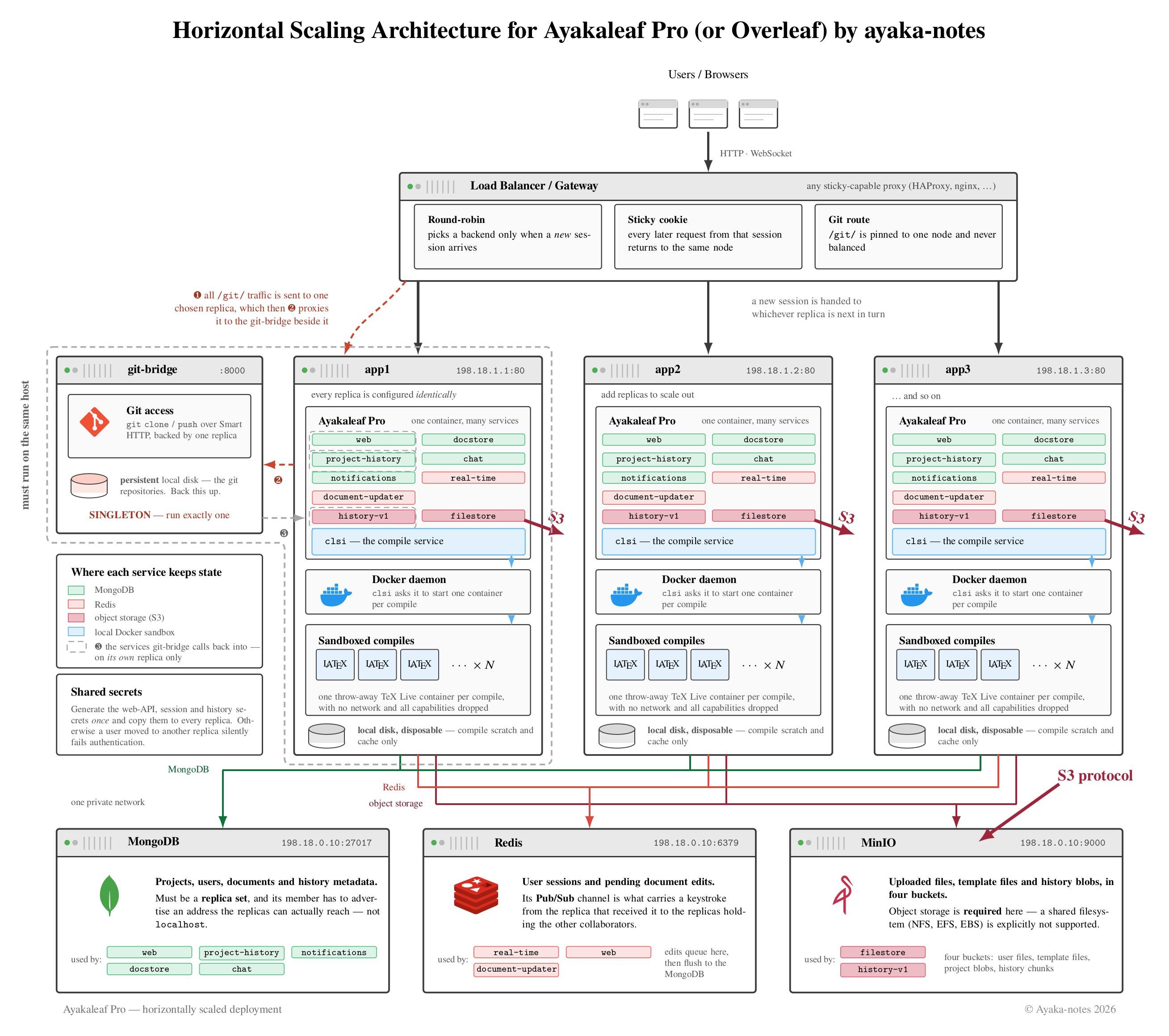 #### Lưu trữ dữ liệu tập trung, bên ngoài
Việc lưu trữ dữ liệu trong Server Pro có thể được chia thành bốn kho dữ liệu:
* **MongoDB**
* Phần lớn dữ liệu được lưu trữ bền vững trong MongoDB.
* Chúng tôi hỗ trợ cả phiên bản cục bộ lẫn phiên bản bên ngoài, chẳng hạn như [MongoDB](https://www.mongodb.com/atlas) Atlas (một dịch vụ MongoDB được quản lý hoàn toàn, chạy trên hạ tầng AWS).
#### Lưu trữ dữ liệu tập trung, bên ngoài
Việc lưu trữ dữ liệu trong Server Pro có thể được chia thành bốn kho dữ liệu:
* **MongoDB**
* Phần lớn dữ liệu được lưu trữ bền vững trong MongoDB.
* Chúng tôi hỗ trợ cả phiên bản cục bộ lẫn phiên bản bên ngoài, chẳng hạn như [MongoDB](https://www.mongodb.com/atlas) Atlas (một dịch vụ MongoDB được quản lý hoàn toàn, chạy trên hạ tầng AWS).
Lưu ý: Rất tiếc, hiện tại chưa có hỗ trợ chính thức cho các cơ sở dữ liệu tương thích MongoDB như CosmoDB/DocumentDB, vì chúng tôi chưa kiểm thử Server Pro với chúng. Mặc dù việc triển khai Server Pro với các cơ sở dữ liệu tương thích **có thể** khả thi, chúng tôi chỉ hỗ trợ chính thức các bản triển khai sử dụng MongoDB.
* **Redis**
* Redis lưu trữ dữ liệu tạm thời, chẳng hạn như các cập nhật tài liệu đang chờ trước khi được ghi xuống MongoDB.
* Redis được dùng để truyền các cập nhật tài liệu giữa các dịch vụ khác nhau và thông báo cho trình soạn thảo về các thay đổi trạng thái trong một dự án nhất định.
* Redis được dùng để lưu trữ phiên của người dùng.
* Chúng tôi hỗ trợ cả phiên bản cục bộ lẫn phiên bản bên ngoài.
Lưu ý: Rất tiếc, hiện tại chưa có hỗ trợ chính thức cho các kho key/value tương thích Redis như KeyDB/Valkey, vì chúng tôi chưa kiểm thử Server Pro với chúng. Mặc dù việc triển khai Server Pro với các kho tương thích **có thể** khả thi, chúng tôi chỉ hỗ trợ chính thức các bản triển khai sử dụng Redis.
* **Tệp dự án và tệp lịch sử**
* Các tệp dự án không thể chỉnh sửa được lưu trữ bên ngoài MongoDB.
Hệ thống lịch sử dự án mới (từ Server Pro 3.5 trở đi) cũng lưu trữ lịch sử bên ngoài MongoDB.
* Đối với các phiên bản đơn lẻ nhỏ, chúng tôi hỗ trợ cả hệ thống tệp cục bộ (có thể dựa trên SSD cục bộ, NFS hoặc EBS) lẫn [hệ thống lưu trữ dữ liệu tương thích S3](/vi/on-premises/configuration/overleaf-toolkit/s3).
* Đối với mở rộng theo chiều ngang, chúng tôi **chỉ** hỗ trợ các hệ thống lưu trữ dữ liệu tương thích S3.
Quan trọng: NFS/Amazon EFS/Amazon EBS **không** được hỗ trợ cho mở rộng theo chiều ngang. Vui lòng xem phần yêu cầu [lưu trữ phần cứng](/vi/on-premises/getting-started/requirements/hardware-requirements#storage) về việc mở rộng lưu trữ trong Server Pro để biết thêm chi tiết.
* **Tệp tạm thời (ephemeral)**
* Việc biên dịch LaTeX cần chạy trên đĩa cục bộ tốc độ cao để đạt hiệu năng tối ưu. Kết quả đầu ra của quá trình biên dịch không cần được lưu trữ bền vững hay sao lưu.
* Việc đệm các tệp mới được tải lên và tạo tệp zip của dự án cũng được hưởng lợi từ việc sử dụng đĩa cục bộ.
Chúng tôi đặc biệt khuyên bạn nên sử dụng đĩa cục bộ. Việc sử dụng bất kỳ loại đĩa mạng nào (chẳng hạn như NFS hoặc EBS) có thể dẫn đến các lỗi biên dịch không mong muốn và các vấn đề hiệu năng khác.
#### **Git-bridge**
Git-bridge có sẵn trong Server Pro bắt đầu từ phiên bản 4.0.1.
Các kho git được lưu trữ cục bộ trên đĩa. Không có tùy chọn sao chép (replication) nào. Git-bridge nên được chạy dưới dạng **singleton** (một phiên bản duy nhất). Để đạt hiệu năng tối ưu, chúng tôi khuyên bạn nên sử dụng đĩa cục bộ cho dữ liệu git-bridge. Đĩa dữ liệu git-bridge nên được sao lưu thường xuyên.
Để lưu trữ dữ liệu với mở rộng theo chiều ngang, bạn cần:
* một phiên bản MongoDB tập trung mà tất cả các phiên bản Server Pro đều có thể truy cập
* một phiên bản Redis tập trung mà tất cả các phiên bản Server Pro đều có thể truy cập
* một hệ thống lưu trữ tương thích S3 tập trung cho các tệp dự án và tệp lịch sử
* một đĩa cục bộ trên mỗi phiên bản cho các tệp tạm thời
* một đĩa cục bộ trên phiên bản chứa container git-bridge để lưu dữ liệu git-bridge
#### Yêu cầu đối với Load balancer
* **Định tuyến cố định (persistent routing)**, ví dụ: sử dụng cookie
Yêu cầu này xuất phát từ các thành phần sau:
* Khả năng chỉnh sửa thời gian thực trong Server Pro sử dụng WebSocket với phương án dự phòng là XHR polling. Mỗi phiên chỉnh sửa có trạng thái cục bộ ở phía máy chủ, và các yêu cầu của một phiên chỉnh sửa nhất định luôn cần được định tuyến đến cùng một phiên bản Server Pro. Tính năng cộng tác sử dụng Redis [Pub/Sub](https://redis.io/docs/latest/develop/interact/pubsub/) để chia sẻ cập nhật giữa nhiều phiên bản Server Pro.
* Quá trình biên dịch LaTeX giữ kết quả đầu ra và bộ nhớ đệm biên dịch ở cục bộ để tối ưu hiệu năng. Khi gửi một yêu cầu biên dịch đến một phiên bản Server Pro, các yêu cầu tải xuống PDF/log tiếp theo cần được định tuyến đến cùng phiên bản Server Pro đó.
* **Thời gian chờ yêu cầu dài** để hỗ trợ biên dịch các tài liệu LaTeX lớn
* **Hỗ trợ WebSocket** để đạt hiệu năng tối ưu
* **Kích thước payload POST 50MB**
* **Thời gian chờ keep-alive** phải thấp hơn thời gian chờ keep-alive của Server Pro
Thời gian chờ keep-alive trong Server Pro có thể được cấu hình bằng biến môi trường `NGINX_KEEPALIVE_TIMEOUT`. Giá trị mặc định là 65s.
Với giá trị mặc định, thời gian chờ keep-alive 60s trên load balancer sẽ hoạt động tốt.
Với `NGINX_KEEPALIVE_TIMEOUT=120`, load balancer có thể chọn 115s.
* **IP của client**
Đặt header yêu cầu `X-Forwarded-For` thành IP của client.
* Khi **kết thúc SSL (SSL termination)**
Load balancer cần thêm header yêu cầu `X-Forwarded-Proto: https`.
```text theme={null}
global
group haproxy
user haproxy
# Verbose logging
log stdout format raw local0 debug
defaults
mode http
option httpchk HEAD /status
http-check expect status 200
default-server check
# Verbose logging
log global
option httplog
# Reroute to a different backend if the sticky one is down
option redispatch 1
# These retries are for TCP connect errors, not on HTTP status 500 responses
retries 3
# Sticky session for 24h of inactivity -- compile output is deleted after 24h
cookie server-pro-ha insert maxidle 24h
# Try to connect to any backend for 1min, then return 503
timeout queue 1m
# Give Server Pro instances 15s to startup
timeout connect 15s
# Abort requests from very slow clients (allow 1min of inactivity when reading a request)
timeout client 1m
# Allow slow compiles -- hard-coded limit in clsi is 10min
timeout server 10m
# Disconnect the editor after 23h -- 1h ahead of their last use yesterday
timeout tunnel 23h
# Note: The keepalive behavior in haproxy works great with the default keepalive setup in Server Pro.
# Haproxy is cleaning up connections in the background and it will redispatch requests when needed.
listen server-pro-ha-http
bind :80
http-request redirect scheme https unless { ssl_fc }
listen server-pro-ha-https
bind :443 ssl crt /etc/ssl/certs/ssl-key-and-certificate-bundle.pem
# Tell the application that we are behind https
http-request set-header X-Forwarded-Proto https
# Tell the application the actual client ip
option forwardfor
# See https://hstspreload.org/#deployment-recommendations
http-response set-header Strict-Transport-Security "max-age=63072000; includeSubDomains; preload;"
# Route git traffic to the sibling container of the git-bridge
use-server server-pro-ha-1 if { path_beg /git/ }
# Debugging
http-response add-header X-Served-By %s
stats enable
stats uri /haproxy
server server-pro-ha-1 198.18.1.1:80 cookie server-pro-ha-1
server server-pro-ha-2 198.18.1.2:80 cookie server-pro-ha-2
server server-pro-ha-3 198.18.1.3:80 cookie server-pro-ha-3
```
#### Cấu hình Server Pro
**Secret**
Các phiên bản Server Pro cần thống nhất về các secret dùng chung:
* `WEB_API_PASSWORD` (xác thực web api)
* `STAGING_PASSWORD` và `V1_HISTORY_PASSWORD` có cùng giá trị (xác thực lịch sử)
* `CRYPTO_RANDOM` (cho cookie phiên)
* `OT_JWT_AUTH_KEY` (xác thực lịch sử)
Tất cả các secret này cần được cấu hình với giá trị duy nhất riêng và được chia sẻ giữa các phiên bản.
Nếu không được cấu hình và các yêu cầu của người dùng được định tuyến đến các phiên bản Server Pro khác nhau, yêu cầu của họ sẽ không vượt qua được các bước kiểm tra xác thực, và họ sẽ thường xuyên bị chuyển hướng về trang đăng nhập hoặc các thao tác của họ trên giao diện sẽ thất bại theo những cách không mong muốn.
Khi không được cấu hình, Server Pro sẽ dùng một giá trị ngẫu nhiên mới cho mỗi secret dựa trên 32 byte ngẫu nhiên từ `/dev/urandom` (256 bit ngẫu nhiên).
```bash wrap theme={null}
# https://github.com/overleaf/overleaf/blob/45ca0f796c679103efd305ddbef28073c4a5de32/server-ce/init_scripts/00_regen_sharelatex_secrets.sh#L14
dd if=/dev/urandom bs=1 count=32 2>/dev/null | base64 -w 0 | rev | cut -b 2- | rev | tr -d '\n+/'
```
**MongoDB**
Trỏ `OVERLEAF_MONGO_URL` (`SHARELATEX_MONGO_URL` cho các phiên bản `4.x` trở về trước) đến phiên bản MongoDB tập trung.
**Redis**
Trỏ `OVERLEAF_REDIS_HOST` (`SHARELATEX_REDIS_HOST` cho các phiên bản `4.x` trở về trước) và `REDIS_HOST` đến phiên bản Redis tập trung.
**Lưu trữ tương thích S3 cho tệp dự án và tệp lịch sử**
Vui lòng xem tài liệu về [lưu trữ tương thích S3](/vi/on-premises/configuration/overleaf-toolkit/s3) để biết chi tiết.
**Tệp tạm thời (ephemeral)**
Bind-mount mặc định của một SSD cục bộ vào `/var/lib/overleaf` (`/var/lib/sharelatex` cho các phiên bản `4.x` trở về trước) là đủ. Hãy đảm bảo trỏ `SANDBOXED_COMPILES_HOST_DIR` đến điểm mount trên máy chủ.
Chúng tôi đặc biệt khuyên bạn nên sử dụng đĩa cục bộ. Việc sử dụng bất kỳ loại đĩa mạng nào (chẳng hạn như NFS hoặc EBS) có thể dẫn đến các lỗi biên dịch không mong muốn và các vấn đề hiệu năng khác.
**Cấu hình proxy**
* Đặt `OVERLEAF_BEHIND_PROXY=true` (`SHARELATEX_BEHIND_PROXY` cho các phiên bản `4.x` trở về trước) để có IP client chính xác.
* Đặt `TRUSTED_PROXY_IPS` thành IP của load balancer (có thể chỉ định nhiều CIDR, phân tách bằng dấu phẩy).
**Tích hợp Git-bridge**
Git-bridge có sẵn trong Server Pro bắt đầu từ phiên bản 4.0.1.
Container git-bridge cần một container Server Pro "anh em" (sibling) để xử lý các yêu cầu git gửi đến. Container sibling này cũng có thể phục vụ lưu lượng người dùng thông thường. Trong cấu hình mẫu, phiên bản đầu tiên đóng vai trò container sibling cho git-bridge, nhưng thực tế bất kỳ phiên bản nào cũng có thể đảm nhận vai trò đó.
Tại sao chúng ta cần chỉ định một container Server Pro làm sibling cho git-bridge? Server Pro cung cấp các URL tải xuống của dịch vụ lịch sử cho git-bridge. Chúng ta cần cấu hình để các URL lịch sử này có thể truy cập được từ container git-bridge.
Cấu hình container Server Pro:
* Đặt `GIT_BRIDGE_ENABLED` thành `'true'`
* Đặt `GIT_BRIDGE_HOST` thành ``, ví dụ: `git-bridge`
* Đặt `GIT_BRIDGE_PORT` thành `8000`
* Đặt `V1_HISTORY_URL` thành `http://:3100/api`.
Lưu ý: Điều này chỉ cần thiết trên container sibling của container git-bridge. Các phiên bản khác có thể dùng URL localhost, vốn là giá trị mặc định.
Cấu hình container git-bridge:
* Đặt `GIT_BRIDGE_API_BASE_URL` thành `http:///api/v0`, ví dụ: `http://server-pro-ha-1/api/v0`
* Đặt `GIT_BRIDGE_OAUTH2_SERVER` thành `http://`, ví dụ: `http://server-pro-ha-1`
* Đặt `GIT_BRIDGE_POSTBACK_BASE_URL` thành `http://:8000`, ví dụ: `http://git-bridge:8000`
* Đặt `GIT_BRIDGE_ROOT_DIR` thành đĩa dữ liệu git-bridge được bind-mount, ví dụ: `/data/git-bridge`
Cấu hình sau đây minh họa một thiết lập độc lập (self-contained). Để bản demo hoạt động, bạn cần cung cấp khóa/chứng chỉ SSL hợp lệ và điều chỉnh `OVERLEAF_SITE_URL` (`SHARELATEX_SITE_URL` cho các phiên bản `4.x` trở về trước). Đối với thiết lập thực tế, bạn phải thay các secret giả bằng secret thật như được ghi chú trong cấu hình. Đối với thiết lập thực tế, bạn cần chuyển từng container lên các node chuyên dụng và điều chỉnh địa chỉ IP cho phù hợp với cấu hình mạng cục bộ của bạn.
```yaml theme={null}
version: '2.2'
# Actual horizontal scaling setup: pick your own network and replace IPs in config.
networks:
default:
ipam:
config:
# This subnet is part of a reserved subnet used for benchmarking
# https://tools.ietf.org/html/rfc2544
# The full subnet is 198.18.0.0/15
# Use 198.18.0.0/24 for lb and dbs
# Use 198.18.1.0/24 for server-pro
# Use 198.18.0.128/25 for ephemeral container
- gateway: 198.18.0.1
ip_range: 198.18.0.128/25
subnet: 198.18.0.0/23
services:
# Actual horizontal scaling setup: run haproxy outside docker on a separate host.
lb:
image: haproxy:2.6
container_name: lb
user: root
logging:
driver: local
options:
max-size: 10g
max-file: '100'
volumes:
- ./haproxy.conf:/usr/local/etc/haproxy/haproxy.cfg
# $ cat certificate.pem key.pem > ssl-key-and-certificate-bundle.pem
- /path/to/ssl-key-and-certificate-bundle.pem:/etc/ssl/certs/ssl-key-and-certificate-bundle.pem
# Alternative to "ports": use host network to avoid docker-proxy overhead
network_mode: host
# Alternative to "network_mode: host": use docker-proxy for network isolation
# ports:
# - "80:80"
# - "443:443"
# networks:
# default:
# ipv4_address: 198.18.0.2
# Actual horizontal scaling setup: remove these as they run on other hosts.
depends_on:
server-pro-ha-1:
condition: service_started
server-pro-ha-2:
condition: service_started
server-pro-ha-3:
condition: service_started
# Actual horizontal scaling setup: run this container next to server-pro-ha-1.
# For Server Pro 4.0 onwards.
git-bridge:
restart: always
# The tag should match the `server-pro-ha-1` container tag.
image: quay.io/sharelatex/git-bridge:4.0.1
volumes:
# Actual horizontal scaling setup: point /data/git-bridge at a dedicated local ssd.
- ~/git_bridge_data:/data/git-bridge
container_name: git-bridge
environment:
GIT_BRIDGE_API_BASE_URL: "http://server-pro-ha-1/api/v0"
GIT_BRIDGE_OAUTH2_SERVER: "http://server-pro-ha-1"
GIT_BRIDGE_POSTBACK_BASE_URL: "http://198.18.0.6:8000"
GIT_BRIDGE_ROOT_DIR: "/data/git-bridge"
user: root
command: ["/server-pro-start.sh"]
# Actual horizontal scaling setup: run on host 198.18.0.6 and expose port
# ports:
# - "8000:8000"
networks:
default:
ipv4_address: 198.18.0.6
# Actual horizontal scaling setup: run this container on a separate host.
server-pro-ha-1: &server-pro-ha-config
restart: always
image: quay.io/sharelatex/sharelatex-pro:4.0.1
container_name: server-pro-ha-1
hostname: server-pro-ha-1
depends_on:
# Actual horizontal scaling setup: keep this entry.
git-bridge:
condition: service_started
# Actual horizontal scaling setup: remove the ones below as they run on other hosts.
mongo:
condition: service_healthy
redis:
condition: service_started
minio:
condition: service_started
mongo_replica_set_setup:
condition: service_completed_successfully
minio_setup:
condition: service_completed_successfully
stop_grace_period: 60s
volumes:
- /tmp/scratch-disk1:/var/lib/sharelatex
- /var/run/docker.sock:/var/run/docker.sock
environment: &server-pro-ha-environment
# Actual horizontal scaling setup: provide your own domain/app name.
OVERLEAF_SITE_URL: 'https://overleaf.example.com'
OVERLEAF_APP_NAME: Server Pro Horizontal Scaling Demo
OVERLEAF_MONGO_URL: mongodb://198.18.0.3/sharelatex
OVERLEAF_REDIS_HOST: 198.18.0.4
REDIS_HOST: 198.18.0.4
ENABLED_LINKED_FILE_TYPES: 'project_file,project_output_file'
EMAIL_CONFIRMATION_DISABLED: 'true'
SANDBOXED_COMPILES: 'true'
SANDBOXED_COMPILES_SIBLING_CONTAINERS: 'true'
SANDBOXED_COMPILES_HOST_DIR: '/tmp/scratch-disk1/data/compiles'
# S3
# Actual horizontal scaling setup: pick secure credentials.
OVERLEAF_FILESTORE_BACKEND: s3
OVERLEAF_FILESTORE_USER_FILES_BUCKET_NAME: overleaf-user-files
OVERLEAF_FILESTORE_TEMPLATE_FILES_BUCKET_NAME: overleaf-template-files
OVERLEAF_FILESTORE_S3_ACCESS_KEY_ID: OVERLEAF_FILESTORE_S3_ACCESS_KEY_ID
OVERLEAF_FILESTORE_S3_SECRET_ACCESS_KEY: OVERLEAF_FILESTORE_S3_SECRET_ACCESS_KEY
OVERLEAF_FILESTORE_S3_ENDPOINT: http://198.18.0.5:9000
OVERLEAF_FILESTORE_S3_PATH_STYLE: 'true'
OVERLEAF_FILESTORE_S3_REGION: ''
OVERLEAF_HISTORY_BACKEND: "s3"
OVERLEAF_HISTORY_PROJECT_BLOBS_BUCKET: "overleaf-project-blobs"
OVERLEAF_HISTORY_CHUNKS_BUCKET: "overleaf-chunks"
OVERLEAF_HISTORY_S3_ACCESS_KEY_ID: "OVERLEAF_HISTORY_S3_ACCESS_KEY_ID"
OVERLEAF_HISTORY_S3_SECRET_ACCESS_KEY: "OVERLEAF_HISTORY_S3_SECRET_ACCESS_KEY"
OVERLEAF_HISTORY_S3_ENDPOINT: http://198.18.0.5:9000
OVERLEAF_HISTORY_S3_PATH_STYLE: 'true'
OVERLEAF_HISTORY_S3_REGION: ''
# /S3
# git-bridge
GIT_BRIDGE_ENABLED: 'true'
GIT_BRIDGE_HOST: 198.18.0.6
GIT_BRIDGE_PORT: 8000
# Only needed on the sibling instance of git-bridge
V1_HISTORY_URL: "http://server-pro-ha-1:3100/api"
# /git-bridge
# Horizontal scaling
# Actual horizontal scaling setup: pick secure credentials.
WEB_API_PASSWORD: WEB_API_PASSWORD
STAGING_PASSWORD: V1_HISTORY_PASSWORD
V1_HISTORY_PASSWORD: V1_HISTORY_PASSWORD
CRYPTO_RANDOM: CRYPTO_RANDOM
OT_JWT_AUTH_KEY: OT_JWT_AUTH_KEY
OVERLEAF_BEHIND_PROXY: 'true'
# Actual horizontal scaling setup: IPs of load balancers
TRUSTED_PROXY_IPS: 198.18.0.1,198.18.0.2
# /Horizontal scaling
# Actual horizontal scaling setup: run on host 198.18.1.1 and expose ports
# ports:
# - "80:80"
networks:
default:
ipv4_address: 198.18.1.1
# Actual horizontal scaling setup: run this container on a separate host.
server-pro-ha-2:
<<: *server-pro-ha-config
hostname: server-pro-ha-2
container_name: server-pro-ha-2
volumes:
- /tmp/scratch-disk2:/var/lib/sharelatex
- /var/run/docker.sock:/var/run/docker.sock
environment:
<<: *server-pro-ha-environment
SANDBOXED_COMPILES_HOST_DIR: '/tmp/scratch-disk2/data/compiles'
V1_HISTORY_URL: "http://localhost:3100/api"
# Actual horizontal scaling setup: run on host 198.18.1.2 and expose ports
# ports:
# - "80:80"
networks:
default:
ipv4_address: 198.18.1.2
# Actual horizontal scaling setup: run this container on a separate host.
server-pro-ha-3:
<<: *server-pro-ha-config
hostname: server-pro-ha-3
container_name: server-pro-ha-3
volumes:
- /tmp/scratch-disk3:/var/lib/sharelatex
- /var/run/docker.sock:/var/run/docker.sock
environment:
<<: *server-pro-ha-environment
SANDBOXED_COMPILES_HOST_DIR: '/tmp/scratch-disk3/data/compiles'
V1_HISTORY_URL: "http://localhost:3100/api"
# Actual horizontal scaling setup: run on host 198.18.1.3 and expose ports
# ports:
# - "80:80"
networks:
default:
ipv4_address: 198.18.1.3
# Actual horizontal scaling setup: run this container on a separate host.
minio:
image: minio/minio:RELEASE.2023-05-18T00-05-36Z
container_name: minio
command: server /data
volumes:
# Actual horizontal scaling setup: run minio with multiple disks, see minio docs.
- ~/minio_data:/data
environment:
# Actual horizontal scaling setup: pick secure credentials.
MINIO_ROOT_USER: MINIO_ROOT_USER
MINIO_ROOT_PASSWORD: MINIO_ROOT_PASSWORD
# Actual horizontal scaling setup: run on host 198.18.0.5 and expose port
# ports:
# - "9000:9000"
networks:
default:
ipv4_address: 198.18.0.5
# Actual horizontal scaling setup: run this setup once on a separate host.
minio_setup:
depends_on:
- minio
image: minio/mc:RELEASE.2023-05-18T16-59-00Z
entrypoint: sh
command:
- '-c'
# Actual horizontal scaling setup: pick secure credentials.
- |
mc alias set s3 http://198.18.0.5:9000 MINIO_ROOT_USER MINIO_ROOT_PASSWORD \
|| sleep 10 && \
mc alias set s3 http://198.18.0.5:9000 MINIO_ROOT_USER MINIO_ROOT_PASSWORD \
|| sleep 10 && \
mc alias set s3 http://198.18.0.5:9000 MINIO_ROOT_USER MINIO_ROOT_PASSWORD \
|| sleep 10 && \
mc alias set s3 http://198.18.0.5:9000 MINIO_ROOT_USER MINIO_ROOT_PASSWORD
mc mb --ignore-existing s3/overleaf-user-files
mc mb --ignore-existing s3/overleaf-template-files
mc admin user add s3 \
OVERLEAF_FILESTORE_S3_ACCESS_KEY_ID \
OVERLEAF_FILESTORE_S3_SECRET_ACCESS_KEY
mc mb --ignore-existing s3/overleaf-project-blobs
mc mb --ignore-existing s3/overleaf-chunks
mc admin user add s3 \
OVERLEAF_HISTORY_S3_ACCESS_KEY_ID \
OVERLEAF_HISTORY_S3_SECRET_ACCESS_KEY
echo '
{
"Version": "2012-10-17",
"Statement": [
{
"Effect": "Allow",
"Action": [
"s3:ListBucket"
],
"Resource": "arn:aws:s3:::overleaf-user-files"
},
{
"Effect": "Allow",
"Action": [
"s3:PutObject",
"s3:GetObject",
"s3:DeleteObject"
],
"Resource": "arn:aws:s3:::overleaf-user-files/*"
},
{
"Effect": "Allow",
"Action": [
"s3:ListBucket"
],
"Resource": "arn:aws:s3:::overleaf-template-files"
},
{
"Effect": "Allow",
"Action": [
"s3:PutObject",
"s3:GetObject",
"s3:DeleteObject"
],
"Resource": "arn:aws:s3:::overleaf-template-files/*"
}
]
}' > policy-filestore.json
echo '
{
"Version": "2012-10-17",
"Statement": [
{
"Effect": "Allow",
"Action": [
"s3:ListBucket"
],
"Resource": "arn:aws:s3:::overleaf-project-blobs"
},
{
"Effect": "Allow",
"Action": [
"s3:PutObject",
"s3:GetObject",
"s3:DeleteObject"
],
"Resource": "arn:aws:s3:::overleaf-project-blobs/*"
},
{
"Effect": "Allow",
"Action": [
"s3:ListBucket"
],
"Resource": "arn:aws:s3:::overleaf-chunks"
},
{
"Effect": "Allow",
"Action": [
"s3:PutObject",
"s3:GetObject",
"s3:DeleteObject"
],
"Resource": "arn:aws:s3:::overleaf-chunks/*"
}
]
}' > policy-history.json
# Put the contents of the policy from the previous section in policy-filestore.json
# Reminder: Replace the bucket names accordingly.
mc admin policy create s3 overleaf-filestore policy-filestore.json
mc admin policy attach s3 overleaf-filestore \
--user=OVERLEAF_FILESTORE_S3_ACCESS_KEY_ID || true
mc admin policy create s3 overleaf-history policy-history.json
mc admin policy attach s3 overleaf-history \
--user=OVERLEAF_HISTORY_S3_ACCESS_KEY_ID || true
# Actual horizontal scaling setup: run this container on a separate host.
mongo:
restart: always
image: mongo:4.4
container_name: mongo
command: "--replSet overleaf"
expose:
- 27017
volumes:
- ~/mongo_data:/data/db
healthcheck:
test: echo 'db.stats().ok' | mongo localhost:27017/test --quiet
interval: 10s
timeout: 10s
retries: 5
# Actual horizontal scaling setup: run on host 198.18.0.3 and expose port
# ports:
# - "27017:27017"
networks:
default:
ipv4_address: 198.18.0.3
mongo_replica_set_setup:
image: mongo:4.4
entrypoint: sh
depends_on:
mongo:
condition: service_healthy
command:
- '-c'
- |
mongo 198.18.0.3 --eval "rs.initiate({ _id: \"overleaf\", members: [ { _id: 0, host: \"198.18.0.3:27017\" } ] })"
# Actual horizontal scaling setup: run this container on a separate host.
redis:
restart: always
image: redis:6.2
container_name: redis
expose:
- 6379
volumes:
- ~/redis_data:/data
# Actual horizontal scaling setup: run on host 198.18.0.4 and expose port
# ports:
# - "6379:6379"
networks:
default:
ipv4_address: 198.18.0.4
```
#### Phần cứng
Chúng tôi khuyến nghị sử dụng cùng thông số phần cứng cho tất cả các phiên bản Server Pro tham gia vào việc mở rộng theo chiều ngang.
Các khuyến nghị chung về [thông số phần cứng](/vi/on-premises/getting-started/requirements/hardware-requirements) cho các phiên bản Server Pro vẫn được áp dụng.
#### Nâng cấp Server Pro
Trong quá trình nâng cấp, Server Pro tự động chạy các bước di chuyển (migration) cơ sở dữ liệu. Các bước di chuyển này **không** được thiết kế để chạy song song từ nhiều phiên bản.
Các bước di chuyển cần hoàn tất trước khi ứng dụng web thực sự được khởi động. Bạn có thể kiểm tra nhật ký để tìm mục `Finished migrations` hoặc chờ cho đến khi ứng dụng bắt đầu nhận lưu lượng.
Quy trình nâng cấp như sau:
1. Lên lịch một khung thời gian bảo trì
2. Dừng tất cả các phiên bản Server Pro
3. Tạo một bản sao lưu nhất quán như được mô tả trong [tài liệu](/vi/on-premises/maintenance/data-and-backups#performing-a-consistent-backup)
4. Khởi động một phiên bản Server Pro duy nhất với phiên bản mới
5. Xác nhận rằng phiên bản mới hoạt động như mong đợi
6. Khởi động các phiên bản còn lại với phiên bản mới
This documentation is built and hosted on [Mintlify](https://mintlify.com), a developer documentation platform.