> ## Documentation Index
> Fetch the complete documentation index at: https://ayakaleaf-pro.mintlify.site/llms.txt
> Use this file to discover all available pages before exploring further.
# GitHub Senkronizasyonu
Bu özellik [ayaka-notes/overleaf-pro](https://github.com/ayaka-notes/overleaf-pro) tarafından geliştirilmiş ve [yu-i-i/overleaf-cep](https://github.com/yu-i-i/overleaf-cep) tarafından değiştirilmiştir. v6.2.0 ve sonrasında sunulmuştur. Hâlâ beta aşamasındadır. Herhangi bir sorun yaşarsanız geri bildiriminize ihtiyacımız var.
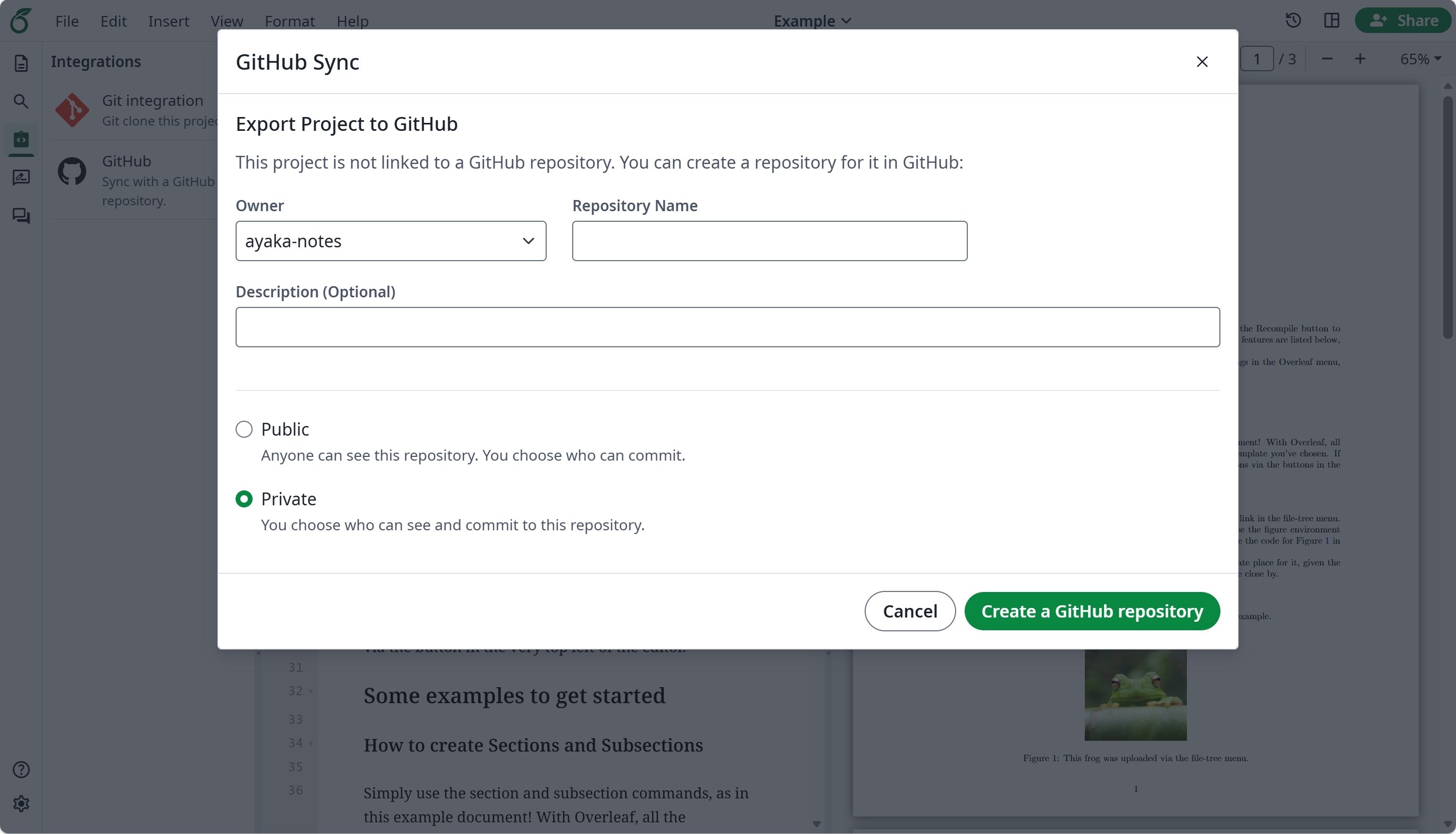
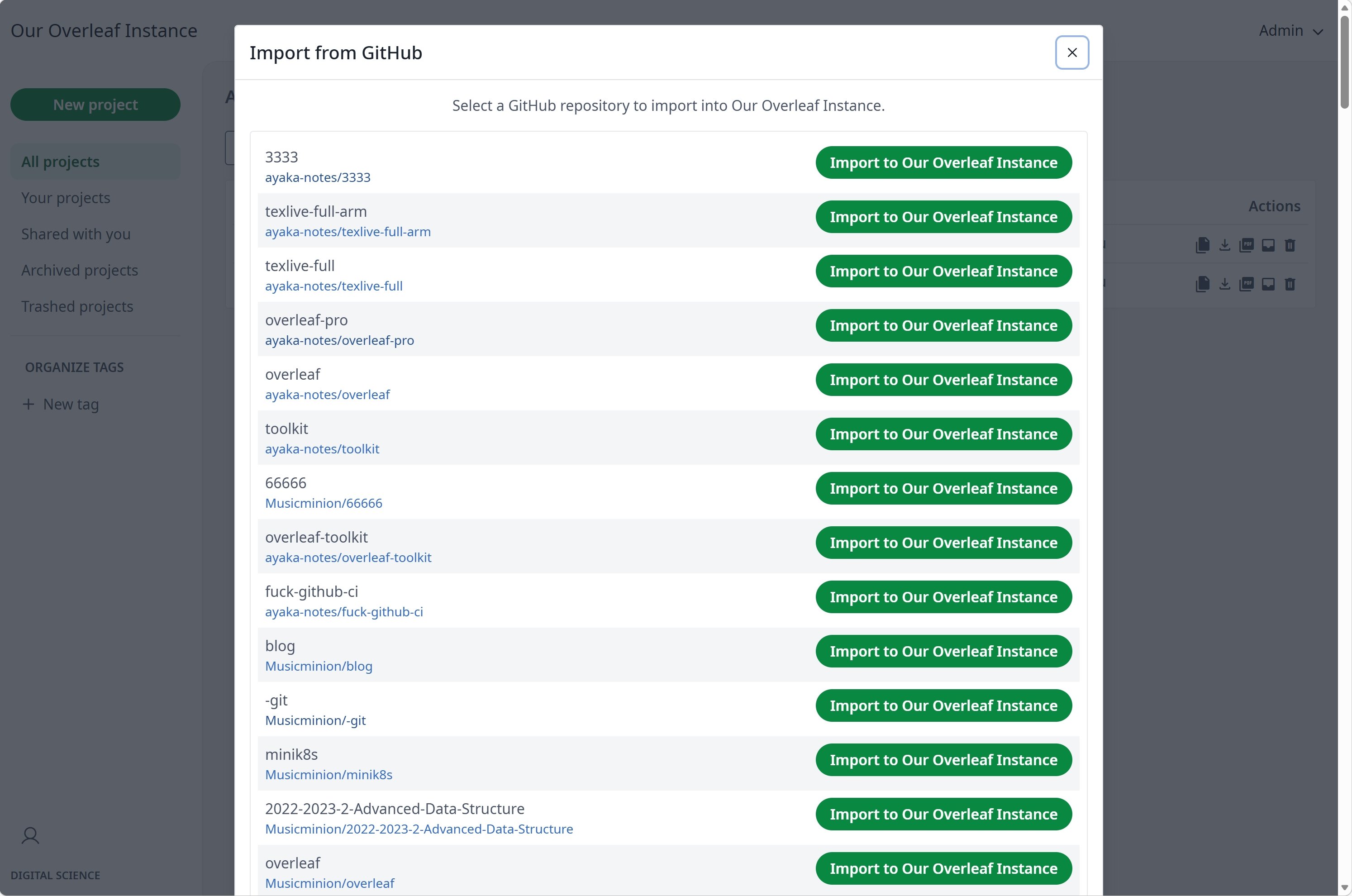
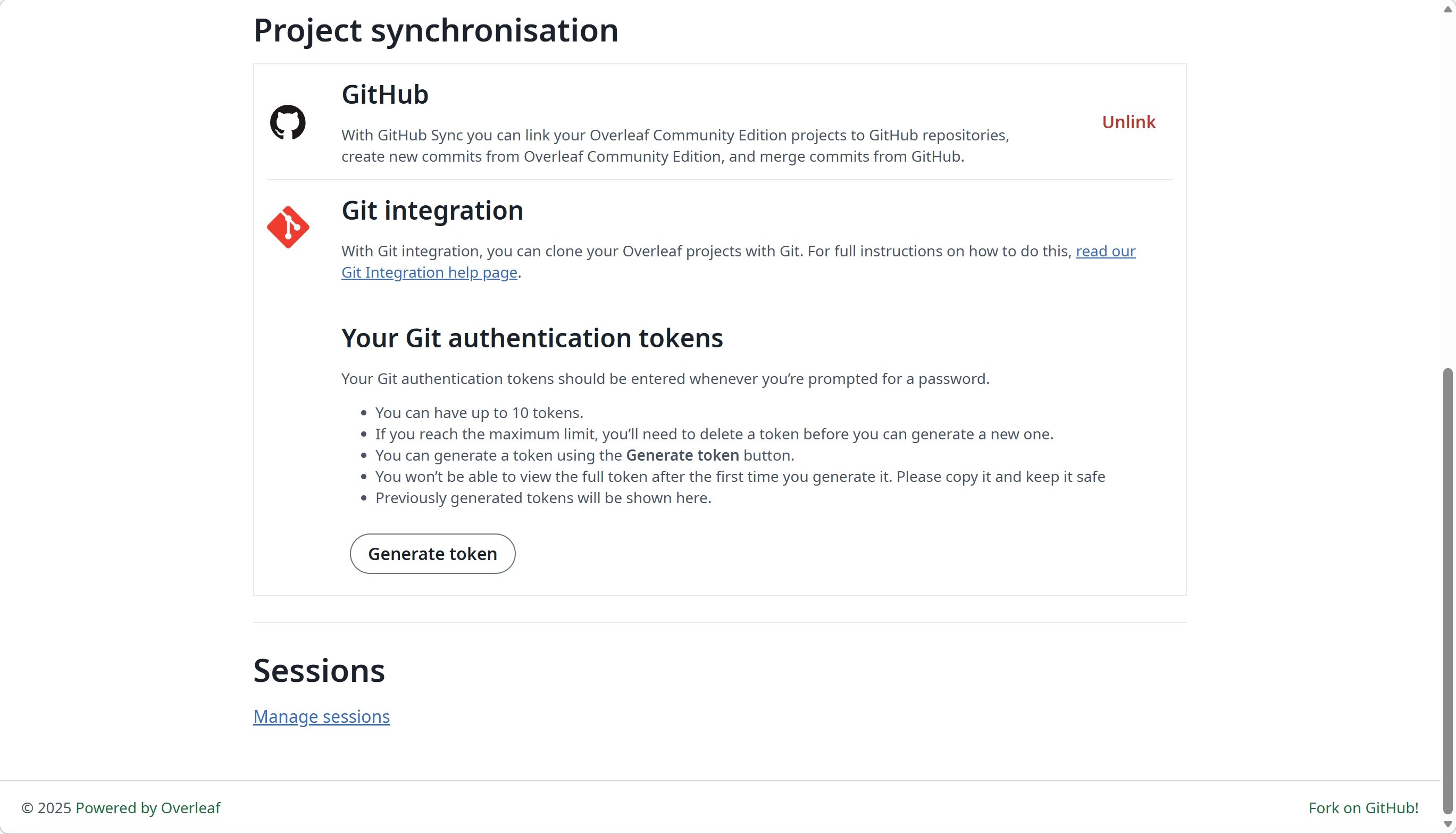
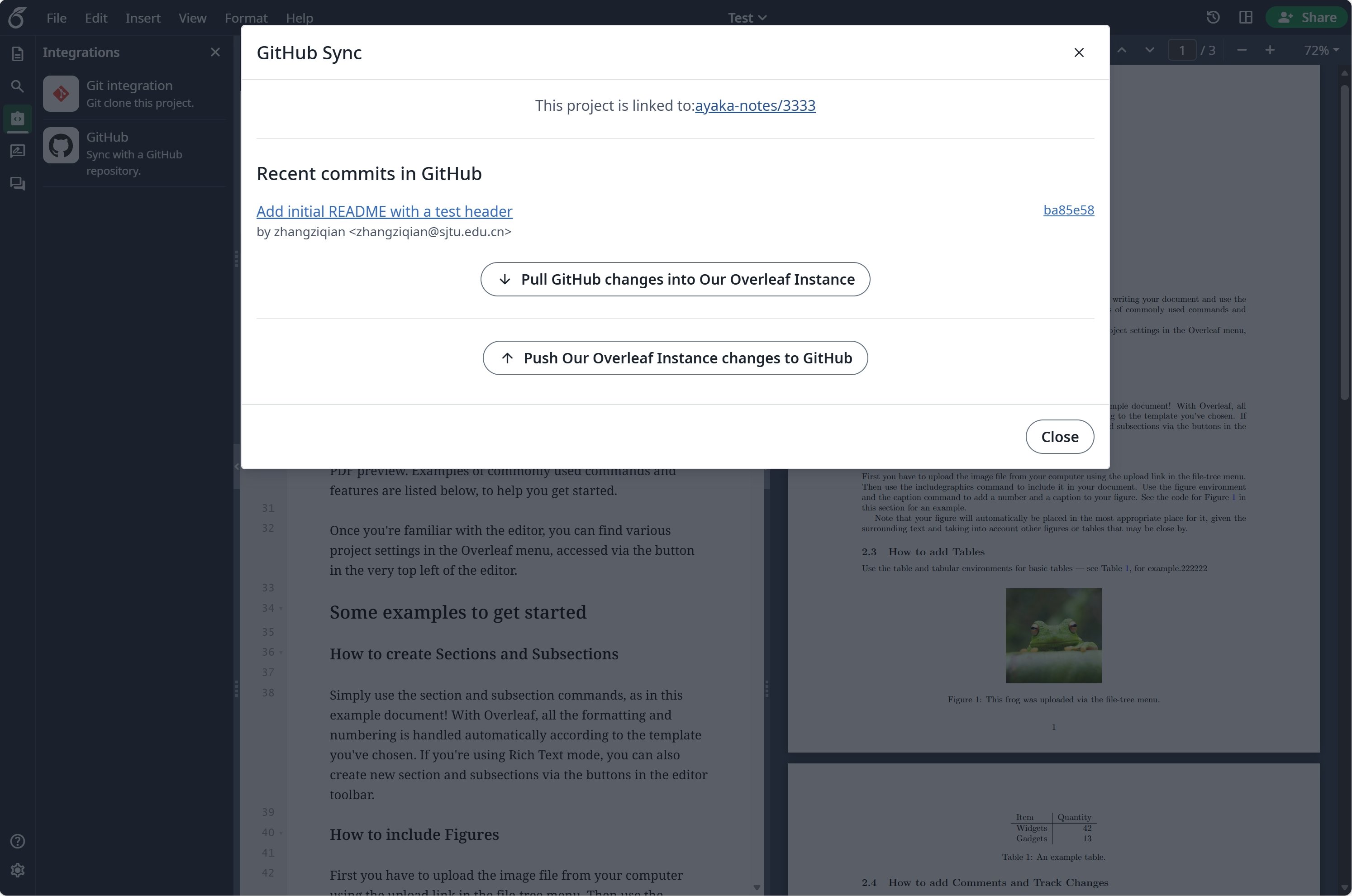 ### GitHub Senkronizasyonunu Kurma
GitHub Senkronizasyonunu kullanmadan önce [git-bridge](/tr/on-premises/configuration/overleaf-toolkit/git-integration) özelliğini etkinleştirmeniz gerekir.
```dotenv title="config/overleaf.rc" theme={null}
GIT_BRIDGE_ENABLED=true
```
GitHub OAuth uygulamanızı oluşturmak için [geliştirici ayarlarını](https://github.com/settings/developers) ziyaret edin ve `CLIENT_ID` ile `SECRET` değerlerinizi kopyalayın.
**Notlar**: OAuth geri çağırma (callback) URL'niz şudur: `${OVERLEAF_SITE_URL}/user/github-sync/oauth2/callback`.
Ardından aşağıdaki ayarları Overleaf ortam değişkeni dosyalarınıza ekleyin.
```dotenv title="config/variables.env" wrap theme={null}
# used to encrypt the user's GitHub access token.
# How to generate: `openssl rand -hex 32`
GITHUB_TOKEN_CIPHER_PASSWORD=0123456789ABCDEFG # changed to yours
# Github Sync Settings
GITHUB_SYNC_ENABLED=true
GITHUB_SYNC_CLIENT_ID=
GITHUB_SYNC_CLIENT_SECRET=
# OAuth callback is: ${OVERLEAF_SITE_URL}/user/github-sync/oauth2/callback
# (Optional) GITHUB_SYNC_PROXY_URL=http://10.0.0.1:10808
```
GitHub OAuth geri çağırma URL'sini yapılandırmadan önce `OVERLEAF_SITE_URL` değerinin doğru ayarlandığından emin olun.
Çin anakarasında bulunuyorsanız, GitHub'a erişmek için bir proxy yapılandırmanız gerekebilir. Şu ortam değişkenini ayarlayın: `GITHUB_SYNC_PROXY_URL=http://10.0.0.1:10808`.
Proxy ana bilgisayarı için `127.0.0.1` kullanmayın. Proxy ana sunucuda çalışıyorsa, sunucunun LAN IP adresini (`192.168.1.xx` gibi) kullanın ve proxy'nin yerel ağdaki cihazlardan gelen bağlantıları kabul edecek şekilde yapılandırıldığından emin olun.
This documentation is built and hosted on [Mintlify](https://mintlify.com), a developer documentation platform.
### GitHub Senkronizasyonunu Kurma
GitHub Senkronizasyonunu kullanmadan önce [git-bridge](/tr/on-premises/configuration/overleaf-toolkit/git-integration) özelliğini etkinleştirmeniz gerekir.
```dotenv title="config/overleaf.rc" theme={null}
GIT_BRIDGE_ENABLED=true
```
GitHub OAuth uygulamanızı oluşturmak için [geliştirici ayarlarını](https://github.com/settings/developers) ziyaret edin ve `CLIENT_ID` ile `SECRET` değerlerinizi kopyalayın.
**Notlar**: OAuth geri çağırma (callback) URL'niz şudur: `${OVERLEAF_SITE_URL}/user/github-sync/oauth2/callback`.
Ardından aşağıdaki ayarları Overleaf ortam değişkeni dosyalarınıza ekleyin.
```dotenv title="config/variables.env" wrap theme={null}
# used to encrypt the user's GitHub access token.
# How to generate: `openssl rand -hex 32`
GITHUB_TOKEN_CIPHER_PASSWORD=0123456789ABCDEFG # changed to yours
# Github Sync Settings
GITHUB_SYNC_ENABLED=true
GITHUB_SYNC_CLIENT_ID=
GITHUB_SYNC_CLIENT_SECRET=
# OAuth callback is: ${OVERLEAF_SITE_URL}/user/github-sync/oauth2/callback
# (Optional) GITHUB_SYNC_PROXY_URL=http://10.0.0.1:10808
```
GitHub OAuth geri çağırma URL'sini yapılandırmadan önce `OVERLEAF_SITE_URL` değerinin doğru ayarlandığından emin olun.
Çin anakarasında bulunuyorsanız, GitHub'a erişmek için bir proxy yapılandırmanız gerekebilir. Şu ortam değişkenini ayarlayın: `GITHUB_SYNC_PROXY_URL=http://10.0.0.1:10808`.
Proxy ana bilgisayarı için `127.0.0.1` kullanmayın. Proxy ana sunucuda çalışıyorsa, sunucunun LAN IP adresini (`192.168.1.xx` gibi) kullanın ve proxy'nin yerel ağdaki cihazlardan gelen bağlantıları kabul edecek şekilde yapılandırıldığından emin olun.
This documentation is built and hosted on [Mintlify](https://mintlify.com), a developer documentation platform.