> ## Documentation Index
> Fetch the complete documentation index at: https://ayakaleaf-pro.mintlify.site/llms.txt
> Use this file to discover all available pages before exploring further.
# Public Access
> How to let guests, signed-out visitors and new users access your Overleaf instance?
You can open your Overleaf instance to people without an account in three ways:
* [Project Access](/on-premises/configuration/overleaf-toolkit/public-access#project-access "mention"): let guests open a shared project link without logging in
* [Page Access](/on-premises/configuration/overleaf-toolkit/public-access#page-access "mention"): let signed-out visitors browse pages such as `/learn`, `/templates` and `/devs`
* [Public Registration](/on-premises/configuration/overleaf-toolkit/public-access#public-registration "mention"): let users sign up themselves, optionally limited to an email domain
### Project Access
By default, even if a user obtains a project sharing link, they must **log in** before they can join a collaborative project editing session.
To allow anonymous access for link-shared projects, set both variables below:
```dotenv title="config/variables.env" theme={null}
OVERLEAF_ALLOW_ANONYMOUS_READ_AND_WRITE_SHARING=true
OVERLEAF_ALLOW_PUBLIC_ACCESS=true
```
`OVERLEAF_ALLOW_ANONYMOUS_READ_AND_WRITE_SHARING` enables anonymous read/write on link-shared projects.
`OVERLEAF_ALLOW_PUBLIC_ACCESS` prevents non-authenticated users being redirected to the login page.
Recreate containers with `bin/up`. Then open a link-sharing URL in a private window.
### Page Access
By default (`OVERLEAF_ALLOW_PUBLIC_ACCESS` not set), **every** page except the login and registration pages redirects signed-out visitors to the login page. This includes pages that are meant to be public, so links to them only work for users who are already logged in.
With `OVERLEAF_ALLOW_PUBLIC_ACCESS=true`, signed-out visitors can open:
| Page | Requires |
| - | - |
| LaTeX help at `/learn` (see [adding-latex-user-help.md](/on-premises/configuration/overleaf-toolkit/adding-latex-user-help "mention")) | `OVERLEAF_PROXY_LEARN=true` |
| The template gallery at `/templates`, template pages, previews and ZIP downloads (see [templates.md](/on-premises/configuration/overleaf-toolkit/templates "mention")) | `OVERLEAF_TEMPLATE_GALLERY=true` |
| The Overleaf Import API page at `/devs` (see [overleaf-import-api.md](/on-premises/configuration/overleaf-toolkit/overleaf-import-api "mention")) | — |
It also lets the [Overleaf Import API](/on-premises/configuration/overleaf-toolkit/overleaf-import-api#signed-out-visitors "mention") keep a form submission from a signed-out visitor until they have logged in.
The project list, the editor and creating projects (also from a template or through the Import API) still require a login.
### Public Registration
Public registration is only available in [ayaka-notes/ayakaleaf-pro](https://github.com/ayaka-notes/ayakaleaf-pro).
Please note that once you enable public registration, **anyone** with access to your Overleaf instance can register as a user.
The registration process does not verify email addresses, so please only use it on an intranet or in a trusted environment, or disable it when you no longer need registration.
By default, neither the Community Edition nor Overleaf Pro allows public registration.
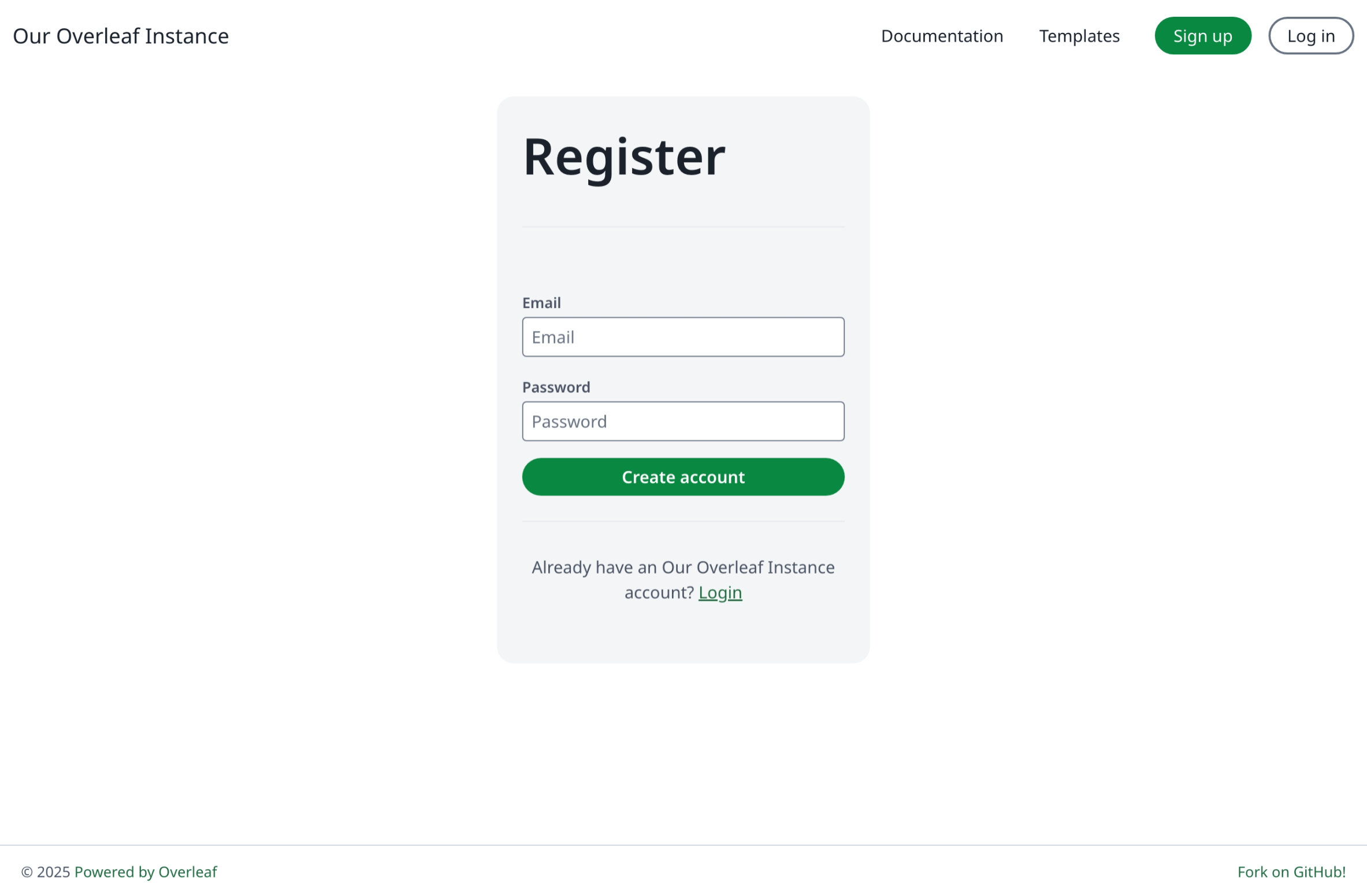
To enable it, add this to `config/variables.env`:
```dotenv title="config/variables.env" theme={null}
OVERLEAF_ALLOW_PUBLIC_REGISTRATION=true
```
Recreate containers with `bin/up`.
Then click **Sign up** or visit `/register`.
 ### Registration With Limited Domain
Limited-domain public registration is only available in [ayaka-notes/ayakaleaf-pro](https://github.com/ayaka-notes/ayakaleaf-pro).
Before enabling this, configure email delivery so users can receive invites and notifications. See [Email delivery](/on-premises/configuration/overleaf-toolkit/email-delivery).
Then add the following line to `config/variables.env`:
```dotenv title="config/variables.env" wrap theme={null}
OVERLEAF_ALLOW_PUBLIC_REGISTRATION=@example.domain
```
`OVERLEAF_ALLOW_PUBLIC_REGISTRATION` can be set to:
* `true` to allow anyone who can reach the site to register
* `@example.domain` to restrict registration to emails in that domain
This documentation is built and hosted on [Mintlify](https://mintlify.com), a developer documentation platform.
### Registration With Limited Domain
Limited-domain public registration is only available in [ayaka-notes/ayakaleaf-pro](https://github.com/ayaka-notes/ayakaleaf-pro).
Before enabling this, configure email delivery so users can receive invites and notifications. See [Email delivery](/on-premises/configuration/overleaf-toolkit/email-delivery).
Then add the following line to `config/variables.env`:
```dotenv title="config/variables.env" wrap theme={null}
OVERLEAF_ALLOW_PUBLIC_REGISTRATION=@example.domain
```
`OVERLEAF_ALLOW_PUBLIC_REGISTRATION` can be set to:
* `true` to allow anyone who can reach the site to register
* `@example.domain` to restrict registration to emails in that domain
This documentation is built and hosted on [Mintlify](https://mintlify.com), a developer documentation platform.