> ## Documentation Index
> Fetch the complete documentation index at: https://ayakaleaf-pro.mintlify.site/llms.txt
> Use this file to discover all available pages before exploring further.
# 수평 확장
Ayakaleaf Pro는 수평 확장을 지원합니다. 여러 레플리카에서 올바르게 실행되는 것을 테스트하고 검증했습니다.
이 문서는 Ayakaleaf Pro를 둘 이상의 노드에서 실행하기 위한 기술 요구 사항을 나열하고 가이드라인을 제공합니다.
Server CE/Server Pro `5.0.3`부터 환경 변수 이름이 `SHARELATEX_*`에서 `OVERLEAF_*`로 변경되었습니다.
`4.x` 버전(또는 그 이전)을 사용하는 경우 변수에 올바른 접두사가 붙어 있는지 확인하세요(예: `OVERLEAF_SITE_URL` 대신 `SHARELATEX_SITE_URL`).
수평 확장을 설정하려면 상당한 노력이 필요합니다. 일정 규모에 도달한 경우에**만** 수평 확장을 고려할 것을 권장합니다. 예를 들어 전체 사용자 1,000명 규모의 Server Pro 설치가 4코어 프로세서 2개와 32GB 시스템 메모리를 갖춘 단일 서버로 성공적으로 구성된 사례가 있습니다. 권장 사항은 [하드웨어 요구 사항](/ko/on-premises/getting-started/requirements/hardware-requirements) 문서를 참조하세요.
수평 확장을 적용한 Server Pro 배포에는 로드 밸런서와 S3 호환 스토리지 백엔드 같은 일련의 외부 구성 요소가 포함됩니다.
잘못된 구성으로 인해 발생할 수 있는 Server Pro 컨테이너의 오류 해결을 도와드리고, 이 문서를 바탕으로 일반적인 조언을 제공할 수 있습니다. 하지만 안타깝게도 제3자 애플리케이션/시스템 구성에 대해서는 지원을 제공할 수 없습니다.
외부 구성 요소를 제공하기 위한 하드웨어/소프트웨어에 특정한 기술 문제의 해결은 지원 범위에 포함되지 않습니다.
### 요구 사항
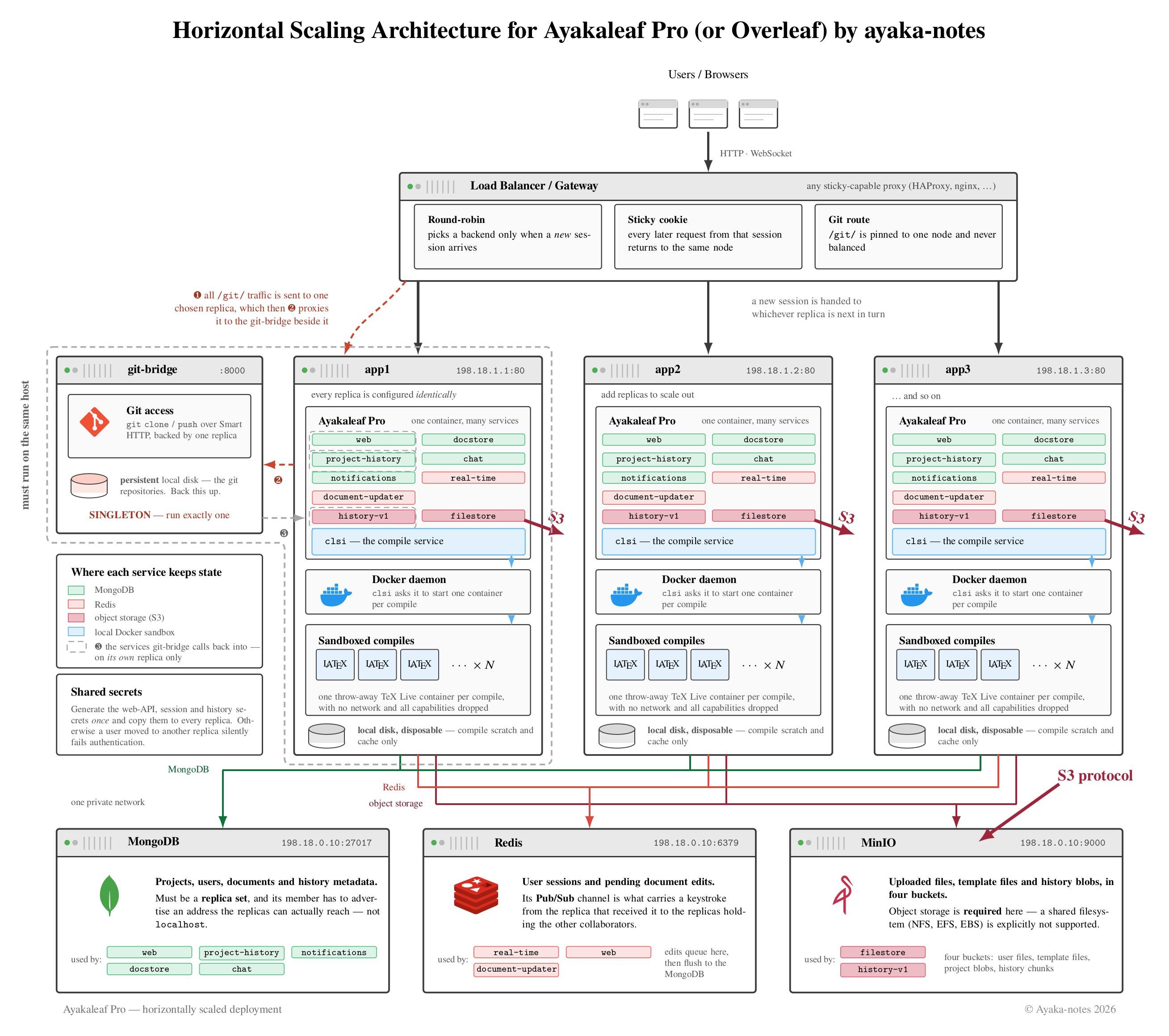 #### 외부 중앙 데이터 스토리지
Server Pro의 데이터 스토리지는 네 가지 데이터 저장소로 나눌 수 있습니다:
* **MongoDB**
* 대부분의 데이터는 MongoDB에 저장됩니다.
* 로컬 인스턴스 또는 [MongoDB](https://www.mongodb.com/atlas) Atlas(AWS 인프라 내에서 실행되는 완전 관리형 MongoDB 서비스) 같은 외부 인스턴스를 지원합니다.
#### 외부 중앙 데이터 스토리지
Server Pro의 데이터 스토리지는 네 가지 데이터 저장소로 나눌 수 있습니다:
* **MongoDB**
* 대부분의 데이터는 MongoDB에 저장됩니다.
* 로컬 인스턴스 또는 [MongoDB](https://www.mongodb.com/atlas) Atlas(AWS 인프라 내에서 실행되는 완전 관리형 MongoDB 서비스) 같은 외부 인스턴스를 지원합니다.
참고: 안타깝게도 현재 CosmoDB/DocumentDB 같은 MongoDB 호환 데이터베이스는 Server Pro와 함께 테스트하지 않았으므로 공식적으로 지원하지 않습니다. 호환 데이터베이스로 Server Pro를 배포하는 것이 가능할 **수도** 있지만, 공식적으로는 MongoDB를 사용하는 배포만 지원합니다.
* **Redis**
* Redis는 MongoDB로 플러시되기 전의 대기 중인 문서 업데이트 같은 임시 데이터를 저장합니다.
* Redis는 서로 다른 서비스 간에 문서 업데이트를 전달하고 특정 프로젝트의 상태 변경을 에디터에 알리는 데 사용됩니다.
* Redis는 사용자 세션을 저장하는 데 사용됩니다.
* 로컬 인스턴스 또는 외부 인스턴스를 지원합니다.
참고: 안타깝게도 현재 KeyDB/Valkey 같은 Redis 호환 키/값 저장소는 Server Pro와 함께 테스트하지 않았으므로 공식적으로 지원하지 않습니다. 호환 저장소로 Server Pro를 배포하는 것이 가능할 **수도** 있지만, 공식적으로는 Redis를 사용하는 배포만 지원합니다.
* **프로젝트 파일 및 기록 파일**
* 편집할 수 없는 프로젝트 파일은 MongoDB 외부에 저장됩니다.
새로운 프로젝트 기록 시스템(Server Pro 3.5 이상)도 기록을 MongoDB 외부에 저장합니다.
* 소규모 단일 인스턴스의 경우 로컬 파일 시스템(로컬 SSD, NFS 또는 EBS 기반일 수 있음) 또는 [S3 호환 데이터 스토리지 시스템](/ko/on-premises/configuration/overleaf-toolkit/s3)을 지원합니다.
* 수평 확장의 경우 S3 호환 데이터 스토리지 시스템**만** 지원합니다.
중요: NFS/Amazon EFS/Amazon EBS는 수평 확장에 지원되지 **않습니다**. 자세한 내용은 Server Pro의 스토리지 확장에 관한 [하드웨어 스토리지](/ko/on-premises/getting-started/requirements/hardware-requirements#storage) 요구 사항 섹션을 참조하세요.
* **임시 파일**
* 최적의 성능을 위해 LaTeX 컴파일은 빠른 로컬 디스크에서 실행해야 합니다. 컴파일 출력은 영구 저장하거나 백업할 필요가 없습니다.
* 새 파일 업로드의 버퍼링과 프로젝트 zip 파일 생성도 로컬 디스크를 사용하면 이점이 있습니다.
로컬 디스크를 사용할 것을 강력히 권장합니다. 어떤 종류의 네트워크 디스크(NFS 또는 EBS 등)를 사용하든 예기치 않은 컴파일 오류 및 기타 성능 문제가 발생할 수 있습니다.
#### **Git-bridge**
Git-bridge는 버전 4.0.1부터 Server Pro에서 사용할 수 있습니다.
git 저장소는 로컬 디스크에 저장됩니다. 사용할 수 있는 복제 옵션은 없습니다. Git-bridge는 **싱글톤**으로 실행해야 합니다. 최적의 성능을 위해 git-bridge 데이터에는 로컬 디스크를 사용할 것을 권장합니다. git-bridge 데이터 디스크는 정기적으로 백업해야 합니다.
수평 확장 시 데이터 스토리지를 위해 다음이 필요합니다:
* 모든 Server Pro 인스턴스에서 접근할 수 있는 중앙 MongoDB 인스턴스
* 모든 Server Pro 인스턴스에서 접근할 수 있는 중앙 Redis 인스턴스
* 프로젝트 및 기록 파일을 위한 중앙 S3 호환 스토리지 백엔드
* 임시 파일을 위한 각 인스턴스의 로컬 디스크
* git-bridge 데이터를 위한, git-bridge 컨테이너를 호스팅하는 인스턴스의 로컬 디스크
#### 로드 밸런서 요구 사항
* **영구 라우팅**(예: 쿠키 사용)
이 요구 사항은 다음 구성 요소에서 비롯됩니다:
* Server Pro의 실시간 편집 기능은 WebSocket을 사용하며 XHR 폴링으로 폴백합니다. 각 편집 세션은 서버 측에 로컬 상태를 가지므로, 특정 편집 세션의 요청은 항상 같은 Server Pro 인스턴스로 라우팅되어야 합니다. 공동 작업 기능은 여러 Server Pro 인스턴스 간에 업데이트를 공유하기 위해 Redis [Pub/Sub](https://redis.io/docs/latest/develop/interact/pubsub/)를 사용합니다.
* LaTeX 컴파일은 최적의 성능을 위해 출력과 컴파일 캐시를 로컬에 보관합니다. 한 Server Pro 인스턴스에 컴파일 요청을 보낸 후에는 이어지는 PDF/로그 다운로드 요청도 같은 Server Pro 인스턴스로 라우팅되어야 합니다.
* 큰 LaTeX 문서의 컴파일을 지원하기 위한 **긴 요청 시간 제한**
* 최적의 성능을 위한 **WebSocket 지원**
* **50MB의 POST 페이로드 크기**
* **Keep-alive 시간 제한**은 Server Pro의 keep-alive 시간 제한보다 짧아야 합니다
Server Pro의 keep-alive 시간 제한은 환경 변수 `NGINX_KEEPALIVE_TIMEOUT`으로 구성할 수 있습니다. 기본값은 65초입니다.
기본값을 사용하는 경우 로드 밸런서의 keep-alive 시간 제한은 60초로 설정하면 됩니다.
`NGINX_KEEPALIVE_TIMEOUT=120`이면 로드 밸런서는 115초로 설정할 수 있습니다.
* **클라이언트 IP**
요청 헤더 `X-Forwarded-For`를 클라이언트 IP로 설정하세요.
* **SSL 종료** 시
로드 밸런서가 요청 헤더 `X-Forwarded-Proto: https`를 추가해야 합니다.
```text theme={null}
global
group haproxy
user haproxy
# Verbose logging
log stdout format raw local0 debug
defaults
mode http
option httpchk HEAD /status
http-check expect status 200
default-server check
# Verbose logging
log global
option httplog
# Reroute to a different backend if the sticky one is down
option redispatch 1
# These retries are for TCP connect errors, not on HTTP status 500 responses
retries 3
# Sticky session for 24h of inactivity -- compile output is deleted after 24h
cookie server-pro-ha insert maxidle 24h
# Try to connect to any backend for 1min, then return 503
timeout queue 1m
# Give Server Pro instances 15s to startup
timeout connect 15s
# Abort requests from very slow clients (allow 1min of inactivity when reading a request)
timeout client 1m
# Allow slow compiles -- hard-coded limit in clsi is 10min
timeout server 10m
# Disconnect the editor after 23h -- 1h ahead of their last use yesterday
timeout tunnel 23h
# Note: The keepalive behavior in haproxy works great with the default keepalive setup in Server Pro.
# Haproxy is cleaning up connections in the background and it will redispatch requests when needed.
listen server-pro-ha-http
bind :80
http-request redirect scheme https unless { ssl_fc }
listen server-pro-ha-https
bind :443 ssl crt /etc/ssl/certs/ssl-key-and-certificate-bundle.pem
# Tell the application that we are behind https
http-request set-header X-Forwarded-Proto https
# Tell the application the actual client ip
option forwardfor
# See https://hstspreload.org/#deployment-recommendations
http-response set-header Strict-Transport-Security "max-age=63072000; includeSubDomains; preload;"
# Route git traffic to the sibling container of the git-bridge
use-server server-pro-ha-1 if { path_beg /git/ }
# Debugging
http-response add-header X-Served-By %s
stats enable
stats uri /haproxy
server server-pro-ha-1 198.18.1.1:80 cookie server-pro-ha-1
server server-pro-ha-2 198.18.1.2:80 cookie server-pro-ha-2
server server-pro-ha-3 198.18.1.3:80 cookie server-pro-ha-3
```
#### Server Pro 구성
**시크릿**
Server Pro 인스턴스들은 공유 시크릿에 합의해야 합니다:
* `WEB_API_PASSWORD` (web api 인증)
* `STAGING_PASSWORD`와 `V1_HISTORY_PASSWORD`는 같은 값 (history 인증)
* `CRYPTO_RANDOM` (세션 쿠키용)
* `OT_JWT_AUTH_KEY` (history 인증)
이 시크릿들은 모두 각각 고유한 값으로 구성되어야 하며 인스턴스 간에 공유되어야 합니다.
구성되지 않은 상태에서 사용자 요청이 서로 다른 Server Pro 인스턴스로 라우팅되면 요청이 인증 검사에 실패하여, 사용자가 로그인 페이지로 자주 리디렉션되거나 UI에서의 작업이 예기치 않은 방식으로 실패합니다.
구성되지 않은 경우 Server Pro는 각 시크릿에 대해 `/dev/urandom`에서 얻은 32개의 무작위 바이트(256개의 무작위 비트)를 기반으로 새로운 무작위 값을 사용합니다.
```bash wrap theme={null}
# https://github.com/overleaf/overleaf/blob/45ca0f796c679103efd305ddbef28073c4a5de32/server-ce/init_scripts/00_regen_sharelatex_secrets.sh#L14
dd if=/dev/urandom bs=1 count=32 2>/dev/null | base64 -w 0 | rev | cut -b 2- | rev | tr -d '\n+/'
```
**MongoDB**
`OVERLEAF_MONGO_URL`(`4.x` 이하 버전에서는 `SHARELATEX_MONGO_URL`)이 중앙 MongoDB 인스턴스를 가리키도록 설정하세요.
**Redis**
`OVERLEAF_REDIS_HOST`(`4.x` 이하 버전에서는 `SHARELATEX_REDIS_HOST`)와 `REDIS_HOST`가 중앙 Redis 인스턴스를 가리키도록 설정하세요.
**프로젝트 및 기록 파일을 위한 S3 호환 스토리지**
자세한 내용은 [S3 호환 스토리지](/ko/on-premises/configuration/overleaf-toolkit/s3) 문서를 참조하세요.
**임시 파일**
로컬 SSD를 `/var/lib/overleaf`(`4.x` 이하 버전에서는 `/var/lib/sharelatex`)에 바인드 마운트하는 기본 설정으로 충분합니다. `SANDBOXED_COMPILES_HOST_DIR`이 호스트의 마운트 지점을 가리키도록 설정하세요.
로컬 디스크를 사용할 것을 강력히 권장합니다. 어떤 종류의 네트워크 디스크(NFS 또는 EBS 등)를 사용하든 예기치 않은 컴파일 오류 및 기타 성능 문제가 발생할 수 있습니다.
**프록시 구성**
* 정확한 클라이언트 IP를 위해 `OVERLEAF_BEHIND_PROXY=true`(`4.x` 이하 버전에서는 `SHARELATEX_BEHIND_PROXY`)를 설정하세요.
* `TRUSTED_PROXY_IPS`를 로드 밸런서의 IP로 설정하세요(쉼표로 구분하여 여러 CIDR을 지정할 수 있습니다).
**Git-bridge 통합**
Git-bridge는 버전 4.0.1부터 Server Pro에서 사용할 수 있습니다.
git-bridge 컨테이너는 들어오는 git 요청을 처리하기 위해 형제(sibling) Server Pro 컨테이너가 필요합니다. 이 형제 컨테이너는 일반 사용자 트래픽도 처리할 수 있습니다. 예시 구성에서는 첫 번째 인스턴스가 git-bridge의 형제 컨테이너 역할을 하지만, 실제로는 어떤 인스턴스든 그 역할을 할 수 있습니다.
왜 하나의 Server Pro 컨테이너를 git-bridge의 형제로 지정해야 할까요? Server Pro는 git-bridge에 history 서비스의 다운로드 URL을 제공합니다. 이러한 history URL이 git-bridge 컨테이너에서 접근 가능하도록 구성해야 합니다.
Server Pro 컨테이너 구성:
* `GIT_BRIDGE_ENABLED`를 `'true'`로 설정
* `GIT_BRIDGE_HOST`를 ``으로 설정. 예: `git-bridge`
* `GIT_BRIDGE_PORT`를 `8000`으로 설정
* `V1_HISTORY_URL`을 `http://:3100/api`로 설정
참고: 이는 git-bridge 컨테이너의 형제 컨테이너에서만 필요합니다. 다른 인스턴스는 기본값인 localhost URL을 사용할 수 있습니다.
git-bridge 컨테이너 구성:
* `GIT_BRIDGE_API_BASE_URL`을 `http:///api/v0`로 설정. 예: `http://server-pro-ha-1/api/v0`
* `GIT_BRIDGE_OAUTH2_SERVER`를 `http://`으로 설정. 예: `http://server-pro-ha-1`
* `GIT_BRIDGE_POSTBACK_BASE_URL`을 `http://:8000`으로 설정. 예: `http://git-bridge:8000`
* `GIT_BRIDGE_ROOT_DIR`을 바인드 마운트된 git-bridge 데이터 디스크로 설정. 예: `/data/git-bridge`
다음 구성은 자체 완결형 설정을 보여 줍니다. 데모가 작동하려면 유효한 SSL 키/인증서를 제공하고 `OVERLEAF_SITE_URL`(`4.x` 이하 버전에서는 `SHARELATEX_SITE_URL`)을 조정해야 합니다. 실제 설정에서는 인라인에 표시된 대로 더미 시크릿을 실제 시크릿으로 바꿔야 합니다. 또한 실제 설정에서는 개별 컨테이너를 전용 노드로 옮기고 IP 주소를 로컬 네트워크 설정에 맞게 조정해야 합니다.
```yaml theme={null}
version: '2.2'
# Actual horizontal scaling setup: pick your own network and replace IPs in config.
networks:
default:
ipam:
config:
# This subnet is part of a reserved subnet used for benchmarking
# https://tools.ietf.org/html/rfc2544
# The full subnet is 198.18.0.0/15
# Use 198.18.0.0/24 for lb and dbs
# Use 198.18.1.0/24 for server-pro
# Use 198.18.0.128/25 for ephemeral container
- gateway: 198.18.0.1
ip_range: 198.18.0.128/25
subnet: 198.18.0.0/23
services:
# Actual horizontal scaling setup: run haproxy outside docker on a separate host.
lb:
image: haproxy:2.6
container_name: lb
user: root
logging:
driver: local
options:
max-size: 10g
max-file: '100'
volumes:
- ./haproxy.conf:/usr/local/etc/haproxy/haproxy.cfg
# $ cat certificate.pem key.pem > ssl-key-and-certificate-bundle.pem
- /path/to/ssl-key-and-certificate-bundle.pem:/etc/ssl/certs/ssl-key-and-certificate-bundle.pem
# Alternative to "ports": use host network to avoid docker-proxy overhead
network_mode: host
# Alternative to "network_mode: host": use docker-proxy for network isolation
# ports:
# - "80:80"
# - "443:443"
# networks:
# default:
# ipv4_address: 198.18.0.2
# Actual horizontal scaling setup: remove these as they run on other hosts.
depends_on:
server-pro-ha-1:
condition: service_started
server-pro-ha-2:
condition: service_started
server-pro-ha-3:
condition: service_started
# Actual horizontal scaling setup: run this container next to server-pro-ha-1.
# For Server Pro 4.0 onwards.
git-bridge:
restart: always
# The tag should match the `server-pro-ha-1` container tag.
image: quay.io/sharelatex/git-bridge:4.0.1
volumes:
# Actual horizontal scaling setup: point /data/git-bridge at a dedicated local ssd.
- ~/git_bridge_data:/data/git-bridge
container_name: git-bridge
environment:
GIT_BRIDGE_API_BASE_URL: "http://server-pro-ha-1/api/v0"
GIT_BRIDGE_OAUTH2_SERVER: "http://server-pro-ha-1"
GIT_BRIDGE_POSTBACK_BASE_URL: "http://198.18.0.6:8000"
GIT_BRIDGE_ROOT_DIR: "/data/git-bridge"
user: root
command: ["/server-pro-start.sh"]
# Actual horizontal scaling setup: run on host 198.18.0.6 and expose port
# ports:
# - "8000:8000"
networks:
default:
ipv4_address: 198.18.0.6
# Actual horizontal scaling setup: run this container on a separate host.
server-pro-ha-1: &server-pro-ha-config
restart: always
image: quay.io/sharelatex/sharelatex-pro:4.0.1
container_name: server-pro-ha-1
hostname: server-pro-ha-1
depends_on:
# Actual horizontal scaling setup: keep this entry.
git-bridge:
condition: service_started
# Actual horizontal scaling setup: remove the ones below as they run on other hosts.
mongo:
condition: service_healthy
redis:
condition: service_started
minio:
condition: service_started
mongo_replica_set_setup:
condition: service_completed_successfully
minio_setup:
condition: service_completed_successfully
stop_grace_period: 60s
volumes:
- /tmp/scratch-disk1:/var/lib/sharelatex
- /var/run/docker.sock:/var/run/docker.sock
environment: &server-pro-ha-environment
# Actual horizontal scaling setup: provide your own domain/app name.
OVERLEAF_SITE_URL: 'https://overleaf.example.com'
OVERLEAF_APP_NAME: Server Pro Horizontal Scaling Demo
OVERLEAF_MONGO_URL: mongodb://198.18.0.3/sharelatex
OVERLEAF_REDIS_HOST: 198.18.0.4
REDIS_HOST: 198.18.0.4
ENABLED_LINKED_FILE_TYPES: 'project_file,project_output_file'
EMAIL_CONFIRMATION_DISABLED: 'true'
SANDBOXED_COMPILES: 'true'
SANDBOXED_COMPILES_SIBLING_CONTAINERS: 'true'
SANDBOXED_COMPILES_HOST_DIR: '/tmp/scratch-disk1/data/compiles'
# S3
# Actual horizontal scaling setup: pick secure credentials.
OVERLEAF_FILESTORE_BACKEND: s3
OVERLEAF_FILESTORE_USER_FILES_BUCKET_NAME: overleaf-user-files
OVERLEAF_FILESTORE_TEMPLATE_FILES_BUCKET_NAME: overleaf-template-files
OVERLEAF_FILESTORE_S3_ACCESS_KEY_ID: OVERLEAF_FILESTORE_S3_ACCESS_KEY_ID
OVERLEAF_FILESTORE_S3_SECRET_ACCESS_KEY: OVERLEAF_FILESTORE_S3_SECRET_ACCESS_KEY
OVERLEAF_FILESTORE_S3_ENDPOINT: http://198.18.0.5:9000
OVERLEAF_FILESTORE_S3_PATH_STYLE: 'true'
OVERLEAF_FILESTORE_S3_REGION: ''
OVERLEAF_HISTORY_BACKEND: "s3"
OVERLEAF_HISTORY_PROJECT_BLOBS_BUCKET: "overleaf-project-blobs"
OVERLEAF_HISTORY_CHUNKS_BUCKET: "overleaf-chunks"
OVERLEAF_HISTORY_S3_ACCESS_KEY_ID: "OVERLEAF_HISTORY_S3_ACCESS_KEY_ID"
OVERLEAF_HISTORY_S3_SECRET_ACCESS_KEY: "OVERLEAF_HISTORY_S3_SECRET_ACCESS_KEY"
OVERLEAF_HISTORY_S3_ENDPOINT: http://198.18.0.5:9000
OVERLEAF_HISTORY_S3_PATH_STYLE: 'true'
OVERLEAF_HISTORY_S3_REGION: ''
# /S3
# git-bridge
GIT_BRIDGE_ENABLED: 'true'
GIT_BRIDGE_HOST: 198.18.0.6
GIT_BRIDGE_PORT: 8000
# Only needed on the sibling instance of git-bridge
V1_HISTORY_URL: "http://server-pro-ha-1:3100/api"
# /git-bridge
# Horizontal scaling
# Actual horizontal scaling setup: pick secure credentials.
WEB_API_PASSWORD: WEB_API_PASSWORD
STAGING_PASSWORD: V1_HISTORY_PASSWORD
V1_HISTORY_PASSWORD: V1_HISTORY_PASSWORD
CRYPTO_RANDOM: CRYPTO_RANDOM
OT_JWT_AUTH_KEY: OT_JWT_AUTH_KEY
OVERLEAF_BEHIND_PROXY: 'true'
# Actual horizontal scaling setup: IPs of load balancers
TRUSTED_PROXY_IPS: 198.18.0.1,198.18.0.2
# /Horizontal scaling
# Actual horizontal scaling setup: run on host 198.18.1.1 and expose ports
# ports:
# - "80:80"
networks:
default:
ipv4_address: 198.18.1.1
# Actual horizontal scaling setup: run this container on a separate host.
server-pro-ha-2:
<<: *server-pro-ha-config
hostname: server-pro-ha-2
container_name: server-pro-ha-2
volumes:
- /tmp/scratch-disk2:/var/lib/sharelatex
- /var/run/docker.sock:/var/run/docker.sock
environment:
<<: *server-pro-ha-environment
SANDBOXED_COMPILES_HOST_DIR: '/tmp/scratch-disk2/data/compiles'
V1_HISTORY_URL: "http://localhost:3100/api"
# Actual horizontal scaling setup: run on host 198.18.1.2 and expose ports
# ports:
# - "80:80"
networks:
default:
ipv4_address: 198.18.1.2
# Actual horizontal scaling setup: run this container on a separate host.
server-pro-ha-3:
<<: *server-pro-ha-config
hostname: server-pro-ha-3
container_name: server-pro-ha-3
volumes:
- /tmp/scratch-disk3:/var/lib/sharelatex
- /var/run/docker.sock:/var/run/docker.sock
environment:
<<: *server-pro-ha-environment
SANDBOXED_COMPILES_HOST_DIR: '/tmp/scratch-disk3/data/compiles'
V1_HISTORY_URL: "http://localhost:3100/api"
# Actual horizontal scaling setup: run on host 198.18.1.3 and expose ports
# ports:
# - "80:80"
networks:
default:
ipv4_address: 198.18.1.3
# Actual horizontal scaling setup: run this container on a separate host.
minio:
image: minio/minio:RELEASE.2023-05-18T00-05-36Z
container_name: minio
command: server /data
volumes:
# Actual horizontal scaling setup: run minio with multiple disks, see minio docs.
- ~/minio_data:/data
environment:
# Actual horizontal scaling setup: pick secure credentials.
MINIO_ROOT_USER: MINIO_ROOT_USER
MINIO_ROOT_PASSWORD: MINIO_ROOT_PASSWORD
# Actual horizontal scaling setup: run on host 198.18.0.5 and expose port
# ports:
# - "9000:9000"
networks:
default:
ipv4_address: 198.18.0.5
# Actual horizontal scaling setup: run this setup once on a separate host.
minio_setup:
depends_on:
- minio
image: minio/mc:RELEASE.2023-05-18T16-59-00Z
entrypoint: sh
command:
- '-c'
# Actual horizontal scaling setup: pick secure credentials.
- |
mc alias set s3 http://198.18.0.5:9000 MINIO_ROOT_USER MINIO_ROOT_PASSWORD \
|| sleep 10 && \
mc alias set s3 http://198.18.0.5:9000 MINIO_ROOT_USER MINIO_ROOT_PASSWORD \
|| sleep 10 && \
mc alias set s3 http://198.18.0.5:9000 MINIO_ROOT_USER MINIO_ROOT_PASSWORD \
|| sleep 10 && \
mc alias set s3 http://198.18.0.5:9000 MINIO_ROOT_USER MINIO_ROOT_PASSWORD
mc mb --ignore-existing s3/overleaf-user-files
mc mb --ignore-existing s3/overleaf-template-files
mc admin user add s3 \
OVERLEAF_FILESTORE_S3_ACCESS_KEY_ID \
OVERLEAF_FILESTORE_S3_SECRET_ACCESS_KEY
mc mb --ignore-existing s3/overleaf-project-blobs
mc mb --ignore-existing s3/overleaf-chunks
mc admin user add s3 \
OVERLEAF_HISTORY_S3_ACCESS_KEY_ID \
OVERLEAF_HISTORY_S3_SECRET_ACCESS_KEY
echo '
{
"Version": "2012-10-17",
"Statement": [
{
"Effect": "Allow",
"Action": [
"s3:ListBucket"
],
"Resource": "arn:aws:s3:::overleaf-user-files"
},
{
"Effect": "Allow",
"Action": [
"s3:PutObject",
"s3:GetObject",
"s3:DeleteObject"
],
"Resource": "arn:aws:s3:::overleaf-user-files/*"
},
{
"Effect": "Allow",
"Action": [
"s3:ListBucket"
],
"Resource": "arn:aws:s3:::overleaf-template-files"
},
{
"Effect": "Allow",
"Action": [
"s3:PutObject",
"s3:GetObject",
"s3:DeleteObject"
],
"Resource": "arn:aws:s3:::overleaf-template-files/*"
}
]
}' > policy-filestore.json
echo '
{
"Version": "2012-10-17",
"Statement": [
{
"Effect": "Allow",
"Action": [
"s3:ListBucket"
],
"Resource": "arn:aws:s3:::overleaf-project-blobs"
},
{
"Effect": "Allow",
"Action": [
"s3:PutObject",
"s3:GetObject",
"s3:DeleteObject"
],
"Resource": "arn:aws:s3:::overleaf-project-blobs/*"
},
{
"Effect": "Allow",
"Action": [
"s3:ListBucket"
],
"Resource": "arn:aws:s3:::overleaf-chunks"
},
{
"Effect": "Allow",
"Action": [
"s3:PutObject",
"s3:GetObject",
"s3:DeleteObject"
],
"Resource": "arn:aws:s3:::overleaf-chunks/*"
}
]
}' > policy-history.json
# Put the contents of the policy from the previous section in policy-filestore.json
# Reminder: Replace the bucket names accordingly.
mc admin policy create s3 overleaf-filestore policy-filestore.json
mc admin policy attach s3 overleaf-filestore \
--user=OVERLEAF_FILESTORE_S3_ACCESS_KEY_ID || true
mc admin policy create s3 overleaf-history policy-history.json
mc admin policy attach s3 overleaf-history \
--user=OVERLEAF_HISTORY_S3_ACCESS_KEY_ID || true
# Actual horizontal scaling setup: run this container on a separate host.
mongo:
restart: always
image: mongo:4.4
container_name: mongo
command: "--replSet overleaf"
expose:
- 27017
volumes:
- ~/mongo_data:/data/db
healthcheck:
test: echo 'db.stats().ok' | mongo localhost:27017/test --quiet
interval: 10s
timeout: 10s
retries: 5
# Actual horizontal scaling setup: run on host 198.18.0.3 and expose port
# ports:
# - "27017:27017"
networks:
default:
ipv4_address: 198.18.0.3
mongo_replica_set_setup:
image: mongo:4.4
entrypoint: sh
depends_on:
mongo:
condition: service_healthy
command:
- '-c'
- |
mongo 198.18.0.3 --eval "rs.initiate({ _id: \"overleaf\", members: [ { _id: 0, host: \"198.18.0.3:27017\" } ] })"
# Actual horizontal scaling setup: run this container on a separate host.
redis:
restart: always
image: redis:6.2
container_name: redis
expose:
- 6379
volumes:
- ~/redis_data:/data
# Actual horizontal scaling setup: run on host 198.18.0.4 and expose port
# ports:
# - "6379:6379"
networks:
default:
ipv4_address: 198.18.0.4
```
#### 하드웨어
수평 확장에 참여하는 모든 Server Pro 인스턴스에 동일한 하드웨어 사양을 사용할 것을 권장합니다.
Server Pro 인스턴스에 대한 일반적인 [하드웨어 사양](/ko/on-premises/getting-started/requirements/hardware-requirements) 권장 사항이 적용됩니다.
#### Server Pro 업그레이드
업그레이드 과정의 일부로 Server Pro는 데이터베이스 마이그레이션을 자동으로 실행합니다. 이 마이그레이션은 여러 인스턴스에서 병렬로 실행되도록 설계되지 **않았습니다**.
마이그레이션은 실제 웹 애플리케이션이 시작되기 전에 완료되어야 합니다. 로그에서 `Finished migrations` 항목을 확인하거나 애플리케이션이 트래픽을 받아들일 때까지 기다릴 수 있습니다.
업그레이드 절차는 다음과 같습니다:
1. 유지 관리 시간을 예약합니다
2. Server Pro의 모든 인스턴스를 중지합니다
3. [문서](/ko/on-premises/maintenance/data-and-backups#performing-a-consistent-backup)에 설명된 대로 일관된 백업을 만듭니다
4. 새 버전으로 Server Pro의 단일 인스턴스를 시작합니다
5. 새 인스턴스가 예상대로 작동하는지 검증합니다
6. 새 버전으로 나머지 인스턴스를 가동합니다
This documentation is built and hosted on [Mintlify](https://mintlify.com), a developer documentation platform.