> ## Documentation Index
> Fetch the complete documentation index at: https://ayakaleaf-pro.mintlify.site/llms.txt
> Use this file to discover all available pages before exploring further.
# MCP 서버
각 프로젝트에는 MCP 서버가 있어 Claude Code, Codex, Cursor, VS Code, Gemini CLI 같은 AI 클라이언트가 프로젝트에서 작업할 수 있습니다. 파일을 읽고 편집하고, 컴파일하고, LaTeX 로그를 읽고, PDF를 다운로드하고, 댓글에 답할 수 있습니다.
이 기능은 [ayaka-notes/ayakaleaf-pro](https://github.com/ayaka-notes/ayakaleaf-pro)에서 개발했습니다. v6.4.0 이상부터 도입되었습니다.
 ### 설정
MCP 서버는 Git 연동과 함께 제공됩니다. [git-bridge](/ko/on-premises/configuration/overleaf-toolkit/git-integration)를 활성화하면 MCP 서버도 사용할 수 있습니다. 그 외에 구성할 것은 없습니다.
### AI 클라이언트 연결
1. **Account Settings**에서 Git 인증 토큰을 생성하세요. 같은 토큰이 MCP 서버와 Git에 사용됩니다.
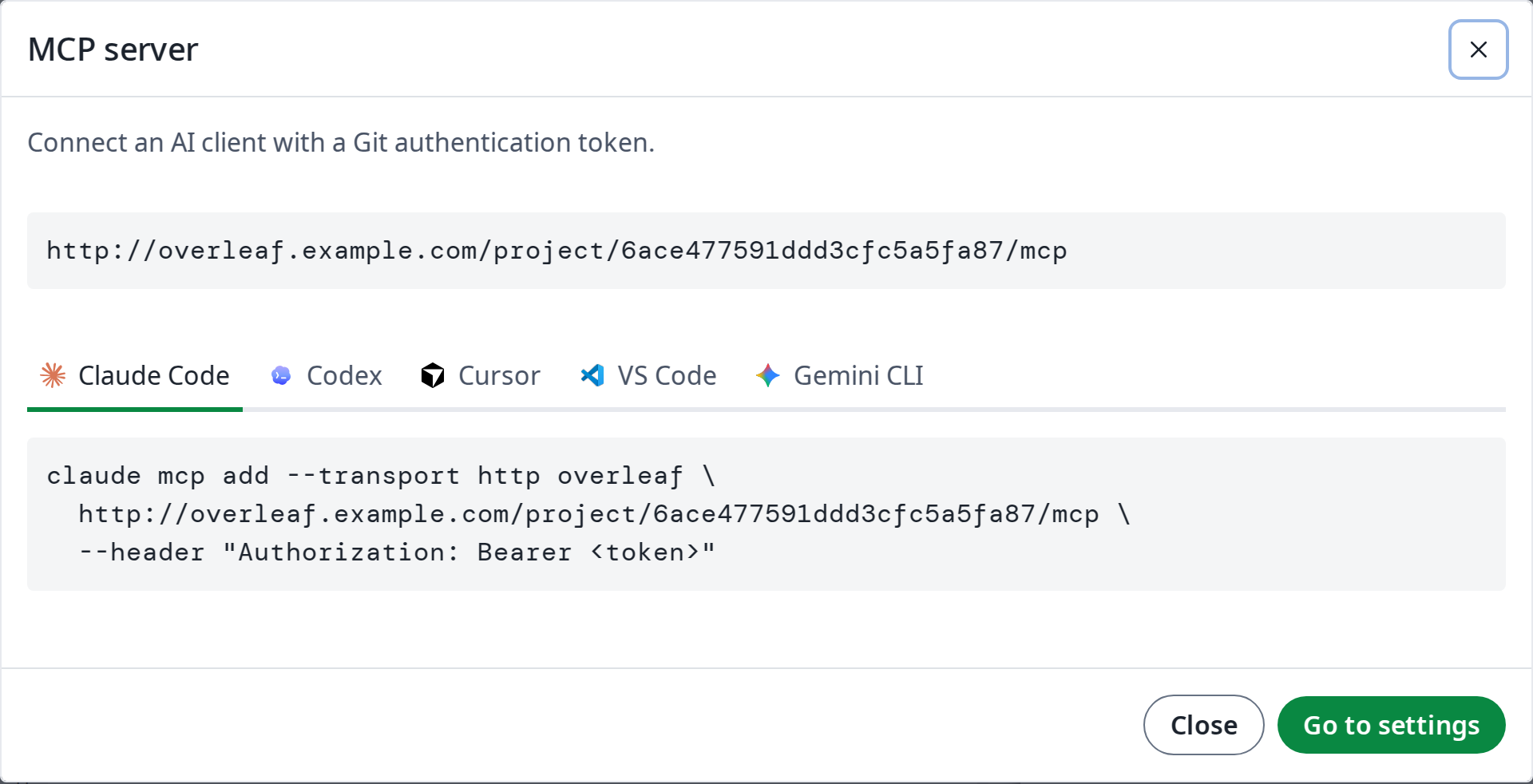
2. 편집기에서 **Integrations**를 열고 **MCP server**를 클릭하세요. 프로젝트 MCP 서버의 주소 `https:///project//mcp`와 각 AI 클라이언트에 추가하는 방법이 표시됩니다. 명령을 복사한 다음 ``을 자신의 토큰으로 바꾸세요.
### 사용법
연결되면 AI 클라이언트에 일상적인 말로 요청하세요. 예:
| 요청 내용 | AI 클라이언트가 사용하는 도구 |
| - | - |
| *서론의 오타를 수정해 줘.* | `read_file`, `edit_file`: 수정 사항이 편집기에 실시간으로 표시됩니다 |
| *프로젝트를 컴파일하고 LaTeX 오류를 수정해 줘.* | `compile`, `get_compile_log`, `edit_file` |
| *열린 댓글에 답한 다음 해결해 줘.* | `list_comments`, `reply_to_comment`, `resolve_comment` |
| *XeLaTeX로 전환하고 PDF를 다운로드해 줘.* | `update_settings`, `compile`, `get_output_file_link` |
### 도구
| 그룹 | 도구 |
| - | - |
| 프로젝트 | `get_clone_info`, `get_settings`, `update_settings`, `list_versions` |
| 파일 | `list_files`, `read_file`, `edit_file`, `write_file`, `delete_file` |
| 컴파일 | `compile`, `get_compile_log`, `get_output_file_link`, `word_count` |
| 댓글 | `list_comments`, `reply_to_comment`, `resolve_comment`, `reopen_comment` |
`edit_file`과 `write_file`로 수정한 내용은 편집기에 실시간으로 표시되며 공동 작업자의 수정 사항과 병합됩니다. 여러 파일을 한 번에 다루거나 바이너리 파일, 이름 변경이 필요한 경우 AI 클라이언트는 Git으로 프로젝트를 clone한 다음 push할 수도 있습니다.
### 권한
MCP 서버는 Git과 마찬가지로 프로젝트의 공유 설정을 따릅니다.
* 프로젝트를 볼 수 있는 모든 사용자는 프로젝트를 읽고, 컴파일하고, 출력을 다운로드할 수 있습니다.
* 소유자와 편집자만 파일과 설정을 변경할 수 있습니다.
* 검토자는 댓글에 답할 수 있으며, 자신이 시작한 댓글을 해결하거나 다시 열 수도 있습니다.
* 링크로 참여한 보기 전용 사용자는 편집기에서와 마찬가지로 댓글을 볼 수 없습니다.
This documentation is built and hosted on [Mintlify](https://mintlify.com), a developer documentation platform.
### 설정
MCP 서버는 Git 연동과 함께 제공됩니다. [git-bridge](/ko/on-premises/configuration/overleaf-toolkit/git-integration)를 활성화하면 MCP 서버도 사용할 수 있습니다. 그 외에 구성할 것은 없습니다.
### AI 클라이언트 연결
1. **Account Settings**에서 Git 인증 토큰을 생성하세요. 같은 토큰이 MCP 서버와 Git에 사용됩니다.
2. 편집기에서 **Integrations**를 열고 **MCP server**를 클릭하세요. 프로젝트 MCP 서버의 주소 `https:///project//mcp`와 각 AI 클라이언트에 추가하는 방법이 표시됩니다. 명령을 복사한 다음 ``을 자신의 토큰으로 바꾸세요.
### 사용법
연결되면 AI 클라이언트에 일상적인 말로 요청하세요. 예:
| 요청 내용 | AI 클라이언트가 사용하는 도구 |
| - | - |
| *서론의 오타를 수정해 줘.* | `read_file`, `edit_file`: 수정 사항이 편집기에 실시간으로 표시됩니다 |
| *프로젝트를 컴파일하고 LaTeX 오류를 수정해 줘.* | `compile`, `get_compile_log`, `edit_file` |
| *열린 댓글에 답한 다음 해결해 줘.* | `list_comments`, `reply_to_comment`, `resolve_comment` |
| *XeLaTeX로 전환하고 PDF를 다운로드해 줘.* | `update_settings`, `compile`, `get_output_file_link` |
### 도구
| 그룹 | 도구 |
| - | - |
| 프로젝트 | `get_clone_info`, `get_settings`, `update_settings`, `list_versions` |
| 파일 | `list_files`, `read_file`, `edit_file`, `write_file`, `delete_file` |
| 컴파일 | `compile`, `get_compile_log`, `get_output_file_link`, `word_count` |
| 댓글 | `list_comments`, `reply_to_comment`, `resolve_comment`, `reopen_comment` |
`edit_file`과 `write_file`로 수정한 내용은 편집기에 실시간으로 표시되며 공동 작업자의 수정 사항과 병합됩니다. 여러 파일을 한 번에 다루거나 바이너리 파일, 이름 변경이 필요한 경우 AI 클라이언트는 Git으로 프로젝트를 clone한 다음 push할 수도 있습니다.
### 권한
MCP 서버는 Git과 마찬가지로 프로젝트의 공유 설정을 따릅니다.
* 프로젝트를 볼 수 있는 모든 사용자는 프로젝트를 읽고, 컴파일하고, 출력을 다운로드할 수 있습니다.
* 소유자와 편집자만 파일과 설정을 변경할 수 있습니다.
* 검토자는 댓글에 답할 수 있으며, 자신이 시작한 댓글을 해결하거나 다시 열 수도 있습니다.
* 링크로 참여한 보기 전용 사용자는 편집기에서와 마찬가지로 댓글을 볼 수 없습니다.
This documentation is built and hosted on [Mintlify](https://mintlify.com), a developer documentation platform.