> ## Documentation Index
> Fetch the complete documentation index at: https://ayakaleaf-pro.mintlify.site/llms.txt
> Use this file to discover all available pages before exploring further.
# 인증
이 기능은 [yu-i-i/overleaf-cep](https://github.com/yu-i-i/overleaf-cep)에서 개발되었습니다.
세 가지 인증 방식을 지원합니다. 설정을 마치면 아래 이미지와 같이 다음 옵션으로 로그인할 수 있습니다.
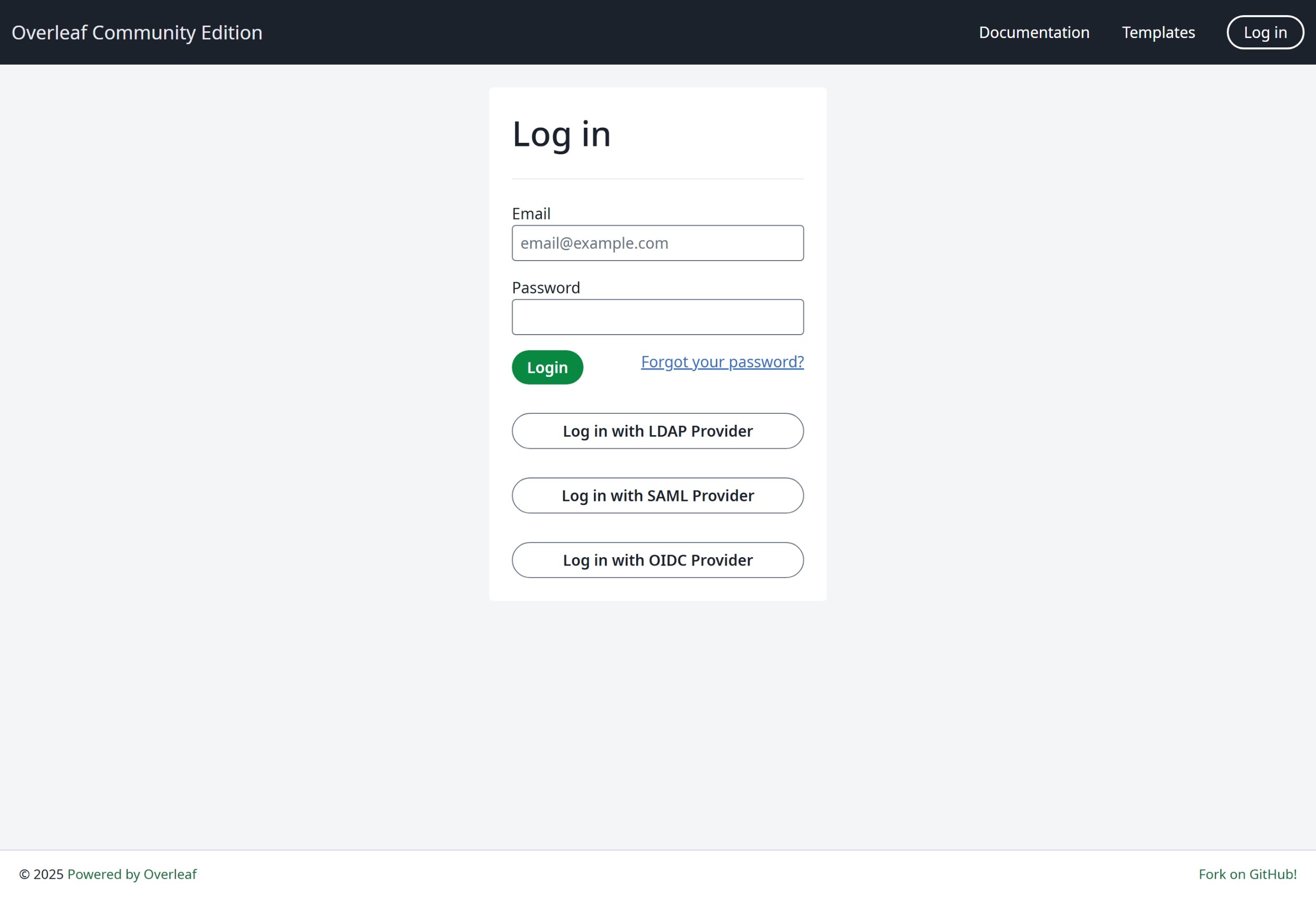 가장 범용적인 방식인 OIDC 사용을 적극 권장합니다.
### 전역 설정
특정 인증 모듈을 활성화하려면 환경 변수 `EXTERNAL_AUTH`가 필요합니다. 이 환경 변수는 어떤 외부 인증 방식을 활성화할지 지정합니다. 사용 가능한 옵션은 다음과 같습니다(소문자):
* saml
* ldap
* oidc
### SSO 관련 제안
Overleaf에서 saml, ldap, oauth를 테스트해 보았습니다. saml과 oauth는 모두 Overleaf에서 잘 동작하지만, ldap은 상황에 따라 다릅니다. [https://docs.goauthentik.io/](https://docs.goauthentik.io/)에서는 잘 동작하지 않지만, openLDAP([https://github.com/rroemhild/docker-test-openldap](https://github.com/rroemhild/docker-test-openldap))에서는 잘 동작합니다.
passport-ldapauth를 업데이트해야 합니다. 최근 [https://goauthentik.io/](https://goauthentik.io/)로 Overleaf LDAP을 테스트했을 때 실패했습니다. "passport-ldapauth"를 3.0.0으로 업데이트한 후에는 모든 것이 잘 동작했습니다.
```text theme={null}
"passport-ldapauth": "^3.0.0",
```
원래 버전은 6년 전의 2.x.x입니다.
원인은 확실하지 않습니다. LDAP(그리고 saml, oauth) 인증은 모두 외부 패키지에 의존하기 때문입니다. 동작하지 않는다면 Overleaf Server Pro에서도 같은 상황일 수 있습니다. 모든 환경 변수를 내부 패키지에 그대로 전달할 뿐이므로, 버그가 있더라도 현재로서는 알 수 없습니다.
**따라서 사용자분들께 전체 소스 코드로 SSO를 테스트할 수 있도록 개발 환경을 구성할 것을 적극 권장합니다.** 자세한 내용은 [개발 환경 설정(로컬)](/ko/dev/environment/setup-develop-environment-local "mention")에서 확인할 수 있습니다. 개발 환경에서는 터미널에서 모든 로그를 볼 수 있어 디버깅에 편리합니다.
\\
가장 범용적인 방식인 OIDC 사용을 적극 권장합니다.
### 전역 설정
특정 인증 모듈을 활성화하려면 환경 변수 `EXTERNAL_AUTH`가 필요합니다. 이 환경 변수는 어떤 외부 인증 방식을 활성화할지 지정합니다. 사용 가능한 옵션은 다음과 같습니다(소문자):
* saml
* ldap
* oidc
### SSO 관련 제안
Overleaf에서 saml, ldap, oauth를 테스트해 보았습니다. saml과 oauth는 모두 Overleaf에서 잘 동작하지만, ldap은 상황에 따라 다릅니다. [https://docs.goauthentik.io/](https://docs.goauthentik.io/)에서는 잘 동작하지 않지만, openLDAP([https://github.com/rroemhild/docker-test-openldap](https://github.com/rroemhild/docker-test-openldap))에서는 잘 동작합니다.
passport-ldapauth를 업데이트해야 합니다. 최근 [https://goauthentik.io/](https://goauthentik.io/)로 Overleaf LDAP을 테스트했을 때 실패했습니다. "passport-ldapauth"를 3.0.0으로 업데이트한 후에는 모든 것이 잘 동작했습니다.
```text theme={null}
"passport-ldapauth": "^3.0.0",
```
원래 버전은 6년 전의 2.x.x입니다.
원인은 확실하지 않습니다. LDAP(그리고 saml, oauth) 인증은 모두 외부 패키지에 의존하기 때문입니다. 동작하지 않는다면 Overleaf Server Pro에서도 같은 상황일 수 있습니다. 모든 환경 변수를 내부 패키지에 그대로 전달할 뿐이므로, 버그가 있더라도 현재로서는 알 수 없습니다.
**따라서 사용자분들께 전체 소스 코드로 SSO를 테스트할 수 있도록 개발 환경을 구성할 것을 적극 권장합니다.** 자세한 내용은 [개발 환경 설정(로컬)](/ko/dev/environment/setup-develop-environment-local "mention")에서 확인할 수 있습니다. 개발 환경에서는 터미널에서 모든 로그를 볼 수 있어 디버깅에 편리합니다.
\\
This documentation is built and hosted on [Mintlify](https://mintlify.com), a developer documentation platform.