> ## Documentation Index
> Fetch the complete documentation index at: https://ayakaleaf-pro.mintlify.site/llms.txt
> Use this file to discover all available pages before exploring further.
# Proxy TLS
Un proxy TLS opzionale, basato su NGINX, per la terminazione delle connessioni HTTPS.
Esegui `bin/init --tls` per inizializzare la configurazione locale con la configurazione del proxy NGINX, oppure per aggiungere la configurazione del proxy NGINX a una configurazione locale esistente. Viene creata una chiave privata **di esempio** in `config/nginx/certs/overleaf_key.pem` e un certificato **fittizio** in `config/nginx/certs/overleaf_certificate.pem`. Sostituiscili con la tua chiave privata e il tuo certificato reali, oppure imposta i valori delle variabili `TLS_PRIVATE_KEY_PATH` e `TLS_CERTIFICATE_PATH` rispettivamente sui percorsi della tua chiave privata e del tuo certificato reali.
In `config/nginx/nginx.conf` è fornita una configurazione predefinita di NGINX, che può essere personalizzata in base alle tue esigenze. Il percorso del file di configurazione può essere modificato con la variabile `NGINX_CONFIG_PATH`.
Se hai un deployment basato su **docker-compose.yml**, o gestisci un tuo reverse proxy NGINX, puoi consultare un file **nginx.conf** di esempio [qui](https://github.com/overleaf/toolkit/blob/master/lib/config-seed/nginx.conf).
Aggiungi la seguente sezione al tuo file `config/overleaf.rc`, se non è già presente:
```text theme={null}
# TLS proxy configuration (optional)
NGINX_ENABLED=false
NGINX_CONFIG_PATH=config/nginx/nginx.conf
NGINX_HTTP_PORT=80
# Replace these IP addresses with the external IP address of your host
NGINX_HTTP_LISTEN_IP=127.0.1.1
NGINX_TLS_LISTEN_IP=127.0.1.1
TLS_PRIVATE_KEY_PATH=config/nginx/certs/overleaf_key.pem
TLS_CERTIFICATE_PATH=config/nginx/certs/overleaf_certificate.pem
TLS_PORT=443
```
Se usi un proxy TLS esterno (cioè non gestito dall'Overleaf Toolkit), assicurati che `OVERLEAF_TRUSTED_PROXY_IPS=loopback,` sia impostato nel tuo `config/variables.env`, ad esempio `OVERLEAF_TRUSTED_PROXY_IPS=loopback,192.168.13.37`.
Se per la tua rete locale usi una sottorete di `172.16.0.0/12` (la sottorete predefinita per le reti Docker), dovrai impostare `OVERLEAF_TRUSTED_PROXY_IPS=loopback,` nel tuo `config/variables.env`, dove `` è il valore `IPAM -> Config -> Subnet` restituito da `docker inspect overleaf_default`, ad esempio `OVERLEAF_TRUSTED_PROXY_IPS=loopback,172.19.0.0/16`. Questo serve a prevenire la falsificazione degli header `X-Forwarded`.
Se `OVERLEAF_TRUSTED_PROXY_IPS` non viene impostata manualmente, il suo valore predefinito è `loopback`. Se la imposti manualmente, devi assicurarti di includere `loopback` (o `127.0.0.1`), che rende attendibile l'istanza **nginx** in esecuzione all'interno del container **sharelatex**. Sono accettati solo indirizzi IP e intervalli CIDR: non aggiungere nomi host come `localhost`, altrimenti Overleaf non si avvia e restituisce `502 Bad Gateway`.
Se hai configurato correttamente gli IP dei proxy attendibili, dovresti vedere il tuo indirizzo IP pubblico nella pagina `/user/sessions`, in questo modo:
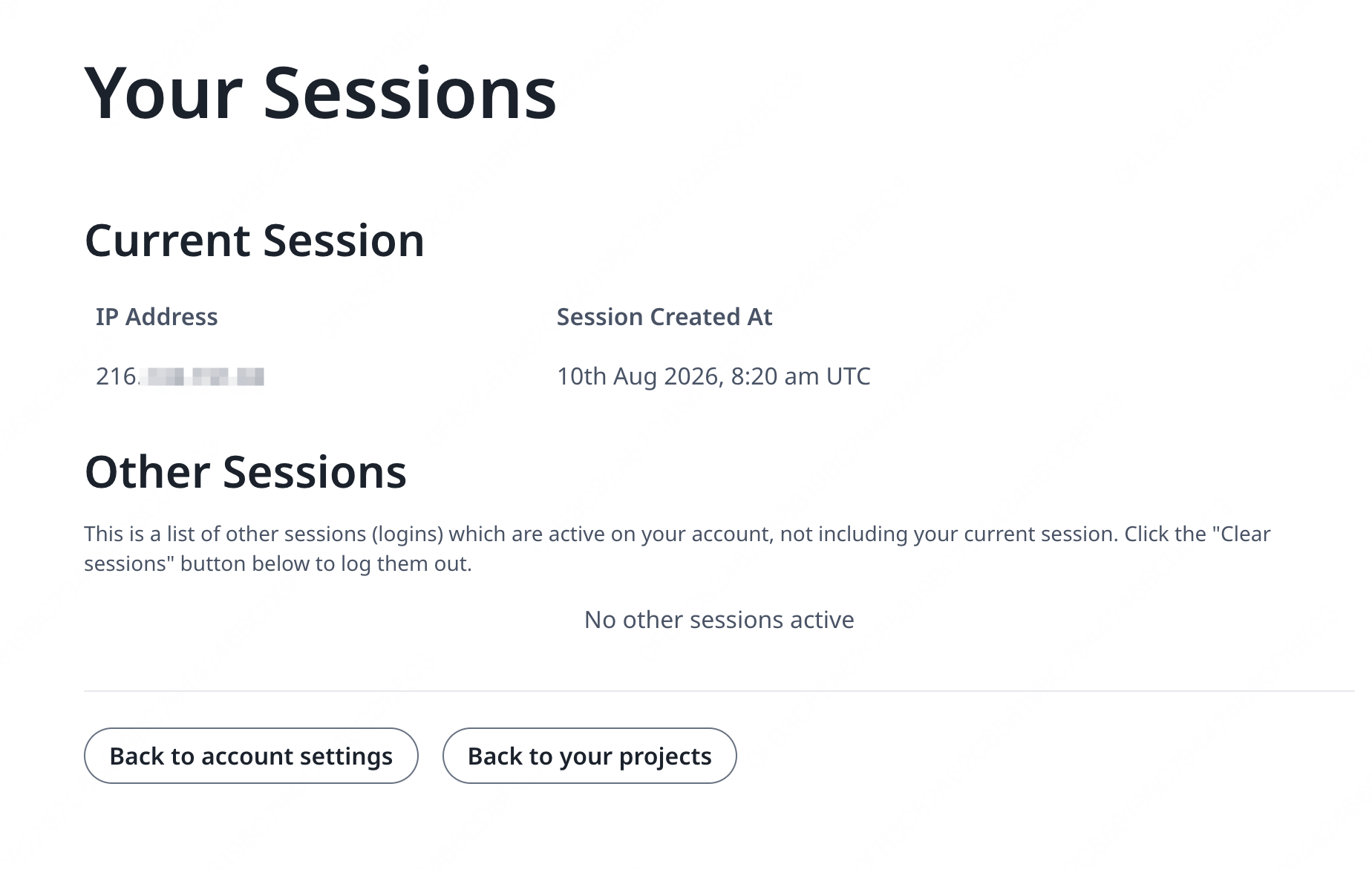 Se l'indirizzo IP mostrato sopra è ancora qualcosa come `127.0.0.1` o un indirizzo IP di rete privata/locale, controlla la configurazione dei proxy attendibili, in particolare il valore di `OVERLEAF_TRUSTED_PROXY_IPS`.
Per avviare il proxy, cambia il valore della variabile `NGINX_ENABLED` in `config/overleaf.rc` da `false` a `true` ed esegui di nuovo `bin/up`.
Per impostazione predefinita, l'interfaccia web HTTPS sarà disponibile su `https://127.0.1.1:443`. Le connessioni a `http://127.0.1.1:80` verranno reindirizzate a `https://127.0.1.1:443`. Per cambiare l'indirizzo IP su cui NGINX è in ascolto, imposta le variabili `NGINX_HTTP_LISTEN_IP` e `NGINX_TLS_LISTEN_IP`. Le porte possono essere modificate tramite le variabili `NGINX_HTTP_PORT` e `TLS_PORT`.
Se NGINX non si avvia con il messaggio di errore `Error starting userland proxy: listen tcp4 ... bind: address already in use`, assicurati che `OVERLEAF_LISTEN_IP:OVERLEAF_PORT` non si sovrapponga a `NGINX_HTTP_LISTEN_IP:NGINX_HTTP_PORT`.
```mermaid theme={null}
sequenceDiagram
participant user as Utente
participant external as Host esterno
participant internal as Host interno
participant nginx as nginx
participant sharelatex as sharelatex
participant git-bridge as git-bridge
%% User connects to external host HTTP
user->>+ external: HTTP
note over external: NGINX_HTTP_LISTEN_IP:NGINX_HTTP_PORT
external->>+ nginx: HTTP
note over nginx: nginx:80
nginx-->>-external: 301
%% User connects to external host HTTPS
user->>+ external: HTTPS
note over external: NGINX_TLS_LISTEN_IP:TLS_PORT
external->>+ nginx: HTTPS
note over nginx: nginx:443
nginx->>+ sharelatex: HTTP
note over sharelatex: sharlatex:80
%% User connects to localhost HTTP
user->>+ internal: HTTP
note over internal: OVERLEAF_LISTEN_IP:OVERLEAF_PORT
internal->>+sharelatex: HTTP
note over sharelatex: sharlatex:80
%% sharelatex connects to git-bridge
sharelatex->>+git-bridge: HTTP /git/
note over git-bridge: git-bridge:8000
note over sharelatex: GIT_BRIDGE_HOST:GIT_BRIDGE_PORT
git-bridge->>+sharelatex: WEB/WEB-API:3000
git-bridge->>+sharelatex: HISTORY-V1:3100
```
This documentation is built and hosted on [Mintlify](https://mintlify.com), a developer documentation platform.
Se l'indirizzo IP mostrato sopra è ancora qualcosa come `127.0.0.1` o un indirizzo IP di rete privata/locale, controlla la configurazione dei proxy attendibili, in particolare il valore di `OVERLEAF_TRUSTED_PROXY_IPS`.
Per avviare il proxy, cambia il valore della variabile `NGINX_ENABLED` in `config/overleaf.rc` da `false` a `true` ed esegui di nuovo `bin/up`.
Per impostazione predefinita, l'interfaccia web HTTPS sarà disponibile su `https://127.0.1.1:443`. Le connessioni a `http://127.0.1.1:80` verranno reindirizzate a `https://127.0.1.1:443`. Per cambiare l'indirizzo IP su cui NGINX è in ascolto, imposta le variabili `NGINX_HTTP_LISTEN_IP` e `NGINX_TLS_LISTEN_IP`. Le porte possono essere modificate tramite le variabili `NGINX_HTTP_PORT` e `TLS_PORT`.
Se NGINX non si avvia con il messaggio di errore `Error starting userland proxy: listen tcp4 ... bind: address already in use`, assicurati che `OVERLEAF_LISTEN_IP:OVERLEAF_PORT` non si sovrapponga a `NGINX_HTTP_LISTEN_IP:NGINX_HTTP_PORT`.
```mermaid theme={null}
sequenceDiagram
participant user as Utente
participant external as Host esterno
participant internal as Host interno
participant nginx as nginx
participant sharelatex as sharelatex
participant git-bridge as git-bridge
%% User connects to external host HTTP
user->>+ external: HTTP
note over external: NGINX_HTTP_LISTEN_IP:NGINX_HTTP_PORT
external->>+ nginx: HTTP
note over nginx: nginx:80
nginx-->>-external: 301
%% User connects to external host HTTPS
user->>+ external: HTTPS
note over external: NGINX_TLS_LISTEN_IP:TLS_PORT
external->>+ nginx: HTTPS
note over nginx: nginx:443
nginx->>+ sharelatex: HTTP
note over sharelatex: sharlatex:80
%% User connects to localhost HTTP
user->>+ internal: HTTP
note over internal: OVERLEAF_LISTEN_IP:OVERLEAF_PORT
internal->>+sharelatex: HTTP
note over sharelatex: sharlatex:80
%% sharelatex connects to git-bridge
sharelatex->>+git-bridge: HTTP /git/
note over git-bridge: git-bridge:8000
note over sharelatex: GIT_BRIDGE_HOST:GIT_BRIDGE_PORT
git-bridge->>+sharelatex: WEB/WEB-API:3000
git-bridge->>+sharelatex: HISTORY-V1:3100
```
This documentation is built and hosted on [Mintlify](https://mintlify.com), a developer documentation platform.