> ## Documentation Index
> Fetch the complete documentation index at: https://ayakaleaf-pro.mintlify.site/llms.txt
> Use this file to discover all available pages before exploring further.
# Installer les outils de développement
## Outils de développement recommandés
Ces services facultatifs ne sont pas nécessaires pour exécuter Overleaf, mais ils sont fortement recommandés pour le développement, le débogage et l'inspection lors du développement en local.
* **Hoppscotch** est un outil léger de test d'API similaire à Postman, mais basé sur le navigateur et très pratique pour le développement.
* Frontend : [http://localhost:3000](http://localhost:3000/)
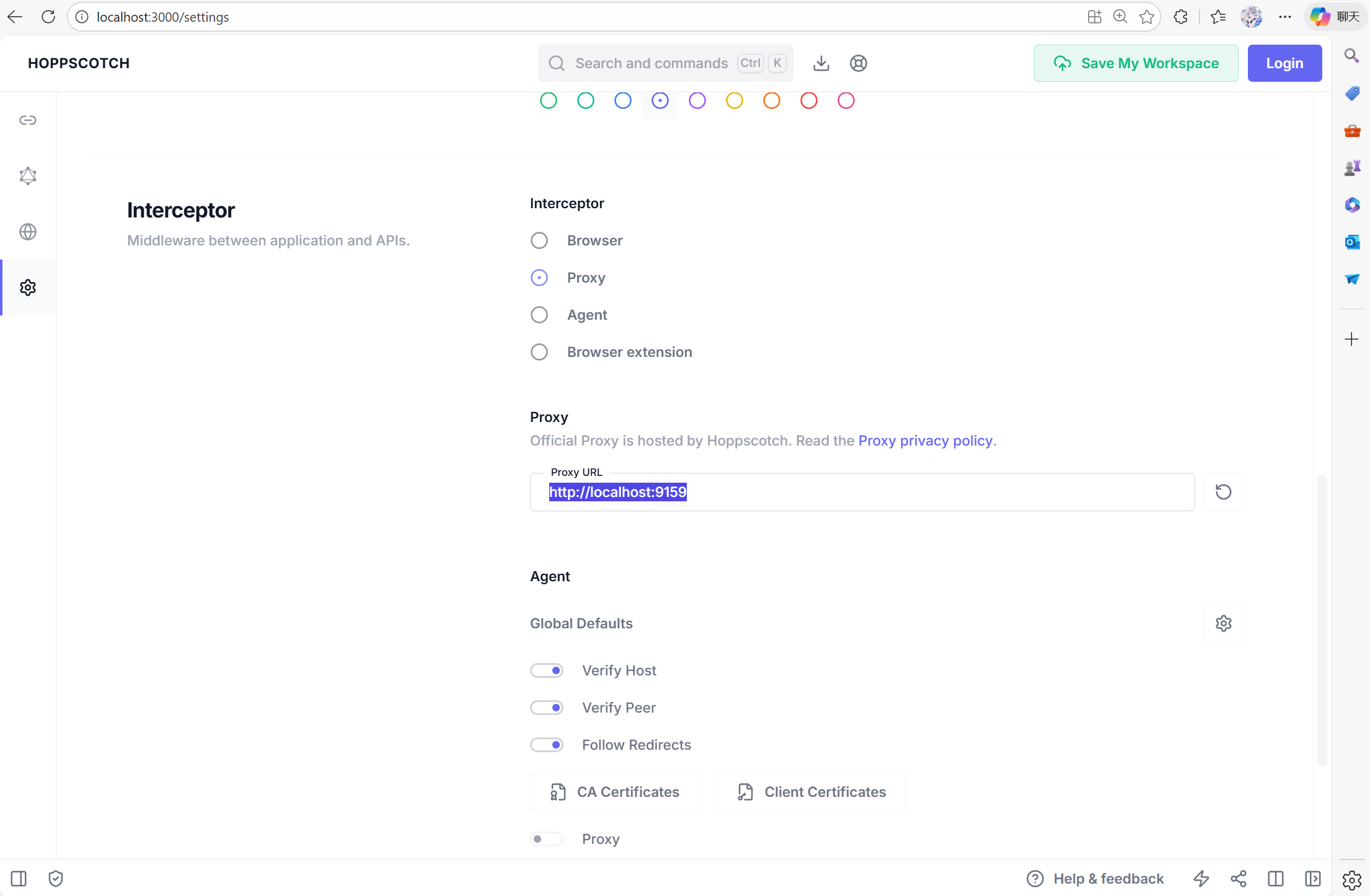
* Proxy (pour contourner CORS) : [http://localhost:9159](http://localhost:9159/)
* **RedisInsight** fournit une interface visuelle pour inspecter les données Redis. Interface disponible à l'adresse : [http://localhost:5540](http://localhost:5540/)
* **Mongo Express** est une interface web pour MongoDB. Vous pouvez y accéder sur [http://localhost:8081](http://localhost:8081/) avec les **identifiants** : `admin:pass`
Veuillez ajouter ce qui suit à votre `docker-compose.yml` :
```yml title="develop/docker-compose.yml" theme={null}
# services:
# Overleaf Dev Containers
# ...
# Add those for your development
# API debug
hoppscotch-frontend:
image: hoppscotch/hoppscotch-frontend:latest
ports:
- "3000:3000"
hoppscotch-proxy:
image: hoppscotch/proxyscotch:latest
environment:
- PORT=9159
ports:
- "9159:9159"
# Redis-insight
redis-insight:
image: redislabs/redisinsight:latest
ports:
- "5540:5540"
depends_on:
- redis
volumes:
- ./data/redis-insight:/data
# mongo-express
# basicAuth credentials are "admin:pass"
mongo-express:
image: mongo-express
ports:
- "8081:8081"
environment:
ME_CONFIG_MONGODB_SERVER: mongo
```
### Configurer Hoppscotch
#### Requêtes API via le proxy
Pour configurer Hoppscotch, rendez-vous sur [http://localhost:3000](http://localhost:3000/), puis ouvrez l'onglet des paramètres. Vous devez définir `Proxy` sur [http://localhost:9159](http://localhost:9159/), afin que vos outils de débogage puissent communiquer avec les réseaux internes des conteneurs.
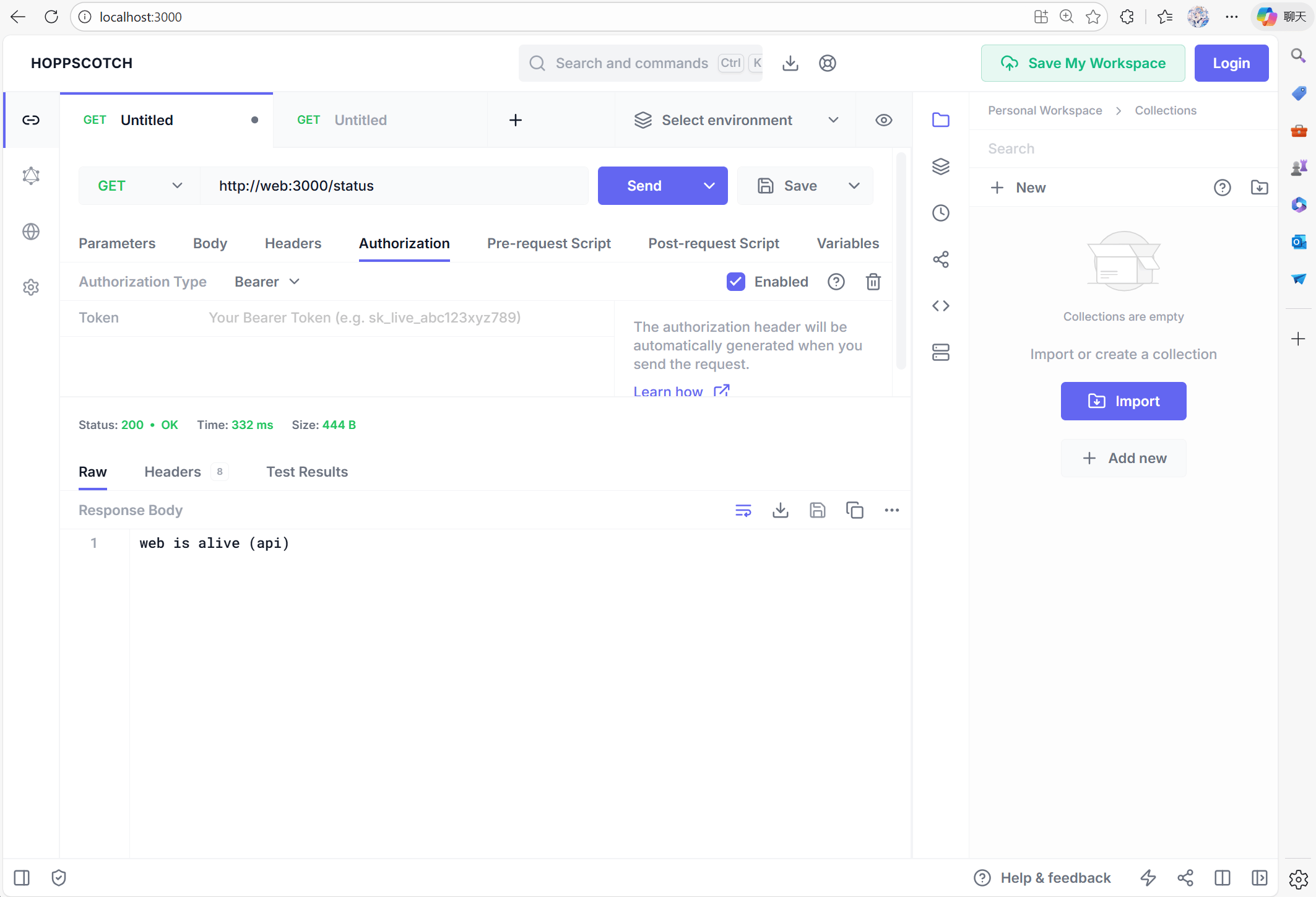
 Vous pouvez maintenant tester avec [http://web:3000/status](http://web:3000/status) pour vérifier que le service web est actif :
 #### Problèmes de CSRF
Si vous utilisez Postman ou d'autres outils de débogage pour générer une requête **POST**, vous constaterez peut-être que la connexion est **refusée**, avec une erreur 401. Cela s'explique par le fait qu'Overleaf est protégé par une vérification **CSRF**.
#### Problèmes de CSRF
Si vous utilisez Postman ou d'autres outils de débogage pour générer une requête **POST**, vous constaterez peut-être que la connexion est **refusée**, avec une erreur 401. Cela s'explique par le fait qu'Overleaf est protégé par une vérification **CSRF**.
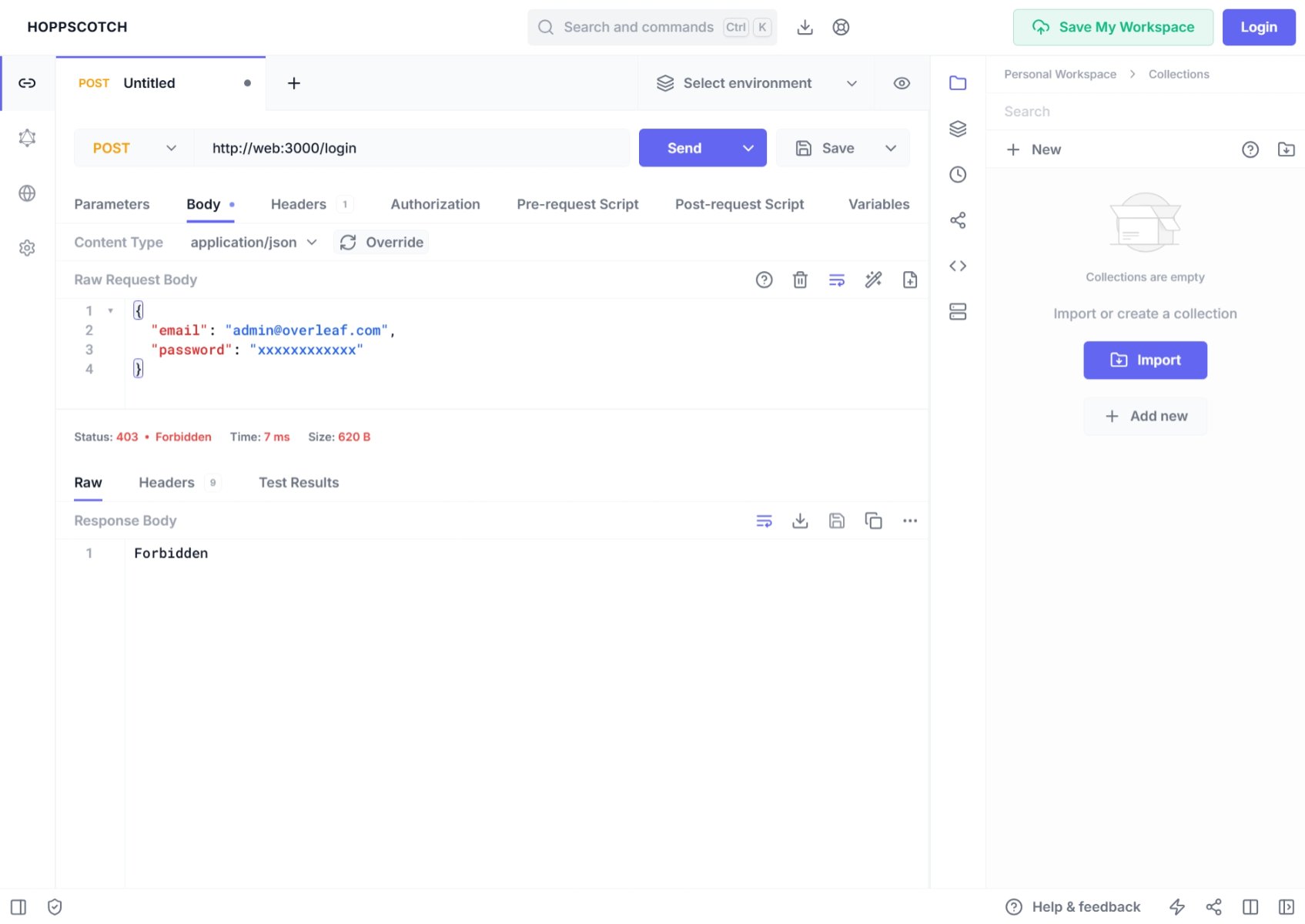 Dans votre console, vous verrez peut-être :
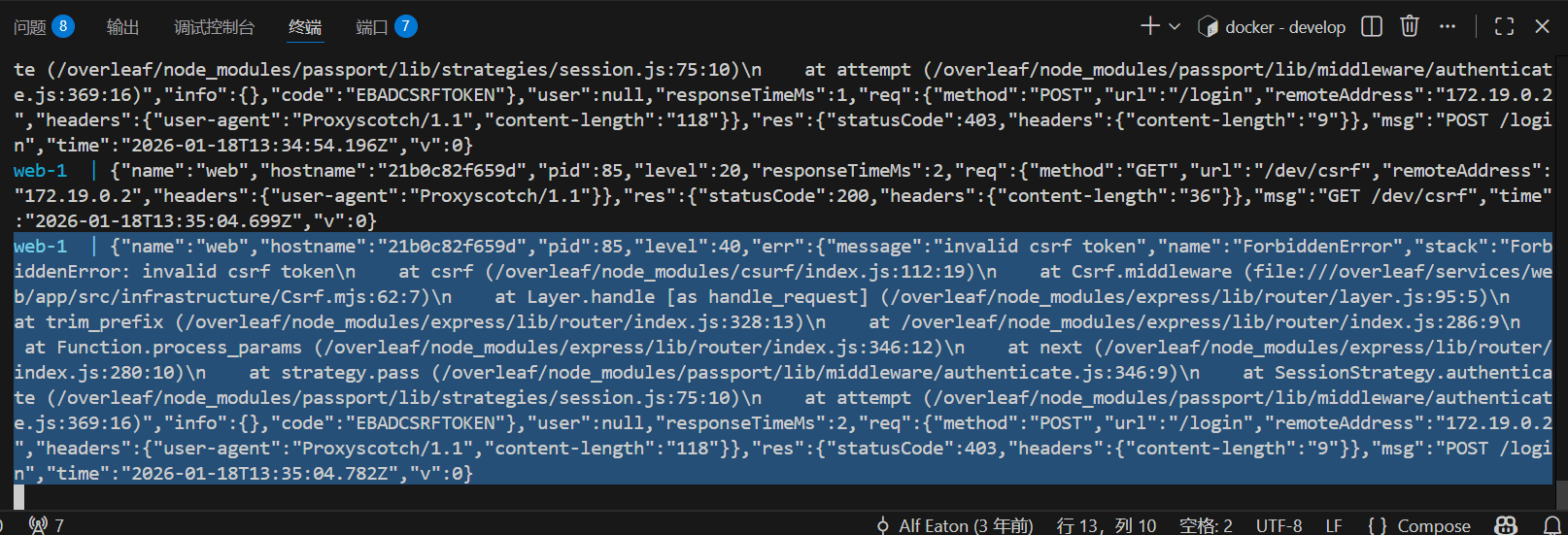 Pour gérer cela dans votre développement Overleaf, vous devez configurer votre jeton CSRF. Voici le tutoriel détaillé.
Ajoutez le code suivant dans Pre-Request
Pour gérer cela dans votre développement Overleaf, vous devez configurer votre jeton CSRF. Voici le tutoriel détaillé.
Ajoutez le code suivant dans Pre-Request
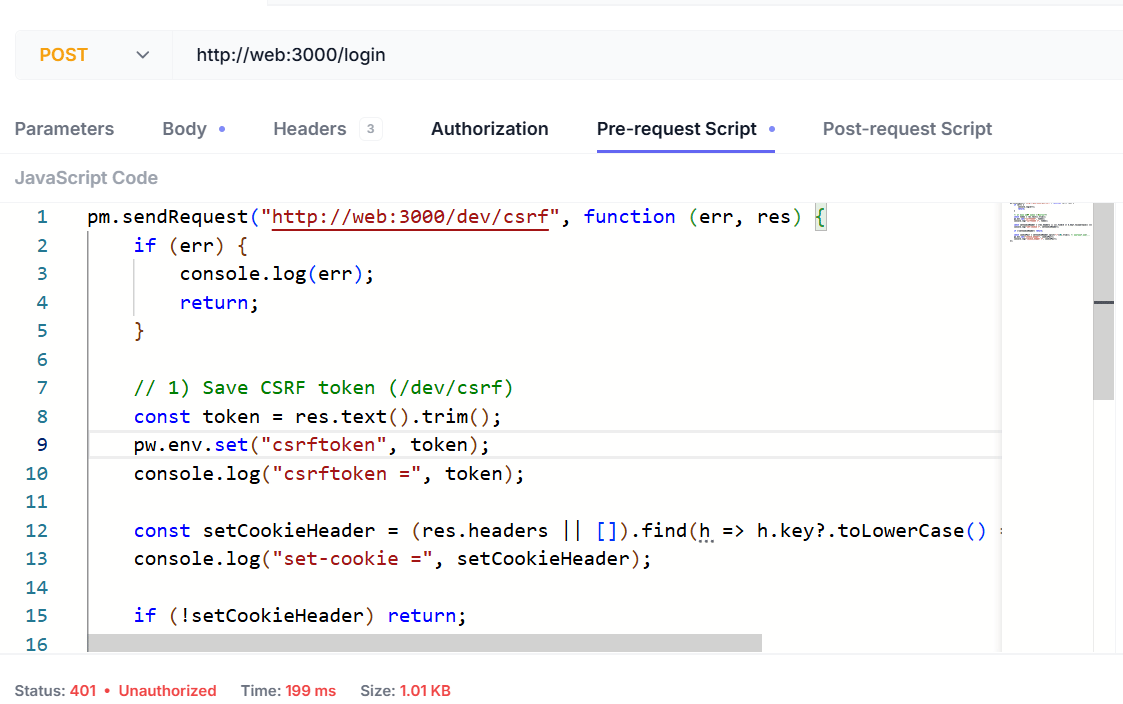 Voici le script :
```js wrap theme={null}
pm.sendRequest("http://web:3000/dev/csrf", function (err, res) {
if (err) {
console.log(err);
return;
}
// 1) Save CSRF token (/dev/csrf)
const token = res.text().trim();
pw.env.set("csrftoken", token);
console.log("csrftoken =", token);
const setCookieHeader = (res.headers || []).find(h => h.key?.toLowerCase() === "set-cookie")?.value;
console.log("set-cookie =", setCookieHeader);
if (!setCookieHeader) return;
const cookiePair = setCookieHeader.split(";")[0].trim(); // overleaf.sid=...
pw.env.set("cookie_header", cookiePair);
console.log("cookie_header =", cookiePair);
});
```
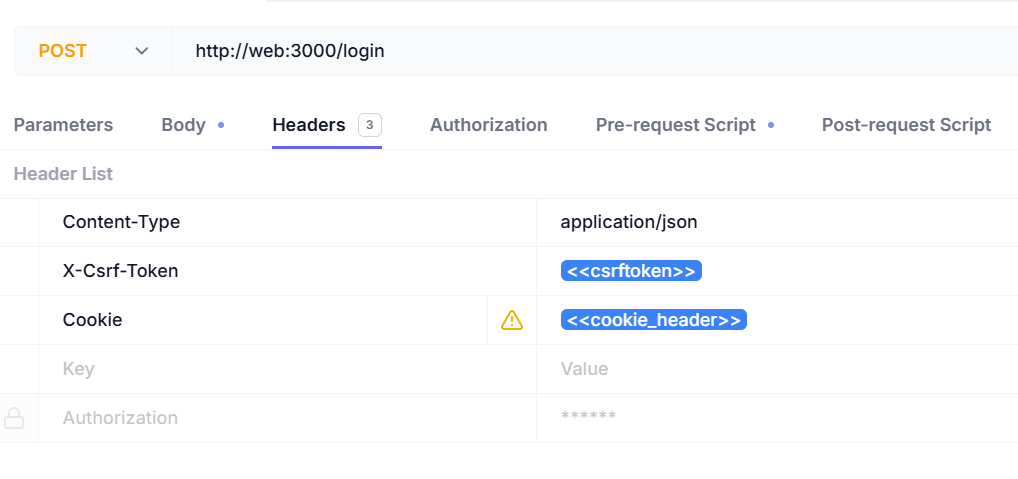
Vous devez ajouter les en-têtes suivants :
| Nom de l'en-tête | Valeur de l'en-tête |
| - | - |
| Content-Type | `application/json` |
| X-Csrf-Token | `<>` |
| Cookie | `<>` |
Voici le script :
```js wrap theme={null}
pm.sendRequest("http://web:3000/dev/csrf", function (err, res) {
if (err) {
console.log(err);
return;
}
// 1) Save CSRF token (/dev/csrf)
const token = res.text().trim();
pw.env.set("csrftoken", token);
console.log("csrftoken =", token);
const setCookieHeader = (res.headers || []).find(h => h.key?.toLowerCase() === "set-cookie")?.value;
console.log("set-cookie =", setCookieHeader);
if (!setCookieHeader) return;
const cookiePair = setCookieHeader.split(";")[0].trim(); // overleaf.sid=...
pw.env.set("cookie_header", cookiePair);
console.log("cookie_header =", cookiePair);
});
```
Vous devez ajouter les en-têtes suivants :
| Nom de l'en-tête | Valeur de l'en-tête |
| - | - |
| Content-Type | `application/json` |
| X-Csrf-Token | `<>` |
| Cookie | `<>` |
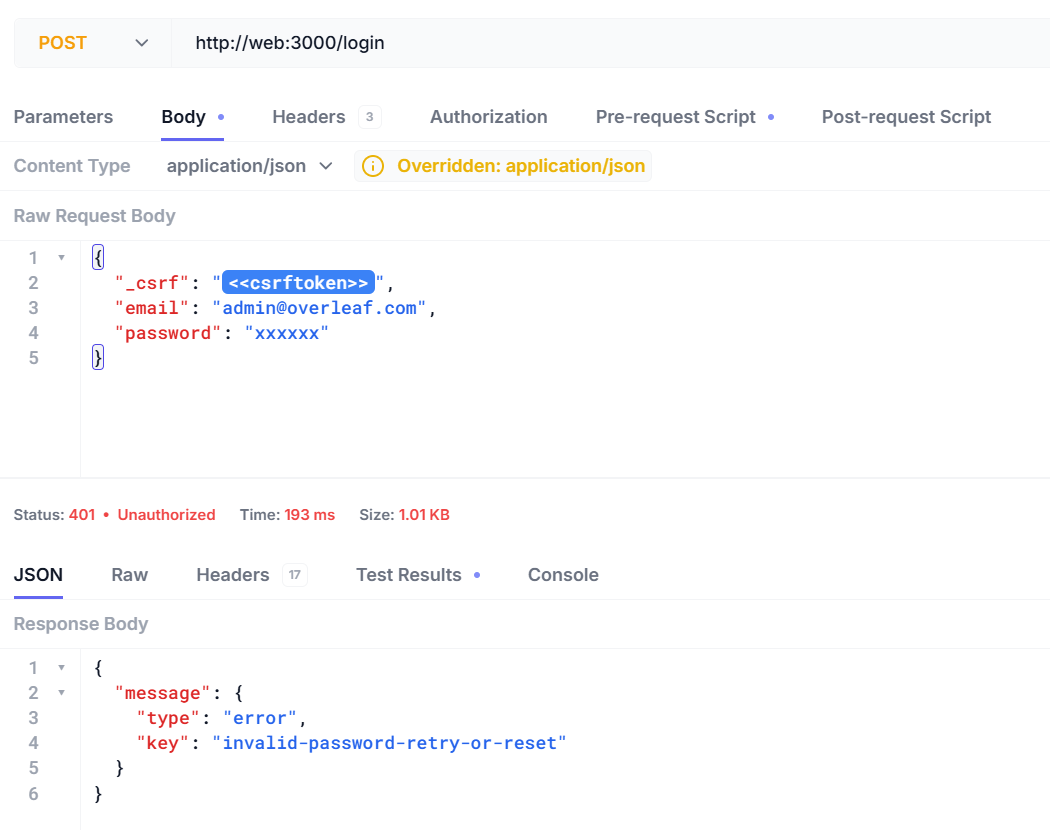
 Vous pouvez maintenant vous connecter avec votre nom d'utilisateur et votre mot de passe.
```json5 theme={null}
{
"_csrf": "<>",
"email": "admin@overleaf.com",
"password": "xxxxxx"
}
```
Voici la réponse obtenue lorsque vous saisissez un nom d'utilisateur ou un mot de passe incorrect.
Vous pouvez maintenant vous connecter avec votre nom d'utilisateur et votre mot de passe.
```json5 theme={null}
{
"_csrf": "<>",
"email": "admin@overleaf.com",
"password": "xxxxxx"
}
```
Voici la réponse obtenue lorsque vous saisissez un nom d'utilisateur ou un mot de passe incorrect.
 This documentation is built and hosted on [Mintlify](https://mintlify.com), a developer documentation platform.