> ## Documentation Index
> Fetch the complete documentation index at: https://ayakaleaf-pro.mintlify.site/llms.txt
> Use this file to discover all available pages before exploring further.
# GitHub-Synchronisierung
Diese Funktion wurde von [ayaka-notes/overleaf-pro](https://github.com/ayaka-notes/overleaf-pro) entwickelt und von [yu-i-i/overleaf-cep](https://github.com/yu-i-i/overleaf-cep) angepasst. Sie ist ab v6.2.0 verfügbar und befindet sich noch im Beta-Status. Wir freuen uns über Ihr Feedback, falls Probleme auftreten.
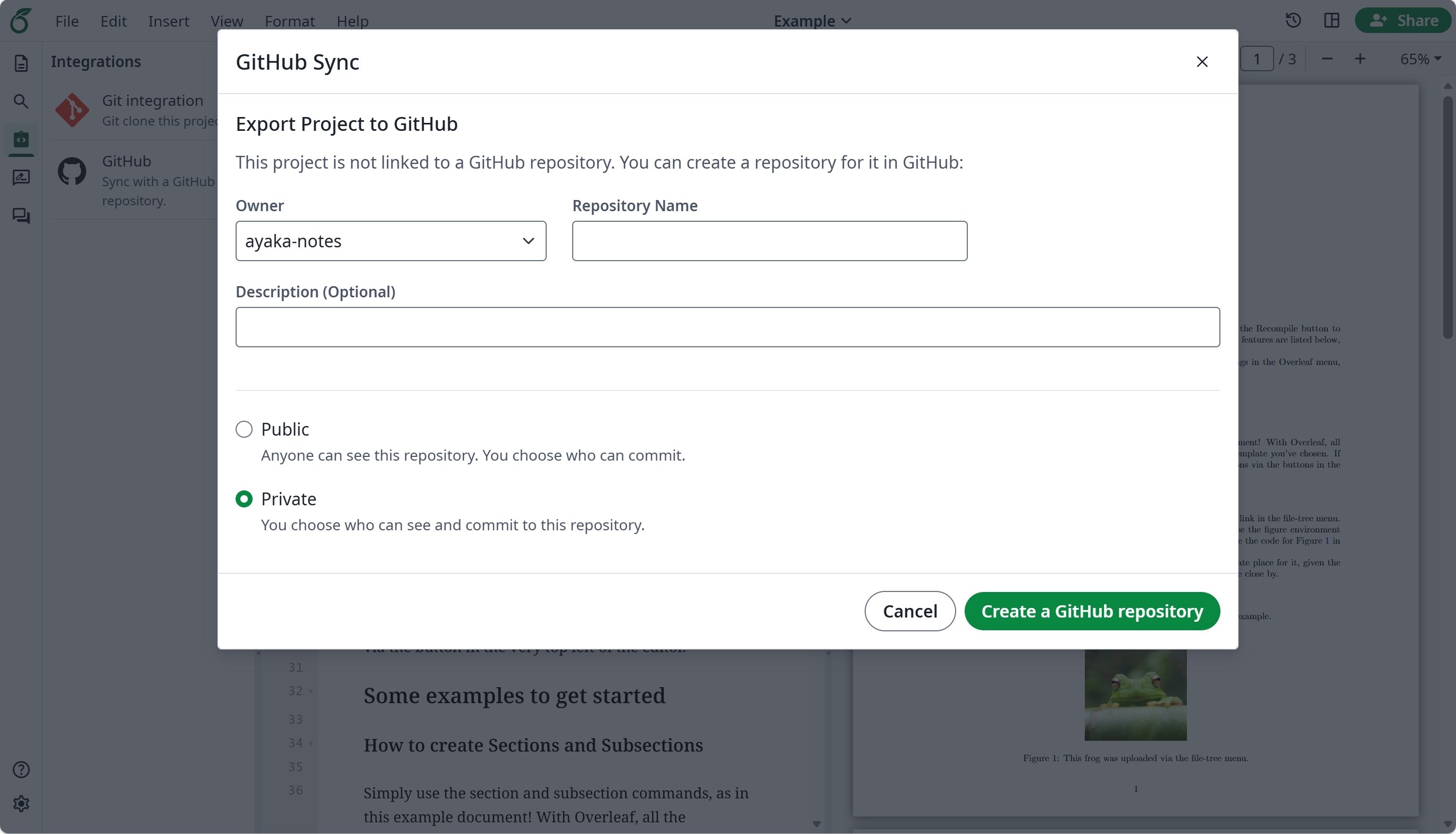
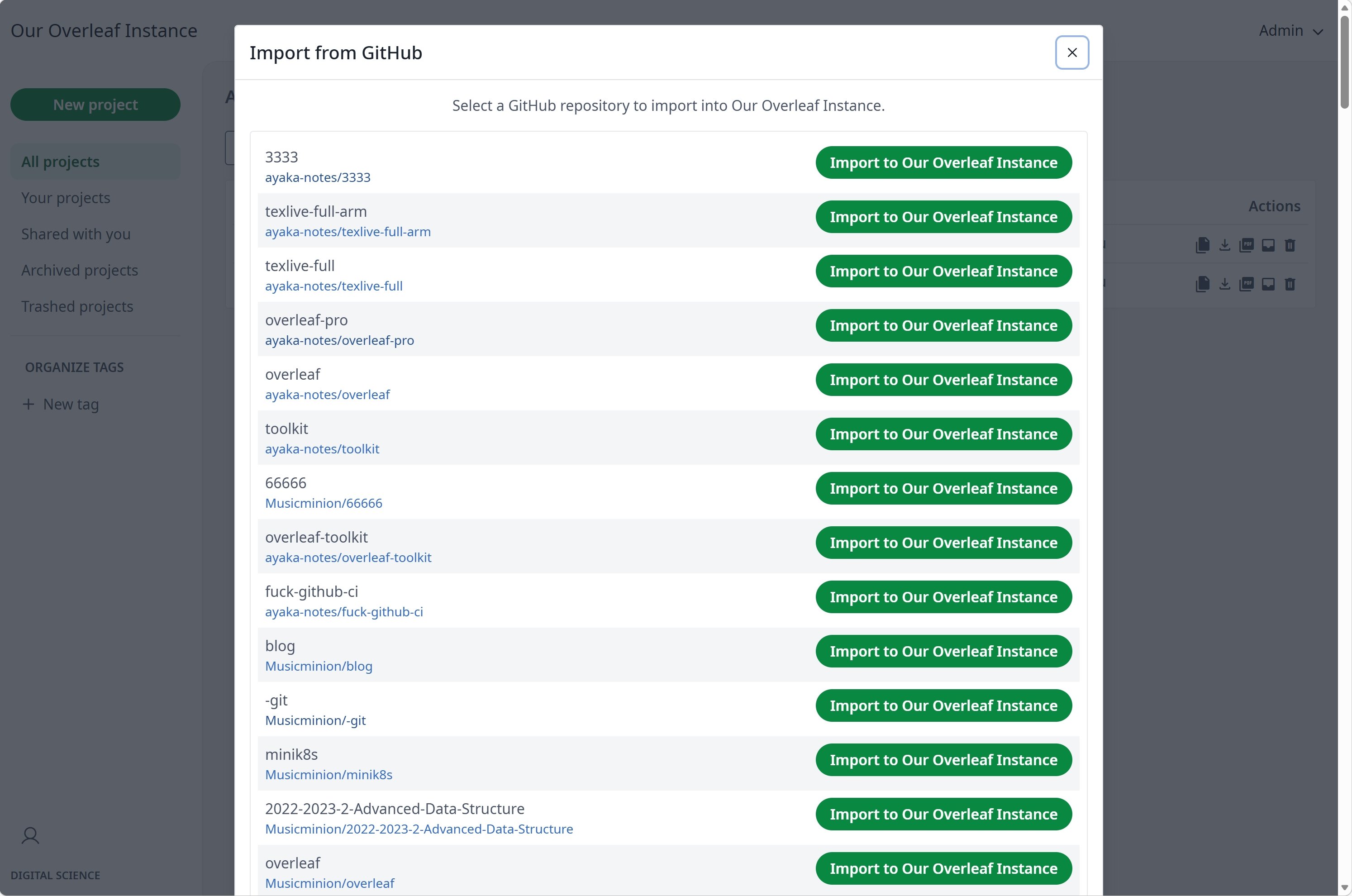
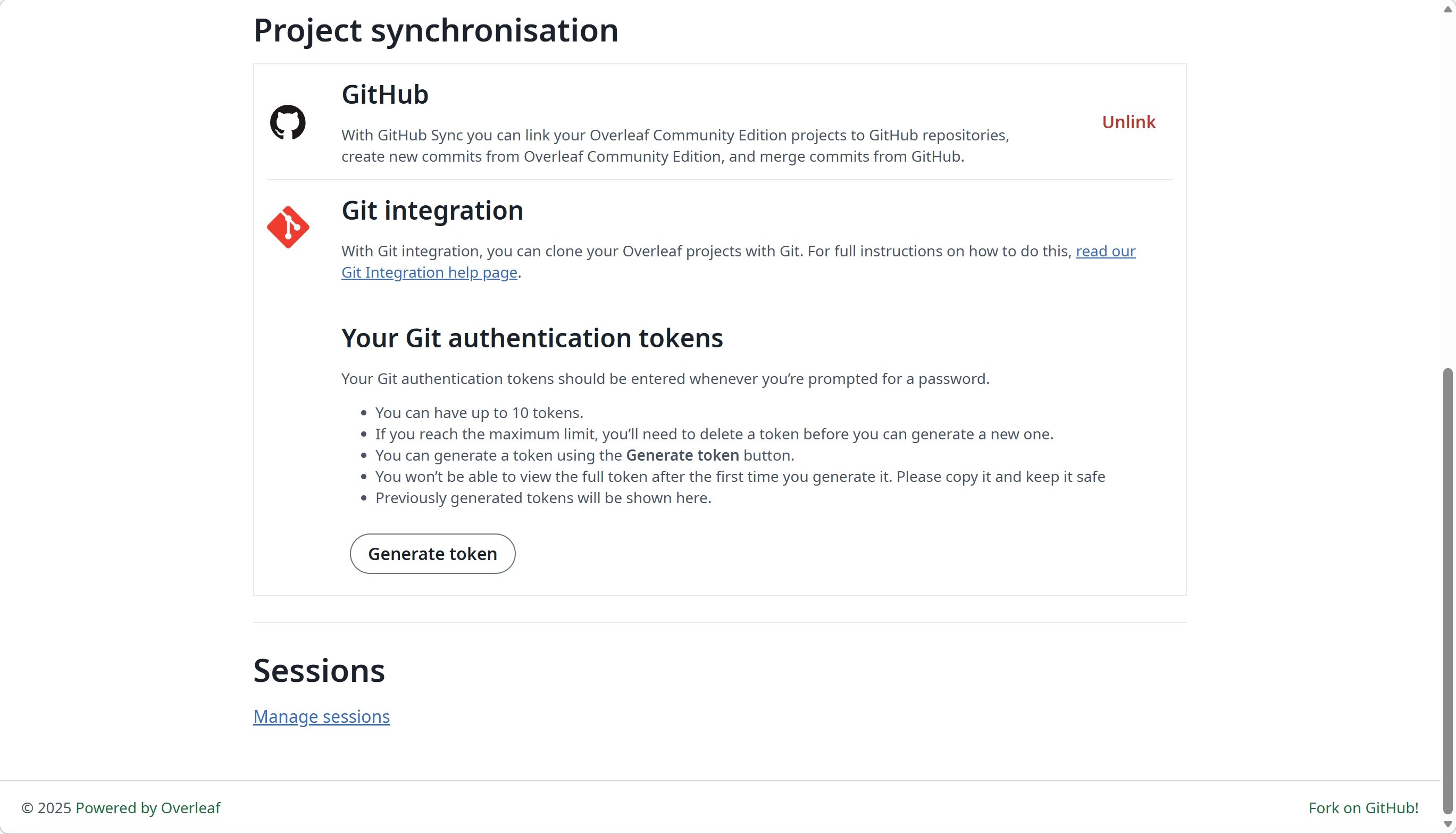
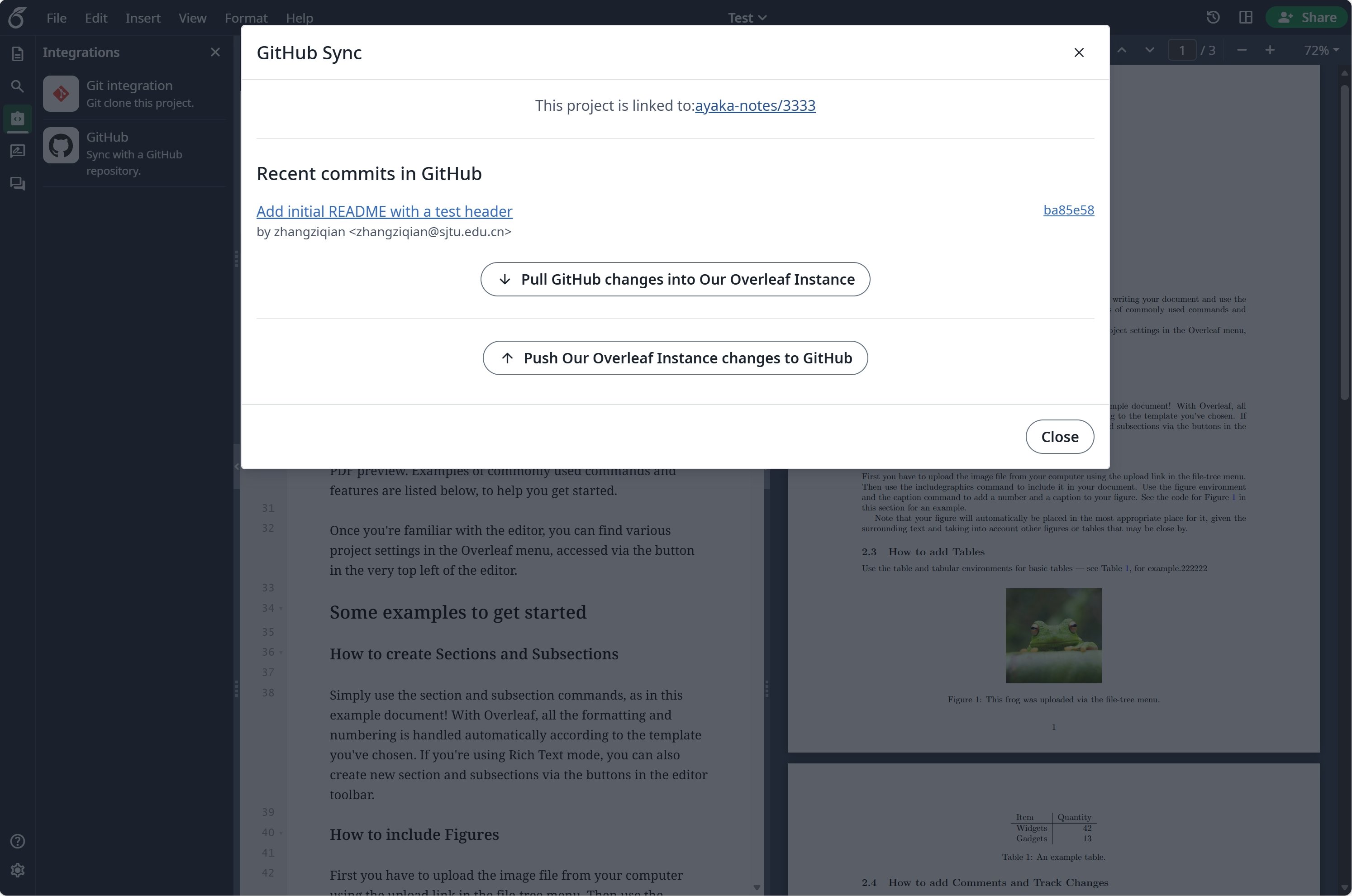 ### GitHub-Synchronisierung einrichten
Sie müssen zuerst [git-bridge](/de/on-premises/configuration/overleaf-toolkit/git-integration) aktivieren, bevor Sie die GitHub-Synchronisierung verwenden können.
```dotenv title="config/overleaf.rc" theme={null}
GIT_BRIDGE_ENABLED=true
```
Besuchen Sie die [Entwicklereinstellungen](https://github.com/settings/developers), um Ihre GitHub-OAuth-Anwendung zu erstellen, und kopieren Sie Ihre `CLIENT_ID` und Ihr `SECRET`.
**Hinweis**: Ihre OAuth-Callback-URL lautet: `${OVERLEAF_SITE_URL}/user/github-sync/oauth2/callback`.
Fügen Sie anschließend die folgenden Einstellungen zu Ihren Overleaf-Umgebungsvariablendateien hinzu.
```dotenv title="config/variables.env" wrap theme={null}
# used to encrypt the user's GitHub access token.
# How to generate: `openssl rand -hex 32`
GITHUB_TOKEN_CIPHER_PASSWORD=0123456789ABCDEFG # changed to yours
# Github Sync Settings
GITHUB_SYNC_ENABLED=true
GITHUB_SYNC_CLIENT_ID=
GITHUB_SYNC_CLIENT_SECRET=
# OAuth callback is: ${OVERLEAF_SITE_URL}/user/github-sync/oauth2/callback
# (Optional) GITHUB_SYNC_PROXY_URL=http://10.0.0.1:10808
```
Stellen Sie vor dem Konfigurieren der GitHub-OAuth-Callback-URL sicher, dass `OVERLEAF_SITE_URL` korrekt gesetzt ist.
Wenn Sie sich in Festlandchina befinden, müssen Sie möglicherweise einen Proxy konfigurieren, um auf GitHub zuzugreifen. Setzen Sie dazu die folgende Umgebungsvariable: `GITHUB_SYNC_PROXY_URL=http://10.0.0.1:10808`.
Verwenden Sie nicht `127.0.0.1` als Proxy-Host. Wenn der Proxy auf dem Host-Server läuft, verwenden Sie die LAN-IP-Adresse des Servers (z. B. `192.168.1.xx`) und stellen Sie sicher, dass der Proxy Verbindungen von Geräten im lokalen Netzwerk akzeptiert.
This documentation is built and hosted on [Mintlify](https://mintlify.com), a developer documentation platform.
### GitHub-Synchronisierung einrichten
Sie müssen zuerst [git-bridge](/de/on-premises/configuration/overleaf-toolkit/git-integration) aktivieren, bevor Sie die GitHub-Synchronisierung verwenden können.
```dotenv title="config/overleaf.rc" theme={null}
GIT_BRIDGE_ENABLED=true
```
Besuchen Sie die [Entwicklereinstellungen](https://github.com/settings/developers), um Ihre GitHub-OAuth-Anwendung zu erstellen, und kopieren Sie Ihre `CLIENT_ID` und Ihr `SECRET`.
**Hinweis**: Ihre OAuth-Callback-URL lautet: `${OVERLEAF_SITE_URL}/user/github-sync/oauth2/callback`.
Fügen Sie anschließend die folgenden Einstellungen zu Ihren Overleaf-Umgebungsvariablendateien hinzu.
```dotenv title="config/variables.env" wrap theme={null}
# used to encrypt the user's GitHub access token.
# How to generate: `openssl rand -hex 32`
GITHUB_TOKEN_CIPHER_PASSWORD=0123456789ABCDEFG # changed to yours
# Github Sync Settings
GITHUB_SYNC_ENABLED=true
GITHUB_SYNC_CLIENT_ID=
GITHUB_SYNC_CLIENT_SECRET=
# OAuth callback is: ${OVERLEAF_SITE_URL}/user/github-sync/oauth2/callback
# (Optional) GITHUB_SYNC_PROXY_URL=http://10.0.0.1:10808
```
Stellen Sie vor dem Konfigurieren der GitHub-OAuth-Callback-URL sicher, dass `OVERLEAF_SITE_URL` korrekt gesetzt ist.
Wenn Sie sich in Festlandchina befinden, müssen Sie möglicherweise einen Proxy konfigurieren, um auf GitHub zuzugreifen. Setzen Sie dazu die folgende Umgebungsvariable: `GITHUB_SYNC_PROXY_URL=http://10.0.0.1:10808`.
Verwenden Sie nicht `127.0.0.1` als Proxy-Host. Wenn der Proxy auf dem Host-Server läuft, verwenden Sie die LAN-IP-Adresse des Servers (z. B. `192.168.1.xx`) und stellen Sie sicher, dass der Proxy Verbindungen von Geräten im lokalen Netzwerk akzeptiert.
This documentation is built and hosted on [Mintlify](https://mintlify.com), a developer documentation platform.