> ## Documentation Index
> Fetch the complete documentation index at: https://ayakaleaf-pro.mintlify.site/llms.txt
> Use this file to discover all available pages before exploring further.
# إعداد أدوات التطوير
## أدوات التطوير الموصى بها
هذه الخدمات الاختيارية ليست مطلوبة لتشغيل Overleaf، لكنها موصى بها بشدة للتطوير وتصحيح الأخطاء والفحص أثناء التطوير المحلي.
* **Hoppscotch** أداة خفيفة لاختبار واجهات API تشبه Postman، لكنها تعمل في المتصفح وملائمة جدًا للتطوير.
* الواجهة الأمامية: [http://localhost:3000](http://localhost:3000/)
* الوكيل (لتجاوز قيود CORS): [http://localhost:9159](http://localhost:9159/)
* توفر **RedisInsight** واجهة مرئية لفحص بيانات Redis. وتتوفر الواجهة على: [http://localhost:5540](http://localhost:5540/)
* **Mongo Express** واجهة ويب لـ MongoDB. يمكنك زيارة [http://localhost:8081](http://localhost:8081/) باستخدام **بيانات الاعتماد**: `admin:pass`
يُرجى إضافة ما يلي إلى ملف `docker-compose.yml` الخاص بك:
```yml title="develop/docker-compose.yml" theme={null}
# services:
# Overleaf Dev Containers
# ...
# Add those for your development
# API debug
hoppscotch-frontend:
image: hoppscotch/hoppscotch-frontend:latest
ports:
- "3000:3000"
hoppscotch-proxy:
image: hoppscotch/proxyscotch:latest
environment:
- PORT=9159
ports:
- "9159:9159"
# Redis-insight
redis-insight:
image: redislabs/redisinsight:latest
ports:
- "5540:5540"
depends_on:
- redis
volumes:
- ./data/redis-insight:/data
# mongo-express
# basicAuth credentials are "admin:pass"
mongo-express:
image: mongo-express
ports:
- "8081:8081"
environment:
ME_CONFIG_MONGODB_SERVER: mongo
```
### إعداد Hoppscotch
#### تمرير طلبات API عبر الوكيل
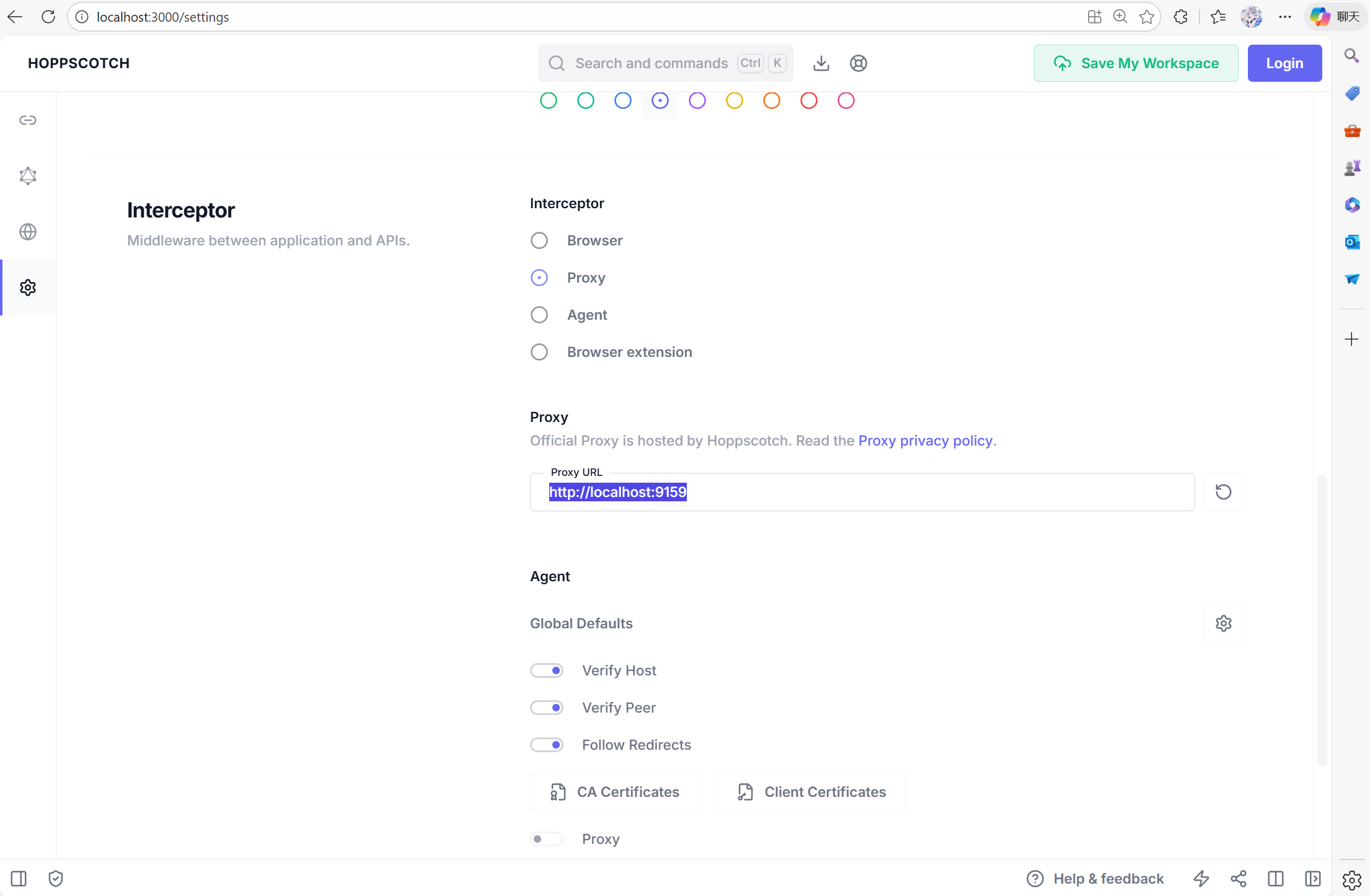
لإعداد Hoppscotch، يمكنك زيارة [http://localhost:3000](http://localhost:3000/)، ثم الانتقال إلى علامة تبويب الإعدادات. عليك ضبط `Proxy` على [http://localhost:9159](http://localhost:9159/)، حتى تتمكن أدوات التصحيح من التفاعل مع الشبكات الداخلية للحاويات.
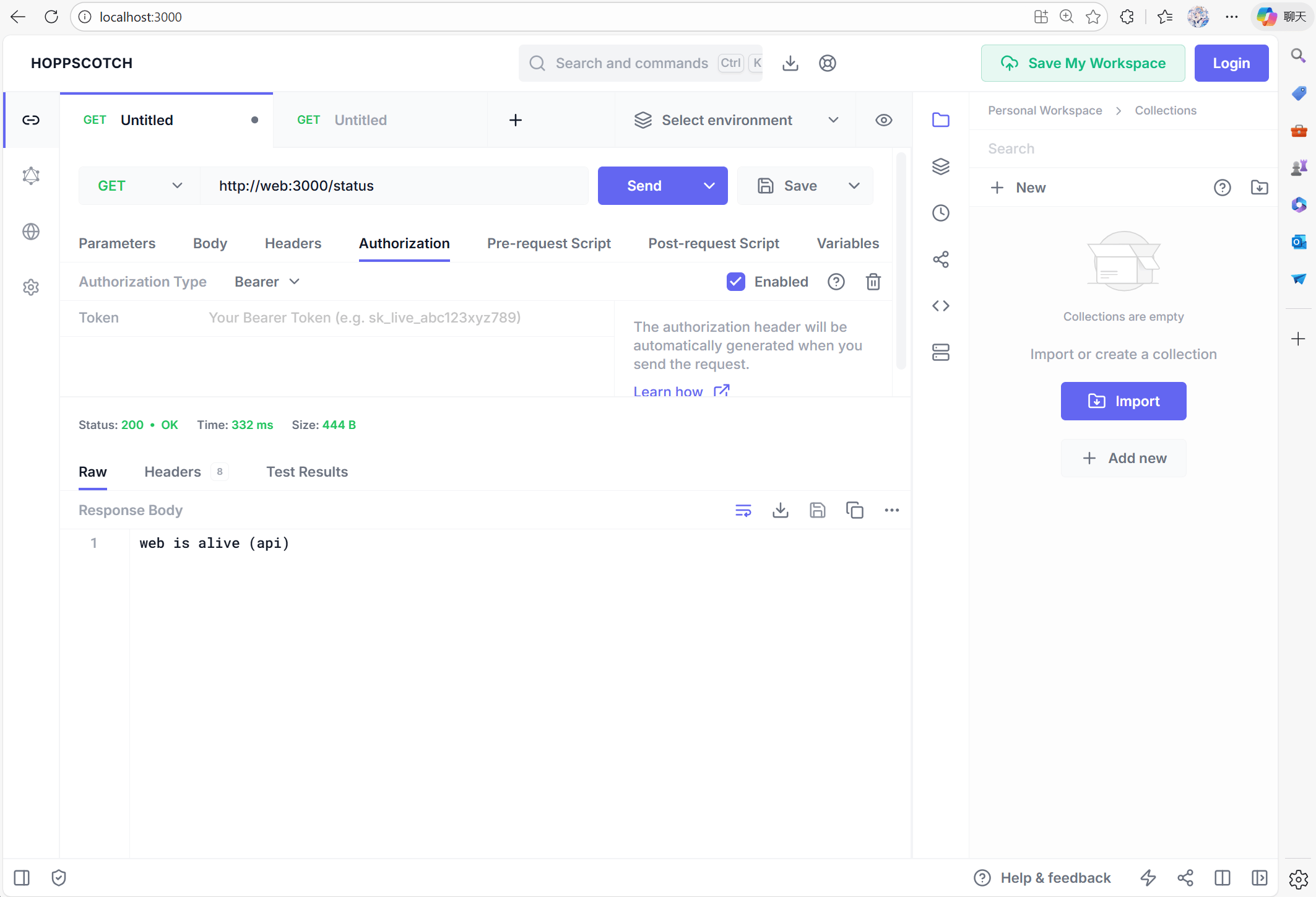
 يمكنك الآن الاختبار باستخدام [http://web:3000/status](http://web:3000/status) للتحقق مما إذا كانت خدمة web تعمل:
 #### مشكلات CSRF
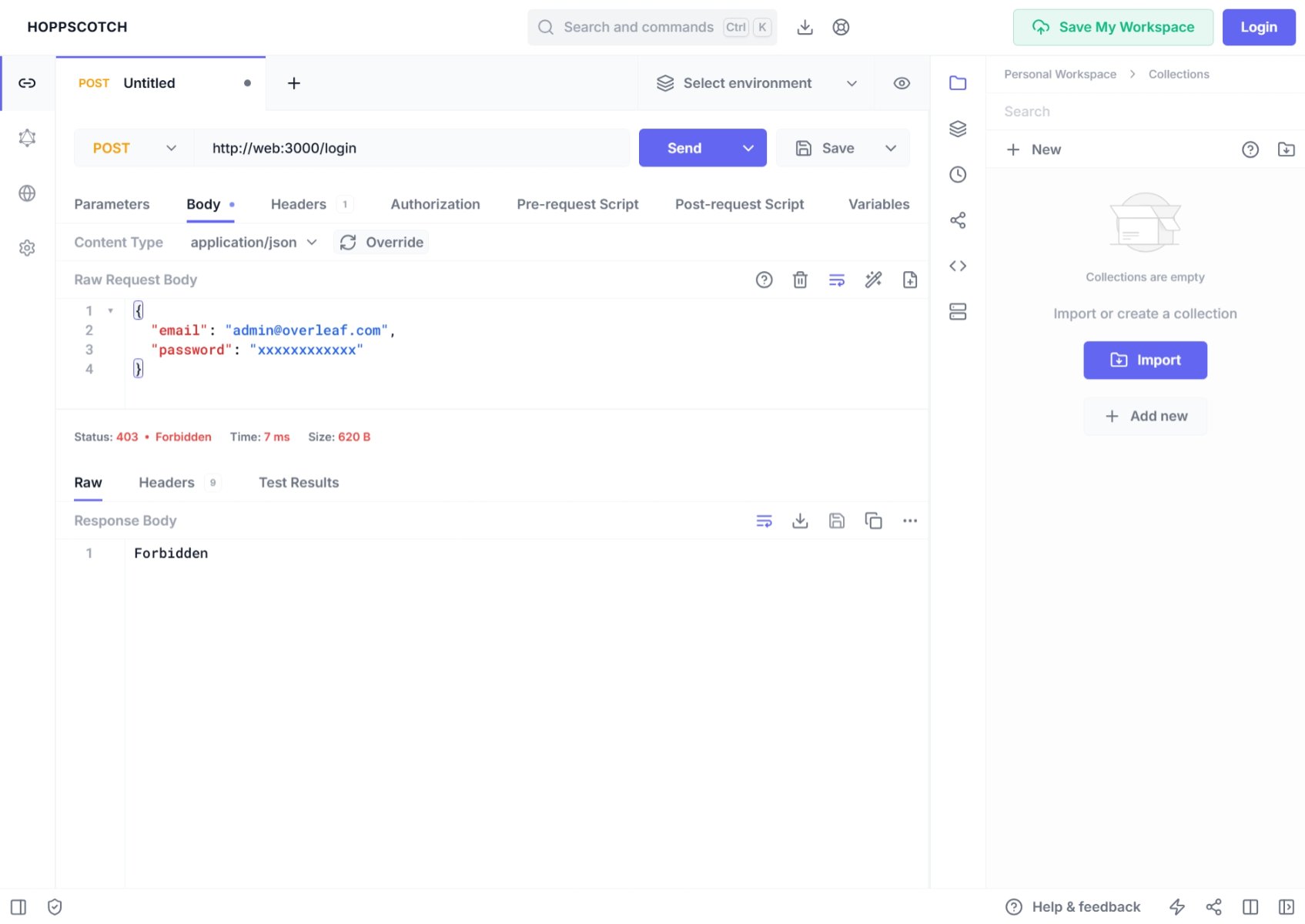
إذا استخدمت Postman أو أدوات تصحيح أخرى لإنشاء طلب **post**، فقد تجد أن تسجيل الدخول **مرفوض**، والسبب هو الخطأ 401. ويرجع ذلك إلى أن Overleaf محمي بالتحقق من **csrf**.
#### مشكلات CSRF
إذا استخدمت Postman أو أدوات تصحيح أخرى لإنشاء طلب **post**، فقد تجد أن تسجيل الدخول **مرفوض**، والسبب هو الخطأ 401. ويرجع ذلك إلى أن Overleaf محمي بالتحقق من **csrf**.
 قد ترى في وحدة التحكم ما يلي:
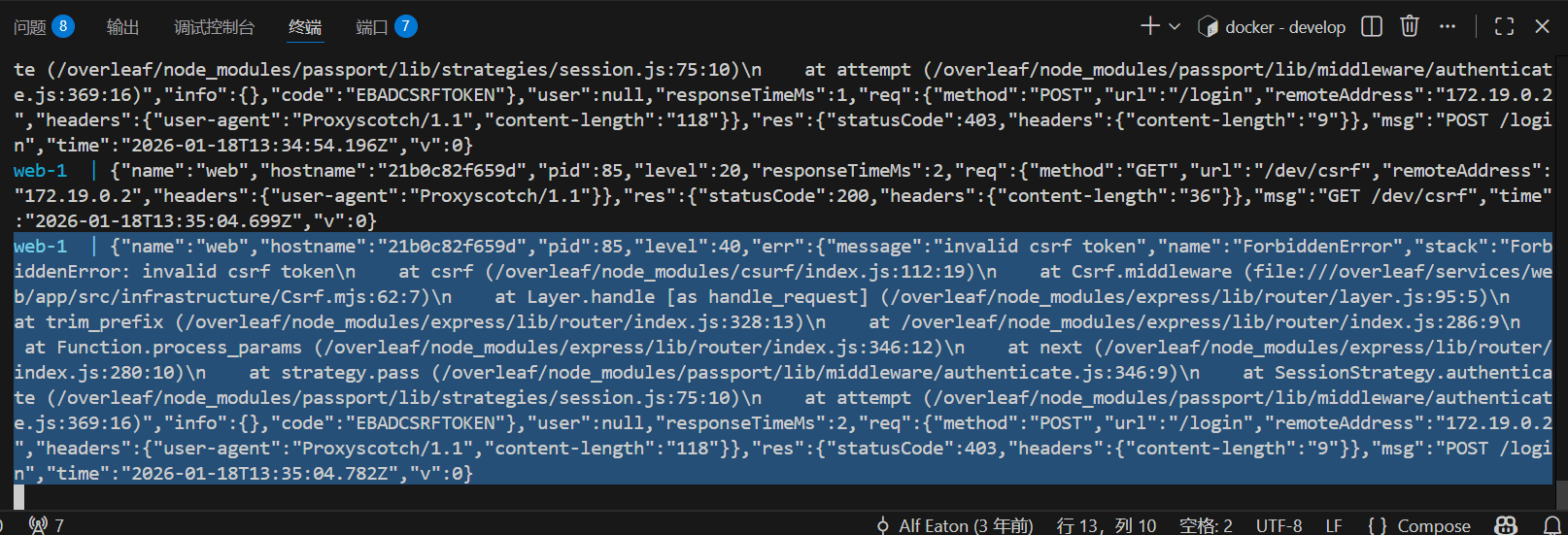 للتعامل مع ذلك أثناء تطويرك لـ Overleaf، عليك إعداد رمز csrf الخاص بك. وإليك الشرح المفصل.
أضف الشيفرة التالية إلى Pre-Request
للتعامل مع ذلك أثناء تطويرك لـ Overleaf، عليك إعداد رمز csrf الخاص بك. وإليك الشرح المفصل.
أضف الشيفرة التالية إلى Pre-Request
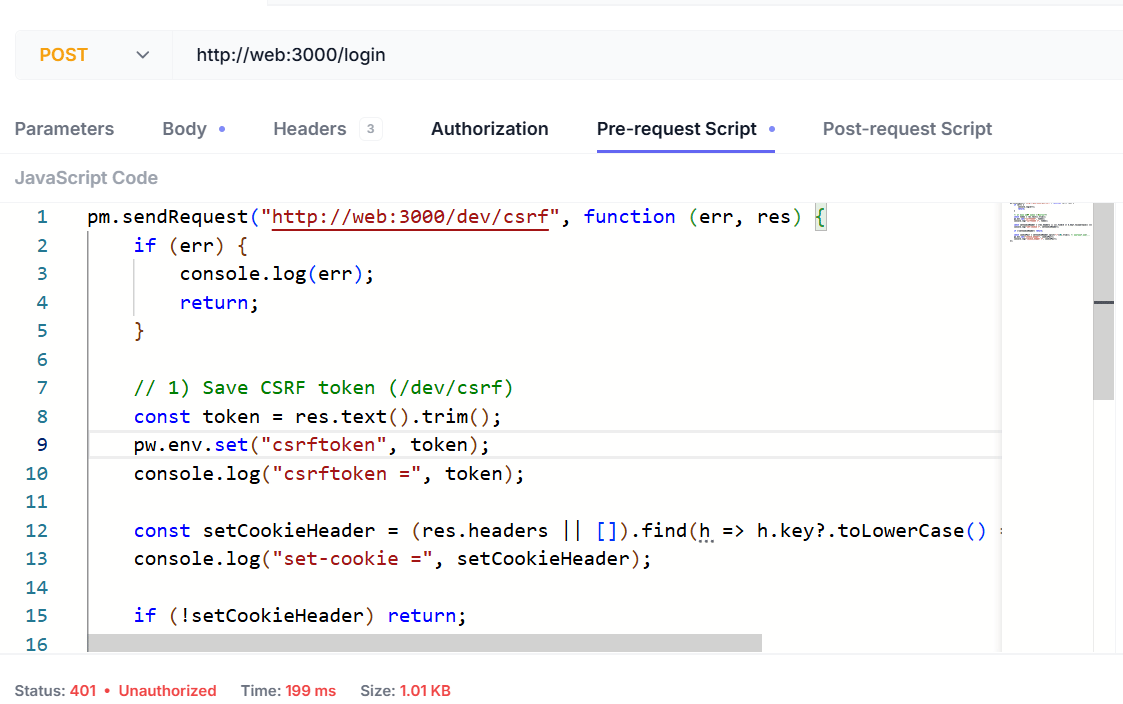 السكربت كما يلي:
```js wrap theme={null}
pm.sendRequest("http://web:3000/dev/csrf", function (err, res) {
if (err) {
console.log(err);
return;
}
// 1) Save CSRF token (/dev/csrf)
const token = res.text().trim();
pw.env.set("csrftoken", token);
console.log("csrftoken =", token);
const setCookieHeader = (res.headers || []).find(h => h.key?.toLowerCase() === "set-cookie")?.value;
console.log("set-cookie =", setCookieHeader);
if (!setCookieHeader) return;
const cookiePair = setCookieHeader.split(";")[0].trim(); // overleaf.sid=...
pw.env.set("cookie_header", cookiePair);
console.log("cookie_header =", cookiePair);
});
```
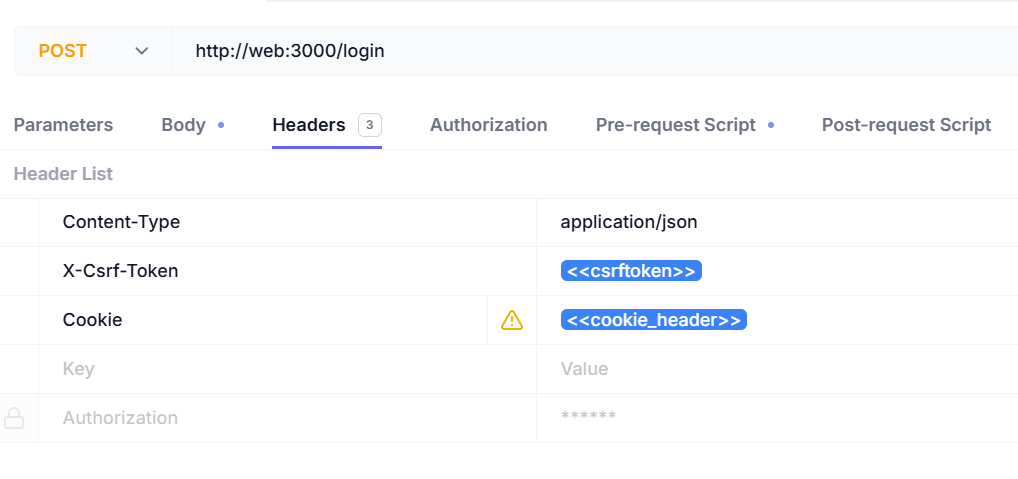
عليك إضافة الترويسات التالية:
| اسم الترويسة | قيمة الترويسة |
| - | - |
| Content-Type | `application/json` |
| X-Csrf-Token | `<>` |
| Cookie | `<>` |
السكربت كما يلي:
```js wrap theme={null}
pm.sendRequest("http://web:3000/dev/csrf", function (err, res) {
if (err) {
console.log(err);
return;
}
// 1) Save CSRF token (/dev/csrf)
const token = res.text().trim();
pw.env.set("csrftoken", token);
console.log("csrftoken =", token);
const setCookieHeader = (res.headers || []).find(h => h.key?.toLowerCase() === "set-cookie")?.value;
console.log("set-cookie =", setCookieHeader);
if (!setCookieHeader) return;
const cookiePair = setCookieHeader.split(";")[0].trim(); // overleaf.sid=...
pw.env.set("cookie_header", cookiePair);
console.log("cookie_header =", cookiePair);
});
```
عليك إضافة الترويسات التالية:
| اسم الترويسة | قيمة الترويسة |
| - | - |
| Content-Type | `application/json` |
| X-Csrf-Token | `<>` |
| Cookie | `<>` |
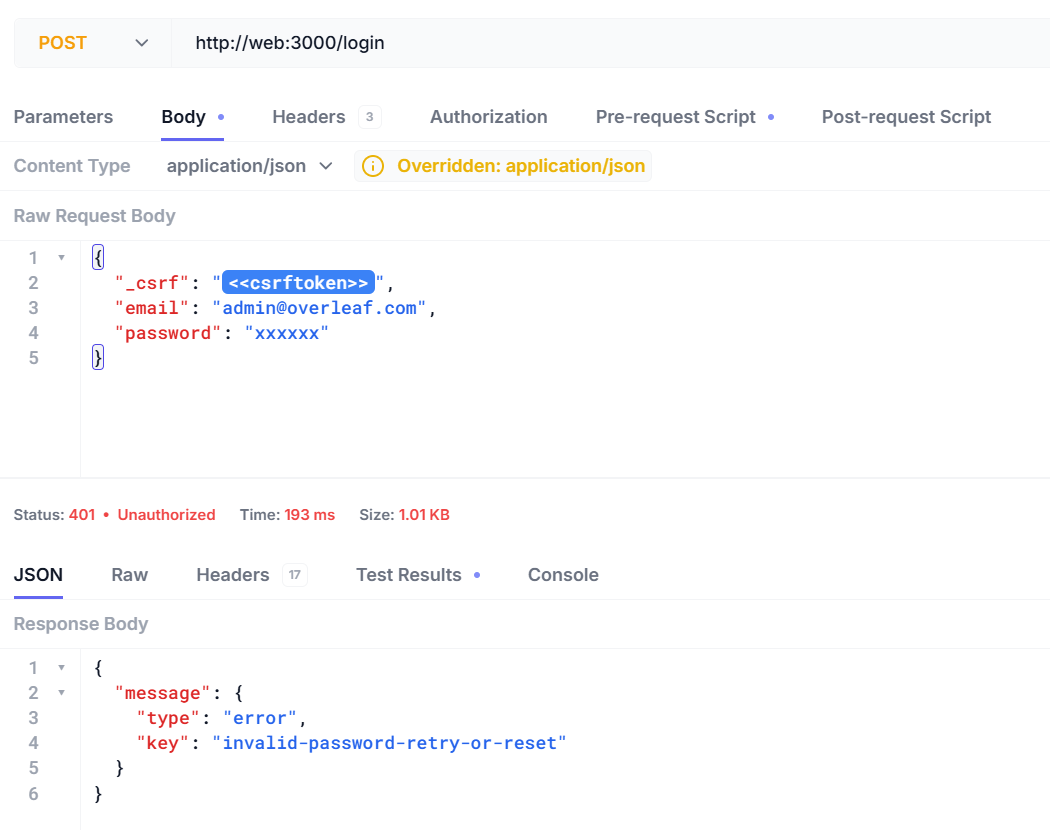
 يمكنك الآن تسجيل الدخول باسم المستخدم وكلمة المرور.
```json5 theme={null}
{
"_csrf": "<>",
"email": "admin@overleaf.com",
"password": "xxxxxx"
}
```
إليك الاستجابة عند إدخال اسم مستخدم أو كلمة مرور خاطئة.
يمكنك الآن تسجيل الدخول باسم المستخدم وكلمة المرور.
```json5 theme={null}
{
"_csrf": "<>",
"email": "admin@overleaf.com",
"password": "xxxxxx"
}
```
إليك الاستجابة عند إدخال اسم مستخدم أو كلمة مرور خاطئة.
 This documentation is built and hosted on [Mintlify](https://mintlify.com), a developer documentation platform.